


In today’s fast-paced software development landscape, the ability to translate business goals into technical designs—while ensuring alignment across engineering, product, and executive teams—is more critical than ever. Visual modeling has evolved from a niche activity into a strategic enabler of clarity, collaboration, and decision-making. However, with a wide array of modeling languages and frameworks available, selecting the right approach can be daunting.
Understanding the Core: C4 vs. ArchiMate — Two Worlds, One Goal
The primary challenge in architectural modeling is not just creating diagrams, but choosing the right language to express the right insight at the right time. Two of the most influential methodologies in this space—C4 Model and ArchiMate—serve distinct but complementary roles in the architecture lifecycle.
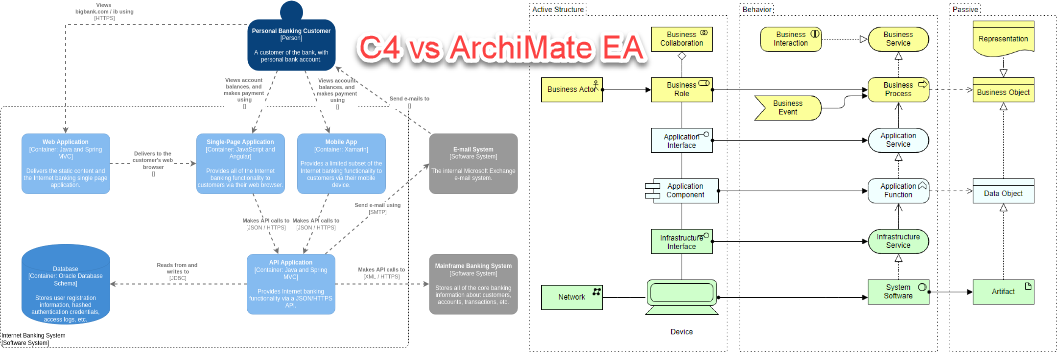
C4: The Developer-Centric, Agile Blueprint
Introduced by Simon Brown and widely adopted in agile and DevOps environments, the C4 model is fundamentally a developer-first approach. It is not designed to reflect formal enterprise standards or to serve executives, but to help software engineers, backend developers, and system architects rapidly understand system boundaries, component responsibilities, and interaction flows.
At its core, C4 follows a hierarchical zoom-in model, much like navigating Google Maps: starting at a broad business context and progressively drilling down into implementation details. This structure ensures that technical decisions are grounded in real-world deployments and team workflows.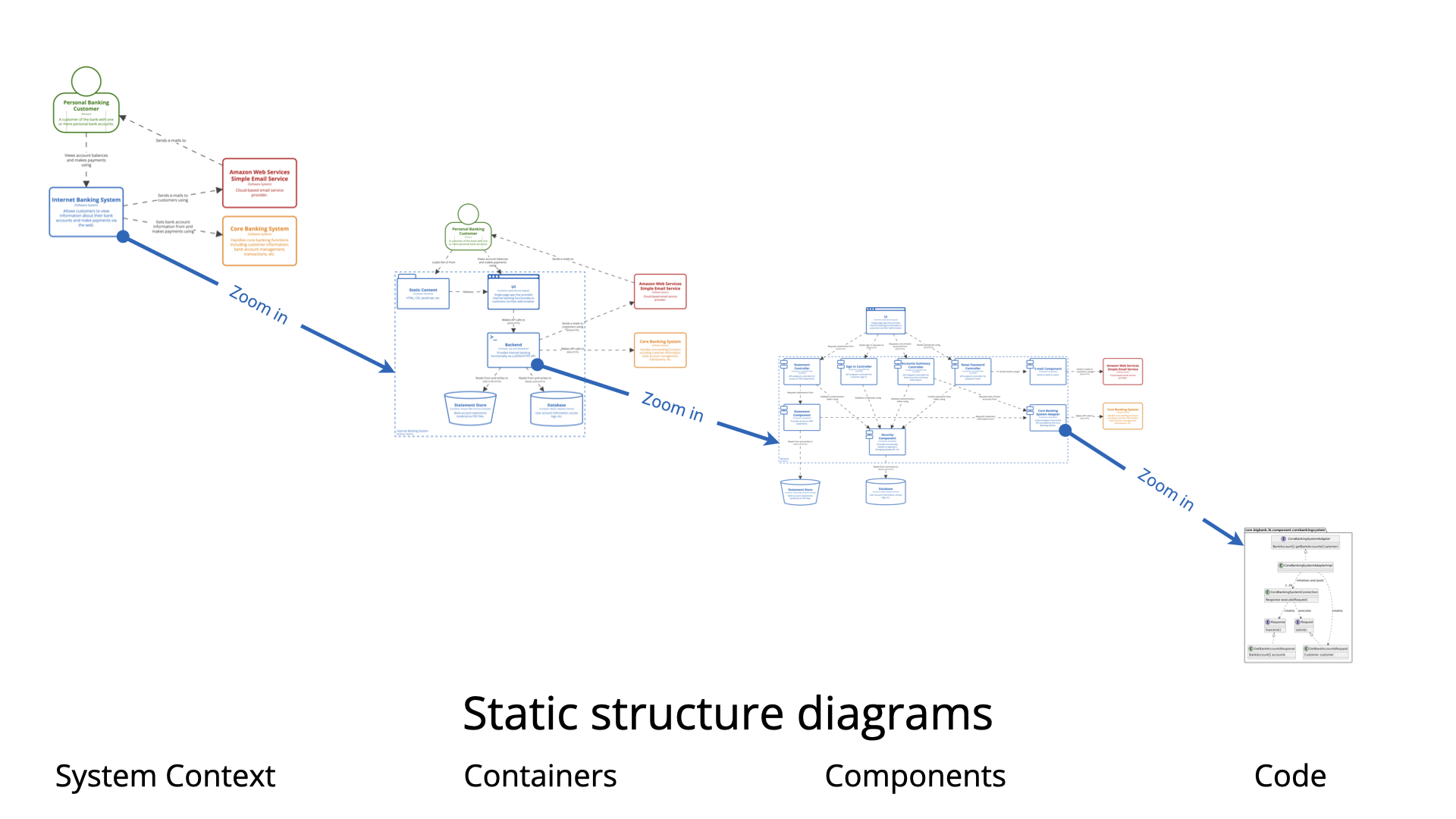
- System Context Diagram: Depicts the software system within its broader environment—what external actors (users, devices, APIs) interact with it, and how. For instance, in an online banking platform, it shows a customer accessing the web app, triggering a login, which then invokes the core bank system.
- Container Diagram: Focuses on deployable units—such as web applications, mobile apps, APIs, databases, or microservices. These represent the smallest production-level services that can be monitored, deployed, or scaled independently.
- Component Diagram: Explores internal structure of a container. It breaks down services into functional modules—like authentication, transaction processing, or account summarization—revealing how responsibilities are segmented and interact.
- Code Diagram (optional): A low-level view showing actual class hierarchies or module dependencies. While not always needed, it becomes valuable during code reviews or refactoring discussions where precise interface definitions matter.
One of C4’s greatest strengths is its symbolic minimalism. It uses simple shapes—rectangles for components, lines for connections—without relying on UML or complex enterprise notation. This dramatically reduces the learning curve and enables cross-functional teams (frontend, backend, QA) to collaborate without needing formal training in modeling standards.
ArchiMate: The Enterprise-Grade Strategic Framework
Developed by The Open Group and now widely adopted in large enterprises undergoing digital transformation, ArchiMate is a comprehensive, standardized language for enterprise architecture. Unlike C4, which is focused on implementation, ArchiMate bridges the gap between business strategy and IT capability, offering a holistic view of how value is created through integrated systems.
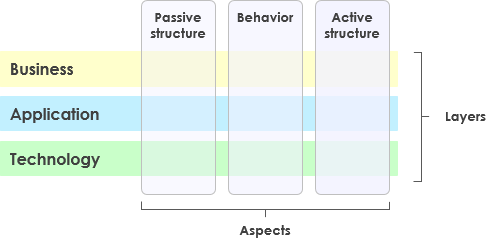
ArchiMate is structured around three primary layers:
- Business Layer: Defines key business processes, roles (e.g., customers, account managers), and value drivers (e.g., ‘improve customer satisfaction’). In a retail bank, this could include processes like account opening or fund transfers.
- Application Layer: Describes the digital systems that support business functions—such as a mobile banking app or a loan processing portal—showing how these systems implement business flows through services and APIs.
- Technology Layer: Outlines the underlying infrastructure—cloud platforms, server clusters, databases, and network topologies—that enable application performance and scalability.
ArchiMate goes beyond these layers by introducing additional dimensions:
- Motivation Layer: Explains why a system is being built—what strategic objectives it supports (e.g., compliance, scalability, customer retention).
- Implementation & Migration Views: Enable teams to model evolution paths—such as moving from on-premise to cloud, or upgrading legacy systems—supporting long-term planning and regulatory compliance.
ArchiMate’s power lies in its semantic rigor. Every element—such as ‘service’, ‘process’, or ‘object’—has a well-defined meaning and relationship (e.g., ‘realization’, ‘triggering’, ‘serving’). These relationships allow for full traceability, enabling auditors, governance teams, and business stakeholders to verify that technical decisions align with organizational goals.
Key Differences: When to Choose Which?
While both C4 and ArchiMate aim to visualize architecture, their goals, audiences, and use cases differ significantly. The following comparison highlights their strategic positioning:
| Dimension | C4 Model | ArchiMate |
|---|---|---|
| Core Focus | Software system design, component interactions | Enterprise alignment, business-process-to-technology mapping |
| Scope | Single software system or microservices group | Full organization-level IT and business ecosystem |
| Complexity | Lightweight, flexible, symbol-free | Structured, formal, rich in semantics |
| Target Audience | Developers, backend engineers, DevOps | Enterprise architects, CTOs, business leaders, governance teams |
| Tooling Requirements | Any diagram tool (e.g., Figma, PowerPoint, Draw.io) | Specialized modeling platforms with strict element libraries |
| Primary Use Case | Agile development, API design, microservice breakdown | Digital transformation, IT governance, investment justification |
| Learning Curve | Extremely low — minutes to confidence | High — weeks of study and practice required |
Crucially, C4 and ArchiMate are not competitors—they are symbiotic. In practice, many organizations adopt a hybrid modeling strategy:
- Use ArchiMate to define the business vision, value propositions, and IT strategy at the enterprise level.
- Apply C4 to break down one or more key systems into detailed technical designs that developers can implement.
Real-World Example: Designing an Online Banking System
Consider a real-world scenario: designing a secure, scalable online banking platform.
Using C4 for Technical Design
The C4 model helps clarify how individual services work:
- System Context shows the customer using the web app, which communicates with the core banking system via APIs.
- Container Diagram reveals that the web frontend is protected by an API gateway, which routes requests to services like user authentication and transaction processing.
- Component Diagram breaks down the transaction service into modules for validation, authorization, and ledger updates.
This level of detail is immediately actionable by developers. It enables them to:
- Define service boundaries clearly.
- Identify dependencies for integration testing.
- Plan deployment strategies (e.g., containerization, auto-scaling).
Using ArchiMate for Strategic Alignment
ArchiMate provides the strategic narrative:
- Business Layer defines customer journeys and KPIs like ‘reduce account opening time from 7 days to 24 hours’.
- Application Layer maps digital services to those business processes.
- Technology Layer includes cloud infrastructure, data encryption, and disaster recovery plans.
- Motivation Layer ties everything to strategic goals such as ‘improving customer retention’ and ‘compliance with financial regulations’.
This enables senior leadership to see the investment not just as a technical project—but as a direct path to increased revenue and reduced risk.
VP AI: How Visual Paradigm AI Enhances C4 and ArchiMate Modeling
Modern modeling platforms are no longer just repositories of diagrams—they are intelligent, context-aware environments that support iterative, human-centered design. Visual Paradigm stands at the forefront of this evolution by integrating AI-powered features that significantly accelerate the modeling process and improve accuracy across both C4 and ArchiMate.
AI-Powered Diagram Generation
Visual Paradigm’s AI C4 Diagram Generator and C4 PlantUML Studio allow users to generate compliant, industry-standard diagrams using simple natural language prompts.
For example, a developer can type:
"Generate a C4 container diagram for a healthcare platform with user authentication, appointment scheduling, and reporting modules."
The system responds by automatically creating a properly structured C4 container diagram with appropriate containers (e.g., web app, mobile app, API gateway), services (e.g., authentication, scheduling), and connections—respecting C4 best practices and hierarchy.
Smart Modeling Assistance
The AI component also offers:
- Auto-relationship suggestion: Based on context, it suggests appropriate relationships like ‘calls’, ‘depends on’, or ‘is part of’ between components.
- Missing element detection: If a service is referenced without being defined, the system flags it and proposes a new component.
- Version consistency: Ensures that when a new service is added in C4, the corresponding ArchiMate application layer is updated with a traceable link.
Seamless Integration Across Models
Visual Paradigm enables a truly hybrid workflow:
- Start with ArchiMate to model enterprise value streams, business roles, and strategic drivers.
- Use AI-assisted C4 views to explore technical breakdowns of specific systems—like the user management module or payment processing.
- Link the two models via traceability—e.g., a business process in ArchiMate maps to a container in C4, which in turn details specific components.
This eliminates silos, prevents version drift, and ensures that every architectural decision has both a strategic and operational justification.
Enterprise-Grade Capabilities
Visual Paradigm goes beyond AI to offer:
- Full support for ArchiMate 3.2 standards, including complete element libraries and relationship types.
- Native C4 model views: System Context, Container, Component, Deployment, Dynamic, and Landscape views—all aligned with C4 best practices.
- Seamless workflow with UML, BPMN, TOGAF ADM, ERD, and code repositories, enabling full lifecycle traceability from business requirements to implementation.
- Real-time collaboration with team members in multiple time zones—ideal for global software teams.
- Version control and audit trails that support compliance, risk assessments, and post-mortem reviews.
Tips and Tricks: Practical, Quick-Win Optimizations
Even with powerful tools, effective modeling requires discipline and smart habits. Here are practical tips to maximize productivity and clarity:
1. Start with a Single C4 View, Then Expand
Instead of building the full C4 hierarchy immediately, begin with just the System Context. This gives immediate visibility into system boundaries and stakeholder interactions. Once the context is clear, iteratively add layers—starting with containers—before diving into components.
2. Use Natural Language Prompts to Generate Initial Models
Use the AI C4 generator to draft initial diagrams. This saves hours of manual drawing and reduces cognitive load during early design phases. Refine the output by adjusting labels, adding actors, or removing unnecessary connections.
3. Apply the 30-Second Rule
Before presenting a diagram to a team, spend 30 seconds asking: Does this show a clear relationship between actors and services? If not, revise it. This simple check ensures clarity and avoids ambiguous or overly complex visuals.
4. Link C4 to Business Goals in ArchiMate
Every C4 container should be linked (via traceability) to a business process in ArchiMate. For example, the ‘User Login Service’ in C4 should trace back to the ‘Customer Authentication’ process in the business layer.
5. Use Color Coding for Clarity
Apply color to distinguish layers: green for business, blue for applications, red for technology. This helps non-technical stakeholders quickly grasp the architecture without reading every label.
6. Share Iteratively, Don’t Finalize
Instead of waiting until the final version to share, present early drafts in stand-up meetings. Use feedback loops to refine the model over time—this increases ownership and alignment across teams.
Conclusion: The Right Tool for the Right Audience
Choosing between C4 and ArchiMate is not a matter of preference—it is a strategic decision based on team needs, project maturity, and stakeholder alignment.
If your team is focused on rapid development, service-oriented architecture, or agile delivery, C4 is the ideal starting point. Its simplicity and developer-centric design minimize friction and accelerate delivery.
If your organization needs to justify investments, demonstrate value to stakeholders, or comply with governance frameworks, ArchiMate is essential. It provides the narrative and structure needed to bridge the gap between business and technology.
In reality, the most successful architectures emerge from a two-tiered modeling approach:
- Strategic Layer: ArchiMate – shows how the system contributes to business value.
- Operational Layer: C4 – shows how it’s technically implemented.
This dual-layer approach ensures that every architectural decision is both technically sound and strategically justified.
And finally, the most powerful tool in your arsenal isn’t just the modeling software—it’s the ability to communicate architecture in a way that everyone understands. Tools like Visual Paradigm, enhanced by AI-driven automation and intelligent modeling support, empower teams to build transparent, scalable, and collaborative architecture that drives innovation across the enterprise.
ArchiMate and the C4 model Visual Paradigm ecosystem:
- Comprehensive Tutorial: Generating ArchiMate Diagrams with AI: This in-depth tutorial demonstrates how to use Visual Paradigm’s AI diagram generator to create ArchiMate diagrams and viewpoints efficiently.
- Ultimate Guide to C4 Model Visualization Using Visual Paradigm’s AI Tools: A comprehensive guide on leveraging AI-powered tools to automate and enhance C4 model visualization for smarter software architecture design.
- Visual Paradigm: The Premier Tool for ArchiMate EA Modeling: An overview of Visual Paradigm as a leading enterprise architecture tool for creating and managing ArchiMate models to support business and IT alignment.
- Introducing AI-Powered ArchiMate Viewpoints Generator in Visual Paradigm: This release details an AI-driven generator that automates the creation of enterprise architecture views, significantly enhancing modeling accuracy.
- The Ultimate Guide to C4-PlantUML Studio: This resource explains how the studio combines AI-driven automation, C4 model clarity, and PlantUML’s flexibility to revolutionize architecture design.
- A Comprehensive Guide to Visual Paradigm’s AI-Powered C4 PlantUML Studio: This guide explores a purpose-built tool that transforms natural language into correct, layered C4 diagrams across the four core levels.
- Generating and Modifying C4 Component Diagrams with AI Chatbot: A specialized tutorial demonstrating how to use the AI-powered Chatbot to create and iteratively refine a C4 Component Diagram for specific system architectures.
- The Essential Guide to ArchiMate: Strengths and Overcoming Challenges with AI: This guide explains the framework’s mechanics and how AI-powered generation addresses traditional disadvantages of ArchiMate modeling.
- ArchiMate Tutorial: Guide to Enterprise Architecture Modeling: A beginner-friendly resource providing step-by-step instructions on creating and using ArchiMate diagrams for structured enterprise modeling.
- AI ArchiMate Diagram Generator Features: This page details the advanced capabilities of the generator, which uses natural language processing to build standard-compliant ArchiMate diagrams.