


Build a Smart Kitchen Renovation Plan: AI Tree Diagram Maker in Action
Imagine you’re juggling a kitchen renovation project—hiring contractors, ordering materials, and navigating permits—all while keeping your team aligned. What if you could turn this chaos into a clean, interactive, AI-powered tree diagram that auto-generates tasks, tracks status, and even suggests improvements? That’s exactly what the AI Tree Diagram Maker from Visual Paradigm does. With just a few clicks, you can transform your vision into a structured, editable, and intelligent project plan. The tool’s dual-view editor and AI assistant make complex hierarchies feel effortless, whether you’re managing a home renovation or a corporate initiative.
Let’s dive into how this powerful online tool works—using real-world screenshots that show you exactly how to generate, customize, and analyze your tree diagrams with minimal effort.
Step-by-Step: From Topic to Tree Diagram
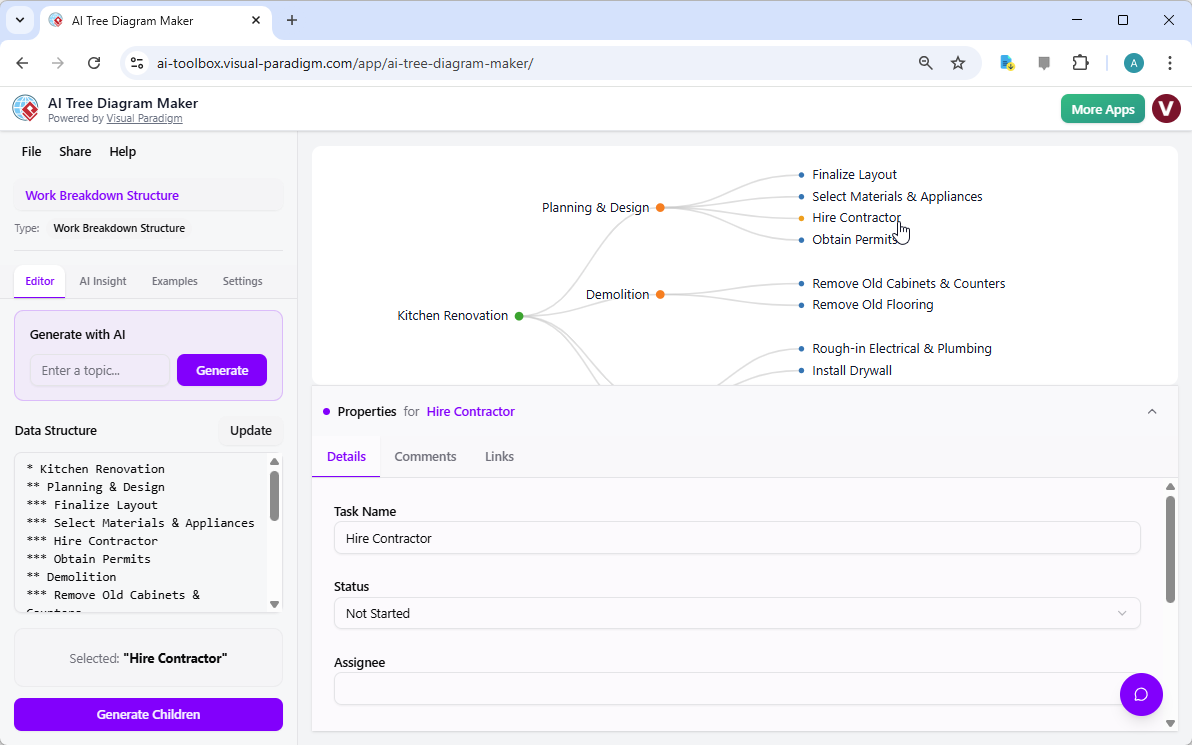
The AI Tree Diagram Maker begins with a simple, intuitive interface. On the left, you enter a topic like “Kitchen Renovation” and click “Generate.” The AI instantly creates a full Work Breakdown Structure (WBS) with phases like “Planning,” “Hire Contractor,” and “Obtain Permits.” The visual tree on the right updates in real time, showing you the structure as you type. This dual-view editor is genius: you can write your hierarchy in plain text, and the visual diagram responds instantly. It’s like having a digital brain that turns your ideas into a structured plan.
But the real magic happens when you click on a node. In the screenshot, you’ve selected “Hire Contractor.” A Property Editor pops up at the bottom, letting you assign the task to a specific person, set its status to “Not Started,” and add comments or links. This level of detail turns your diagram from a static outline into a living project plan. You’re not just visualizing—you’re managing.
Why This Matters for Real Projects
For project managers, this means you can start with a broad topic and let the AI handle the heavy lifting. For students or researchers, it’s a way to structure complex topics into digestible, hierarchical outlines. And for developers or architects, it’s a tool to map component dependencies and system flows. The AI Tree Diagram Maker doesn’t just create diagrams—it builds your workflow.
Intelligent Assistant: Ask the AI to Improve Your Plan
Once your tree is built, the tool doesn’t stop there. The AI Assistant, shown in the second screenshot, turns your diagram into an interactive knowledge base. You can ask questions like, “What’s the next step after hiring the contractor?” or “Show me all high-risk tasks.” The assistant doesn’t just answer—it gives you actionable suggestions. In the example, the AI recommends adding a “Site Survey” to assess conditions before design begins. This isn’t just helpful—it’s strategic. The assistant understands your data and can highlight bottlenecks or opportunities you might have missed.
What makes this feature so powerful is that it’s not just a chatbot—it’s context-aware. It knows your nodes, their properties, and their relationships. So when you ask, “Which tasks are overdue?” or “What’s the risk of not getting permits?” the AI doesn’t guess. It analyzes your structure and gives you a precise, data-driven answer.
Key Takeaways
-
Generate your entire tree from a single topic—no more manual structuring. The AI creates a full WBS or decision tree in seconds.
-
Detail each node with assignee, status, comments, and links—turn your diagram into a living project database.
-
Ask the AI Assistant questions—get intelligent, real-time suggestions and answers about your plan’s risks and opportunities.
-
Visualize complex data simply—collapsible branches and real-time updates make even large diagrams manageable.
-
Save, share, and export—your work is cloud-based and exportable as PNG or text, perfect for presentations or stakeholder reviews.
And here’s the kicker: this isn’t just a tool—it’s a workflow. It’s designed for people who need to organize, analyze, and communicate complex information. Whether you’re a project manager, a developer, a student, or a researcher, this AI Tree Diagram Maker gives you the power to turn ideas into actionable plans—without the stress of manual hierarchy building.
What’s more, the tool comes with pre-built blueprints like Work Breakdown Structure, Decision Tree, and Family Tree. You don’t need to reinvent the wheel. Just pick the right blueprint, enter your topic, and let the AI do the rest. It’s like having a professional project planner in your browser.
But don’t just take our word for it. Try it yourself and see how fast you can turn a vague idea into a detailed, interactive, AI-enhanced tree diagram. The AI Tree Diagram Maker is more than a tool—it’s your project’s digital co-pilot.
Ready to build your next project plan? Start your free trial today with the AI Tree Diagram Maker.
Related Resources
-
Visualizing Complex Ideas with AI-Powered Tree Diagrams: Explores how AI-driven tree diagram tools help users break down complex concepts into structured, visual representations for better understanding.
-
AI Tree Diagram Maker | Visualize Hierarchical Data Instantly: Effortlessly create stunning hierarchical diagrams like mind maps, org charts, and work breakdowns with our AI-powered tool. Simply describe your topic and …
-
AI Tree Diagram Maker – Visual Paradigm AI: Visualize Any Idea. Build Your First Tree Diagram Instantly. Get AI-powered risk analysis and structural suggestions to perfect your project before you even start.
-
AI Tree Diagram Maker: Generate Hierarchies Instantly – Visual Paradigm Product Updates: Effortlessly create complex tree diagrams from text with Visual Paradigm’s new AI Tree Diagram Maker. Describe your structure, and let AI build the visualization for you.
-
Comprehensive Tutorial: How to Master AI Tree Diagram Maker …: The AI Tree Diagram Maker from Visual Paradigm is one of the most powerful AI-assisted hierarchical diagramming tools available in 2026…
-
Home – Tree Diagram Maker: Create, visualize, and analyze hierarchical data with our AI Tree Diagram Maker. Use blueprints for WBS, SWOT, org charts, and more. Start for free.
-
Comprehensive Tutorial: Mastering the AI Tree Diagram Maker …: Dec 3, 2025 · Released in late 2025, Visual Paradigm ’s AI Tree Diagram Maker completely removes that bottleneck by using generative AI to turn natural-language descriptions into fully-structured, professionally formatted tree diagrams in seconds. Instead of drawing, you now think, type, and let AI do the heavy lifting.