
Enterprise architecture can seem daunting at first glance. It involves mapping complex systems, processes, and technologies to align with business goals. Within this landscape, ArchiMate serves as a standard language. However, a model without context is merely a diagram. This is where the concept of a Viewpoint becomes critical. Understanding ArchiMate Viewpoints is fundamental for anyone engaging in architecture modeling. It ensures that the right information reaches the right people at the right time.
This guide covers the foundational elements of ArchiMate Viewpoints. We will explore what they are, why they matter, and how to construct them effectively. By the end of this article, you will have a clear understanding of how to structure architectural information for specific stakeholder needs.
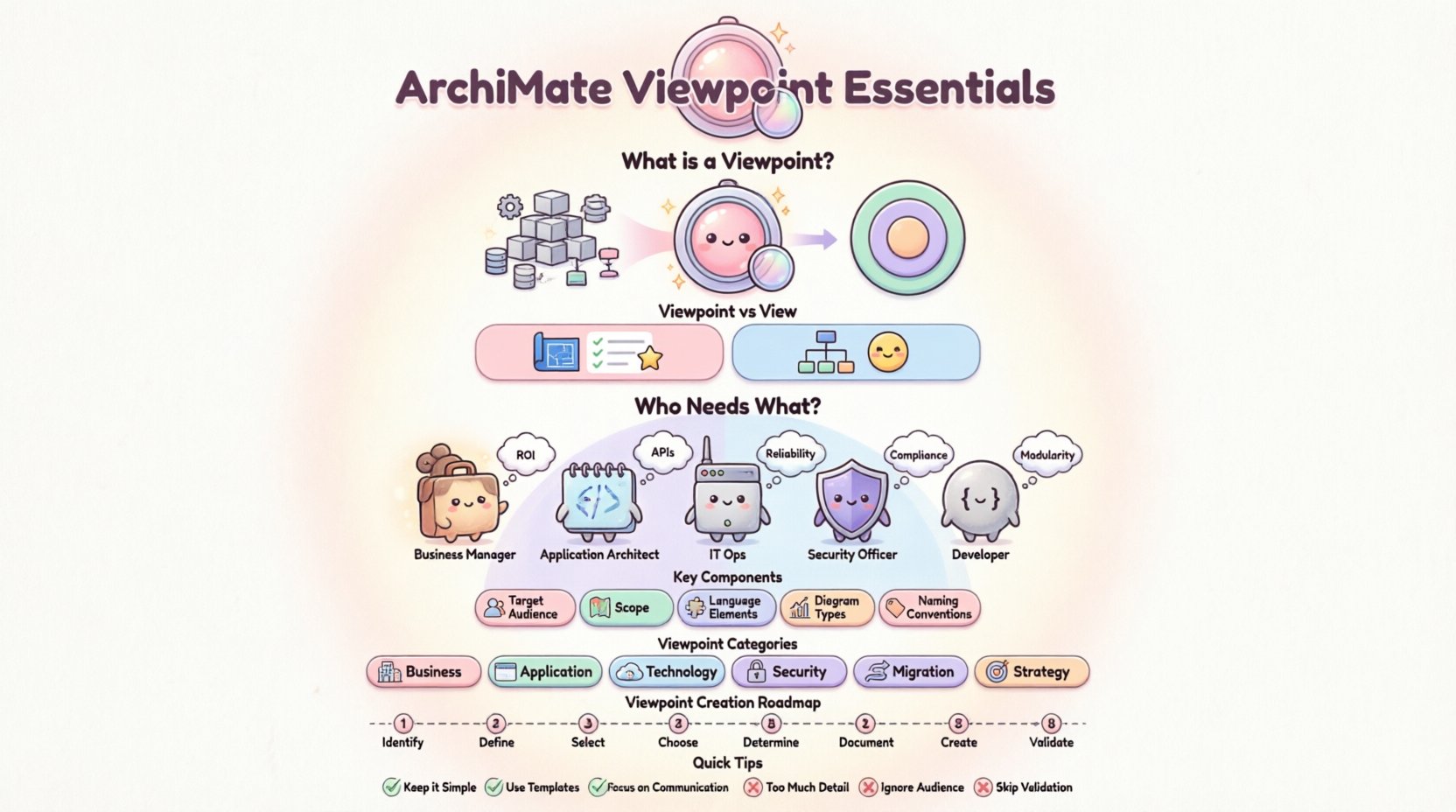
🧩 What is an ArchiMate Viewpoint?
In the world of ArchiMate, a Viewpoint is a template or a specification for a specific view. It defines the rules, conventions, and concerns that should be addressed when creating a model representation. Think of it as a lens. Just as a photographer uses different lenses to capture different aspects of a scene, an architect uses different viewpoints to capture different aspects of the enterprise.
A Viewpoint does not describe the actual data or the specific instances of the architecture. Instead, it describes the way the data is presented. It answers the question: “What do we want to know about this architecture?” and “Who needs to see this?”
Key characteristics of a Viewpoint include:
- Stakeholder Focus: It identifies the specific group of people for whom the view is intended.
- Concerns: It lists the specific questions or issues that the view must answer.
- Modeling Language: It specifies which parts of the ArchiMate language are relevant.
- Representation: It defines the graphical style or diagram type used.
- Notation: It sets the rules for how elements should be labeled and colored.
Without a defined Viewpoint, a model risks becoming cluttered with irrelevant information. A developer does not need to see high-level business strategy details, just as a C-level executive does not need to see the specific database schema. The Viewpoint filters this noise.
🤝 Understanding Stakeholders and Concerns
The foundation of any Viewpoint lies in identifying the Stakeholders. Stakeholders are individuals or groups who have an interest in the architecture. They might include business managers, software developers, IT operators, or security auditors. Each group has unique priorities.
Once stakeholders are identified, you must determine their Concerns. A concern is a set of questions that a stakeholder wants answered. For example, a security officer is concerned with data flow and access control. A business analyst is concerned with process efficiency and cost.
Mapping concerns to stakeholders is a crucial step. If you get this wrong, the resulting architecture will fail to communicate effectively. Below is a table illustrating common stakeholder groups and their typical concerns.
| Stakeholder Group | Primary Concerns | Typical Viewpoint Focus |
|---|---|---|
| Business Managers | Cost, ROI, Process Alignment | Business Layer, Strategy |
| Application Architects | Integration, Interfaces, Functionality | Application Layer, Service |
| IT Operations | Deployment, Infrastructure, Reliability | Technology Layer, Infrastructure |
| Security Officers | Access Control, Compliance, Data Flow | Security Constraints, Interfaces |
| Developers | APIs, Data Structures, Logic | Application Composition, Data |
When defining a Viewpoint, you must explicitly state which of these concerns are in scope. This prevents scope creep during the modeling process. It ensures that the model remains focused on the needs of the intended audience.
📊 The Relationship Between View and Viewpoint
It is common to confuse the terms View and Viewpoint. While they are related, they represent different concepts in ArchiMate. Understanding the distinction is vital for accurate documentation.
- Viewpoint: The abstract specification. It is the plan. It defines the rules and the audience. It exists before the diagram is drawn.
- View: The concrete representation. It is the result. It is the actual diagram or set of diagrams that satisfies the Viewpoint specification.
Imagine a blueprint. The Viewpoint is the set of standards and requirements for the blueprint (e.g., “Must show electrical wiring and plumbing”). The View is the actual blueprint drawing that an electrician uses to install the wiring.
One Viewpoint can generate multiple Views. For instance, a “Security Viewpoint” might generate a View for the initial assessment and a different View for the audit report. Both Views adhere to the same Viewpoint rules but serve different moments in the lifecycle.
Furthermore, a single View can satisfy multiple Viewpoints if the stakeholders agree on the information. However, it is best practice to maintain separation to avoid confusion.
🔍 Key Components of a Viewpoint Definition
Creating a robust Viewpoint requires attention to several specific components. These components ensure that the View is consistent and reusable. When you define a Viewpoint, you are essentially creating a contract for the model.
1. Target Audience
Who is this for? Be specific. “Architects” is too broad. “Senior Application Architects focusing on legacy integration” is precise. This definition guides the level of detail required.
2. Scope of the Model
What part of the enterprise are we modeling? Is it the entire organization or just the finance department? Is it the current state, the future state, or the migration path? Defining scope prevents the model from becoming unmanageable.
3. Language Elements
ArchiMate has many elements across different layers (Business, Application, Technology, etc.). A Viewpoint should specify which elements are allowed. For a high-level business view, you might restrict the model to Business Objects and Processes. You might exclude Technology Infrastructure elements entirely.
4. Diagram Types
Which visualization style is best? A Process Flow diagram? A Layered View? A Deployment View? The Viewpoint dictates the visual language used in the View.
5. Naming Conventions
How should elements be named? Should they use full business names or technical acronyms? Consistency in naming makes the View easier to read and maintain.
🗂️ Common Viewpoint Categories
While you can create custom Viewpoints, there are standard categories that are widely recognized. Familiarizing yourself with these can accelerate your learning and modeling process.
- Business Viewpoint: Focuses on business processes, organizational structure, and business objects. It is used to understand how the business operates.
- Application Viewpoint: Focuses on application software, application components, and their interfaces. It helps developers understand dependencies between systems.
- Technology Viewpoint: Focuses on hardware, networks, and infrastructure. It is essential for IT operations and capacity planning.
- Security Viewpoint: Focuses on access control, authentication, and data protection mechanisms across all layers.
- Migration Viewpoint: Focuses on the transition from the current state to the target state. It highlights gaps and required steps.
- Strategy Viewpoint: Focuses on goals, principles, and drivers. It aligns technical efforts with high-level business strategy.
Each of these categories serves a distinct purpose. You do not need to create all of them for every project. Select the ones that address the immediate concerns of your stakeholders.
🛠️ Steps to Define a Viewpoint
Defining a Viewpoint is a structured process. Following a consistent approach ensures quality and clarity. Here is a step-by-step guide to building a Viewpoint.
- Identify the Stakeholders: List all groups who will consume the model. Interview them if possible to understand their needs.
- Define the Concerns: Ask what questions they need answered. Write these down as a list of concerns.
- Select the Scope: Decide which parts of the enterprise are relevant. Exclude areas that are out of scope for this specific discussion.
- Choose the Language: Determine which ArchiMate layers and elements are necessary. Remove elements that add no value.
- Determine the Notation: Decide on the visual style. Will it use color coding? Specific shapes? Standard icons?
- Document the Viewpoint: Write a brief description of the Viewpoint. This document serves as the reference for the View.
- Create the View: Build the actual diagrams according to the rules defined in the Viewpoint.
- Validate: Review the View with the stakeholders. Does it answer their concerns? Is it clear? Iterate if necessary.
This process is iterative. As the architecture evolves, your Viewpoints may need to be updated. Flexibility is key.
⚠️ Common Pitfalls to Avoid
Even experienced practitioners can make mistakes when working with Viewpoints. Being aware of common errors can save time and reduce confusion.
- Too Much Detail: Including every element in the model makes it unreadable. A Viewpoint should filter out noise. If a stakeholder cannot find the information they need within 30 seconds, the Viewpoint is likely too broad.
- Too Little Detail: Conversely, omitting necessary information makes the model useless. Ensure the Viewpoint covers the core concerns of the audience.
- Ignoring the Audience: Creating a technical diagram for a business manager is a common error. Tailor the Viewpoint to the knowledge level of the reader.
- Lack of Consistency: Using different naming conventions or diagram styles within the same Viewpoint confuses users. Adhere strictly to the defined rules.
- Static Viewpoints: Architecture changes over time. A Viewpoint defined today might not fit tomorrow. Review them periodically.
✅ Best Practices for Effective Modeling
To ensure your ArchiMate models are successful, consider adopting these best practices regarding Viewpoints.
- Keep it Simple: Simplicity is a virtue in modeling. A simple Viewpoint that answers the question is better than a complex one that answers everything poorly.
- Use Standard Templates: Where possible, use established Viewpoint templates. This promotes consistency across the organization.
- Document Assumptions: If a Viewpoint relies on certain assumptions (e.g., “Assuming current network topology”), document them clearly.
- Link to Requirements: Where applicable, link model elements to specific business requirements. This adds traceability and value.
- Focus on Communication: The goal of a View is communication. If the stakeholders do not understand it, the model has failed, regardless of its technical accuracy.
- Version Control: Treat Viewpoints as living documents. Version them so you can track changes over time.
🔄 Iterating on Your Viewpoints
Modeling is rarely a linear process. You will likely need to refine your Viewpoints as you learn more about the enterprise. This iteration is normal and expected.
During the initial phases, your Viewpoints might be broad. As the project progresses, you can specialize them. For example, a general “Integration Viewpoint” might evolve into specific “API Viewpoints” for different services.
Feedback loops are essential. After presenting a View, ask the stakeholders: “What was missing?” “What was confusing?” “What would you like to see next time?” Use this feedback to adjust the Viewpoint specification.
This continuous improvement ensures that the architecture documentation remains relevant and useful. It transforms the Viewpoint from a static document into a dynamic tool for decision-making.
🔗 Integrating Viewpoints with Other Standards
ArchiMate is often used alongside other frameworks. A Viewpoint can be designed to bridge these standards. For example, you might create a Viewpoint that maps ArchiMate Business Processes to ITIL Service Processes.
This integration adds value by allowing the architecture to speak the language of other disciplines. It facilitates collaboration between different teams within the organization. When defining a Viewpoint, consider if there are external standards that need to be reflected in the diagram.
However, do not force integration where it does not fit. The Viewpoint should serve the enterprise, not the framework. If a standard does not add value to the specific concern, omit it.
📈 Measuring the Success of Your Viewpoints
How do you know if your Viewpoints are working? There are several indicators of success.
- Adoption: Are stakeholders actually using the Views for their decisions?
- Clarity: Do questions decrease after the View is presented?
- Consistency: Do different architects produce Views that look similar when using the same Viewpoint?
- Traceability: Can you trace a business goal to a technical implementation through the Views?
Tracking these metrics helps you refine your approach. It moves the practice from intuition to evidence-based improvement.
🎓 Final Thoughts on ArchiMate Viewpoints
Mastering ArchiMate Viewpoints is a journey. It requires patience, practice, and a deep understanding of the people you are modeling for. The technology is only half the battle. The other half is communication.
By defining clear Viewpoints, you create a structured environment for architectural modeling. You ensure that every diagram serves a purpose and every stakeholder finds what they need. This leads to better decisions, fewer errors, and a more aligned enterprise.
Start small. Define one Viewpoint for one stakeholder group. Test it. Refine it. Then expand. With time, you will build a robust library of Viewpoints that supports the entire organization. The effort you put into defining these viewpoints now will pay dividends in the clarity and efficiency of your architecture later.
Remember, a Viewpoint is not just a technical specification. It is a promise to the stakeholder that their concerns will be addressed. Keep that promise, and your architecture will thrive.