
The complexity of modern enterprise architecture demands a structured approach to modeling. The ArchiMate Viewpoint Framework provides this structure, allowing architects to organize information without overwhelming stakeholders. This guide dissects the framework, exploring the layers, aspects, and relationships that form the backbone of effective enterprise architecture documentation. 📊
What Defines the ArchiMate Viewpoint Framework? 🤔
Enterprise architecture models can quickly become cluttered if not managed correctly. The ArchiMate Viewpoint Framework addresses this by defining how information is structured and presented. It is not merely a drawing tool but a logic system for organizing architectural concepts. Understanding this system ensures that stakeholders see the right information at the right time.
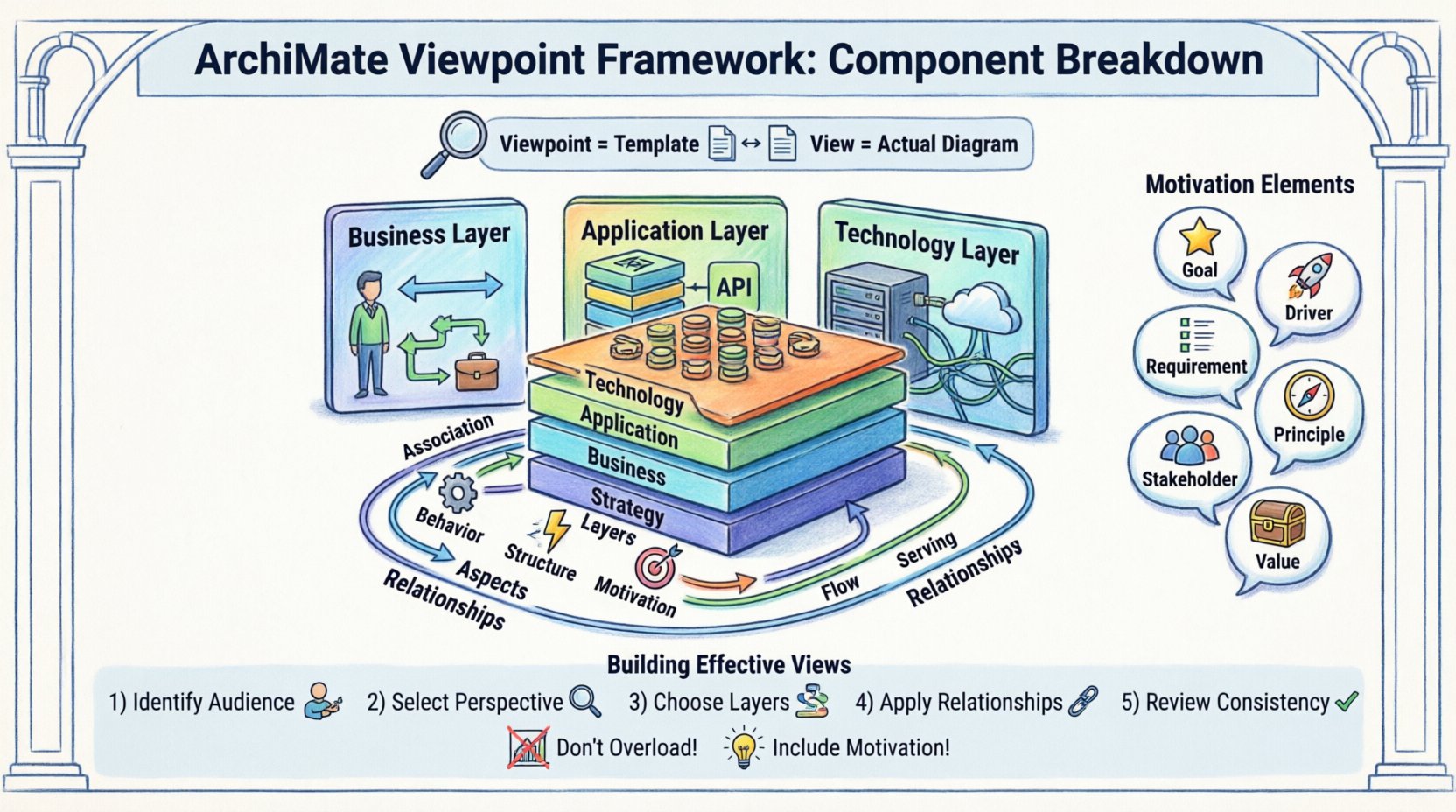
A viewpoint defines the perspective from which a view is created. It specifies which elements are relevant, how they are related, and what notation is used. The framework relies on a consistent vocabulary to ensure clarity across different domains. When architects align their models with this standard, communication improves significantly.
Core Distinction: View vs. Viewpoint 🔄
Confusion often arises between the terms view and viewpoint. Clarifying this distinction is essential for accurate modeling.
- Viewpoint: A specification or template. It defines the rules, conventions, and specific elements to be included in a diagram. It answers the question: What rules govern this view? 👁️
- View: The actual representation. It is the concrete instance created using the viewpoint rules. It answers the question: What does this specific diagram show? 📄
For example, a Business Process Viewpoint might dictate that only business processes and roles are visible. The resulting Business Process View would display the specific processes for a specific department. Using the correct viewpoint ensures consistency across the architecture repository.
The Three Dimensions of ArchiMate 📐
The framework is built upon three fundamental dimensions. These dimensions intersect to create the structure for every element within the model. Understanding these dimensions is crucial for navigating the complexity of enterprise architecture.
1. The Layers Dimension 🏗️
Layers represent the functional areas of the enterprise. They organize elements based on their role within the business and technology stack. The standard ArchiMate model defines several specific layers:
- Business Layer: Focuses on business strategy, governance, and organization. It includes actors, processes, and objects.
- Application Layer: Describes the software systems that support business processes. This includes applications and software services.
- Technology Layer: Represents the hardware and infrastructure. It covers nodes, devices, and networks.
- Strategy Layer: Captures high-level motivations, goals, and principles.
- Implementation & Migration Layer: Details the projects and transitions needed to move from the current state to the target state.
- Physical Layer: Often integrated with the Technology layer, focusing on the actual physical location and environment.
2. The Aspects Dimension 🎨
Aspects describe the static or dynamic nature of an element. They categorize elements based on their behavior or motivation. This dimension allows architects to filter information based on specific concerns.
- Behavior: Describes how elements act or function (e.g., processes, functions).
- Structure: Describes the composition and relationships (e.g., actors, objects, devices).
- Dynamic: Describes the flow and state changes (e.g., events, paths).
- Motivation: Describes the reasons behind decisions (e.g., goals, drivers, requirements).
3. The Relationships Dimension 🔗
Relationships define how elements interact with one another. They establish the logic connecting the layers and aspects. Common relationships include:
- Association: A generic link between elements.
- Specialization: Inheritance or categorization (e.g., a specific process is a type of general process).
- Flow: Sequence or ordering of activities.
- Dependency: One element relies on another to function.
- Access: One element uses or interacts with another.
- Serving: An application provides a service to a business process.
Deep Dive into the Business Layer 🏢
The Business Layer is often the starting point for enterprise architecture. It defines the organizational structure and operational logic. Within a viewpoint focused on this layer, specific elements are prioritized.
Key Business Elements
- Business Actor: A person or organization capable of performing activities. This could be a customer, an employee, or an external partner.
- Business Role: A collection of responsibilities and activities. Unlike actors, roles are not tied to specific individuals but to positions within the organization.
- Business Process: A sequence of activities designed to achieve a specific outcome. This is the core of operational workflow.
- Business Function: A collection of behaviors or capabilities that a business unit possesses. Functions are more stable than processes.
- Business Object: A key entity in the business domain. Examples include customers, orders, or products.
- Business Interface: A point of interaction between an actor and a business function or process.
- Business Event: Something that happens and triggers a business process.
Deep Dive into the Application Layer 💻
The Application Layer bridges the gap between business needs and technical implementation. It models the software systems that automate or support business processes.
Key Application Elements
- Application Service: A functionality provided by an application to a business function. It represents the value delivered by the software.
- Application Component: A modular part of an application. This represents the internal structure of the software.
- Application Interface: A point of interaction between an application and a business actor or process.
- Application Function: A specific capability of an application. This is a logical grouping of application services.
- Application Interaction: An exchange of data between applications.
Deep Dive into the Technology Layer 🖥️
The Technology Layer represents the physical and logical infrastructure required to run applications. It is the foundation upon which the software stack rests.
Key Technology Elements
- Device: A physical or virtual machine that provides processing power. Examples include servers, PCs, or cloud instances.
- Network: A communication infrastructure connecting devices. This includes LANs, WANs, and the internet.
- System Software: Software that manages hardware resources. Examples include operating systems or database management systems.
- Artifact: A physical representation of a software component. This includes files, executables, or libraries.
- Infrastructure Service: A service provided by the technology layer to the application layer.
The Motivation Aspect: Why We Build 🎯
One of the most powerful aspects of the ArchiMate framework is the Motivation Layer. It explains the rationale behind architectural decisions. Without this, models can feel abstract and disconnected from business reality.
Core Motivation Elements
- Goal: A high-level direction or objective. Goals define what the organization wants to achieve.
- Principle: A rule or guideline that influences behavior. Principles ensure consistency in decision-making.
- Requirement: A condition or capability that must be met. Requirements constrain the architecture.
- Driver: An external factor influencing the organization. Drivers force change or adaptation.
- Assessment: A measure of the current state or performance.
- Stakeholder: An individual or group with an interest in the architecture. Stakeholders define the requirements.
- Value: A benefit realized by a stakeholder. Value is the ultimate outcome of the architecture.
Integrating motivation elements into a viewpoint allows architects to trace decisions back to business drivers. This traceability is vital for governance and change management.
Constructing Effective Views 📝
Creating a view involves selecting the appropriate viewpoint and populating it with relevant elements. The goal is clarity, not completeness. A good view answers specific questions for a specific audience.
Steps for View Construction
- Identify the Audience: Who will read this view? Executives need different information than developers.
- Select the Perspective: Choose a viewpoint that filters out irrelevant details. For example, a security viewpoint would focus on access points and threats.
- Choose Relevant Layers: Do not mix all layers unless necessary. Focus on the interaction between specific layers (e.g., Business to Application).
- Apply Relationships: Use relationships to show dependencies. Avoid cluttering the diagram with unnecessary associations.
- Review for Consistency: Ensure that the notation matches the chosen viewpoint standards.
Common Pitfalls in Viewpoint Usage 🚫
Even experienced architects can make mistakes when working with the framework. Recognizing these pitfalls helps maintain the integrity of the models.
- Overloading Views: Trying to show too much information in a single view. This creates confusion. Split complex models into multiple views.
- Ignoring Layers: Mixing layers without clear justification. Ensure that dependencies between layers are logical.
- Missing Motivation: Focusing only on structure without explaining why. This makes the architecture difficult to justify.
- Inconsistent Notation: Using different symbols for the same element. Maintain strict adherence to the standard.
- Static Models: Treating the architecture as a static snapshot. Architecture evolves, so views should reflect change over time.
Summary of Key Components 📊
The following table summarizes the primary elements across the main layers and aspects. This serves as a quick reference for understanding the scope of the framework.
| Dimension | Category | Key Elements |
|---|---|---|
| Business Layer | Structure | Business Actor, Business Role, Business Object |
| Business Layer | Behavior | Business Process, Business Function |
| Application Layer | Structure | Application Component, Application Interface |
| Application Layer | Behavior | Application Service, Application Function |
| Technology Layer | Structure | Device, Network, System Software |
| Motivation | Logic | Goal, Driver, Requirement, Principle |
Interpreting Cross-Layer Relationships 🔗
One of the most valuable features of the framework is the ability to model interactions between layers. This is often called the cross-layer view. It demonstrates how business needs are met by technical capabilities.
Typical Cross-Layer Flows
- Business to Application: A business process uses an application service. This shows automation.
- Application to Technology: An application component runs on a device. This shows deployment.
- Business to Technology: A business object is stored in a database artifact. This shows data management.
When constructing these views, it is important to ensure that the relationships are semantically correct. For instance, a Serving relationship is used when an application provides a service to a business process. A Access relationship is used when an application accesses data. Precision in relationship selection enhances the clarity of the model.
Adapting the Framework for Specific Needs 🛠️
While the standard framework is comprehensive, it can be adapted for specific contexts. This is known as creating a profile. A profile restricts the available elements to those relevant to a specific domain.
- Security Profile: Focuses on access points, threats, and protection mechanisms.
- Cloud Profile: Emphasizes virtualization, orchestration, and cloud services.
- Data Profile: Highlights data objects, flows, and storage structures.
- Process Profile: Concentrates on business processes and workflow logic.
Adapting the framework allows for deeper focus without losing the underlying consistency. It ensures that the model remains relevant to the specific problem being solved.
Documentation and Maintenance 📚
Once views are created, they must be maintained. Architecture is not a one-time activity. It evolves as the organization changes. Documentation should reflect these changes.
- Version Control: Track changes to the model over time. This helps in auditing and rollback if necessary.
- Change Management: Link architectural changes to project initiatives. This ensures that the model stays in sync with reality.
- Review Cycles: Schedule regular reviews of the views. Ensure that the viewpoints remain appropriate for the current stakeholders.
Conclusion on Framework Utility 🏁
The ArchiMate Viewpoint Framework offers a robust method for organizing complex enterprise information. By understanding the layers, aspects, and relationships, architects can create models that are both precise and understandable. The focus on structure and logic ensures that communication remains clear across different levels of the organization.
Effective use of this framework requires discipline and a clear understanding of the elements. When applied correctly, it serves as a powerful tool for strategic planning and operational alignment. The goal is not just to document, but to facilitate understanding and decision-making.