
In modern enterprise environments, the disconnect between high-level business strategy and technical implementation often leads to misalignment, delays, and wasted resources. Enterprise Architecture (EA) exists to manage this complexity, and ArchiMate serves as a powerful standard language for modeling it. However, a single diagram rarely tells the whole story. This is where the concept of the ArchiMate Viewpoint becomes essential. This guide explores how to effectively use Viewpoints to communicate complex architectural information to diverse audiences without getting lost in technical jargon or business abstraction. 🧭
What is an ArchiMate Viewpoint? 🧩
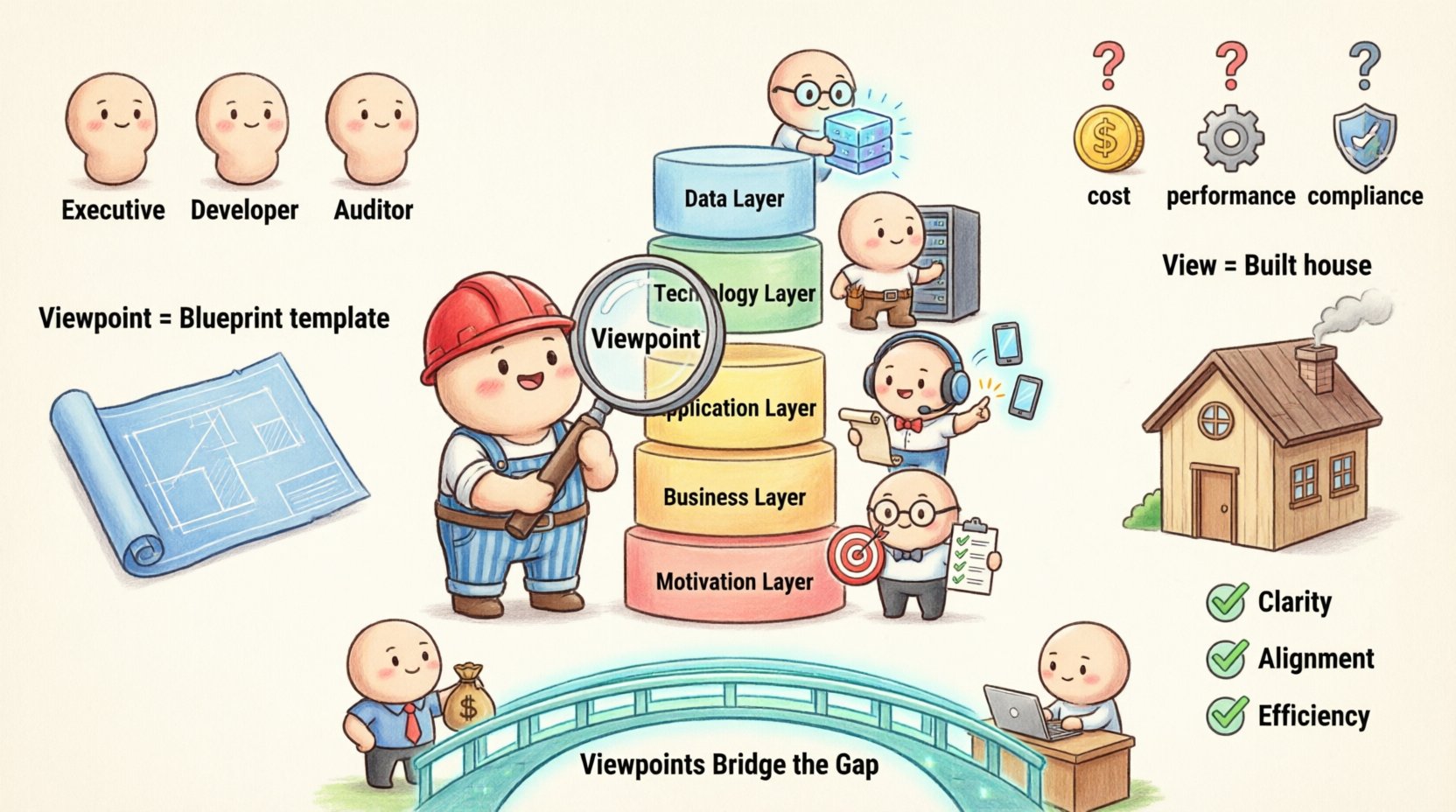
An ArchiMate Viewpoint defines a specific perspective from which an architecture description is created. It is not the diagram itself, but rather the set of rules, concerns, and stakeholders that dictate what the diagram should show. Think of it as a lens. When you look through a magnifying glass, you see details that are invisible to the naked eye. Similarly, a Viewpoint allows you to focus on specific aspects of the enterprise architecture while ignoring irrelevant details.
Without Viewpoints, architecture models risk becoming monolithic and overwhelming. A single massive model containing every business process, application, and technology component would be unreadable by any human. Viewpoints solve this by slicing the architecture into manageable pieces tailored to specific needs.
Key Characteristics of a Viewpoint
- Stakeholders: Who is the intended audience? Are they executives, developers, or security auditors?
- Concerns: What specific questions must this view answer? Is it about cost, performance, or compliance?
- Language: Which parts of the ArchiMate language are relevant? Business modeling differs from technology modeling.
- Notation: How should the information be visualized? Flowcharts, matrices, or network diagrams?
Viewpoint vs. View: Understanding the Difference 📄
Confusion often arises between the terms Viewpoint and View. While related, they serve different functions in the architecture documentation process. Understanding this distinction is critical for maintaining clarity in your modeling efforts.
| Feature | Viewpoint | View |
|---|---|---|
| Definition | A specification or template for creating a view. | A concrete representation of the architecture. |
| Abstraction | High-level concept; reusable. | Low-level instance; specific to a project. |
| Usage | Defines the rules and constraints. | Displays the actual data and relationships. |
| Analogy | A blueprint for a house plan. | The actual house built from the plan. |
For example, if your organization needs to show how business processes map to software applications, you define a Business to Application Viewpoint. You then create multiple Views using this viewpoint for different departments, such as Sales, HR, or Logistics. Each view follows the rules of the viewpoint but contains specific data relevant to that department.
Why Viewpoints Matter in Enterprise Architecture 🤝
Enterprise Architecture is inherently complex. It involves multiple layers, layers of abstraction, and various stakeholders with conflicting priorities. Viewpoints provide structure to this complexity. They ensure that communication is efficient and that the right information reaches the right people.
Bridging the Business and Code Gap
The primary challenge in architecture is the translation between business intent and technical execution. Business leaders think in terms of value, revenue, and processes. Technical teams think in terms of servers, code, APIs, and databases. Viewpoints act as the translator.
- For Business Stakeholders: A business viewpoint simplifies technical details to focus on process flow and value chains. It answers “How does this affect our operations?”
- For Technical Stakeholders: A technology viewpoint abstracts away business logic to focus on infrastructure, dependencies, and deployment. It answers “How do we build and maintain this?”
- For Managers: A motivation viewpoint connects business goals to specific architectural decisions. It answers “Why are we making this change?”
The Core ArchiMate Layers and Their Viewpoints 🏛️
ArchiMate structures enterprise architecture into layers. Each layer represents a different aspect of the enterprise. Viewpoints are often designed to cross these layers to show relationships, or to stay within a layer to show depth.
1. Business Layer
This layer models the organization itself. It includes business processes, functions, roles, and organizational units.
- Typical Viewpoint: Business Process View.
- Focus: Workflow efficiency, role responsibilities, and process orchestration.
- Example Question: “Which roles are involved in the order fulfillment process?”
2. Application Layer
This layer models the software systems that support the business. It includes applications, application components, and interfaces.
- Typical Viewpoint: Application Interaction View.
- Focus: System integration, data flow between applications, and service interfaces.
- Example Question: “How does the CRM system communicate with the Billing system?”
3. Technology Layer
This layer models the hardware and infrastructure that hosts the applications. It includes nodes, devices, and networks.
- Typical Viewpoint: Deployment View.
- Focus: Server topology, network connectivity, and hardware dependencies.
- Example Question: “Where is the database physically hosted?”
4. Data Layer
While sometimes integrated into the Application layer, data structures represent the information assets of the enterprise.
- Typical Viewpoint: Data Entity View.
- Focus: Data entities, attributes, and relationships.
- Example Question: “What data is shared between the two systems?”
5. Motivation Layer
This layer explains the drivers behind the architecture. It includes goals, principles, and requirements.
- Typical Viewpoint: Motivation View.
- Focus: Alignment of strategy with execution.
- Example Question: “Which requirement drives this new application deployment?”
Designing Effective Viewpoints for Your Organization 🛠️
Creating a viewpoint is a strategic decision. It requires understanding the audience and the specific problems they face. A well-designed viewpoint reduces cognitive load and increases decision-making speed.
Step 1: Identify the Stakeholders
Before drawing anything, list who will use the architecture description. Are they architects, developers, project managers, or C-level executives? Each group has a different vocabulary and information need. A CTO cares about risk and cost; a developer cares about interfaces and dependencies.
Step 2: Define the Concerns
What questions must the view answer? If a viewpoint does not answer a specific concern, it is likely too broad. Narrow down the scope to ensure relevance. For instance, a security audit viewpoint should not show process details unless they directly impact security compliance.
Step 3: Select the Language
ArchiMate offers many concepts. Do not use every concept in every view. If you are designing a high-level overview, use Business and Application concepts but omit Technology details. This keeps the diagram clean and focused.
Step 4: Establish Notation Rules
Define how elements are displayed. Should relationships be solid or dashed? What colors indicate status? Consistency in notation across all viewpoints helps users interpret the diagrams quickly.
Common Pitfalls When Modeling Viewpoints ⚠️
Even experienced architects can fall into traps when defining and using Viewpoints. Being aware of these common issues helps in creating robust architecture documentation.
- Creating Too Many Viewpoints: If you define a unique viewpoint for every small project, maintenance becomes a nightmare. Aim for a standard set of viewpoints that cover 80% of the use cases.
- Confusing View and Viewpoint: Treating a specific diagram as a template for future diagrams leads to inconsistencies. Ensure the definition (Viewpoint) is stored separately from the content (View).
- Ignoring the Audience: Designing a technical view for a business audience results in confusion. Always tailor the language and detail level to the reader.
- Overloading the Diagram: Trying to show everything in one view defeats the purpose of the Viewpoint. Split complex topics into multiple related views.
- Lack of Consistency: If Viewpoint A uses a different notation than Viewpoint B for the same concept, users will get confused. Standardize symbols and labels.
Integrating Viewpoints into Your Architecture Process 🔄
Defining viewpoints is only the first step. They must be integrated into the daily workflow of the architecture team. This ensures that the architecture remains relevant and accessible.
1. Standardization
Create a library of standard viewpoints. This library should include templates, rules, and examples. When starting a new project, architects should select from the library rather than creating something from scratch. This reduces time spent on formatting and ensures consistency across the enterprise.
2. Training
Not everyone understands ArchiMate notation. Training sessions should explain the standard viewpoints and how to read them. This ensures that stakeholders can interpret the architecture descriptions correctly without needing an architect present for every meeting.
3. Version Control
As the enterprise changes, the viewpoints may need to evolve. Maintain version control for the viewpoint definitions. If a notation changes, ensure all existing views are updated or archived appropriately. This prevents confusion between old and new standards.
4. Feedback Loops
Regularly review the effectiveness of your viewpoints. Are stakeholders finding the information they need? Are the views being used in decision-making? If not, adjust the viewpoint definitions. Architecture is a living practice, not a static document.
Measuring Success in Viewpoint Implementation 📊
How do you know if your Viewpoint strategy is working? Success in architecture is often qualitative, but there are indicators you can track.
- Reduced Misunderstandings: Fewer meetings are needed to clarify requirements because the architecture is clear.
- Faster Onboarding: New architects or developers can understand the system landscape faster using the standardized views.
- Improved Decision Speed: Stakeholders can make decisions based on the provided views without requesting additional analysis.
- Consistency in Documentation: All documentation follows the same visual and structural standards.
Future Trends in Architecture Modeling 🚀
The landscape of Enterprise Architecture is evolving. As organizations adopt more agile practices and cloud-native technologies, the role of Viewpoints is shifting.
- Dynamic Views: Instead of static diagrams, future systems may generate views dynamically based on real-time data. A Viewpoint would define the query logic rather than the static layout.
- Automated Compliance: Viewpoints could be linked directly to compliance rules. If a technology node violates a policy, the Viewpoint automatically highlights the issue.
- Integration with DevOps: Architecture views will integrate more tightly with CI/CD pipelines, showing the impact of code changes on the broader architecture in real-time.
Summary of Best Practices 📝
To wrap up this guide, here are the essential takeaways for beginners looking to implement ArchiMate Viewpoints effectively.
- Start Small: Do not try to model the entire enterprise at once. Start with a specific concern and build from there.
- Know Your Audience: Design for the reader, not for the tool. Simplicity wins over complexity.
- Maintain Standards: Consistency is key to usability across the organization.
- Iterate: Viewpoints are not set in stone. Refine them as the organization grows and changes.
- Focus on Value: Every diagram should answer a specific business or technical question. If it does not, reconsider its existence.
By mastering the art of Viewpoints, you bridge the gap between the strategic vision of the business and the tactical reality of the code. This alignment is the foundation of successful digital transformation and sustainable enterprise growth. 🏗️