
Entering the world of enterprise architecture often feels like standing at the edge of a vast ocean. The concepts are clear on paper, but the waves of real-world complexity can easily wash away the theoretical foundation. This is where the ArchiMate Viewpoint becomes your anchor. It transforms abstract models into actionable communication tools tailored for specific audiences.
This guide walks you through the practical application of ArchiMate Viewpoints. We will move beyond definitions and explore how to select, design, and deploy these viewpoints in your initial architecture project. By focusing on clarity and stakeholder alignment, you ensure that your architectural work delivers tangible value rather than just documentation.
🔍 What Exactly is a Viewpoint?
In the context of architecture frameworks, a viewpoint is not merely a drawing or a diagram. It is a specification of the conventions for constructing and using a particular view. Think of it as the lens through which a stakeholder examines the architecture.
- Perspective: It defines who is looking at the architecture (e.g., a business manager vs. a developer).
- Focus: It determines which layers of the architecture are visible (Business, Application, Technology, or Motivation).
- Abstraction: It sets the level of detail required for the specific decision-making context.
Without a viewpoint, an architecture model is just a dense web of relationships that confuses rather than clarifies. A viewpoint organizes this complexity into a narrative that resonates with the intended reader.
🧩 The Core Layers of the Framework
To apply viewpoints effectively, you must understand the three primary layers of the language. Your choice of viewpoint depends heavily on which layer(s) your stakeholders care about.
1. Business Layer
This layer represents the organization’s goals, processes, and organizational structure. It is the foundation for understanding what the organization does.
- Key Concepts: Business Process, Business Function, Business Role, Business Object.
- Typical Stakeholders: CIO, Department Heads, Process Owners.
2. Application Layer
This layer describes the software systems that support the business activities. It bridges the gap between business needs and technical implementation.
- Key Concepts: Application Component, Application Service, Application Interface.
- Typical Stakeholders: Application Managers, Solution Architects, DevOps Teams.
3. Technology Layer
This layer covers the physical infrastructure, servers, networks, and middleware that host the applications.
- Key Concepts: Node, Device, System Software, Communication Network.
- Typical Stakeholders: Infrastructure Managers, Network Engineers, Security Officers.
4. Motivation Layer (The Glue)
Often overlooked, this layer explains the why. It captures drivers, goals, and assessments that drive the architecture forward.
- Key Concepts: Driver, Goal, Outcome, Assessment.
- Typical Stakeholders: Board Members, Strategy Teams, Investment Committees.
🗺️ Selecting the Right Viewpoint: A Strategic Matrix
Choosing the correct viewpoint is a critical decision. A mismatch between the viewpoint and the stakeholder leads to disengagement. Use the following matrix to guide your selection process.
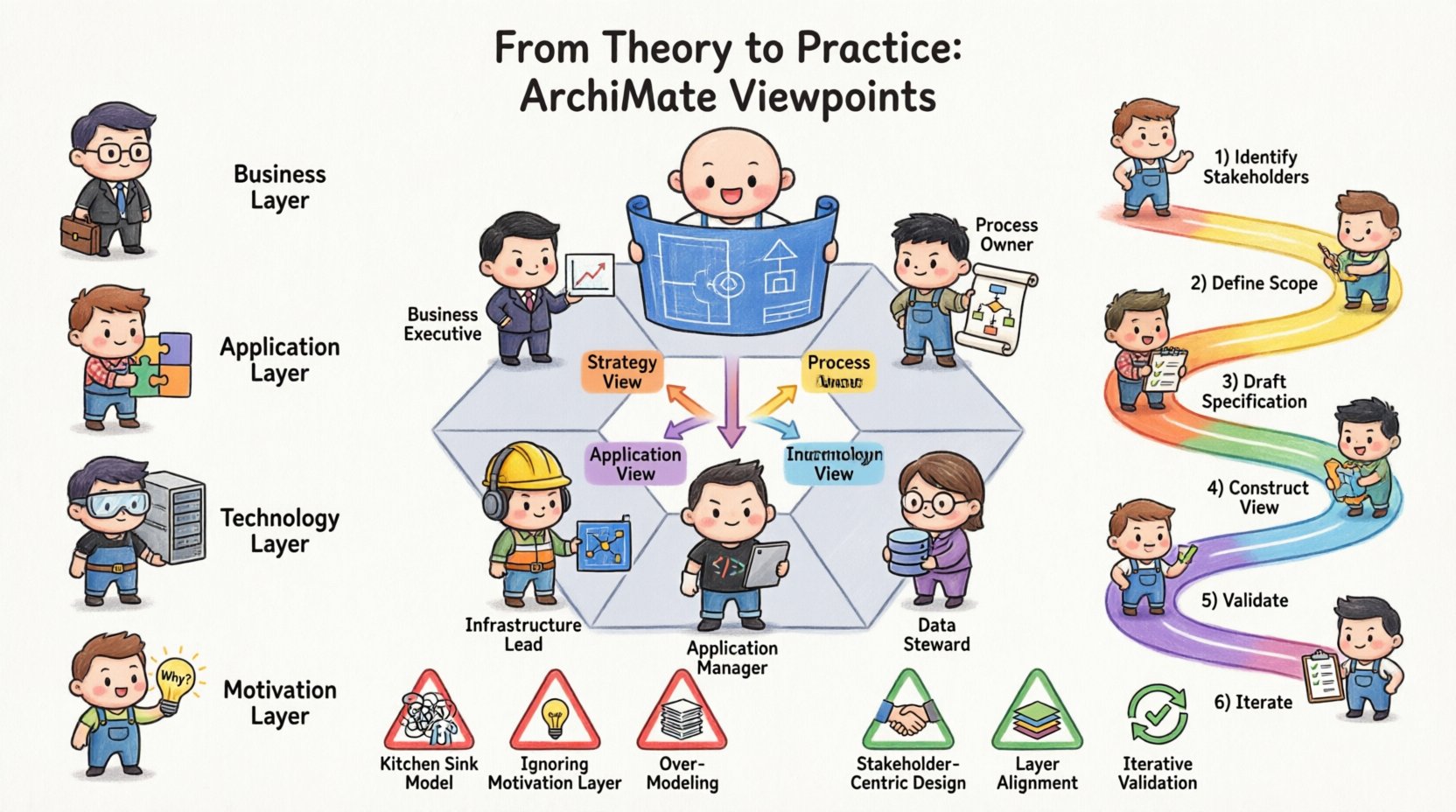
| Stakeholder Role | Primary Focus | Recommended Viewpoint Type | Key Information Needed |
|---|---|---|---|
| Business Executive | Strategy & ROI | Motivation & Business Capability | Goals, Drivers, Business Capabilities |
| Process Owner | Workflow Efficiency | Business Process & Interaction | Process Flow, Roles, Responsibilities |
| Application Manager | System Integration | Application Interaction & Deployment | Services, Interfaces, Dependencies |
| Infrastructure Lead | Performance & Security | Technology Deployment & Physical | Nodes, Devices, Networks, Security |
| Data Steward | Information Flow | Data Object & Flow | Data Entities, Access Rights, Storage |
🛠️ Practical Implementation Steps
Transitioning from theory to practice requires a structured approach. Follow these steps to integrate viewpoints into your first project successfully.
Step 1: Identify Stakeholders and Needs
Before creating a single diagram, list everyone who will consume the architecture. Interview them to understand their pain points. Do they need to see cost implications? Do they need to understand security risks? Their answers dictate the viewpoint.
Step 2: Define the Scope and Boundaries
Not every project requires a full-stack view. Determine the boundaries. If you are migrating a database, focus on the Technology and Data layers. If you are reorganizing a department, focus on the Business and Motivation layers.
Step 3: Draft the Viewpoint Specification
Document the rules for the view. Specify:
- Scope: What is included and excluded?
- Granularity: High-level summary or detailed component list?
- Standardization: What symbols or conventions will be used?
- Notation: Ensure consistent use of ArchiMate relationships (usage, access, flow).
Step 4: Construct the View
Build the actual model based on the specification. Keep the visual layout clean. Avoid clutter. Use grouping to separate distinct logical areas. Ensure that the narrative flows logically from top to bottom or left to right.
Step 5: Validate with Stakeholders
Present the view to the target audience. Ask specific questions: “Does this accurately reflect your current reality?” or “Is this sufficient to make a decision?” Their feedback is the quality control mechanism.
Step 6: Iterate and Refine
Architecture is iterative. As the project evolves, your views must evolve. Update the viewpoints to reflect changes in scope or strategy. Maintain version control for your architectural artifacts.
📊 Deep Dive: Common Viewpoint Scenarios
Below are detailed examples of how specific viewpoints function in real-world scenarios.
1. The Motivation Viewpoint
This is often the starting point for any strategic initiative. It aligns the technical work with business strategy.
- Content: Business Drivers, Strategic Goals, Assessments.
- Usage: Used during the planning phase to justify investment.
- Example: Showing how a new security initiative (Driver) leads to a compliance goal (Goal) which requires a new identity management system (Application).
2. The Business Process Viewpoint
Crucial for business analysts and process owners. It visualizes the flow of work.
- Content: Business Processes, Business Actors, Business Objects.
- Usage: Identifying bottlenecks, redundancies, or handoff issues.
- Example: Mapping the order-to-cash process to identify where manual intervention is causing delays.
3. The Application Interaction Viewpoint
Essential for integration architects. It shows how systems talk to each other.
- Content: Application Services, Application Components, Interfaces.
- Usage: Planning API strategies, microservices decomposition, or legacy modernization.
- Example: Visualizing how the CRM system calls the Billing system via a specific interface.
4. The Technology Deployment Viewpoint
Used by infrastructure teams to understand physical placement.
- Content: Nodes, Devices, System Software, Communication Networks.
- Usage: Capacity planning, disaster recovery planning, network security.
- Example: Showing how an application component is deployed across multiple server nodes for high availability.
⚠️ Common Pitfalls to Avoid
Even experienced practitioners stumble when applying viewpoints. Be aware of these common traps.
- The “Kitchen Sink” Model: Trying to put every layer into a single diagram. This overwhelms the reader. Keep layers separate unless a specific cross-layer interaction is the point of interest.
- Ignoring the Motivation Layer: Building a perfect technical map without explaining why it is being built leads to a lack of business buy-in. Always connect the “what” to the “why”.
- Over-Modeling: Creating detailed models for areas that will not change. Focus your effort on the dynamic parts of the architecture. Static elements can be documented elsewhere.
- Stakeholder Mismatch: Showing a detailed network topology to a business executive. They care about service availability, not IP addresses. Tailor the view to the audience.
- Lack of Governance: Allowing the model to drift from reality. Without a maintenance process, the architecture becomes fiction within months.
🔄 Integrating with Governance Processes
A viewpoint is not a static deliverable; it is part of an ongoing governance cycle. Embedding your viewpoints into standard governance meetings ensures they remain relevant.
1. Architecture Review Boards
Use specific views during review boards. For a technology review, present the Deployment Viewpoint. For a strategic review, present the Motivation Viewpoint. This ensures the right people see the right information.
2. Change Management
When a change request comes in, assess its impact using the relevant viewpoint. If a new service is requested, check the Application Interaction View to see if it conflicts with existing interfaces.
3. Compliance Audits
Use the Data and Security views to demonstrate compliance with regulations. Trace the flow of sensitive data through the Business and Application layers to the Technology layer.
📈 Measuring Success
How do you know if your application of ArchiMate Viewpoints is working? Look for these indicators.
- Reduced Misunderstandings: Fewer questions during meetings because the visuals speak clearly.
- Faster Decision Making: Stakeholders can see the impact of changes without needing deep technical explanations.
- Alignment: Business and IT goals are visibly linked through the Motivation layer.
- Consistency: Different architects produce views that look and behave consistently because they follow the same viewpoint specifications.
🚀 Moving Forward
Applying ArchiMate Viewpoints is a journey of refinement. It requires discipline to define the scope and humility to listen to stakeholder feedback. Your first project will not be perfect. That is acceptable. The goal is to create a shared language that reduces complexity and drives clarity.
Start small. Pick one critical stakeholder. Define a single, clear viewpoint for them. Validate it. Then expand. By treating the viewpoint as a communication tool rather than a modeling exercise, you ensure that your architecture serves the organization effectively.
📝 Summary of Best Practices
- Define Audience First: Never draw a view before knowing who will read it.
- Layer Separation: Keep Business, Application, and Technology layers distinct unless necessary.
- Link to Motivation: Always connect technical changes to business goals.
- Iterate: Treat architecture as a living document that evolves with the business.
- Consistency: Use standard naming conventions and relationship types.
- Validation: Regularly review views with the people who own the processes or systems.
By following these guidelines, you transform the theoretical framework into a practical asset. You build a bridge between the abstract strategy and the concrete execution. This is the essence of effective enterprise architecture.