
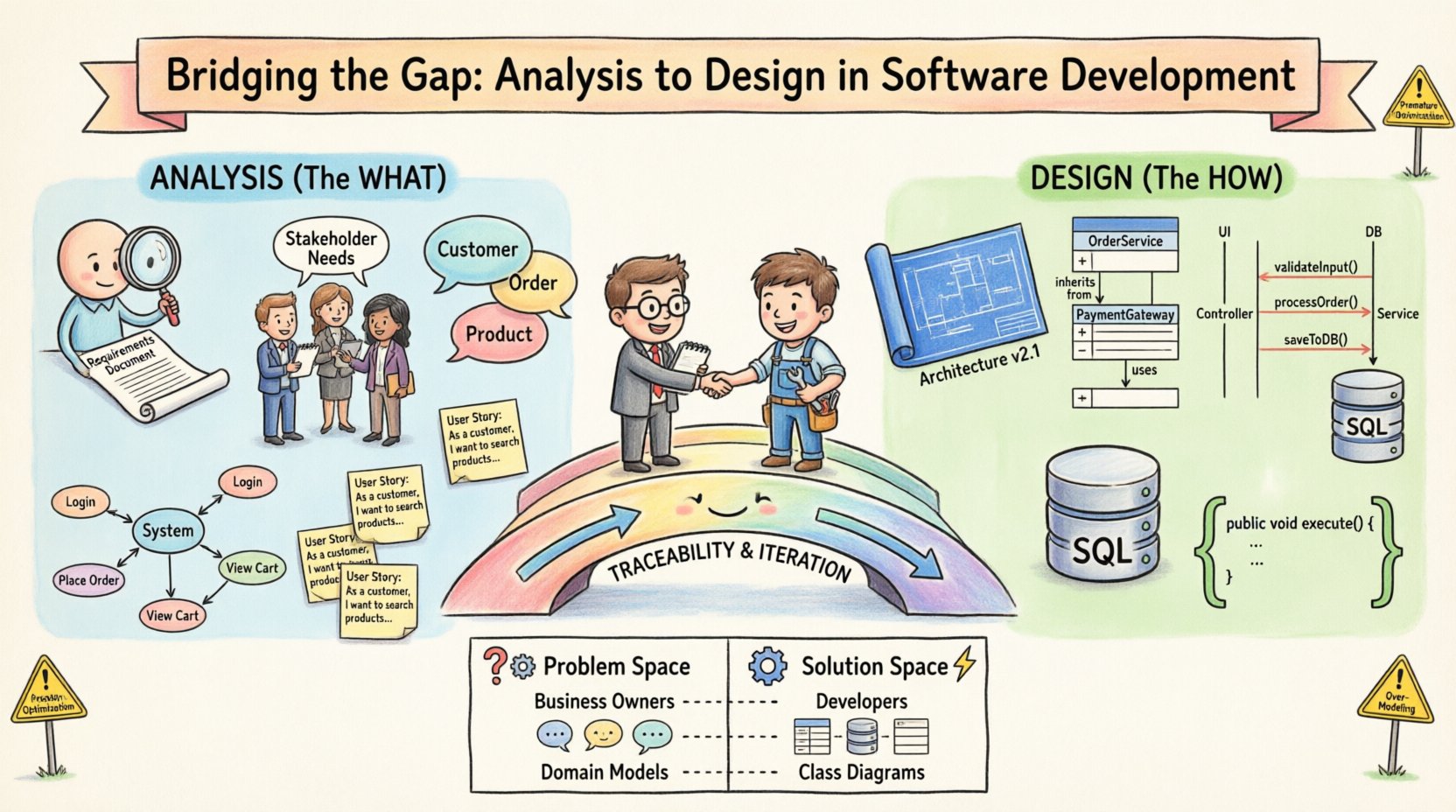
In the landscape of software development, few challenges prove as persistent as the disconnect between what a system must do and how it is built to do it. This divide, often referred to as the chasm between analysis and design, can lead to scope creep, architectural debt, and misaligned stakeholder expectations. Object-Oriented Analysis and Design (OOAD) offers a structured approach to navigating this terrain. By treating these phases not as isolated silos but as a continuous flow of abstraction, teams can ensure that the final implementation faithfully reflects the original intent.
Success in software engineering relies on the seamless integration of requirements gathering with architectural planning. When analysis and design operate in isolation, the resulting product often fails to meet user needs or becomes unmanageable. This article explores the mechanisms for connecting these critical stages, focusing on models, artifacts, and iterative practices that maintain alignment throughout the development lifecycle.
🔍 Understanding the Analysis Phase: The “What”
Analysis is fundamentally concerned with understanding the problem space. It is the stage where requirements are captured, and the boundaries of the system are defined. The goal is to create a clear mental model of the domain without becoming distracted by technical implementation details.
Core Objectives of Analysis
- Requirement Gathering: Identifying functional and non-functional needs from stakeholders.
- Domain Modeling: Creating a vocabulary of concepts relevant to the business context.
- Behavioral Specification: Defining how the system responds to specific events or triggers.
- Constraint Identification: Establishing limits regarding performance, security, and compliance.
During this phase, the focus remains on the business value. Technical decisions such as database choice or programming language are deferred. Instead, the team constructs models that describe the system’s interaction with users and the external environment.
Key Analysis Artifacts
Several artifacts serve as the backbone of the analysis phase. These documents provide the evidence needed to validate that the requirements are complete and accurate.
- Use Case Diagrams: Visualize the actors and their interactions with the system to achieve specific goals.
- Use Case Descriptions: Detailed narratives describing the steps involved in each scenario.
- Domain Models: Representations of key business entities and their relationships (e.g., Customer, Order, Product).
- User Stories: Concise statements describing functionality from the end-user perspective.
These artifacts ensure that everyone involved shares a common understanding of the problem before a single line of code is written. They act as the contract between the business and the technical team.
🛠️ Understanding the Design Phase: The “How”
Once the problem is clearly defined, the design phase begins. This is where the abstract concepts from analysis are translated into a concrete solution. Design focuses on the structure of the software, the behavior of its components, and how they interact.
Core Objectives of Design
- System Architecture: Defining the high-level structure and decomposition of the system.
- Interface Definition: Specifying how components communicate with each other and external systems.
- Data Modeling: Mapping domain concepts to storage mechanisms and data structures.
- Pattern Application: Utilizing proven solutions to solve recurring design problems.
Design decisions directly impact maintainability, scalability, and performance. A well-structured design anticipates change, allowing the system to evolve without requiring a complete rewrite.
Key Design Artifacts
The design phase produces artifacts that guide the implementation team.
- Class Diagrams: Detail the attributes, methods, and relationships of software classes.
- Sequence Diagrams: Illustrate the flow of messages between objects over time.
- State Machine Diagrams: Define the lifecycle of an object through various states.
- Component Diagrams: Show the physical organization of software modules and libraries.
These diagrams serve as blueprints for developers. They reduce ambiguity and provide a reference point for code reviews and testing.
🌉 The Bridge: Connecting Analysis to Design
The gap between analysis and design often widens when teams treat them as sequential, independent tasks. To bridge this gap, the transition must be viewed as an iterative refinement process. The output of analysis becomes the input for design, but the relationship is bidirectional. Design insights often reveal ambiguities in the analysis, prompting a return to clarify requirements.
Traceability
Traceability ensures that every design element can be linked back to a specific requirement or use case. Without this link, it is difficult to justify why a specific component exists or to verify that all requirements have been met.
Maintaining traceability involves:
- Mapping Use Cases to Classes or Services.
- Linking Domain Entities to Database Tables or Data Models.
- Connecting Behavioral Scenarios to Sequence Diagrams.
Abstraction Levels
Moving from analysis to design requires shifting the level of abstraction. Analysis focuses on business abstractions (e.g., “Order”), while design focuses on software abstractions (e.g., “OrderService”, “OrderRepository”). The bridge is built by understanding that the business concept maps to one or more software classes.
This mapping is not always one-to-one. A single business entity might be represented by multiple classes to handle persistence, validation, and business logic separately. Recognizing this complexity early prevents the “anemic domain model” anti-pattern, where the domain logic is stripped away.
📊 Comparison of Analysis and Design Artifacts
Understanding the specific differences between analysis and design artifacts helps teams maintain focus. The table below outlines the distinctions.
| Feature | Analysis Phase | Design Phase |
|---|---|---|
| Focus | Problem Space (Business) | Solution Space (Technical) |
| Stakeholders | Business Owners, Users | Developers, Architects |
| Key Questions | What does the system do? | How does the system do it? |
| Models | Domain Models, Use Cases | Class Diagrams, Sequence Diagrams |
| Flexibility | High (Concepts can change) | Medium (Structure is more rigid) |
| Implementation Dependency | None | High (Language, Framework specific) |
🚧 Common Pitfalls in the Transition
Even with a clear framework, teams frequently encounter obstacles when moving from analysis to design. Identifying these pitfalls allows for proactive mitigation.
- Premature Optimization: Designing for performance constraints before understanding the core business logic. This often leads to unnecessary complexity.
- Leaky Abstractions: Allowing technical details to bleed into the domain model. For example, naming a class “OrderDatabase” instead of “Order”.
- Static Analysis: Treating requirements as fixed documents. In reality, requirements evolve as the design reveals new possibilities.
- Lack of Feedback: Failing to involve developers during analysis. They often spot feasibility issues that business stakeholders miss.
- Over-Modeling: Creating excessive diagrams that slow down development rather than guiding it. Focus on models that add value.
🛡️ Strategies for Seamless Integration
To successfully bridge the gap, teams should adopt specific practices that encourage collaboration and continuous refinement.
1. Iterative Refinement
Adopt an iterative approach where analysis and design occur in small cycles. Instead of a massive analysis phase followed by a massive design phase, work in increments. Define a subset of requirements, design the solution for that subset, and review the results before moving to the next subset.
2. Ubiquitous Language
Establish a shared vocabulary that is used by both business stakeholders and technical teams. When the domain model uses the same terms as the business, the risk of misinterpretation decreases. This language should be consistent across diagrams, documentation, and code.
3. Continuous Collaboration
Encourage pair programming or joint modeling sessions. When analysts and designers work together, the transition of concepts becomes smoother. Architects should participate in requirement gathering to understand the “why” behind the features.
4. Prototype Critical Flows
Before finalizing the design, build lightweight prototypes for complex interactions. This helps validate the design choices against the analysis requirements. If a sequence of events proves difficult to implement, revisit the use case description.
5. Refactoring as a Bridge
Accept that the initial design will not be perfect. Use refactoring to evolve the design as more requirements become clear. This reduces the pressure to get the design “right” on the first attempt and keeps the focus on solving the problem.
🧩 The Role of Models in Bridging the Gap
Models are the primary tool for bridging analysis and design. They provide a visual and structural representation that is accessible to all stakeholders. However, not all models serve the same purpose.
- Conceptual Models: Used in analysis to discuss business rules without technical constraints.
- Logical Models: Used to define relationships and cardinalities without specifying technology.
- Physical Models: Used in design to define specific data types and storage mechanisms.
Moving from conceptual to physical requires careful translation. For instance, a “one-to-many” relationship in a conceptual model might require a join table in a physical database model. Understanding this translation is crucial for maintaining data integrity.
🔄 Maintaining Alignment During Development
The bridge between analysis and design does not end at the start of coding. As development progresses, the gap can reappear if the code diverges from the design. To prevent this:
- Design Reviews: Conduct regular reviews to ensure code matches the architectural plans.
- Documentation Updates: Keep diagrams and specifications current as changes are made.
- Test-Driven Development: Use tests to verify that the design meets the requirements. Tests act as executable specifications.
- Refactoring Discipline: Refactor code to match the design intent, even if the design was initially imperfect.
By maintaining this alignment, the system remains coherent. Technical debt is managed, and the original vision is preserved.
📝 Summary of Best Practices
Effective bridging requires discipline and communication. The following summary highlights the essential actions for success.
- Define clear boundaries: Know when to stop analyzing and start designing.
- Verify traceability: Ensure every design decision supports a requirement.
- Use visual models: Diagrams help clarify complex relationships.
- Encourage iteration: Be willing to go back to analysis if design reveals gaps.
- Focus on value: Prioritize features that deliver business value over technical perfection.
- Communicate constantly: Keep all stakeholders informed of changes and decisions.
The journey from analysis to design is not a straight line. It is a spiral of refinement where understanding deepens and solutions emerge. By respecting the integrity of the analysis while embracing the realities of design, teams can build software that is both robust and relevant.
Ultimately, the goal is not just to build a system that works, but to build a system that is understandable and adaptable. The gap between analysis and design is where the true value of engineering lies. It is where requirements are tested against reality, and where abstract ideas become tangible solutions.