
Enterprise architecture demands clarity. It requires a structured approach to communicate complex systems across diverse teams. At the heart of this structure lies the ArchiMate notation. However, a model without context is merely a diagram. To truly communicate value, architects must utilize ArchiMate Viewpoints. These are the lenses through which stakeholders perceive the architecture. This guide walks you through the creation, application, and maintenance of these viewpoints.
Understanding how to define and deploy these viewpoints is essential for bridging the gap between technical details and business strategy. We will explore the theoretical underpinnings, the practical steps for construction, and the common pitfalls to avoid. By the end of this journey, you will possess a robust framework for designing architecture representations that resonate.
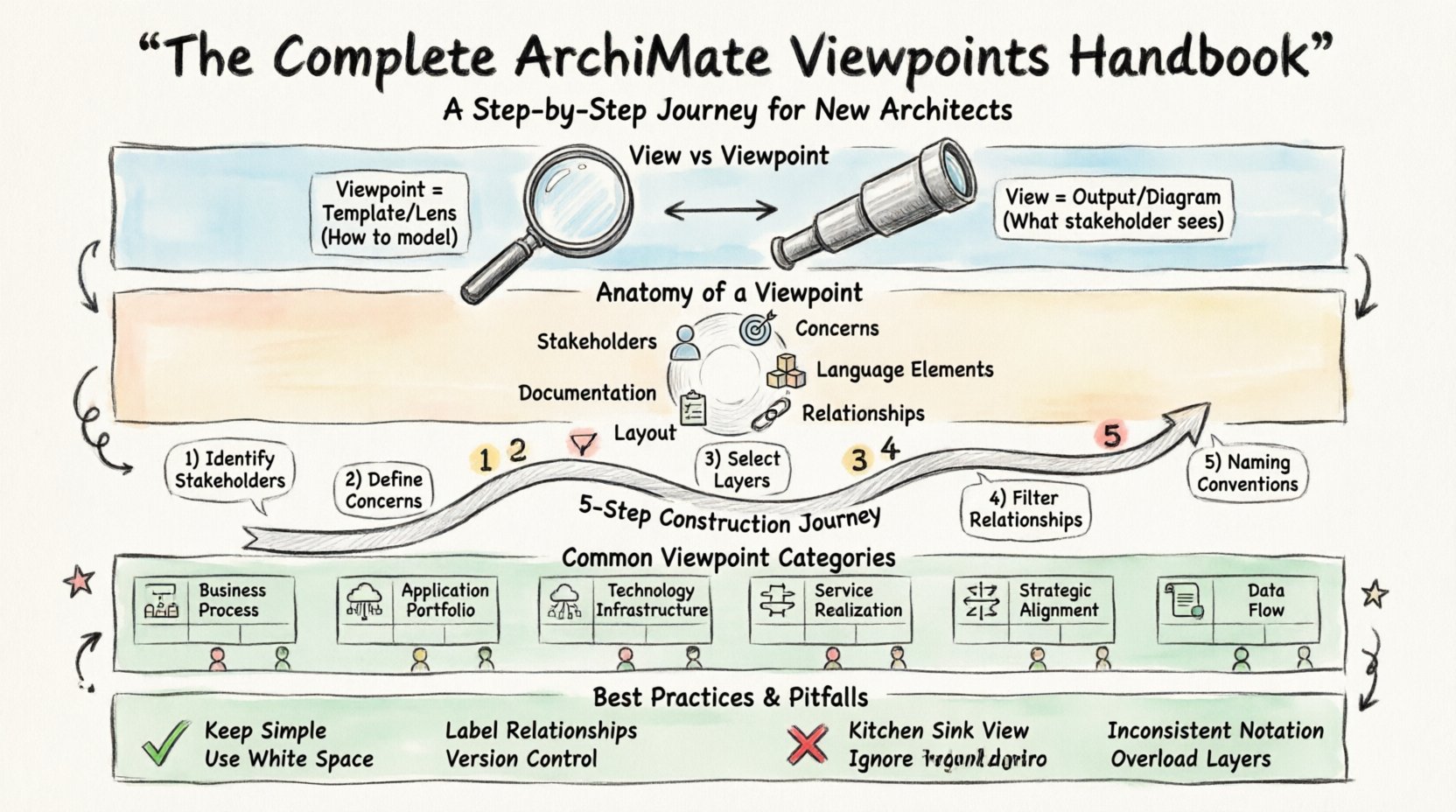
1. Understanding the Core Concepts: Views vs. Viewpoints 👁️
Before constructing any model, it is vital to distinguish between two often confused terms: View and Viewpoint. While related, they serve different functions within the ArchiMate framework.
Viewpoint: A specification for a view. It defines the rules, conventions, and modeling language elements to be used. Think of it as the template or the lens. It answers the question: “How should we model this?”
View: The actual representation of the architecture for a specific stakeholder concern. It is the output generated by applying the viewpoint. It answers the question: “What does this stakeholder see?”
For example, a Viewpoint might define that only Business Objects and Business Processes are visible, connected by flow relationships. The resulting View would be the specific diagram showing the supply chain processes of a retail company, filtered through that specific lens.
2. The Anatomy of an ArchiMate Viewpoint 🧩
An ArchiMate Viewpoint is not just a visual filter. It is a formal definition that ensures consistency. When building a viewpoint, you are defining the following elements:
Stakeholders: Who is this view intended for? (e.g., CTO, Business Analyst, Developer).
Concerns: What questions is the stakeholder trying to answer? (e.g., “Is this cost-effective?”, “How does this integrate?”).
Language Elements: Which specific ArchiMate concepts are allowed? (e.g., Actors, Applications, Devices).
Relationships: Which connections between elements are permitted? (e.g., Uses, Realizes, Serves).
Layout: Are there spatial rules? (e.g., Business layer on top, Technology layer on bottom).
Documentation: What text or metadata accompanies the diagram? (e.g., version, date, owner).
Defining these components upfront prevents scope creep and ensures that every diagram produced serves a specific purpose.
3. The Step-by-Step Journey to Construction 🛠️
Creating a viewpoint is a systematic process. It requires analysis before modeling. Follow this sequence to ensure your viewpoints are effective.
Step 1: Identify the Stakeholders 🙋
Start by listing the individuals or groups who will consume the architecture information. Do not assume everyone reads the same way. A developer needs technical depth, while a board member needs strategic alignment.
Executives: Focus on Strategy, Goals, and Business Services.
Managers: Focus on Business Processes, Roles, and Organization.
Developers: Focus on Applications, Components, and Interfaces.
Operations: Focus on Technology, Infrastructure, and Devices.
Step 2: Define the Concerns 🎯
Once stakeholders are identified, determine what they need to know. This is often the most critical step. If you cannot articulate the concern, you cannot design the view.
Cost: What are the investment requirements?
Integration: How do systems exchange data?
Compliance: Does the architecture meet regulatory standards?
Performance: Can the system handle the load?
Step 3: Select the Architecture Layers 📚
ArchiMate is layered. Not every viewpoint needs every layer. Select the layers relevant to the concern.
Strategy Layer: Principles, Goals, Objectives.
Business Layer: Actors, Roles, Processes, Services.
Application Layer: Applications, Components, Interfaces.
Technology Layer: Nodes, Devices, Networks.
Data Layer: Data Objects, Database.
Step 4: Filter Relationships 🔗
Not all relationships are useful in every view. Too many lines create noise. Choose the relationships that support the stakeholder’s concern.
Association: Generic connection.
Flow: Information or material flow (Business).
Access: Accessing data or information.
Serves: Providing functionality.
Realizes: Implementing a goal or process.
Step 5: Define Naming Conventions 🏷️
Consistency is key for readability. Establish a naming convention for elements within the viewpoint. For instance, should applications be named by function or by system ID? Should business roles include the department name? Document these rules within the viewpoint definition.
4. Common Viewpoint Categories 📋
While every organization has unique needs, several standard viewpoints have emerged as best practices. The following table outlines common categories and their typical scope.
Viewpoint Name | Target Audience | Primary Layers | Key Relationships |
|---|---|---|---|
Business Process View | Process Owners, Managers | Business | Flow, Association |
Application Portfolio | IT Managers, Architects | Application | Association, Usage |
Technology Infrastructure | Infrastructure Teams | Technology, Data | Communication, Access |
Service Realization | Business & IT | Business, Application, Technology | Realizes, Serves |
Strategic Alignment | Executive Board | Strategy, Business | Realizes, Achieves |
Data Flow | Analysts, Developers | Business, Data, Application | Access, Flow |
5. Deep Dive: The Business Process Viewpoint 🔄
The Business Process Viewpoint is perhaps the most common entry point for new architects. It focuses on how the organization operates. When designing this, keep the following in mind.
Focus on Value: Ensure processes link to business services or outcomes.
Actor Definition: Clearly distinguish between internal roles and external actors.
Sequence: Use flow relationships to show order, not just connection.
Granularity: Avoid mixing high-level value chains with detailed transaction steps. Keep the view at a level appropriate for the audience.
A well-designed process view allows a stakeholder to trace a service request from initiation to fulfillment without getting lost in technical implementation details.
6. Deep Dive: The Application & Technology Viewpoint 💻
This viewpoint bridges the gap between what the business needs and the technical systems that deliver it. It is crucial for integration planning and migration.
Interfaces: Highlight the interfaces between applications. This is where integration issues often arise.
Deployment: Show how software components map to hardware nodes.
Dependencies: Identify critical dependencies. If Application A relies on Database B, this must be clear.
Layers: Use the Application layer for functionality and the Technology layer for infrastructure. Do not mix them unless showing deployment.
When presenting this to non-technical stakeholders, simplify the technology layer. Focus on the services provided by the applications rather than the server configurations.
7. Best Practices for Clarity and Usability 📝
A viewpoint is only as good as its readability. Apply these principles to ensure your architecture is understood.
Keep It Simple
Complexity is the enemy of understanding. If a diagram has more than 50 elements, it is likely too dense. Split it into smaller, focused views.
Use White Space
Layout matters. Allow breathing room between elements. Group related items together spatially. Avoid crossing lines where possible to reduce visual clutter.
Label Relationships
Not all lines are equal. Label relationships where the direction or type of connection is not immediately obvious. For example, distinguish between “Uses” and “Accesses”.
Version Control
Architecture changes. Ensure every view has a version number and a date. This helps stakeholders track evolution over time.
Contextual Notes
Use text boxes to explain complex decisions or assumptions. A diagram cannot tell the whole story. Supplement visuals with context.
8. Common Pitfalls to Avoid 🚫
Even experienced architects stumble when defining viewpoints. Be aware of these common errors.
The “Kitchen Sink” Viewpoint: Trying to include every possible ArchiMate element in a single view. This results in a confusing mess. Stick to the defined scope.
Ignoring Stakeholder Feedback: Building views in isolation without asking the audience if they understand them. Validation is key.
Inconsistent Notation: Using different symbols for the same concept in different diagrams. Standardization builds trust.
Overloading Layers: Placing technology details into a business strategy view. Keep the layers distinct unless showing realization.
Lack of Traceability: Failing to link the view back to the underlying model elements. If the model changes, the view must update automatically.
9. Integrating Viewpoints into the Workflow 🔄
Viewpoints are not static documents. They are part of an active workflow. Integrate them into your project lifecycle.
Design Phase
Define the viewpoints early. When starting a new project, decide which views are needed for the requirements gathering phase. This guides the initial data collection.
Review Phase
Use specific viewpoints for design reviews. A technical review might use the Technology Viewpoint, while a business review uses the Process Viewpoint. This ensures the right people see the right information.
Change Management
When a change occurs, identify which viewpoints are impacted. If a business process changes, the Process Viewpoint updates, which may cascade to the Service Realization Viewpoint. Manage these dependencies carefully.
10. Measuring the Success of Your Viewpoints 📊
How do you know if your viewpoint definition is working? Look for these indicators.
Reduced Meeting Time: If stakeholders understand the diagram immediately, discussion time decreases.
Fewer Misunderstandings: A clear viewpoint reduces the need for clarification questions.
Consistent Updates: Stakeholders can contribute to the model without breaking the structure.
Decision Support: The views actively help in making architectural decisions rather than just documenting them.
11. Handling Complexity in Large Enterprises 🏢
In large organizations, a single viewpoint may not suffice. You may need a hierarchy of views.
Top Level: High-level strategic alignment for the board.
Mid Level: Domain-specific views for department heads.
Bottom Level: Detailed technical views for engineering teams.
Ensure there is a clear mapping between these levels. A detail view should roll up to a summary view. This creates a cohesive architecture narrative that scales with the organization’s size.
12. Documentation and Maintenance 📂
A viewpoint is useless if it cannot be maintained. Create a repository for all viewpoint definitions.
Registry: Maintain a list of all active viewpoints.
Ownership: Assign an owner to each viewpoint type. Someone must be responsible for updating the rules.
Training: Ensure new architects know how to use the viewpoints. Share the definitions and examples.
Review Cycle: Schedule periodic reviews of the viewpoint definitions themselves. Do they still meet the needs of the stakeholders?
13. The Role of Standards and Governance 🛡️
Adhering to the ArchiMate standard is crucial. While flexibility is good, deviation from the standard notation can confuse users familiar with the framework.
Standard Symbols: Use the official shapes for Business Objects, Applications, and Technology Nodes.
Standard Colors: Adopt a color palette that aligns with the layers (e.g., Blue for Business, Green for Technology).
Compliance Checks: Regularly audit diagrams to ensure they comply with the defined viewpoints.
Governance ensures that the architecture remains a reliable asset. It prevents the drift toward idiosyncratic modeling styles that only the original creator understands.
14. Adapting Viewpoints for Specific Industries 🏭
Different industries have unique concerns. A financial institution might prioritize compliance views, while a manufacturing company might prioritize supply chain views.
Finance: Add regulatory compliance elements to the Business Viewpoint.
Healthcare: Emphasize patient data flow and privacy in the Data Viewpoint.
Retail: Focus on customer journey and inventory management in the Process Viewpoint.
Customize the standard viewpoints to reflect these domain-specific needs. The core structure remains ArchiMate, but the focus shifts.
15. Final Thoughts on Architectural Communication 🗣️
The journey of defining ArchiMate Viewpoints is continuous. It requires a balance between standardization and flexibility. Your goal is not to create a perfect model, but a useful communication tool.
By focusing on stakeholder concerns, maintaining strict definitions, and iterating based on feedback, you build an architecture capability that delivers real value. Remember, the best architecture is the one that is understood. Use these viewpoints to bridge the gap between ideas and execution.
Start small. Define one viewpoint for one stakeholder group. Refine it. Expand it. Over time, you will have a comprehensive library of views that supports your entire enterprise.