
Introduction
Visual Paradigm offers extensive AI support for UML and Agile development through its integrated AI-powered ecosystem, designed to automate manual modeling and streamline project planning. This comprehensive guide explores how Visual Paradigm leverages artificial intelligence to transform software development workflows, from initial requirements gathering to final documentation.
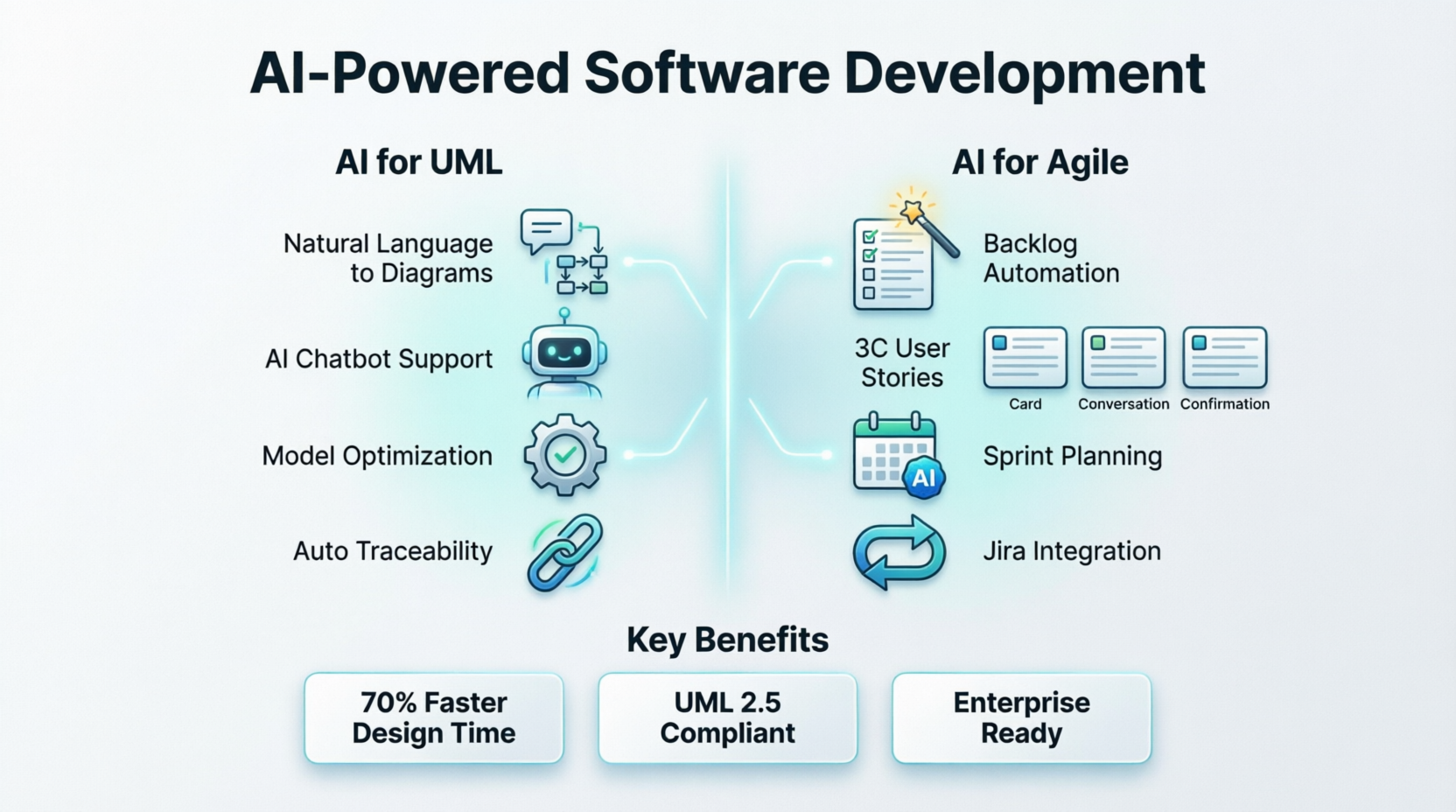
AI Support for UML
Visual Paradigm utilizes fine-tuned language models specifically trained on UML constructs to transform natural language into structured, compliant diagrams.
Natural Language Generation
You can describe system behaviors (e.g., “a user books a ride”) and the AI will generate UML Use Case Diagrams, Sequence Diagrams, or Activity Diagrams automatically. This capability reduces time-to-design by up to 70% while maintaining full compliance with UML 2.5 standards.
AI Chatbot Support
A conversational interface allows you to create and refine artifacts like Component or Package diagrams through direct commands. The AI chatbot provides:
-
Instant help creating UML artifacts via natural language commands
-
Interactive UML learning with real-time feedback
-
Contextual explanations and examples
-
Guided modeling assistance for new team members
Model Optimization
AI analyzes existing diagram structures to:
-
Detect inconsistencies
-
Suggest layout improvements
-
Identify missing relationships based on contextual patterns
-
Recommend modeling best practices
-
Enhance model quality and maintainability without manual review overhead
Traceability
AI can automatically generate sequence or activity diagrams from detailed use case scenarios, maintaining a clear link between requirements and design. This includes:
-
Automatic generation of actions, decisions, forks, joins, and flows
-
Intelligent layout for readable, presentation-ready diagrams
-
Support for complex workflows including parallel processing and exceptions
-
Seamless integration within existing Visual Paradigm projects
AI Support for Agile Development
The platform integrates AI deeply into the Agile workflow, primarily through tools like Agilien.
Backlog Automation
Agilien translates broad project goals or ideas into a structured product backlog—including epics, user stories, and sub-tasks—in seconds. Key features include:
-
AI-Powered Generation: Automatically generate comprehensive user stories with acceptance criteria
-
Hierarchical Structure: Create organized epics, user stories, and sub-tasks from simple descriptions
-
Consistency: Enforce consistent terminology and format across all documentation
-
3C-Compliant Stories: AI assistants help craft “Card, Conversation, Confirmation” (3C) compliant user stories directly from requirements
Sprint Planning & Retrospectives
AI-powered planners can instantly generate 4-step retrospective plans and highlight team performance metrics, reducing manual preparation. The system provides:
-
Instant generation of full retrospective plans from high-level goals
-
Context-aware activities tailored to specific objectives
-
Actionable insights with step summaries
-
Professional reports in Markdown format
-
Team performance metrics and improvement areas
Jira Integration
The AI tools feature bi-directional synchronization with Jira, allowing teams to sync their AI-generated backlogs directly to their existing task management platform. This ensures:
-
Automatic updates and synchronization across workflows
-
Seamless transition from planning to execution
-
Real-time collaboration between planning and development teams
-
Version-controlled backlog management
Key AI-Powered Features
1. AI Textual Analysis
Automatically extract system entities, relationships, and behaviors from natural language requirements. Generate initial class diagrams, use case models, or activity diagrams directly from user stories or specification documents, reducing ambiguity and accelerating the transition from idea to structured model.
2. AI-Assisted Diagram Generation
UML Class Diagram Generator: Describe your domain in plain English, and AI suggests classes, attributes, operations, and relationships through a guided 10-step wizard.
Sequence Diagram Creator: Input a scenario description, and AI drafts a professional sequence diagram with lifelines, messages, and fragments.
Use Case to Activity Diagram Converter: Transform high-level use cases into detailed workflow diagrams with AI-guided step decomposition.
Communication Diagrams: Generate UML Communication Diagrams from natural language descriptions, automatically identifying objects, links, and message sequences.
3. AI-Powered Use Case Modeling Studio
This revolutionary studio transforms requirements into complete software design documents:
-
AI-Powered Generation: Automatically generate comprehensive use case descriptions with preconditions, postconditions, and complex flows
-
From Text to Diagrams: Generate Use Case Diagrams, Activity Diagrams, Sequence Diagrams, Class Diagrams, and ERDs from descriptions
-
AI-Driven Test Case Creation: Generate detailed test cases with scenarios, steps, and expected results
-
Interactive Project Dashboard: Track completeness of descriptions, diagram generation, and test case coverage
-
Comprehensive Report Generation: Produce professional Software Design Documents (SDDs) in Markdown or PDF format
4. Intelligent Model Optimization
AI analyzes diagram structure to suggest layout improvements, detect inconsistencies, or recommend modeling best practices. The system automatically identifies missing elements or relationships based on contextual patterns, enhancing model quality without manual review overhead.
Suitability for Professional Use
Visual Paradigm is highly suitable for both educational and enterprise environments.
Strengths
-
Market Leader: Widely regarded as a market leader for strict adherence to UML 2.x standards
-
Time Efficiency: Reduces “time-to-design” by up to 70%, ideal for rapid prototyping in Agile teams
-
Comprehensive Support: Full support for all 14 UML 2.x diagram types plus BPMN, SysML, C4, and enterprise architecture frameworks
-
Code Engineering: Generate production-ready code from diagrams for Java, C#, Python, and other languages
-
Team Collaboration: Real-time concurrent editing with version control and cloud integration
-
Educational Value: Integrated learning tips and AI insights help users understand UML principles deeply
Considerations
-
Learning Curve: Some users find the interface complex for beginners or slightly dated in appearance
-
Pricing: Premium AI features typically require a paid subscription, though a free tier for basic modeling exists
-
System Requirements: Desktop version requires installation; online version needs internet connectivity
Use Cases
-
Students & Educators: Learn and teach UML diagramming with expert AI assistance
-
Developers & Architects: Rapidly design, review, and communicate software architecture
-
Business Analysts: Visualize system requirements and validate designs
-
Technical Writers: Generate accurate diagrams for documentation
-
Agile Teams: Accelerate sprint planning and backlog management
Getting Started with Visual Paradigm AI
For UML Diagramming
-
Define the system context in natural language
-
Access AI tools through Visual Paradigm Desktop (Tools > AI Diagram Generation) or Visual Paradigm Online
-
Enter your description and select the diagram type
-
Review and refine the AI-generated output
-
Export or integrate into your project workflow
For Agile Development
-
Access Agilien through the Visual Paradigm AI Toolbox
-
Input project goals or feature ideas
-
Generate backlog with AI-created epics, user stories, and tasks
-
Sync with Jira for development team integration
-
Use retrospective planner for continuous improvement
For Use Case Modeling
-
Launch the Use Case Modeling Studio
-
Define system scope and actors
-
Describe use cases in natural language
-
Generate diagrams and documentation automatically
-
Review AI-generated test cases and refine as needed
Technical Capabilities
Supported Diagram Types (40+)
-
UML Diagrams: Class, Sequence, Activity, Use Case, Component, Package, Deployment, Communication, State Machine, Object, Composite Structure, Interaction Overview, Timing, Profile
-
Agile Artifacts: User Story Maps, Backlogs, Sprint Plans
-
Business Models: BPMN, ArchiMate, C4 Model, SWOT, PESTLE
-
System Architecture: SysML, ERD, DFD
-
Project Management: Gantt Charts, PERT, WBS
Integration Capabilities
-
IDE Integration: Visual Studio, IntelliJ, NetBeans, Eclipse, Android Studio
-
Project Management: Jira (bi-directional sync)
-
Version Control: Git integration for diagram-as-code
-
Cloud Collaboration: PostMania for real-time team collaboration
-
Export Formats: PNG, JPEG, PDF, SVG, JSON, PlantUML, Markdown, Word, HTML
Conclusion
Visual Paradigm’s AI-powered ecosystem represents a significant advancement in software modeling and Agile development. By combining rigorous UML compliance with intelligent automation, the platform enables teams to:
-
Accelerate Development: Reduce manual modeling time by up to 70%
-
Improve Quality: Ensure standards compliance and consistency across all artifacts
-
Enhance Collaboration: Bridge the gap between technical and non-technical stakeholders
-
Maintain Traceability: Link requirements to design to implementation seamlessly
-
Scale Effectively: Support projects from individual developers to enterprise teams
Whether you’re architecting enterprise systems, iterating on a startup MVP, or modernizing legacy applications, Visual Paradigm’s AI-enhanced platform empowers you to model with confidence, trace requirements end-to-end, and leverage artificial intelligence to accelerate every phase of development.
- Reference List
- How Visual Paradigm’s AI-Powered Ecosystem Transforms UML Development: Comprehensive overview of Visual Paradigm’s AI-driven approach to visual modeling, covering AI textual analysis, diagram generation, chatbot support, and model optimization capabilities.
- AI-Powered UML Diagramming with Visual Paradigm: Detailed exploration of AI-powered UML diagramming accuracy, standards compliance, and speed, including comparisons with competing tools and real-world application examples.
- Visual Paradigm Desktop AI Activity Diagram Generation: Announcement of AI-powered activity diagram generation feature that creates professional UML activity diagrams from text descriptions, use case scenarios, or workflow requirements.
- AI Generates UML Communication Diagrams: Guide to generating UML Communication Diagrams from natural language descriptions, demonstrating how AI transforms text into structured diagrams showing object collaboration.
- AI-Powered Use Case Modeling Studio: Introduction to the revolutionary Use Case Modeling Studio that automatically generates use case descriptions, diagrams, and test cases from simple goal statements.
- Agile Tool Solution: Overview of Visual Paradigm’s Agile workflow integration, including user story mapping, backlog management, and seamless connection between use case modeling and Agile processes.
- How AI is Transforming Technical Documentation and Diagramming: In-depth analysis of AI’s role in automating content generation, enhancing clarity, keeping documentation current, and generating intelligent diagrams from textual descriptions.
- AI Tools for Agile Workflow: Comprehensive catalog of AI-powered Agile workflow tools including sprint automation, backlog planning, Kanban insights, visual diagramming, and retrospective summaries.
- AI Agile Retrospective Planner Tool: Introduction to the AI-powered retrospective planning tool that transforms high-level goals into comprehensive, actionable 4-step plans in minutes.
- AI-Assisted UML Class Diagram Generator: Detailed guide to the AI-powered class diagram generator featuring a 10-step wizard for creating, analyzing, and exporting professional UML class diagrams without syntax expertise.
- Visual Paradigm Reviews – Gartner: Professional reviews and ratings from Gartner users evaluating Visual Paradigm’s enterprise modeling capabilities.
- Top 5 UML Tools: Why Visual Paradigm Stands Out: Comparative analysis of leading UML tools highlighting Visual Paradigm’s unique strengths in AI integration, standards compliance, and comprehensive feature set.
- Visual Paradigm Reviews – Capterra: User reviews and ratings from Capterra covering ease of use, features, customer support, and value for money.