
Enterprise architecture often feels like a maze of complex diagrams and abstract concepts. Many practitioners struggle to connect high-level business goals with the technical execution required to achieve them. This disconnect is where ArchiMate Viewpoints become essential. A viewpoint acts as a lens, focusing on specific concerns within the broader enterprise model. By selecting the right viewpoint, you can simplify the complexity and visualize your business strategy clearly.
This guide provides a practical framework for mapping your first business strategy using ArchiMate Viewpoints. The process is designed to be efficient, requiring less than 30 minutes for a solid initial draft. We will move from understanding the core concepts to executing the mapping steps, ensuring you create a valuable artifact without getting lost in unnecessary detail.
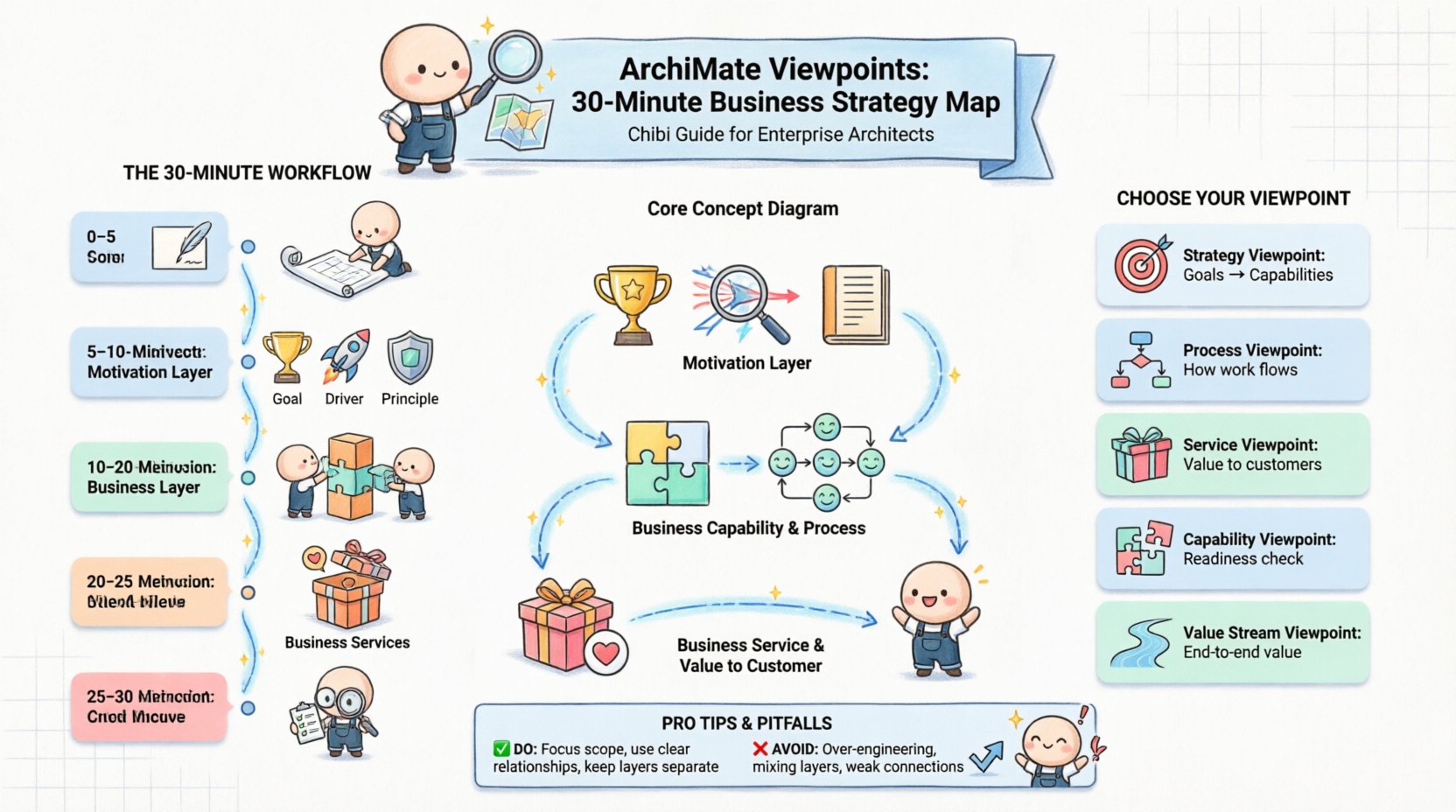
🧐 What Are ArchiMate Viewpoints?
Before diving into the mapping process, it is crucial to understand the foundation. ArchiMate is an open and independent enterprise architecture modeling language. It provides a standard for describing, analyzing, and visualizing the architecture of an enterprise. However, an enterprise model is vast. It contains information about business processes, applications, technology, and strategy.
A viewpoint is a specification of the concerns of a particular set of stakeholders. It defines:
- What elements should be included in the view.
- What relationships between those elements are relevant.
- How the information is presented visually.
Without viewpoints, a model can become a tangled web of every possible relationship. Viewpoints curate this information to answer specific questions. For a business strategist, the concern is usually about capabilities, processes, and goals. For an IT architect, the concern might be about application integration and infrastructure.
📊 Why Viewpoints Matter for Business Strategy
Business strategy is not just a document; it is a set of actions and capabilities required to reach a future state. ArchiMate helps translate these intentions into a structured model. Using viewpoints for business strategy offers several advantages:
- Clarity: Stakeholders see only what matters to them, reducing cognitive load.
- Alignment: It becomes easier to trace how a specific process supports a specific goal.
- Communication: Diagrams become effective communication tools rather than just technical documentation.
- Scalability: You can build a comprehensive model by stitching together multiple viewpoints later.
When you map strategy, you are essentially creating a blueprint for change. The viewpoint ensures that this blueprint is readable by the people who need to approve and fund the change.
📋 Pre-Flight Checklist: Preparation Steps
To complete a strategy map in under 30 minutes, preparation is key. You cannot model effectively without knowing what data you have available. Follow this checklist before opening your modeling environment.
1. Identify Stakeholders
Who needs to see this diagram? Is it the C-suite, department heads, or project managers? The answer determines the level of detail. For a 30-minute exercise, assume the audience is senior leadership interested in the what and why, not the how.
2. Gather Strategy Documents
Collect existing strategic plans, mission statements, or high-level goal documents. You need the source of truth for your Motivation Layer elements (Goals, Drivers, Requirements).
3. Define the Scope
Do not attempt to model the entire enterprise in 30 minutes. Select one specific strategic initiative or one business domain. Focus on a single capability area, such as “Customer Onboarding” or “Supply Chain Optimization”.
4. Select the Viewpoint Pattern
Choose a standard ArchiMate viewpoint pattern. For business strategy, the Business Strategy Viewpoint or Value Stream Viewpoint are typically the most effective starting points.
🕒 The 30-Minute Mapping Process
This section outlines the step-by-step workflow. Each step has a time estimate to help you stay on track. The goal is to produce a coherent diagram that links motivation to business capability.
Minute 0-5: Set Up the Canvas
Create a new diagram. Set the scope to the Business Layer. Do not mix in Application or Technology layers yet. This keeps the focus sharp. Name your diagram clearly, such as “Strategic Initiative X – Business Context”.
Minute 5-10: Define the Motivation Elements
Start at the top of the diagram with the Motivation Extension. This layer provides the context for why the business exists.
- Business Goal: Place the top-level strategic goal here. Example: “Increase Market Share by 10%”.
- Business Driver: Identify the external or internal pressure. Example: “Competitor Launch” or “Regulatory Change”.
- Principle: Note any governing rules. Example: “Customer First”.
Draw a Realization relationship from the Driver to the Goal. This shows that the driver pushes for the goal.
Minute 10-20: Map Business Capabilities and Processes
Now, move to the core Business Layer. This is where the actual work happens.
- Business Capability: Define the ability of the organization to perform an activity. Example: “Customer Management” or “Financial Planning”.
- Business Process: Define the specific sequence of actions. Example: “Process Order” or “Validate Customer”.
Connect the Goal to the Capability using an Assessment or Realization relationship. This indicates that the capability helps achieve the goal.
Next, connect the Capability to the Process. Use a Specialization relationship if the process is a specific version of the capability. Use a Realization relationship if the process enables the capability.
Minute 20-25: Link to Business Services
Business Services represent the value delivered to external stakeholders. This is the interface between the internal strategy and the outside world.
- Business Service: Example: “Account Opening Service”.
Connect the Business Process to the Business Service. Use a Realization relationship. This shows that the internal process creates the external service.
Minute 25-30: Review and Refine
Step back and look at the flow. Does the logic hold? Does the Goal lead to the Service? Ensure all labels are clear. Remove any cluttered lines. If a relationship is not obvious, it may need to be removed to maintain clarity.
🎯 Selecting the Right Viewpoint Pattern
Choosing the correct viewpoint pattern is critical for a successful map. Below is a comparison of common viewpoints suitable for business strategy work.
| Viewpoint Name | Primary Focus | Best Used For |
|---|---|---|
| Business Strategy Viewpoint | Goals, Drivers, Requirements | Linking high-level strategy to capabilities. |
| Business Process Viewpoint | Processes, Interactions | Detailing how work flows across the organization. |
| Business Service Viewpoint | Services, External Value | Showing what the business offers to customers. |
| Business Capability Viewpoint | Capabilities, Organization | Assessing organizational readiness and gaps. |
| Value Stream Viewpoint | Value Creation, Flow | Mapping the end-to-end flow of value to the customer. |
For a 30-minute start, the Business Strategy Viewpoint is the most robust choice. It covers the motivation layer and connects it directly to business capabilities.
⚠️ Common Pitfalls to Avoid
Even with a clear plan, errors can occur. Being aware of common mistakes will save you time during the review phase.
- Over-Engineering: Do not try to include every single business function. Focus on the ones relevant to the specific strategic goal.
- Confusing Layers: Keep the Business Layer separate from the Application Layer. Mixing them creates a complex diagram that confuses business stakeholders.
- Weak Relationships: Do not use generic lines. Use specific relationship types like Realization or Aggregation. This adds semantic meaning to the diagram.
- Lack of Context: Always ensure the Goal is visible. Without a Goal, the Processes look like random activities.
- Ignoring the Motivation Layer: Strategy is driven by Goals and Drivers. If these are missing, the diagram is just a process map, not a strategy map.
🌐 Beyond the First Map: Iteration and Growth
The 30-minute map is a starting point. It provides a baseline for discussion and further analysis. Once the initial view is complete, you can expand the model in several ways.
1. Drill Down into Details
If a specific Process needs more detail, create a sub-diagram. Link the high-level Process to the detailed view. This keeps the main strategy map clean while allowing deep dives later.
2. Integrate Technology
Once the Business Layer is stable, you can add the Application Layer. Show which applications support the Business Services. This begins the traceability path from Strategy to Technology.
3. Add Assessment and Change
Use the Assessment element to mark current states versus target states. This helps visualize the gap analysis required to reach the strategic Goal.
🛠️ Detailed Element Definitions
To ensure accuracy in your mapping, refer to these definitions of key ArchiMate elements. Using the correct terminology ensures your model is understandable to other architects.
Business Layer Elements
- Business Actor: A person or organization that plays a role in business processes. Example: “Customer”.
- Business Role: A specific function performed by an Actor. Example: “Sales Manager”.
- Business Object: A physical or logical object used in a process. Example: “Invoice”.
- Business Process: A structured set of activities designed to produce a specific outcome. Example: “Order Fulfillment”.
- Business Service: A function that provides value to an external stakeholder. Example: “Delivery Service”.
- Business Function:A capability of an organization to perform an activity. Example: “Marketing”.
Motivation Layer Elements
- Goal: An intended outcome for an organization. Example: “Reduce Costs”.
- Driver: An internal or external factor that motivates the organization to act. Example: “New Tax Law”.
- Requirement: A specific condition or capability that must be met. Example: “Compliance with GDPR”.
- Principle: A rule or guideline that guides decision-making. Example: “Use Open Standards”.
- Outcome: The result of an action. Example: “Increased Revenue”.
Relationship Types
- Association: A general relationship between elements.
- Specialization: One element is a specific version of another. Example: “Part-time Role” is a specialization of “Role”.
- Aggregation: One element is part of another. Example: “Order” is part of “Order Processing”.
- Realization: One element implements another. Example: “Process” realizes a “Capability”.
- Access: One element uses another. Example: “Application” accesses a “Database”.
- Flow: Movement of data or information. Example: “Invoice” flows to “Accounting”.
📈 Measuring Success in Your Model
How do you know if your ArchiMate model is successful? It is not just about the number of shapes on the screen. Success is measured by utility and clarity.
- Traceability: Can you trace a Goal back to a specific Process and Service?
- Readability: Can a new stakeholder understand the diagram within 5 minutes?
- Actionability: Does the model suggest clear next steps for improvement?
- Consistency: Are the terminology and relationship types used correctly across the model?
If your model answers the question “Why are we doing this?” and “How does it work?”, it is serving its purpose. If it requires a lecture to explain, it is too complex.
🔄 Maintaining the Viewpoint Over Time
An architecture model is a living document. As the business strategy changes, the model must evolve. Viewpoints help manage this evolution by allowing you to update specific aspects without breaking the entire model.
When a Goal changes, you update the Motivation Layer. When a Process changes, you update the Business Layer. Because the Viewpoint defines the scope, you do not need to redraw the entire diagram. You simply modify the relevant elements within the established structure.
💡 Final Thoughts on Architecture Modeling
Building a strategy map using ArchiMate Viewpoints is a discipline that rewards precision and focus. By limiting the scope to 30 minutes, you force yourself to prioritize the most critical elements. This discipline prevents the common trap of creating overly detailed models that no one reads.
Start small. Focus on the Business Layer. Connect Goals to Capabilities. Ensure the relationships make sense. Once this foundation is solid, you can expand to Application and Technology layers. The Viewpoint remains your guide throughout this expansion, ensuring that every addition serves a specific stakeholder concern.
With practice, this process becomes intuitive. You will find that you can quickly visualize complex organizational structures and identify gaps in your strategy. The key is to treat the model as a communication tool, not just a technical artifact. When the model helps people make better decisions, it has succeeded.
❓ Frequently Asked Questions
Q: Can I use this approach for large enterprises?
A: Yes, but you must apply it iteratively. Start with a single business domain or strategic initiative. Do not attempt to map the entire enterprise in one session.
Q: Do I need to include the Technology Layer?
A: Not for the initial 30-minute strategy map. Focus on the Business and Motivation layers first. Add Technology later when you are mapping the implementation plan.
Q: How do I handle conflicting goals?
A: Use the Principle element to define the rule that resolves the conflict. You can also link Goals to show priority or dependency relationships.
Q: Is ArchiMate the only way to do this?
A: No, but it is a standard. It provides a common language that allows different teams to collaborate effectively on the architecture.
By following this structured approach, you can build a robust, clear, and actionable representation of your business strategy. The Viewpoint is the key to unlocking clarity in a complex world.