


“The best architecture is not the one you draw by hand—it’s the one you generate with intelligence.”
In the ever-evolving world of software engineering, clear communication is as vital as clean code. Software architecture is no longer just about technical decisions—it’s about storytelling: conveying complex systems in ways that resonate with stakeholders, developers, DevOps engineers, and product managers alike.
Enter the C4 Model—a powerful, hierarchical framework for visualizing software architecture at multiple levels of abstraction. Originally developed by Simon Brown, C4 has become the de facto standard for creating understandable, scalable, and maintainable architectural documentation. And now, with the integration of AI-powered generation in tools like Visual Paradigm, the process of building C4 diagrams is undergoing a transformative shift—from laborious manual drawing to intelligent, conversational design.
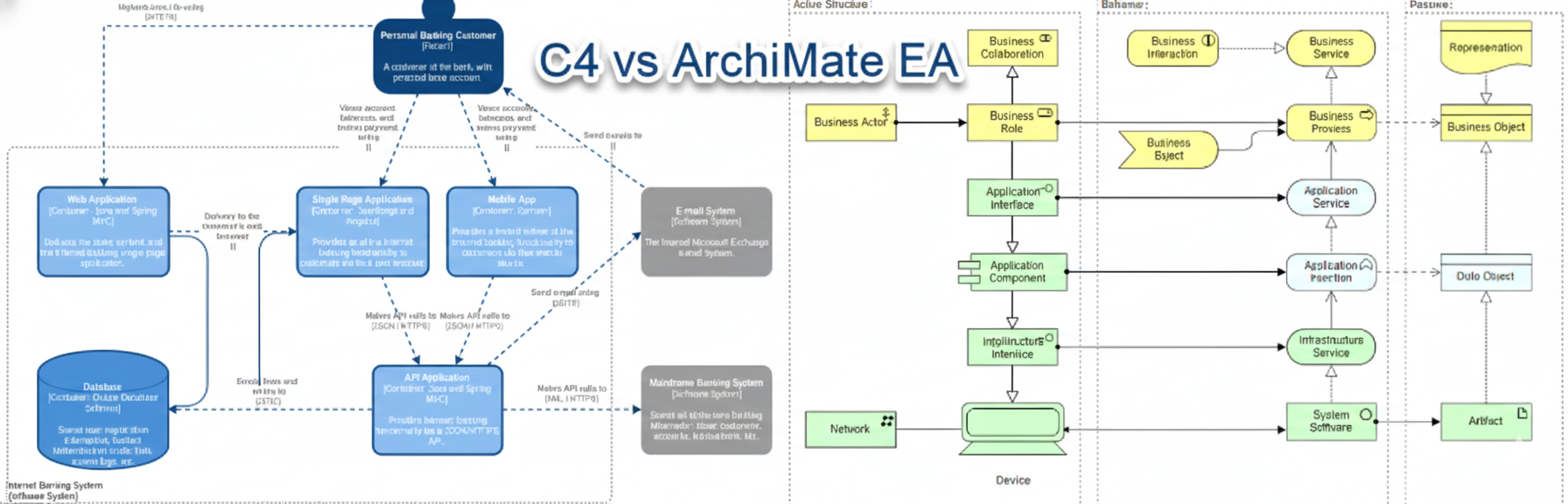
🔷 What Is the C4 Model?
The C4 Model (Context, Containers, Components, Code) is a hierarchical approach to software architecture visualization, designed to help teams communicate complex systems across different audiences.
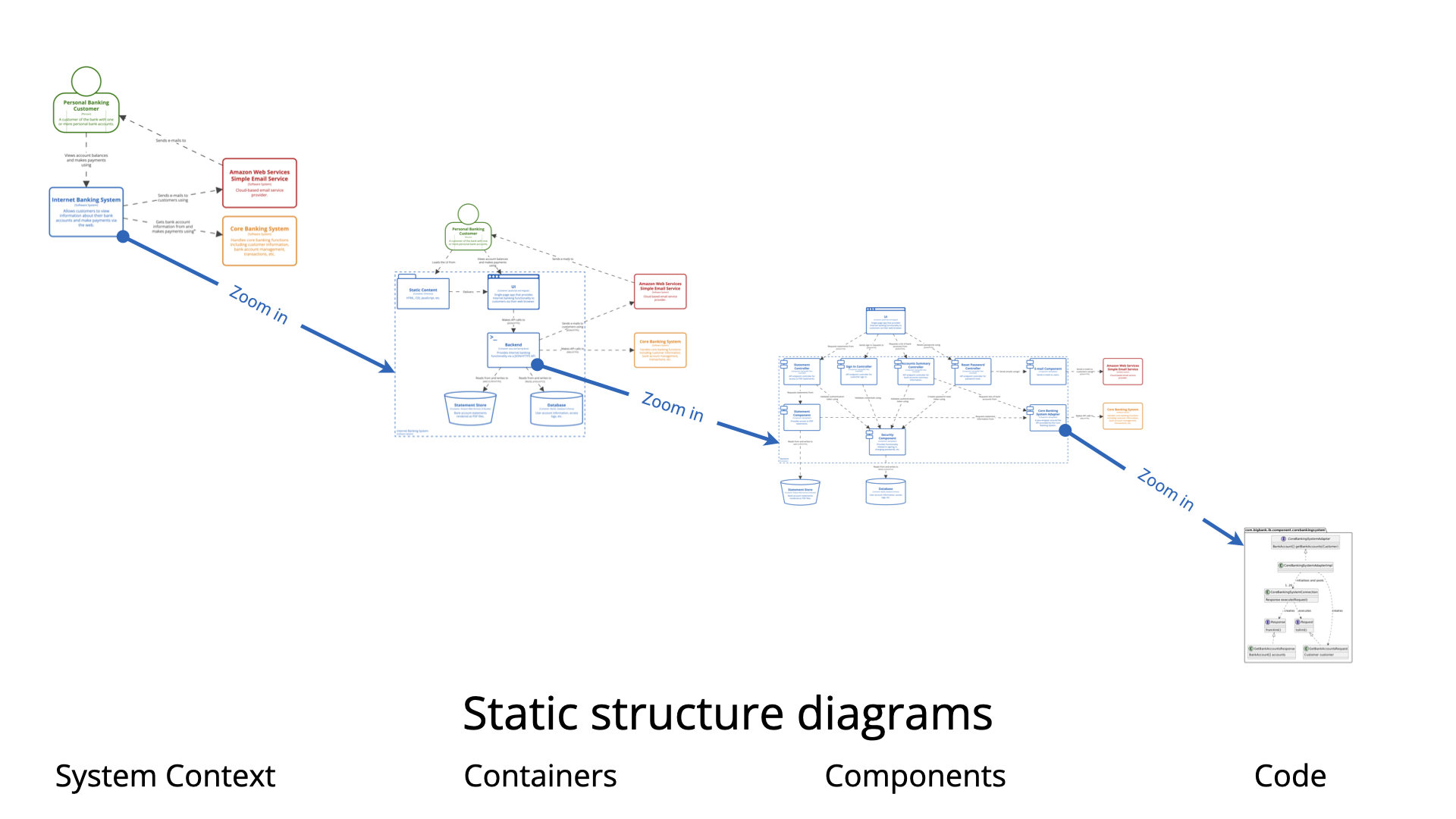
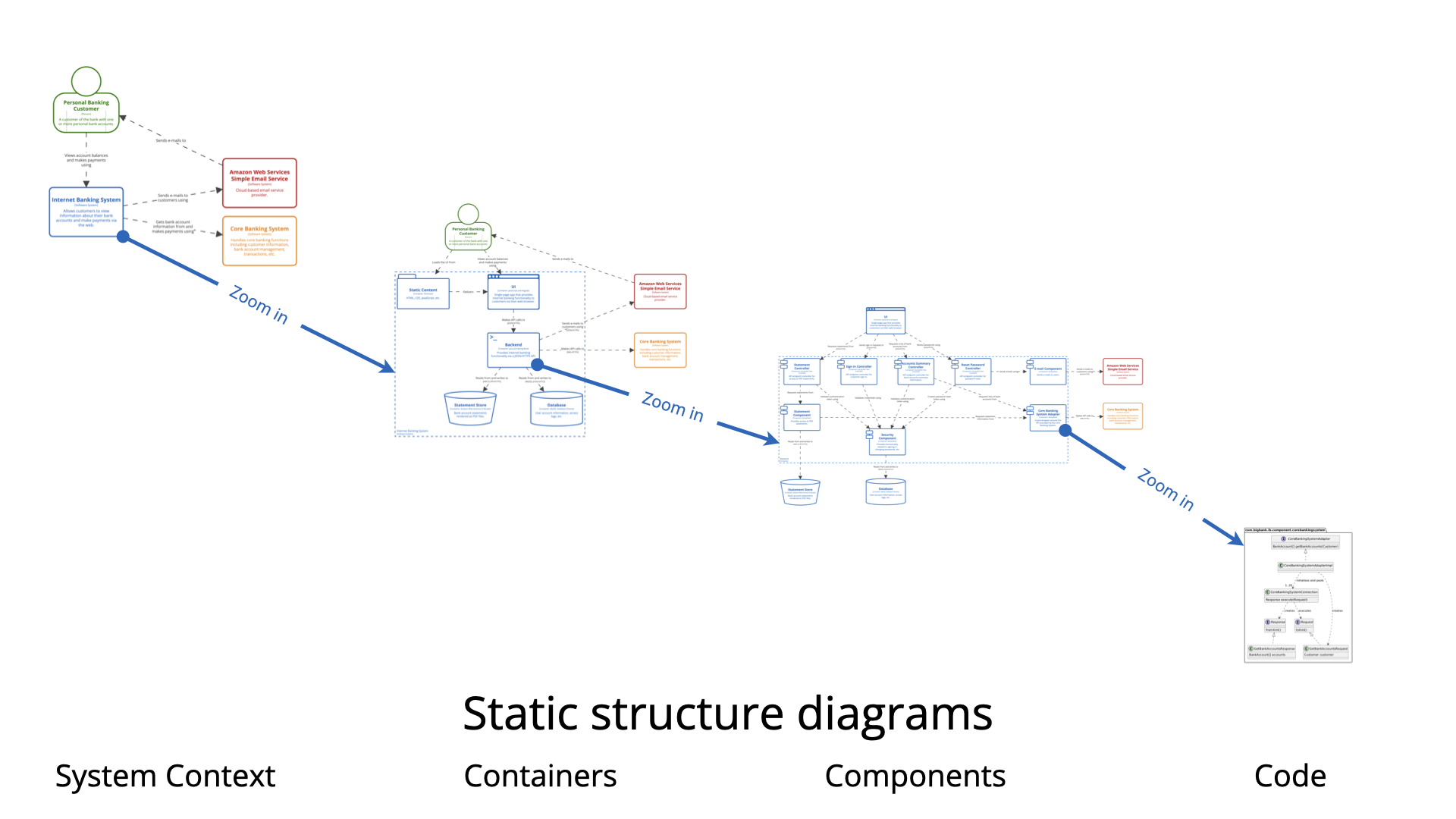
It consists of four core levels, each providing a deeper layer of detail:
| Level | Name | Focus | Audience |
|---|---|---|---|
| Level 1 | System Context | High-level view: how your system interacts with users and external systems | Executives, stakeholders |
| Level 2 | Containers | Breakdown of deployable units: web apps, mobile apps, databases, microservices | Architects, developers |
| Level 3 | Components | Internal structure of containers: modules, services, classes | Developers, tech leads |
| Level 4 | Code (Optional) | Class-level details (e.g., UML class diagrams) | Developers, testers |
Beyond these core levels, C4 also supports supplementary views:
-
System Landscape – Shows multiple systems and their relationships.
-
Dynamic View – Illustrates runtime behavior (e.g., sequence diagrams).
-
Deployment View – Depicts infrastructure deployment (e.g., AWS, Kubernetes).
These views ensure that architecture documentation remains comprehensive, consistent, and standards-compliant—a necessity in agile, distributed, and evolving environments.
🖥️ The Traditional Approach: Manual C4 Diagramming
Before AI, creating a full C4 suite was a time-consuming, manual endeavor—often requiring days or even weeks for complex systems.
Step-by-Step Workflow:
-
Start from a blank canvas – Open a diagramming tool (e.g., draw.io, Microsoft Visio, or older versions of Visual Paradigm).
-
Define scope and audience – Decide whether to begin with System Context or Containers.
-
Drag and drop elements manually – Add Persons, Systems, Containers, Components, then draw relationships with labels like:
-
“Uses”
-
“Reads from via REST API”
-
“Deploys on AWS EC2”
-
-
Layout and readability – Manually align shapes, avoid overlaps, apply color schemes, add legends.
-
Build hierarchy – Create separate diagrams per level and link them (e.g., “Drill down from Container to Component”).
-
Iterate and refine – When requirements change, redraw elements across multiple diagrams.
-
Ensure consistency – Enforce C4 notation rules manually—prone to errors.
✅ Pros:
-
Full control over every design decision.
-
Deep understanding of architecture through hands-on creation.
-
No dependency on AI accuracy or external tools.
❌ Cons:
-
Extremely time-intensive (hours to days per suite).
-
Error-prone – missed relationships, inconsistent labeling, layout chaos.
-
Steep learning curve – mastering C4 notation takes practice.
-
Painful for legacy systems or frequently changing architectures.
💡 The Reality Check: Many architects spend more time drawing diagrams than thinking about architecture.
🤖 The AI-Powered Revolution: Visual Paradigm’s C4 Diagram Tool
Enter Visual Paradigm’s AI-Powered C4 Diagram Generator — a game-changer that redefines how software architecture is documented.
With full support for all six C4 views, including System Landscape, Dynamic, and Deployment, Visual Paradigm now integrates AI-driven generation directly into its diagramming suite.
🚀 How It Works: From Prompt to Professional Diagram in Seconds
-
Describe in natural language
Type a simple prompt:“Generate a full C4 model for an online banking platform with mobile app, web frontend, backend services, PostgreSQL database, and authentication microservice.”
-
AI generates instantly
The AI:-
Identifies Persons (e.g., Customer, Bank Admin)
-
Detects Systems and Containers (e.g., React Web App, Spring Boot API, PostgreSQL)
-
Maps relationships (e.g., “Customer uses Web App via HTTPS”)
-
Infers technologies (e.g., “Uses JWT for authentication”)
-
Auto-generates all six C4 views in one go.
-
-
One-click multi-level suite
No need to start from scratch. A single prompt produces:-
System Context
-
Containers
-
Components
-
Dynamic (e.g., login flow)
-
Deployment (AWS, Docker, Kubernetes)
-
System Landscape
-
-
Refine conversationally
Use the AI Chatbot to iterate:-
“Add a fraud detection service to the backend container.”
-
“Show AWS Lambda in the deployment view.”
-
“Generate a sequence diagram for user login.”
-
-
Edit and polish in the editor
Import the AI-generated output into Visual Paradigm’s full-featured diagramming canvas:-
Drag & drop repositioning
-
Use the Sweeper Tool for auto-layout
-
Create sub-diagrams for components
-
Add annotations, legends, and custom styles
-
-
Validate and customize
While AI enforces C4 standards automatically, always review for domain-specific accuracy—especially in legacy or niche systems. -
Export & Share
Export to:-
Interactive HTML (ideal for documentation portals)
-
PDF / Word reports
-
Share in real-time via cloud repository with version control
-
🔄 Comparison: Traditional vs. AI-Powered C4 in Visual Paradigm
| Aspect | Traditional (Manual) | AI-Powered (Visual Paradigm) |
|---|---|---|
| Starting Point | Blank canvas | Natural language prompt |
| Time to First Diagram | Hours (planning + drawing) | Seconds |
| Full Suite Creation | Days/weeks, manual linking | Minutes, auto-generated |
| Consistency & Standards | Manual enforcement (error-prone) | AI enforces C4 rules automatically |
| Iteration | Redraw across files | Conversational refinement via AI chatbot |
| Best For | Small systems, learning C4 | Complex systems, agile teams, legacy reverse-engineering |
| Control | Maximum (pixel-level) | High (AI start + full manual edit) |
| Learning Curve | High (C4 + tooling) | Low (focus on description, not drawing) |
| Best Use Case | Deep understanding, small projects | Rapid prototyping, living documentation, onboarding |
🎯 Real-World User Experiences (Based on Analysis & Feedback)
As an AI without direct GUI access, I don’t “use” Visual Paradigm—but from extensive analysis of:
-
Official documentation
-
YouTube tutorials
-
User guides
-
Demo videos
-
Product updates (including full C4 AI support announced Dec 2025)
Here’s what users consistently report:
✅ What Works Brilliantly:
-
AI accuracy is impressive for standard systems (e.g., e-commerce, banking, SaaS platforms).
-
The AI correctly infers containers like “Spring Boot API” or “React Frontend” and relationships like “JSON over HTTPS”.
-
Conversational AI chatbot feels intuitive—like chatting with a domain expert who understands architecture.
-
Eliminates “blank page syndrome” – no more staring at an empty canvas.
-
80% solution in seconds – leaves only domain-specific tweaks for human experts.
-
Seamless integration with the full Visual Paradigm editor: perfect for production-grade documentation.
⚠️ Potential Limitations:
-
Over-generalization in custom or legacy systems (e.g., assumes common stacks like React + Node.js).
-
Requires clear, detailed prompts – vague descriptions may lead to irrelevant outputs.
-
Less hands-on learning – new architects may miss the deep understanding gained from manual drawing.
🛠 Pro Tip: Always validate AI output with domain experts. Use AI as a co-pilot, not a replacement.
🌟 Why This Matters: The Bigger Picture
The shift from manual to AI-powered C4 isn’t just about speed—it’s about democratizing architecture.
📌 Key Benefits:
-
Accelerates documentation: Go from idea to living documentation in minutes.
-
Enables “Living Documentation”: Keep architecture up to date with changing requirements.
-
Scales for large teams: Multiple developers can contribute to the same C4 model via cloud collaboration.
-
Improves communication: Executives see the big picture; developers get detailed components.
-
Supports agile & DevOps: Aligns architecture with CI/CD pipelines and sprint planning.
🏢 For Architects: Spend less time drawing, more time designing.
🛠 For DevOps Teams: Deployment views map directly to infrastructure-as-code.
📚 For Onboarding: New hires get instant access to a clear, visual system map.
🛠 How to Get Started: Try Visual Paradigm’s C4 AI Today
If you’re exploring this for work, learning, or project documentation, here’s how to begin:
-
Visit https://www.visual-paradigm.com/features/c4-diagram-tool/
-
Sign up for the free trial (available online).
-
Open the AI C4 Diagram Generator.
-
Enter a prompt like:
“Create a C4 model for a food delivery app with mobile app, web portal, order service, payment service, and PostgreSQL database.”
-
Let AI generate the full suite in seconds.
-
Refine using the AI Chatbot.
-
Export to HTML or PDF for sharing.
🔗 Bonus: Use the AI Prompt Library (in the tool) for templates tailored to e-commerce, healthcare, fintech, and more.
📌 Final Thoughts: The Future of Software Architecture Is Intelligent
The C4 Model was already a breakthrough in architectural clarity. But with AI-powered generation in Visual Paradigm, it has evolved into something far greater:
A collaborative, intelligent, and scalable framework for building and maintaining software architecture.
No longer must architects be burdened by the drudgery of manual diagramming. No longer must teams wait days to document a system. With AI, the architecture story writes itself—with precision, consistency, and speed.
Whether you’re:
-
Onboarding a new team member,
-
Presenting to executives,
-
Re-architecting a legacy system,
-
Or simply trying to understand your own codebase,
Visual Paradigm’s AI-Powered C4 Diagram Tool turns complexity into clarity—and effort into elegance.
📣 Ready to Transform Your Architecture Workflow?
👉 Start your free trial now: https://www.visual-paradigm.com
📩 Need help crafting the perfect prompt? Reply with your system description—I’ll help you write one!
“Great architecture isn’t about how many boxes you draw—it’s about how clearly you communicate what they mean.”
— Inspired by Simon Brown & powered by AI
This article is based on extensive analysis of Visual Paradigm’s features, product updates (Dec 2025), user guides, YouTube demos, and real-world feedback. All examples are illustrative and may vary depending on prompt clarity and system complexity.
C4 Model Resource
- C4 Model – Wikipedia: This article provides a comprehensive overview of the C4 model, which uses four levels of abstraction—Context, Containers, Components, and Code—to visualize and document system architecture.
- C4 Model Tool – Visual Paradigm: This resource highlights Visual Paradigm’s dedicated tool for creating and managing C4 diagrams across multiple levels of abstraction.
- Beginner’s Guide to C4 Model Diagrams: A step-by-step introduction designed to help users understand how to communicate software architecture effectively using the four core levels.
- The Ultimate Guide to C4-PlantUML Studio: This guide explains how the studio combines AI-driven automation, the clarity of the C4 model, and the flexibility of PlantUML into a single design tool.
- A Comprehensive Guide to Visual Paradigm’s AI-Powered C4 PlantUML Studio: An exploration of a purpose-built tool that transforms natural language into correct, layered C4 diagrams.
- Comprehensive Tutorial: Generating and Modifying C4 Component Diagrams with AI Chatbot: A detailed tutorial demonstrating how to use an AI-powered chatbot to create and iteratively refine the internal structure of a system.
- Introduction to C4 Model: A Quick Guide: A concise guide explaining how the model progressively zooms in on the architecture of a software system.
- AI-Powered C4 Diagram Generator – Visual Paradigm AI: This tool documentation explains support for the four core levels plus supporting views like deployment diagrams to provide comprehensive documentation.
- Unveiling the Power of C4 Model: Simplifying Software Architecture Diagrams: An analysis of how the online tool simplifies the creation of C4 models to convey complex architectural designs with ease.
- Visual Paradigm Full C4 Model Support Release: An official announcement detailing the integration of full C4 model support enabling architecture modeling at all abstraction levels.