
Now Reading: Understanding UML State Machine Diagrams: A Comprehensive Guide
-
01
Understanding UML State Machine Diagrams: A Comprehensive Guide


Understanding UML State Machine Diagrams: A Comprehensive Guide
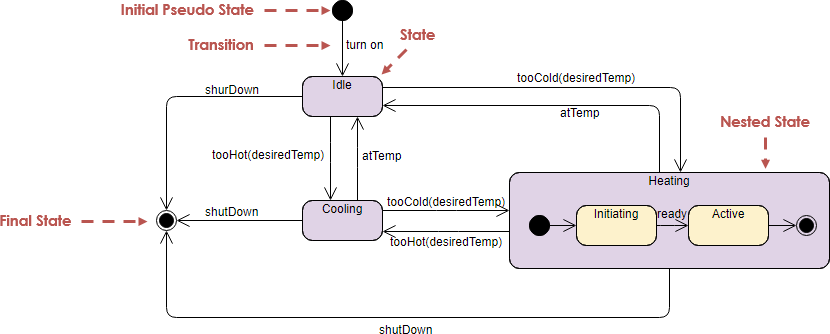
UML (Unified Modeling Language) State Machine Diagrams, also known as Statechart Diagrams, are vital tools in software engineering and systems design. They provide a standardized way to visualize the dynamic behavior of a system, detailing how an object transitions between various “states” based on specific events or conditions. This article delves into the core components of UML State Machine Diagrams, using the example of a Climate Control System (such as a thermostat or HVAC) to illustrate their functionality and significance.
Key Components of UML State Machine Diagrams
1. Initial Pseudo State
The Initial Pseudo State is represented by a solid black circle and indicates the starting point of the state machine process. This element marks where the system begins its journey through various states.
2. State
States are depicted as rounded rectangles and signify a specific condition or situation in the system’s lifecycle. In our Climate Control System example, states include:
-
Idle: The system is not actively heating or cooling.
-
Cooling: The system is actively removing heat.
-
Heating: The system is actively adding heat.
3. Transition
Transitions are represented by arrows connecting the states, showing how and when the system moves from one state to another. Each transition is triggered by an event (e.g., temperature changes) that prompts the system to change its condition.
4. Nested State (Composite State)
A Nested State, also referred to as a Composite State, is a state that contains other states within it. For example, the Heating state encompasses two internal states:
-
Initiating: The system is preparing to heat.
-
Active: The system is currently heating.
This hierarchy allows for more complex behaviors and facilitates the understanding of states within states.
5. Final State
The Final State is represented by a black circle with a ring around it. This component signifies the endpoint of the state machine process, indicating that the system has entered a terminal condition, such as being shut down or inactive.
How the Climate Control System Works
Understanding the flow of the Climate Control System helps clarify how the states and transitions interact. Here’s a breakdown of the system’s logic:
-
Start (Initial State):
-
The user “turns on” the system, and it initializes in the Idle state.
-
-
Logic Transitions:
-
If the temperature increases beyond a set threshold (i.e., too hot), the system transitions to the Cooling state. Once it achieves the desired temperature, it reverts back to the Idle state.
-
Conversely, if the temperature drops below a certain level (i.e., too cold), the system enters the Heating state. This state consists of two phases:
-
Initiating: The system prepares to heat.
-
Active: The system applies heat to reach the desired temperature.
-
-
-
Exit (Final State):
-
Regardless of the current state, issuing a shutdown command leads the system to transition to the Final State, completing the operational cycle.
-
Benefits of Using UML State Machine Diagrams
UML State Machine Diagrams offer several key benefits:
-
Clarity: They provide a clear visualization of system behavior, showcasing how states change in response to events, making complex systems easier to understand.
-
Communication: These diagrams serve as effective communication tools among stakeholders, including developers, designers, and non-technical team members, facilitating discussions regarding system behavior.
-
Documentation: They provide valuable documentation for system behavior throughout the development lifecycle, which can be referred back to as the project evolves.
-
Design Validation: State Machine Diagrams help validate design logic and ensure that all possible states and transitions have been considered before implementation.
Tooling for UML State Machine Diagrams: A Deep Dive into Visual Paradigm
Creating and managing UML State Machine Diagrams efficiently requires the right tools—especially when dealing with complex systems like a Climate Control System. One of the most powerful and user-friendly tools available for this purpose is Visual Paradigm. As a comprehensive UML modeling and design platform, Visual Paradigm offers robust support for all UML diagram types, including State Machine Diagrams, making it an ideal choice for both beginners and advanced users in software engineering and systems design.
Why Choose Visual Paradigm?
Visual Paradigm stands out in the landscape of UML tools due to its intuitive interface, extensive feature set, and seamless integration with modern development workflows. It supports a wide range of UML diagrams, including Class, Sequence, Use Case, Activity, and, most relevant here, State Machine Diagrams. Its support for composite states, nested transitions, entry/exit actions, do activities, and guard conditions enables users to model real-world systems with high fidelity.
Key Features for State Machine Diagrams in Visual Paradigm
1. Drag-and-Drop State Creation
Visual Paradigm allows users to create states, transitions, and pseudo-states (like Initial and Final) using a simple drag-and-drop interface. You can easily:
-
Add states (e.g.,
Idle,Cooling,Heating) by dragging them from the palette. -
Create composite states (like
Heating) and nest sub-states (Initiating,Active) within them with a few clicks. -
Insert initial pseudo states (solid black circle) and final states (black circle with a ring) directly onto the diagram.
2. Support for Nested and Composite States
Visual Paradigm fully supports hierarchical state modeling. In the Climate Control example:
-
You can define
Heatingas a composite state. -
Inside it, create
InitiatingandActiveas sub-states. -
Visual Paradigm automatically visualizes the hierarchy, showing the parent-child relationship clearly, which enhances readability and maintainability.
3. Rich Transition Modeling
Transitions in Visual Paradigm are highly customizable. You can define:
-
Triggers: Events that cause a transition (e.g.,
temperature > 30°C). -
Guards: Boolean conditions that must be true for a transition to occur (e.g.,
fan_enabled = true). -
Actions: Operations executed during or after a transition (e.g.,
start_fan()orset_target_temp(22°C)). -
Entry/Exit Actions: Special actions that execute when entering or exiting a state (e.g.,
log: Heating started).
This level of detail ensures that your state machine accurately reflects real-world logic and constraints.
4. Automatic Layout and Diagram Validation
Visual Paradigm includes automatic layout engines that arrange your diagram elements neatly, reducing clutter and improving readability. It also performs real-time validation, highlighting issues such as:
-
Unconnected transitions.
-
Missing initial or final states.
-
Invalid state hierarchies.
This helps prevent modeling errors before they become problematic during implementation.
5. Synchronization with Code and Documentation
One of the most powerful features of Visual Paradigm is its ability to synchronize models with code. When you design a State Machine Diagram, Visual Paradigm can:
-
Generate code (in Java, C#, Python, etc.) from the diagram.
-
Reverse-engineer existing code into a UML State Machine Diagram.
-
Export diagrams to various formats (PNG, SVG, PDF) for documentation or presentation.
This bidirectional traceability ensures that your design remains aligned with the actual implementation.
6. Collaboration and Version Control
Visual Paradigm supports team collaboration through integration with platforms like Git, Jira, and Confluence. Multiple team members can work on the same model simultaneously, with version control and change tracking. This is especially valuable in large-scale projects where multiple stakeholders (e.g., system architects, developers, QA teams) need to review and validate the state logic.
7. Integration with Other UML Diagrams
Visual Paradigm allows you to link your State Machine Diagram with other UML diagrams such as:
-
Class Diagrams: To define the classes that own the state machine (e.g.,
ThermostatController). -
Sequence Diagrams: To show how messages or events trigger state transitions.
-
Use Case Diagrams: To map user interactions (e.g., “Turn On System”) to initial state transitions.
This holistic modeling approach ensures consistency across your entire system design.
Practical Example: Modeling the Climate Control System in Visual Paradigm
Here’s how you’d model the Climate Control System step-by-step in Visual Paradigm:
-
Create a New State Machine Diagram
-
Open Visual Paradigm → New → UML → State Machine Diagram.
-
-
Add the Initial Pseudo State
-
Drag the “Initial Pseudo State” from the toolbar to the canvas.
-
-
Define States
-
Add
Idle,Cooling, andHeatingas states. -
Right-click
Heating→ “Add Substate” → createInitiatingandActive.
-
-
Create Transitions
-
Draw transitions from
IdletoCooling(trigger:temp > 30°C). -
Draw from
IdletoHeating(trigger:temp < 18°C). -
Inside
Heating, create a transition fromInitiatingtoActive(trigger:heater_ready). -
Add return transitions from
CoolingandActiveback toIdle(trigger:target_temp_reached).
-
-
Add Final State
-
Place a Final State on the left side of the diagram.
-
Create a transition from any major state (e.g.,
Cooling) to the Final State with triggershutdown_command.
-
-
Add Actions and Guards
-
Right-click a transition → “Properties” → add guard conditions and actions (e.g.,
if (fan_enabled)orstart_fan()).
-
-
Generate Documentation or Code
-
Export the diagram as a PDF or image for documentation.
-
Generate Java or C# code to instantiate the state machine logic.
-
Conclusion
Visual Paradigm is a top-tier tool for creating and managing UML State Machine Diagrams. Its rich feature set—ranging from intuitive drag-and-drop modeling to advanced code generation and team collaboration—makes it ideal for modeling complex systems like climate control, automotive systems, or embedded devices. Whether you’re a student learning UML, a developer designing a real-time system, or an architect overseeing a large-scale project, Visual Paradigm provides the tools needed to design, validate, and implement robust state-based logic with confidence.
By leveraging Visual Paradigm, you not only create clearer, more accurate diagrams but also ensure that your design remains traceable, maintainable, and aligned with actual implementation—making it an indispensable part of modern systems development.
UML State Machine Diagrams are essential in defining and understanding the behavior of dynamic systems like the Climate Control System. By breaking down the components—initial state, states, transitions, nested states, and final states—we gain clarity on how systems operate in response to various events. This understanding is crucial for developers, architects, and stakeholders involved in system design and implementation. Whether you’re analyzing an HVAC system or any dynamic system, UML State Machine Diagrams provide a powerful tool for modeling and visualization.
If you have any specific questions about UML modeling or wish to delve deeper into any aspect of State Machine Diagrams, feel free to ask!