


Imagine having a powerful, AI-powered tool that can generate a comprehensive scenario analysis for your renewable energy business in minutes. This isn’t science fiction; it’s the reality with Visual Paradigm’s AI-Powered Scenario Analysis Tool. This tool enables strategic leaders to explore multiple plausible futures, test their strategies against different environments, and build more resilient long-term plans. The process is guided by a structured 5-step workflow, starting with defining the scope and objectives. The AI leverages your business context to generate a complete framework, which you can then refine with your team’s insights. The final output is a professional report, ready for presentations and strategic planning workshops. This article will walk you through the entire process, using a real-world example of a renewable energy company, VoltEdge Energy, to demonstrate how this powerful tool works.
Key Takeaways
-
Visual Paradigm‘s AI-Powered Scenario Analysis Tool guides users through a 5-step process to explore future scenarios.
-
It uses AI to generate a complete analysis framework based on your business context.
-
Users can edit and refine the AI-generated content for a more accurate strategic plan.
-
The final output is a professional report that can be printed or saved as a PDF.
-
Analysis data is saved locally, ensuring complete privacy and control.
Step 1: Define the Scope and Objectives
Every strategic analysis begins with a clear understanding of the problem. The first step in the Visual Paradigm tool is to define the scope and objectives. This is where you establish the foundation for your entire analysis. In the example below:
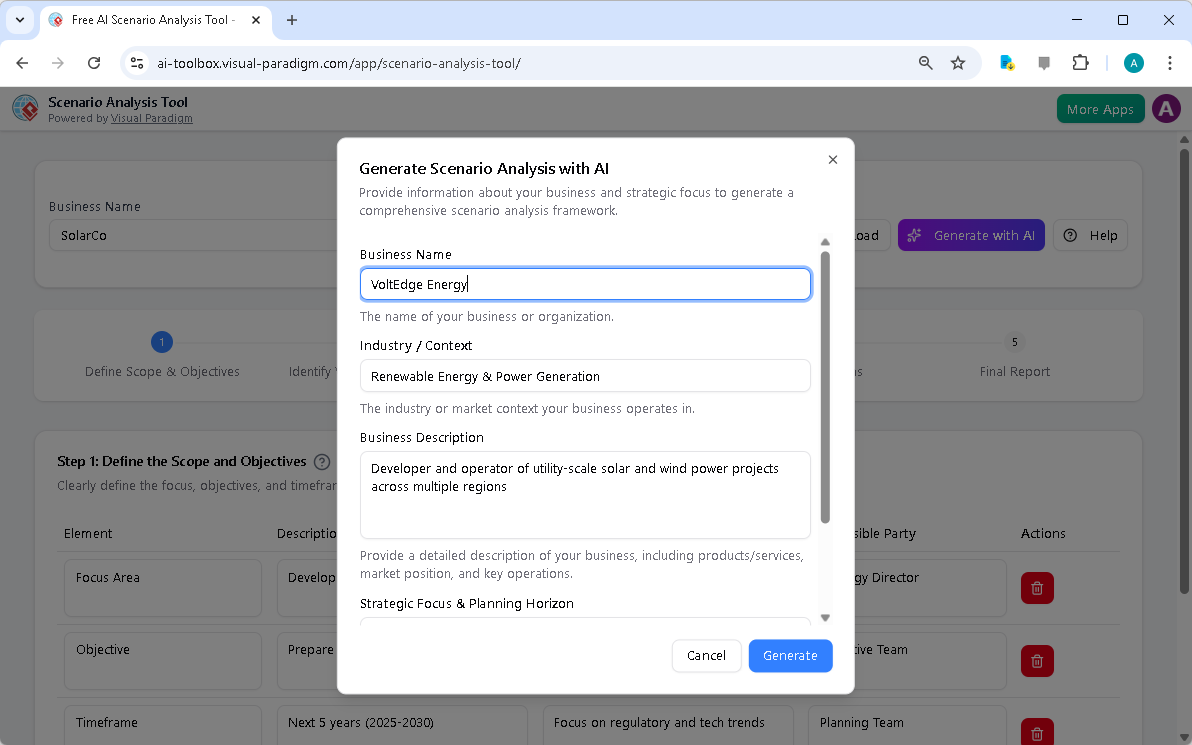
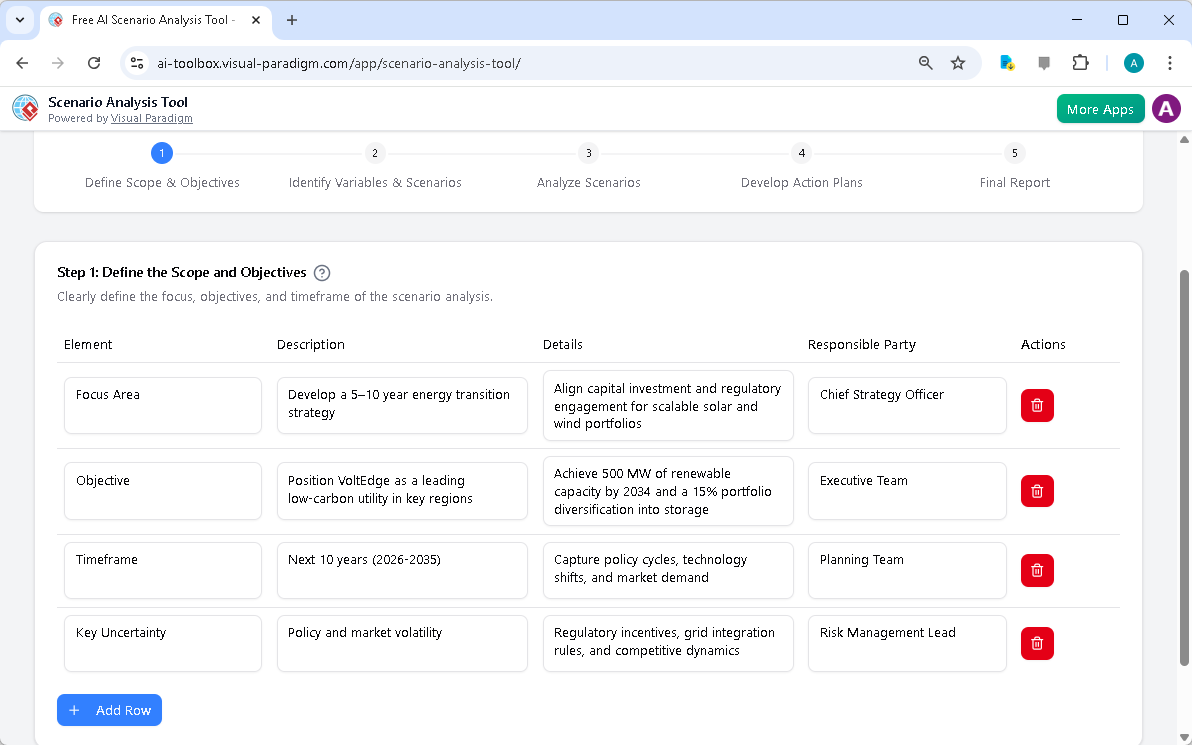
The user has already provided the business name, “VoltEdge Energy,” and the industry context, “Renewable Energy & Power Generation.” The AI then populates the table with a suggested focus area: “Develop a 5–10 year energy transition strategy.” The objective is to “Position VoltEdge as a leading low-carbon utility in key regions.” The timeframe is set to the “Next 10 years (2026-2035).” The key uncertainty identified is “Policy and market volatility.” These elements are crucial for framing the analysis. The tool’s dynamic tables allow you to easily add, edit, or delete rows to tailor the scope to your specific needs. This step ensures that your strategic planning is focused and aligned with your business goals.
Step 2: Identify Key Variables and Scenarios
After defining the scope, the next step is to identify the critical variables and potential future scenarios. This is where the analysis moves from general objectives to specific, plausible futures. In
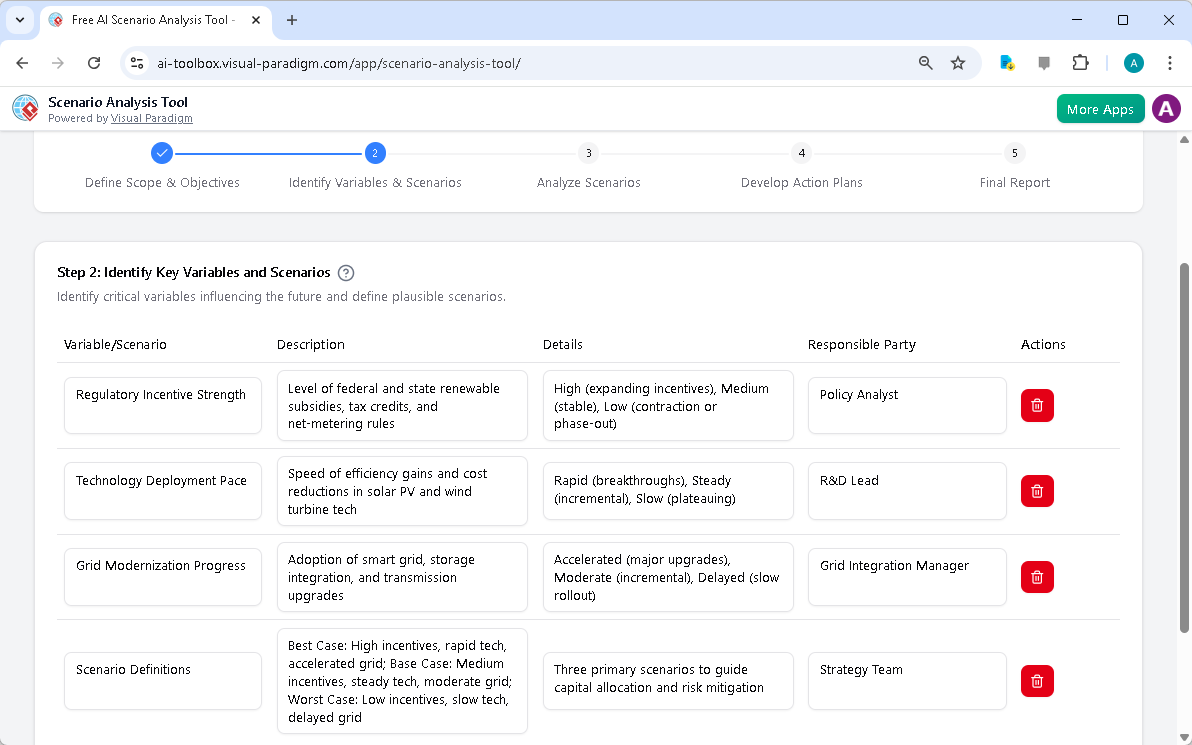
, the tool presents a table with key variables such as “Regulatory Incentive Strength,” “Technology Deployment Pace,” and “Grid Modernization Progress.” For each variable, the AI suggests potential outcomes, such as “High (expanding incentives)” or “Rapid (breakthroughs).” The tool then uses these variables to define three distinct scenarios: “Best Case,” “Base Case,” and “Worst Case.” The “Best Case” scenario, for instance, assumes high incentives, rapid technology adoption, and accelerated grid upgrades. This step is vital for ensuring that your analysis covers a range of possibilities, not just a single, optimistic forecast.
Step 3: Analyze Scenarios
Now that the scenarios are defined, the analysis shifts to understanding their potential impacts. This is the core of scenario planning. In
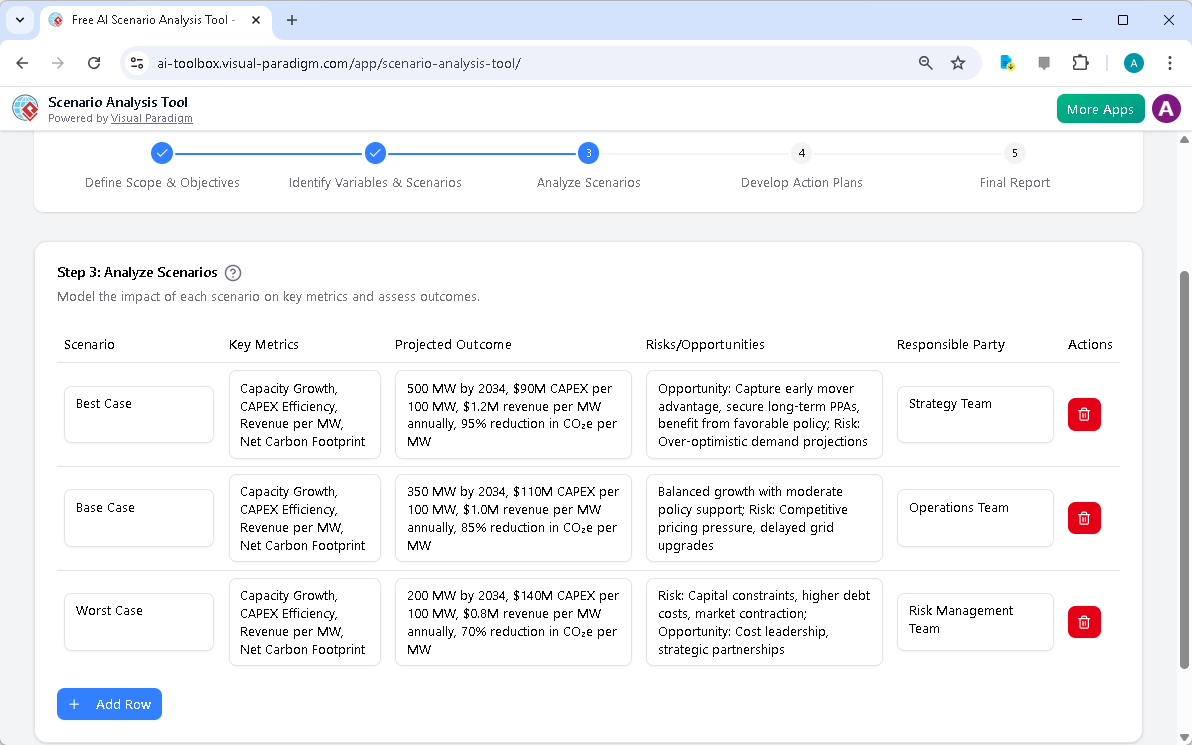
, the tool displays a table for “Step 3: Analyze Scenarios.” For each scenario—Best Case, Base Case, and Worst Case—the user can model the impact on key metrics like “Capacity Growth,” “CAPEX Efficiency,” and “Revenue per MW.” The AI provides projected outcomes, such as “500 MW by 2034” for the Best Case. The tool also prompts users to identify the associated risks and opportunities. For the Best Case, the opportunity is to “Capture early mover advantage,” while the risk is “Over-optimistic demand projections.” This step forces a deep dive into the implications of each future, ensuring that your strategy is robust enough to handle a variety of outcomes.
Step 4: Develop Action Plans
With a clear understanding of the potential impacts, the next logical step is to develop strategic responses. This is where your analysis moves from theoretical to actionable. In
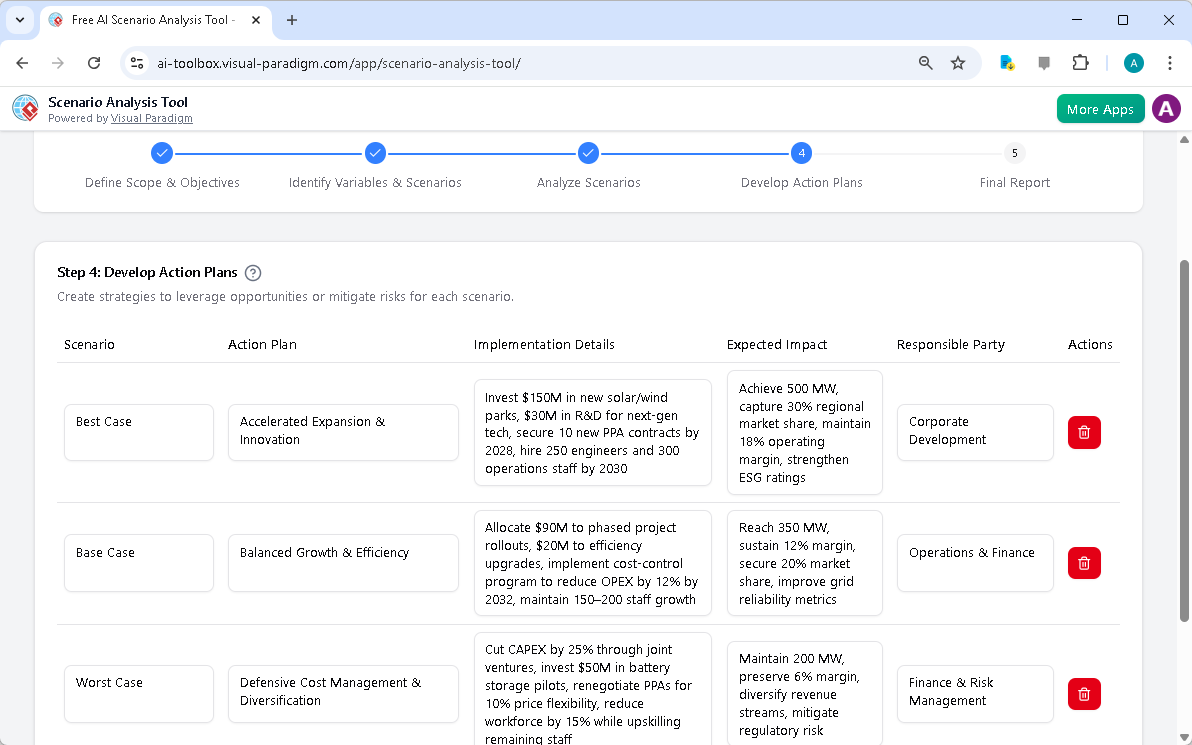
, the tool presents a table for “Step 4: Develop Action Plans.” For each scenario, the user can create a specific action plan. For the Best Case, the action plan is “Accelerated Expansion & Innovation,” with implementation details like investing $150M in new solar/wind parks. For the Base Case, the plan is “Balanced Growth & Efficiency,” with actions like allocating $90M to phased project rollouts. For the Worst Case, the plan is “Defensive Cost Management & Diversification.” This step is crucial for turning your analysis into a practical strategy. The tool allows you to assign responsible parties and expected impacts, ensuring that your plans are not only well-conceived but also executable.
Step 5: Final Report
The final step is to consolidate all your work into a professional report. This report serves as a single source of truth for your strategic analysis and is ideal for sharing with leadership and stakeholders. In
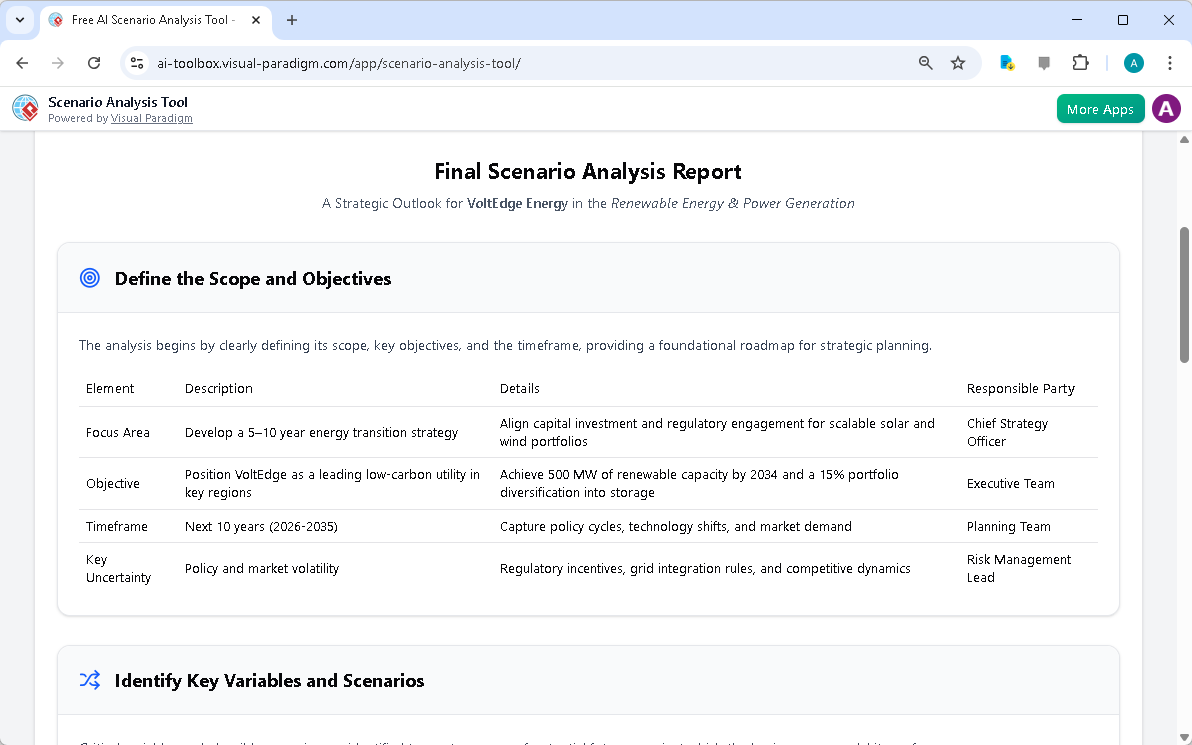
, the tool presents the “Final Scenario Analysis Report.” This report includes a summary of the scope, objectives, key variables, and scenarios, as well as the detailed analysis and action plans. The report is formatted in a clean, professional style, making it easy to read and present. You can print the report directly from your browser or save it as a PDF. This final document is a powerful tool for facilitating strategic dialogue and ensuring that everyone is aligned on the organization’s future direction.
Visual Paradigm’s AI-Powered Scenario Analysis Tool is a game-changer for strategic planning. It provides a structured, AI-assisted framework for exploring the future, making it easier than ever to develop more resilient and adaptive strategies. By following the 5-step workflow, from defining the scope to creating a final report, you can systematically analyze different futures and prepare for uncertainty. The tool’s dynamic tables, AI generation, and local data storage ensure that your analysis is both powerful and private. Whether you’re a business strategist, risk manager, or entrepreneur, this tool can help you make more informed decisions in an uncertain world. Try the Scenario Analysis Tool now and start creating your strategic roadmap today.
Related Links
-
Free AI-Powered Scenario Analysis Tool for Strategic Planning: November 28, 2025 – Discover our free AI-driven Scenario Analysis Tool to future-proof your strategy. Anticipate change, assess risks, and build resilient plans with ease.
-
What is Scenario Planning: Scenario analysis is designed to allow improved decision-making by allowing deep consideration of outcomes and their implications . It enables professionals, and the public, to respond dynamically to an unknown future.
-
Free AI Scenario Analysis Tool – Strategic Foresight & Planning: Use our Free AI -enhanced Scenario Analysis Tool for step-by-step strategic planning. Input dynamic data, save progress, and create actionable plans.