


Creating system requirements is a critical part of engineering and software development. With Visual Paradigm’s AI Chatbot, you can transform plain-language descriptions into structured, standards-compliant SysML Requirement Diagrams—fast, accurately, and with room for refinement.
This guide walks you through how the AI Chatbot works, how to generate a SysML Requirement Diagram step by step, and what recent improvements have made it more powerful and intuitive.
🤖 What Does Visual Paradigm’s AI Chatbot Do?
Visual Paradigm’s AI Chatbot is a natural language-driven modeling assistant designed to help users create professional diagrams without needing deep diagramming expertise. Unlike generic image generators, it understands modeling standards such as UML, SysML, and ArchiMate. It interprets your intent, generates a valid diagram, and allows you to refine it through conversational prompts.
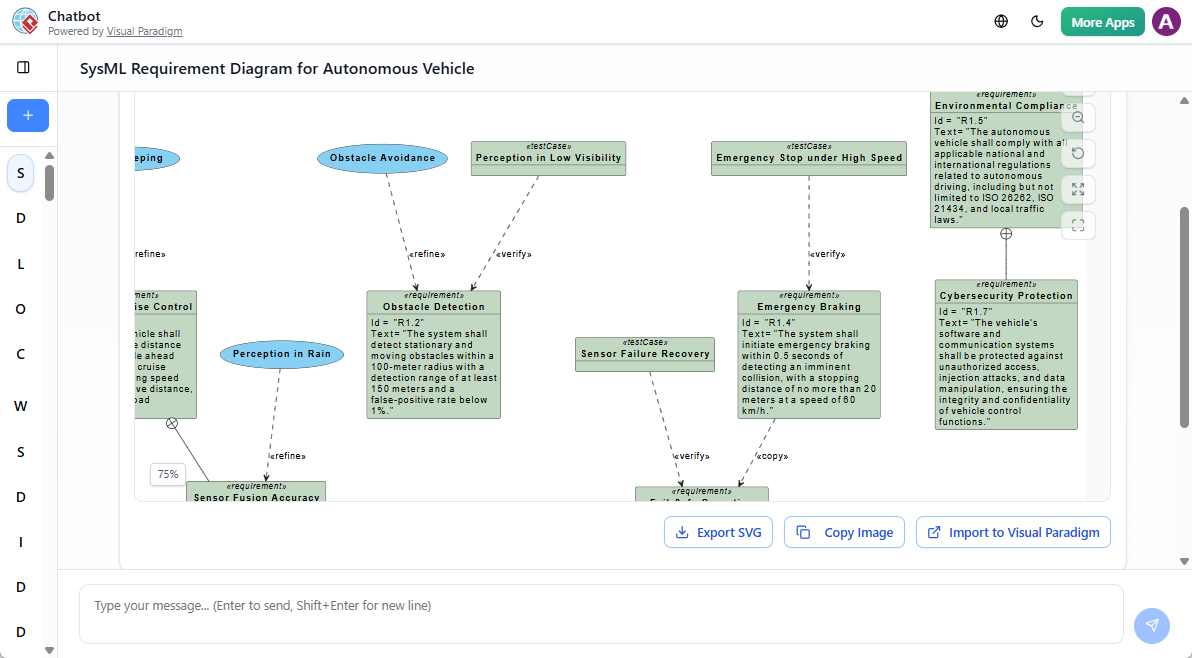
You can describe a system’s behavior, structure, or requirements in everyday language—like “The system must monitor battery temperature and shut down if it exceeds 60°C”—and the AI will translate it into a properly formatted SysML Requirement Diagram with appropriate relationships, constraints, and traceability.
The chatbot supports iterative editing. You can ask to:
- Add new requirements
- Modify relationships (e.g., “Link R-01 to R-02 with a ‘refines’ relationship”)
- Adjust diagram layout or styling
This makes it ideal for both beginners learning SysML and experienced engineers accelerating early-phase design.
📊 Step-by-Step: Generate a SysML Requirement Diagram
Follow these steps to generate a SysML Requirement Diagram using the AI Chatbot:
1. Open the AI Chatbot in Visual Paradigm Desktop
Launch Visual Paradigm Desktop and navigate to Tools > Chatbot (AI Diagram Generation). The chat interface will open, ready to receive your prompt.
2. Write a Clear, Structured Prompt
Describe your system’s requirements in natural language. Be specific about the domain, key functions, and constraints.
👉 Example Prompt:
“Generate a SysML Requirement Diagram for an electric vehicle’s battery management system. Include safety requirements such as thermal protection, over-voltage detection, and cell balancing. Also include performance requirements like charging efficiency above 90% and real-time monitoring with ≤100ms latency.”
This prompt gives the AI enough context to generate a diagram with:
- Requirement nodes (R-01, R-02, etc.)
- Logical relationships (e.g., “refines”, “derives”, “satisfies”)
- Clear separation between safety and performance domains
3. Refine the Diagram Through Conversation
Once the diagram appears, use follow-up prompts to adjust it:
- “Add a requirement that the system must log all thermal events.”
- “Show a ‘refines’ relationship between R-03 and R-05.”
- “Change the label of R-01 to ‘Thermal Overload Protection’.”
The AI understands these commands and updates the diagram in real time, preserving SysML semantics.
4. Import the Diagram into Your Project
When satisfied with the result, click Import to Visual Paradigm. The diagram is added to your active project as a fully editable SysML Requirement Diagram. You can now:
- Add notes or constraints
- Link requirements to other models (e.g., use cases, blocks)
- Export to documentation or share with stakeholders
This seamless integration ensures your AI-generated model remains part of your larger system design workflow.
📌 What Is a SysML Requirement Diagram?
A SysML Requirement Diagram is a specialized diagram used in systems engineering to model, organize, and trace system requirements. It captures what a system must do or how it must behave, expressed as formal, testable statements. Each requirement is represented as a node (e.g., R-01), and relationships between requirements—such as “refines,” “derives,” “satisfies,” or “verifies”—are shown using labeled connectors.
This diagram type supports traceability across the development lifecycle, linking high-level goals to detailed design elements, test cases, and verification activities. It’s essential for safety-critical systems (e.g., aerospace, medical devices, automotive) where compliance, validation, and auditability are mandatory.
By using AI to generate these diagrams, teams reduce manual effort, minimize modeling errors, and ensure consistency with SysML standards.
🛠️ Recent Enhancements to the AI Chatbot (Late 2025 – Early 2026)
Visual Paradigm has continued to improve the AI Chatbot with targeted updates that enhance accuracy, usability, and collaboration:
✅ Enhanced SysML Support
The AI now generates more accurate Internal Block Diagrams (IBD) and Requirement Diagrams, with proper handling of:
- Ports and connectors
- Item flows and data dependencies
- Traceability links between requirements and system components
This ensures generated diagrams are not just visually correct but also semantically valid for formal analysis.
🎨 Visual Style Improvements
- Orthogonal connectors are now the default for UML diagrams, improving readability.
- Associations from the same actor or component are automatically color-coded, reducing visual clutter and aiding navigation.
🌍 Expanded Multi-Language Support
The chatbot now supports Spanish, French, Japanese, and Chinese—both in the UI and in content generation. This allows teams across regions to describe requirements in their native language while still producing standardized SysML diagrams.
🔄 Smarter Behavioral Diagrams
State Machine Diagrams are now generated with better context awareness. The AI captures complex state transitions, guard conditions, and entry/exit actions in a single pass, reducing the need for manual corrections.
📎 OpenDocs Integration
AI-generated diagrams can now be embedded directly into OpenDocs articles. These diagrams are “living”—they auto-update when the underlying model changes. This is especially useful for maintaining up-to-date technical documentation in regulated environments.
💡 Tips for Better Results
- Use clear, unambiguous language. Avoid vague terms like “should” or “maybe.” Instead, use “must,” “shall,” or “requires.”
- Break complex systems into logical domains (e.g., safety, performance, usability) to help the AI organize requirements.
- After generation, always validate the diagram against your system’s actual needs. The AI is a powerful assistant, but human oversight ensures correctness.
🧩 Use Case: Battery Management System (Example)
Let’s say you’re designing a battery management system (BMS) for a new EV. You want to ensure all safety and performance requirements are traceable and formally documented.
With the AI Chatbot, you can:
- Describe the BMS in plain English.
- Generate a SysML Requirement Diagram with 10+ requirements.
- Add traceability links to system blocks and use cases.
- Export the diagram to OpenDocs for team review.
This process, which might take hours manually, now takes minutes.
🔗 References
- How AI Chatbot Can Help You Learn UML Faster
This article explains how the AI Chatbot supports learners by offering instant visualization and feedback, helping them grasp UML concepts through interactive practice. - Visual Paradigm AI Chatbot Features
A detailed overview of the AI Chatbot’s capabilities, including supported diagram types, natural language input, and integration with the modeling environment. - SysML Requirement Diagram Guide
A practical guide showing how to use AI to generate and manage SysML Requirement Diagrams, with examples and best practices. - AI Chatbot Enhancements: Use Case & State Machine Improvements
Highlights recent upgrades to the AI’s ability to generate complex use case and state machine diagrams with higher fidelity and fewer manual corrections. - Multi-Language Support in AI Chatbot
Details the expansion of language support, enabling non-English speakers to generate diagrams in their preferred language while maintaining standard compliance. - OpenDocs Integration with AI Diagrams
Explains how AI-generated diagrams can be embedded in OpenDocs, where they remain linked to the source model and update automatically.
📌 Ready to Try?
Do you have a system or feature you’d like to model? Whether it’s a medical device, industrial control system, or smart home automation, the AI Chatbot can help turn your ideas into structured requirements.
Try this prompt:
“Generate a SysML Requirement Diagram for a smart thermostat that must maintain indoor temperature within ±0.5°C, support remote control via mobile app, and trigger alerts if the temperature exceeds 30°C or drops below 5°C.”
Paste it into the AI Chatbot and see how quickly you get a professional diagram.