


Transforming fragmented workflows into a unified, intelligent “Concept-to-Docs” powerhouse for modern engineering, architecture, and product teams.
Introduction: The Documentation Challenge in the AI Era
In today’s fast-paced development environments, teams face a persistent challenge: keeping technical documentation synchronized with evolving system designs. Traditional workflows force engineers to manually export diagrams, upload static images, and constantly re-sync documentation—a process that introduces friction, version conflicts, and knowledge silos.
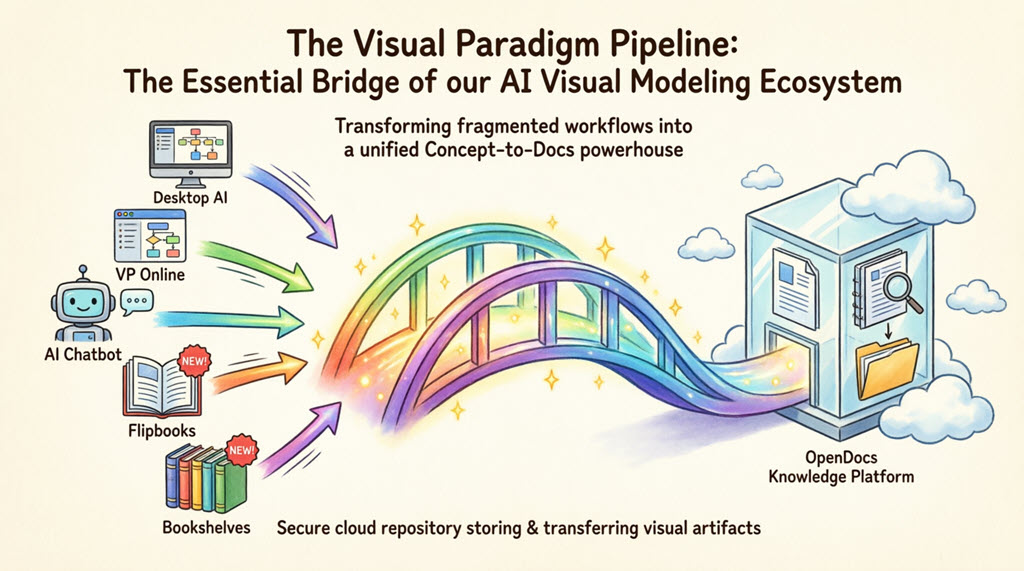
Enter the Visual Paradigm Pipeline: a cloud-based integration that acts as a “knowledge hub,” bridging professional modeling tools like Visual Paradigm Desktop and Visual Paradigm Online directly with OpenDocs, an AI-powered documentation platform. This guide explores how the Pipeline serves as the essential connective tissue of Visual Paradigm’s AI Visual Modeling Ecosystem, enabling seamless, living documentation that evolves alongside your projects.
What Is the Visual Paradigm Pipeline?
The Pipeline is the high-speed connective tissue of the Visual Paradigm ecosystem. It is a secure, cloud-based centralized repository designed to store, manage, and transfer artifacts—the valuable visual assets you create across our various platforms.
In the context of Visual Paradigm’s AI Visual Modeling Ecosystem, the Pipeline acts as the vital bridge between four core pillars:
-
Visual Paradigm Desktop AI Diagram Generation – Professional UML, SysML, BPMN, and C4 modeling with AI assistance
-
AI Chatbot – Natural language-to-diagram generation for rapid prototyping
-
OpenDocs Knowledge Management Platform – AI-powered, diagram-aware documentation
-
Step-by-Step AI-Powered Web Apps – Guided workflows for complex modeling tasks
A Single Source of Truth: The Pipeline eliminates the friction of manual downloads and uploads. It preserves the editability of your models and ensures that every stakeholder is looking at the most recent revision of a design.
The Gateway to OpenDocs: Your Publication Powerhouse
While the Pipeline is the vehicle, Visual Paradigm OpenDocs is the destination. OpenDocs is Visual Paradigm’s premier knowledge management platform, specifically engineered to be “diagram-aware.” By utilizing the Pipeline, you can move work from any Visual Paradigm feature directly into a professional document, technical manual, or knowledge base.
This “Work-to-Publish” workflow allows you to:
-
Model with Precision: Use high-end desktop or online tools to create complex system architectures.
-
Generate with Speed: Use AI to brainstorm and visualize ideas instantly.
-
Publish with Authority: Seamlessly embed those visuals into OpenDocs to create living documentation that evolves alongside your project.
The Role of the Pipeline in Visual Paradigm’s AI Feature & Modeling Ecosystem
🔗 Unified Asset Management Across Platforms
The Pipeline transforms isolated modeling outputs into shareable, version-controlled artifacts. Whether you generate a UML class diagram via AI prompt in the Chatbot, refine a SysML model in Desktop, or design a marketing flowchart in VP Online, the Pipeline ensures these assets flow effortlessly into your documentation workspace.
🔄 One-Click Synchronization for Living Documentation
Once a diagram is embedded in OpenDocs via the Pipeline, any changes made in the original editor can be synced with a single click using the “Update to Latest Revision” button. This eliminates the traditional cycle of re-exporting, re-uploading, and manually replacing static images—keeping documentation perpetually current.
📚 Version History & Collaboration
The Pipeline maintains a secure cloud repository for every artifact, preserving complete version history. Teams can roll back to previous revisions, compare diagram iterations, and maintain an audit trail of design decisions—critical for compliance, onboarding, and stakeholder alignment.
🤖 AI-Enhanced Workflow Integration
The Pipeline uniquely bridges AI-generated content with human-curated documentation. Diagrams created through natural language prompts in the AI Chatbot can be instantly sent to OpenDocs, where they become editable, contextualized assets within technical specifications or user guides.
🌐 Cross-Platform Interoperability
By supporting artifacts from Desktop, Online, AI Chatbot, Flipbooks, and Bookshelves, the Pipeline creates a unified workflow that respects team preferences while maintaining consistency across deliverables.
The 5 Core Connections: What You Can Send to the Pipeline
1. Visual Paradigm Desktop to OpenDocs
For the power user. Create intricate UML, BPMN, or SysML models in Visual Paradigm Desktop and export to OpenDocs via the Pipeline. This moves your local modeling expertise into a global, accessible knowledge base.
How to send a diagram from Visual Paradigm Desktop to OpenDocs:
-
In Visual Paradigm Desktop, open the diagram you wish to send.
-
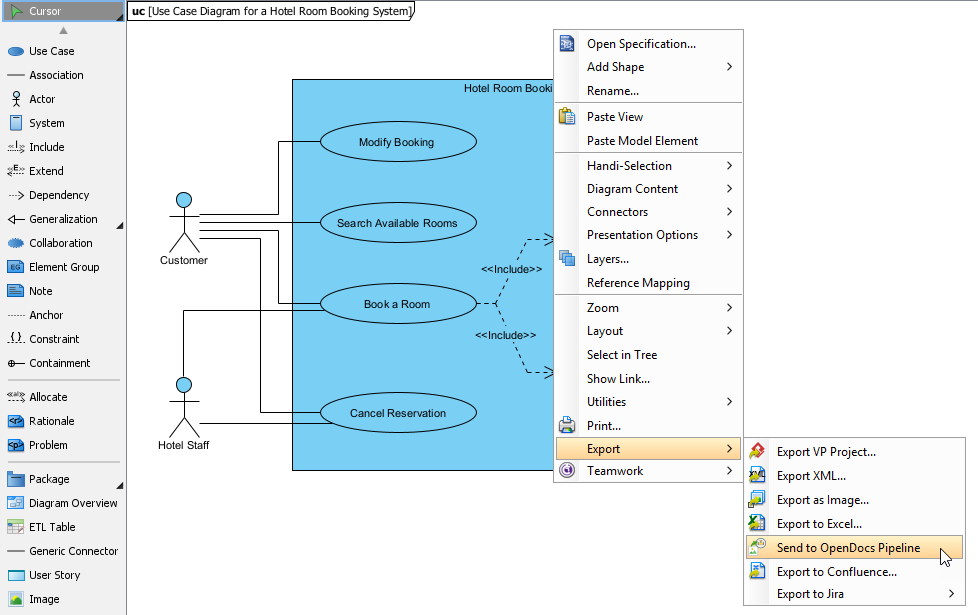
Right-click on the diagram and select Export > Send to OpenDocs Pipeline.
-
When prompted, save your project by clicking OK.
-
(Optional) Enter a comment for version tracking in the Pipeline pane.
-
Confirm the export to output your diagram to the cloud.
-
In OpenDocs, click Edit → Insert → Pipeline to embed your artifact.
Extended Reading: New Feature: Seamlessly Export Visual Paradigm Desktop Diagrams to OpenDocs
2. Visual Paradigm Online to OpenDocs
The 100% cloud workflow. Design flowcharts, infographics, or marketing graphics in your browser and send them directly to OpenDocs without local downloads.
How to send a diagram from Visual Paradigm Online to OpenDocs:
-
Open your diagram in Visual Paradigm Online.
-
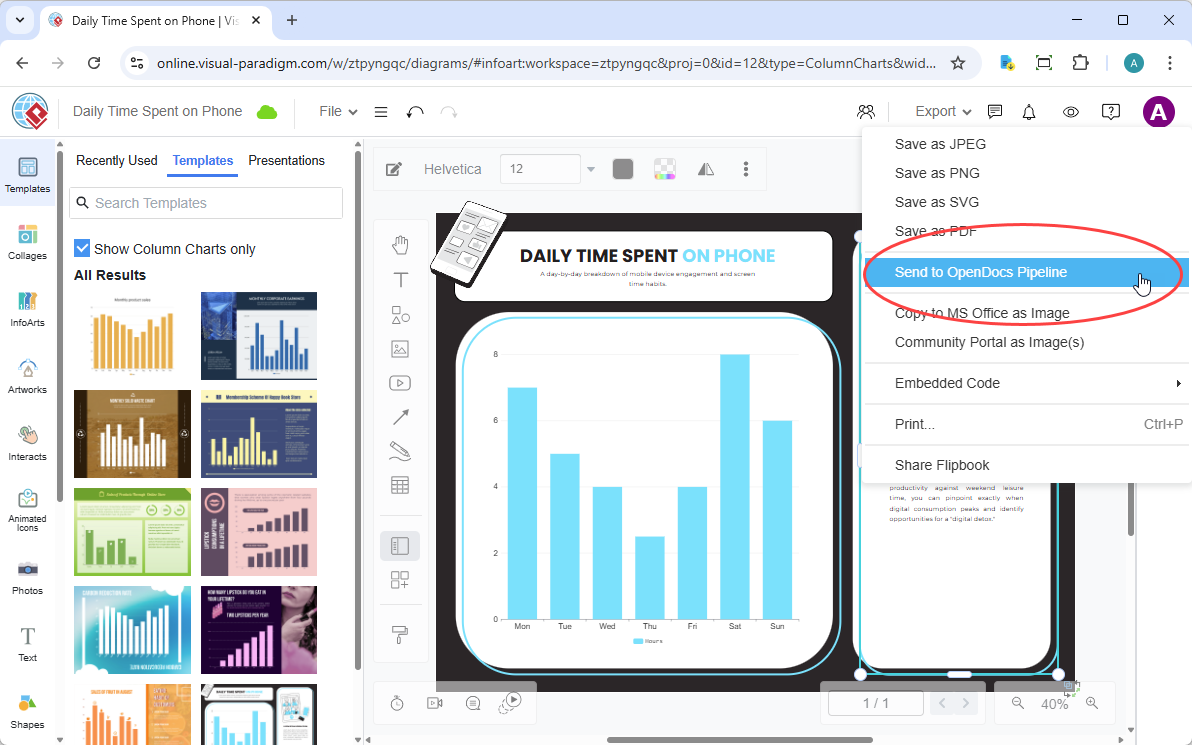
Select Export > Send to OpenDocs Pipeline from the top menu.
-
(Optional) Add a descriptive comment.
-
Confirm export; your visual is now in the Pipeline.
-
In OpenDocs, use Insert > Pipeline to embed the artifact.
Extended Reading: New Feature: Send Your Visual Paradigm Online Creations Directly to OpenDocs
3. AI Chatbot to OpenDocs
Conversational documentation. Generate system architectures or business process diagrams via natural language prompts, then send AI-created artifacts directly to OpenDocs.
How to send a diagram from Visual Paradigm AI Chatbot to OpenDocs:
-
Generate or refine your diagram (UML, flowchart, architecture, BPMN) in the AI Chatbot.
-
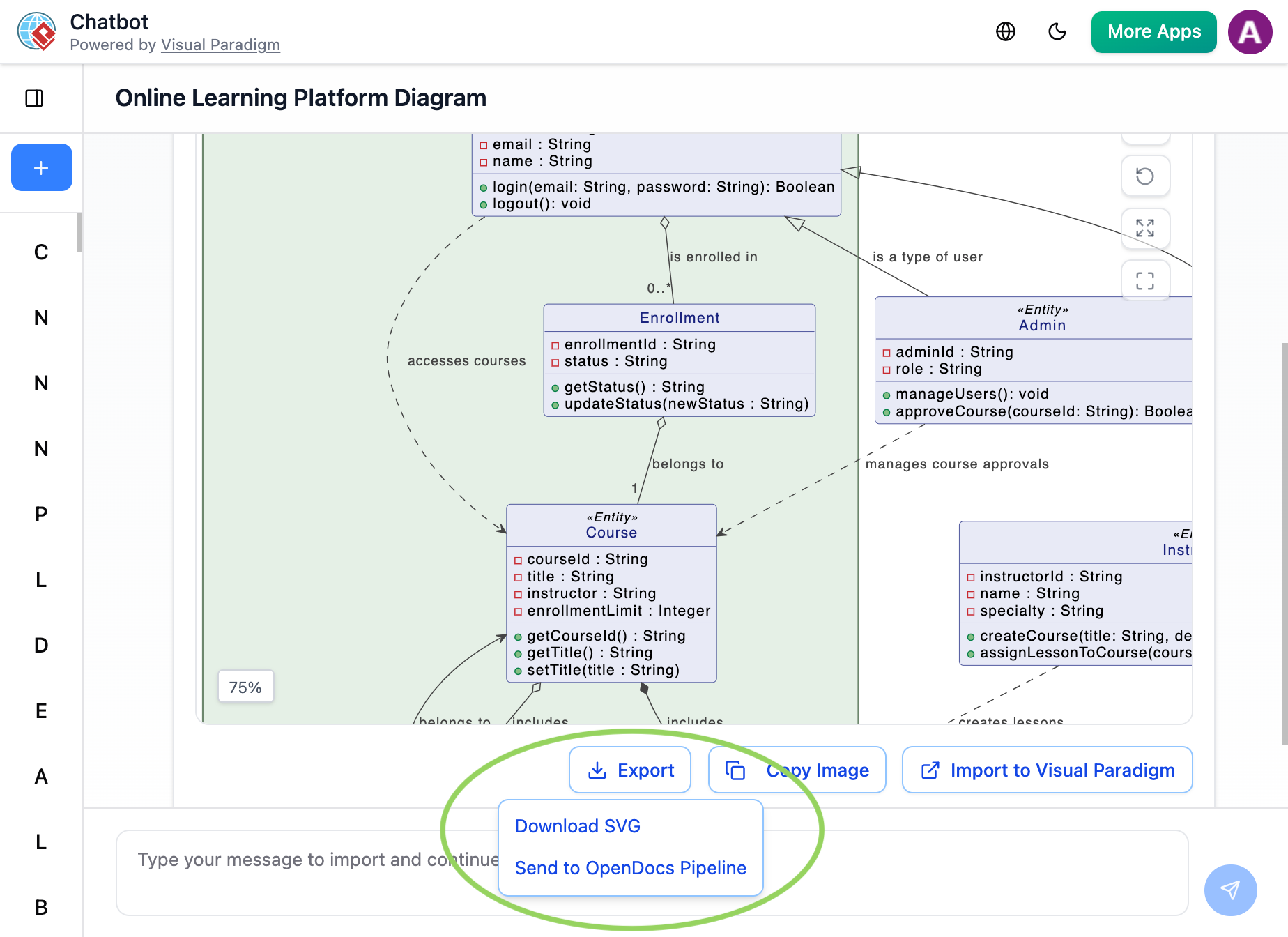
Click Export → Send to OpenDocs Pipeline.
-
In OpenDocs, click Insert > Pipeline to add your AI-generated diagram
Extended Reading: New Feature Alert: Send Diagrams from Visual Paradigm AI Chatbot Directly to OpenDocs!
4. Flipbooks to OpenDocs (New!)
Bring interactive media into knowledge management. Send digital Flipbooks through the Pipeline to embed rich, flippable catalogs or brochures directly within OpenDocs pages.
5. Bookshelves to OpenDocs (New!)
Organize and publish at scale. Send entire Bookshelves to OpenDocs to create a centralized library of resources within your documentation workspace.
Core Workflow: From Diagram to Living Documentation
graph LR
    A[Create Diagram] --> B[Export to Pipeline]
    B --> C[Insert in OpenDocs]
    C --> D[Edit Source Diagram]
    D --> E[Sync with One Click]
    E --> C
Step-by-Step Sync Process:
-
Export to Pipeline: In Visual Paradigm (Desktop/Online/Chatbot), use Export > Send to OpenDocs Pipeline. Add comments for version tracking.
-
Insert in OpenDocs: While editing an OpenDocs page, click the Pipeline button in the sidebar and select your artifact from the library.
-
Sync Revisions: When the source diagram changes, click the update indicator in the OpenDocs Pipeline panel to instantly refresh the document to the latest version.

Why the Pipeline Is a Game-Changer
| Traditional Workflow | The Pipeline Workflow |
|---|---|
| Manual Export (PNG/JPG) | Instant “Send to Pipeline” |
| Manual Re-uploading on changes | “Update to Latest Revision” in one click |
| Disconnected, static images | Deep-linked, editable artifacts |
| Scattered files on local drives | Centralized cloud repository |
| Version confusion | Clear revision history & rollback |
Source: Visual Paradigm Guides
Advanced Use Cases & Best Practices
🏗️ Enterprise Architecture Documentation
Use the Pipeline to maintain living C4 model diagrams that automatically update architecture decision records (ADRs) in OpenDocs as system designs evolve.
🔄 Agile Sprint Documentation
Embed user story maps and process flows created in VP Online directly into sprint retrospectives and release notes, ensuring documentation keeps pace with development velocity.
🤖 AI-Assisted Onboarding
Generate system overview diagrams via the AI Chatbot for new team members, then embed them in onboarding guides via the Pipeline—creating self-updating training materials.
📊 Stakeholder Communication
Share interactive Flipbooks of product roadmaps or marketing collateral with executives through OpenDocs, with all assets centrally managed via the Pipeline.
Conclusion: Building the Future of Intelligent Documentation
The Visual Paradigm Pipeline represents more than a technical integration—it embodies a paradigm shift in how teams create, maintain, and share knowledge. By serving as the intelligent bridge between AI-powered modeling tools and dynamic documentation platforms, the Pipeline enables what Visual Paradigm calls the “Concept-to-Docs” workflow: a seamless journey from initial idea to published, living documentation.
As AI continues to transform software development and system design, the ability to keep documentation synchronized with evolving models becomes not just convenient, but essential. The Pipeline ensures that your visual artifacts remain editable, versioned, and instantly accessible—turning documentation from a static afterthought into a dynamic, collaborative asset.
Whether you’re an enterprise architect maintaining complex SysML models, a product manager documenting user journeys, or a developer rapidly prototyping with AI assistance, the Pipeline empowers you to focus on creation while automating the tedious work of documentation maintenance. In an era where knowledge velocity determines competitive advantage, Visual Paradigm’s Pipeline isn’t just a feature—it’s your strategic advantage.
The future of technical documentation is connected, intelligent, and alive. With the Visual Paradigm Pipeline, that future is available today.
References
-
Export Diagrams from Visual Paradigm Desktop to OpenDocs Pipeline: Official release guide detailing the step-by-step process for sending Desktop diagrams to OpenDocs via the Pipeline, including version sync capabilities.
-
Comprehensive Guide: Visual Paradigm’s Full Support for C4 Diagrams: Third-party guide exploring C4 modeling workflows and how Pipeline integration enables living architecture documentation.
-
My Journey to Seamless Documentation: Sending Visual Paradigm Creations Directly to OpenDocs: User case study demonstrating real-world Pipeline implementation for frictionless documentation workflows.
-
Visual Paradigm Pipeline: The Bridge for AI Modeling & Knowledge Ecosystem: Official Visual Paradigm guide explaining the Pipeline’s role as the connective tissue of the AI modeling ecosystem.
-
My Journey with Visual Paradigm Pipeline: How This Asset Transit Hub Transformed My Documentation Workflow: Practical insights on leveraging the Pipeline for team collaboration and documentation consistency.
-
Visual Paradigm Online Tutorial: Getting Started: Video tutorial introducing Visual Paradigm Online’s cloud-based diagramming capabilities and Pipeline integration.
-
New Integration: Seamlessly Share Your Flipbooks to OpenDocs: Announcement and guide for embedding interactive Flipbooks into OpenDocs via the Pipeline.
-
How to Send Flipbooks and Diagrams to OpenDocs Using the Pipeline: Video walkthrough demonstrating the Pipeline workflow for Flipbooks and other visual artifacts.
-
New Feature Alert: Send Diagrams from Visual Paradigm AI Chatbot Directly to OpenDocs!: Official release notes for AI Chatbot to OpenDocs Pipeline integration, enabling conversational diagram generation and documentation.
-
Export Cloud Diagrams from Visual Paradigm Online to OpenDocs: Comprehensive guide for the 100% cloud workflow connecting VP Online diagrams to OpenDocs documentation.
Additional Resources:
-
Mastering Visual Paradigm OpenDocs: The Ultimate Guide to AI-Powered Knowledge Management: In-depth third-party guide covering advanced Pipeline workflows and OpenDocs optimization strategies.
-
Digital Bookshelf Maker for OpenDocs: Guide for organizing and publishing collections of resources via the Pipeline to OpenDocs.