


Ever felt like your brain was melting while trying to map out a complex database? We’ve all been there, staring at a blank screen and questioning our life choices. Enter DB Modeler AI, the ultimate AI-powered database modeling tool that turns your “napkin ideas” into professional schemas. Imagine you’re building a massive online bookstore. You need to track books, customers, shipping addresses, and those tricky reviews. Instead of sweating over primary keys, you just describe your problem. Visual Paradigm Online has built an assistant that does the heavy lifting while you sip your coffee. ☕ This tool is a game-changer for anyone who wants to accelerate database design without losing their mind.
Whether you’re a seasoned Database Administrator (DBA) or a student just trying to survive a Data 101 course, this app is your new best friend. It takes a logical, 7-step guided approach that feels less like work and more like a conversation with a very smart architect. You start with a simple idea and end with a fully interactive playground where you can test your SQL queries. It’s fast, it’s smart, and it’s surprisingly fun to use. Ready to see how the magic happens? Let’s dive into the workflow using our “Online Bookstore” example!
Quick Summary: Why Use DB Modeler AI?
-
Zero to Hero Speed: Transform a simple project name into a full SQL schema in minutes.
-
No SQL? No Problem: The AI generates the code so you don’t have to (unless you want to!).
-
Best Practices Baked In: Automatic normalization (1NF, 2NF, 3NF) ensures your data stays clean.
-
Interactive Sandbox: Test your design in a live playground before you deploy it.
-
Clear Visuals: Generates beautiful diagrams to keep stakeholders (and your boss) happy.
Step 1: Spilling Your Big Ideas
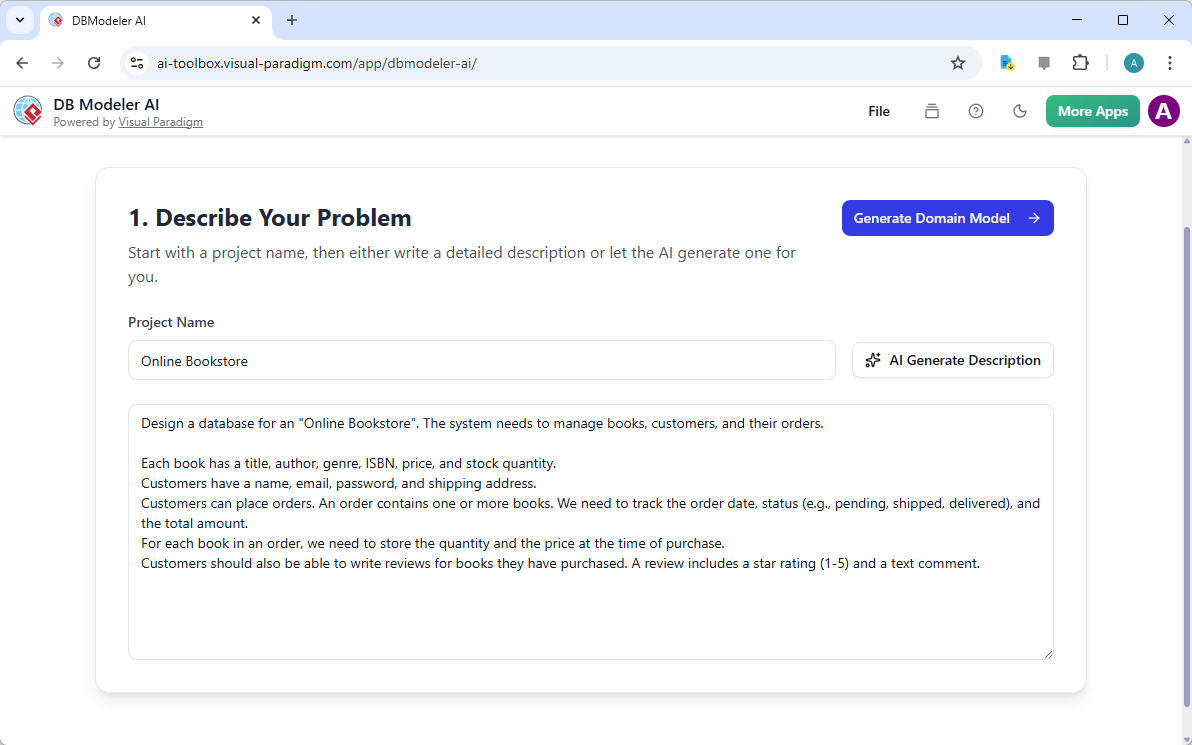
The journey begins with a simple prompt. In the first step, you name your project and tell the DB Modeler AI what you’re trying to solve. For our Bookstore, we just needed to manage books, customers, and orders. If you’re feeling lazy (hey, no judgment!), you can even click “AI Generate Description.” The tool will then flesh out the requirements for you, detailing exactly what data points—like ISBNs, star ratings, and order dates—should be included.
This is where the foundation is laid. By providing a comprehensive problem description, you’re giving the AI the blueprints it needs to build your digital house. It’s like telling a chef exactly what ingredients you like before they start cooking. Once you’re happy with the description, one click on “Generate Domain Model” launches you into the visual world.
Step 2: Visualizing the Big Picture
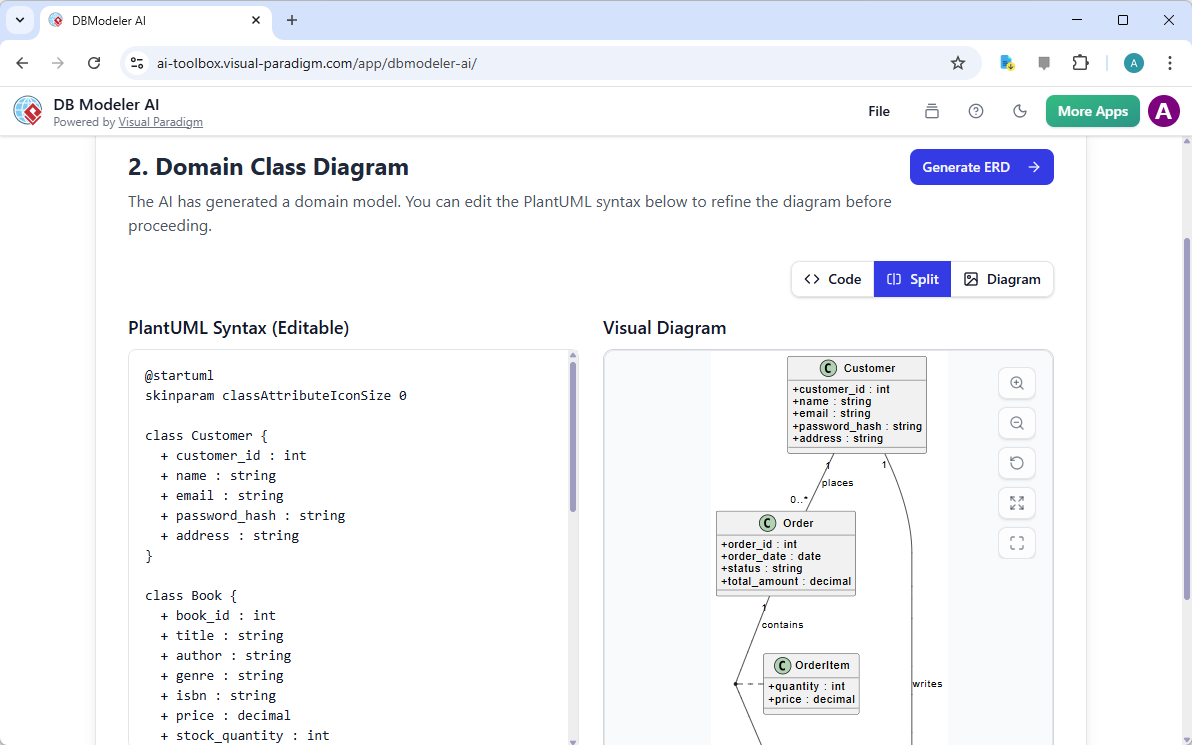
Suddenly, your text is gone, replaced by a sleek Domain Class Diagram. This isn’t just a pretty picture; it’s a conceptual model of your business logic. You’ll see “Customer,” “Book,” and “Order” floating there, connected by lines that explain how they interact. The best part? You can actually edit the PlantUML syntax on the left if you want to tweak something manually. 🛠️
Seeing your bookstore’s structure visually helps you catch errors early. Maybe you realized you forgot to link reviews to customers? No worries! You can refine the model right here. This step bridges the gap between your abstract business requirements and the technical reality that’s about to follow. It’s the easy-to-use database editor experience you’ve always wanted.
Step 3: Getting Serious with the ER Diagram
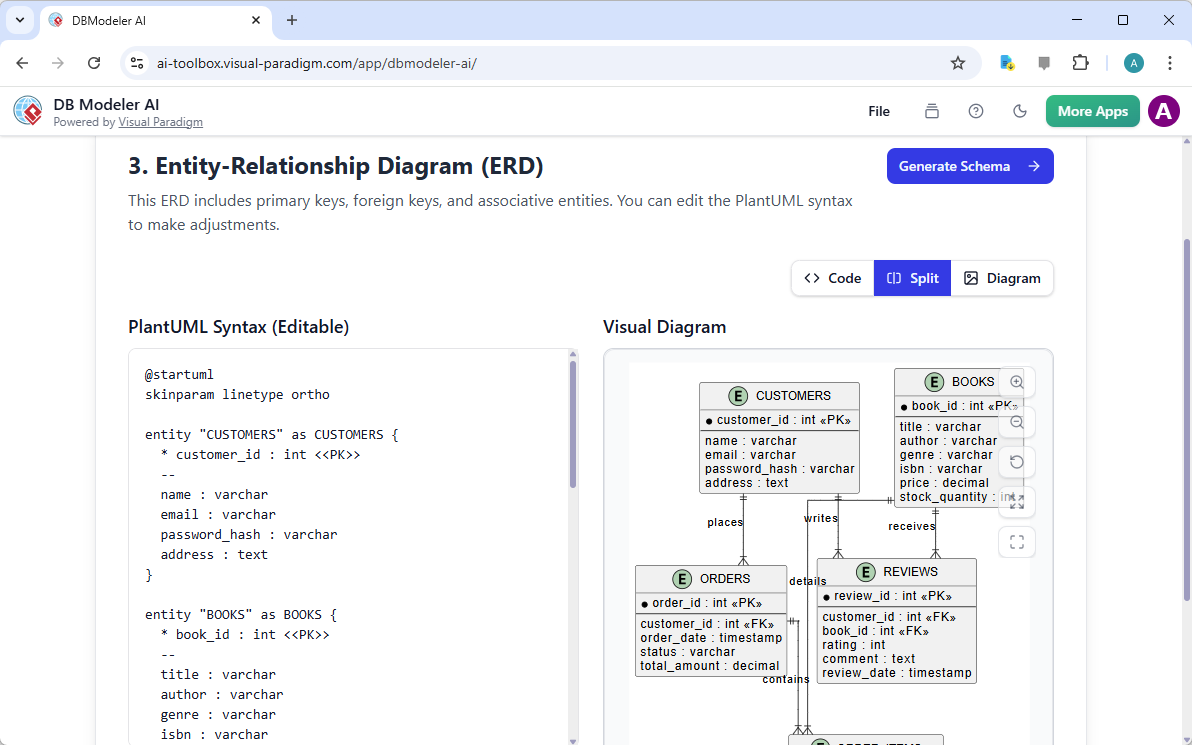
Now things get technical. The tool evolves your class diagram into a full-blown Entity-Relationship (ER) Diagram. This is the “Holy Grail” for developers. The ERD includes primary keys, foreign keys, and associative entities. For our bookstore, this is where we see exactly how an “OrderItem” connects a “Book” to an “Order.” It’s the nervous system of your database.
The AI-powered database modeling engine handles the mapping automatically. It knows that a customer “places” an order and an order “contains” items. Having this visual representation makes it incredibly easy to communicate the design to your team. No more arguing over which table holds the price—it’s all right there in black and white (and blue).
Step 4: The Code Comes Alive (SQL DDL)
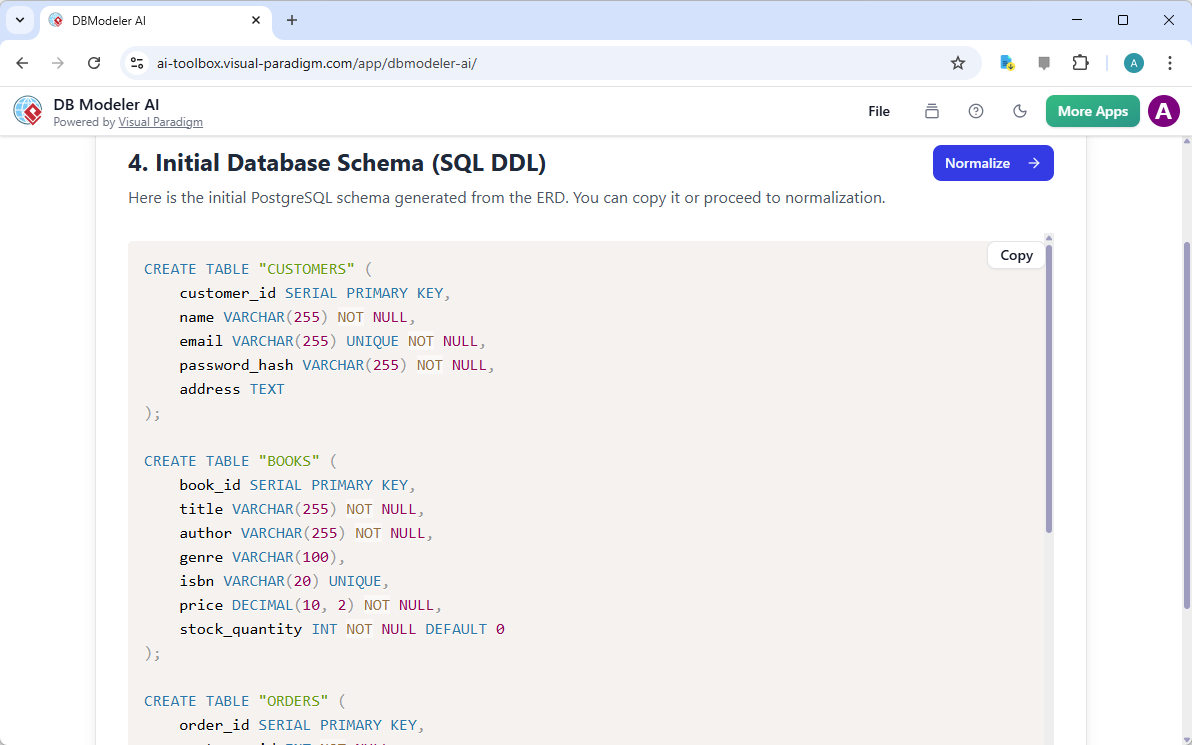
Ready for some code? Step 4 generates the Initial Database Schema (SQL DDL). This is the actual script you would run to create tables in a database like PostgreSQL. You’ll see CREATE TABLE statements, data types like VARCHAR and DECIMAL, and constraints like NOT NULL. It’s professional-grade code generated in seconds.
Even if you’re a SQL pro, having a professional database modeling software draft your DDL is a massive time-saver. You can copy the code directly or, if you’re a perfectionist, proceed to the next step for some serious optimization. The AI ensures that your “Online Bookstore” isn’t just a concept—it’s a functional, code-ready reality.
Step 5: The Normalization Wizardry
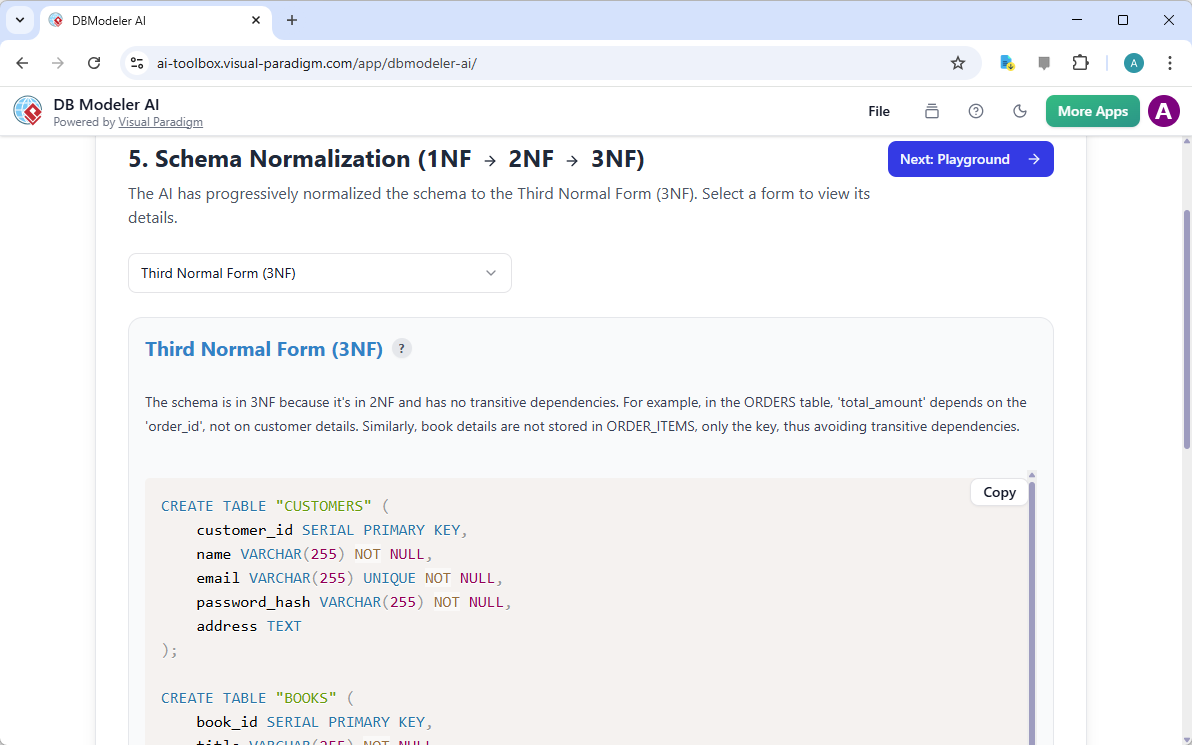
If you’ve ever dealt with a messy database, you know that redundancy is the enemy. Step 5 is where DB Modeler AI performs its Normalization Assistance. It takes your schema through the First, Second, and Third Normal Forms (3NF). This ensures that your bookstore doesn’t store the same customer address in five different places. 🧹
The tool explains *why* it made certain changes, which is fantastic for students or developers looking to sharpen their skills. By the time you reach the Third Normal Form, your database is lean, mean, and ready to scale. It’s the difference between a cluttered closet and a perfectly organized filing cabinet. Efficiency is the name of the game here.
Step 6: Playing in the Sandbox
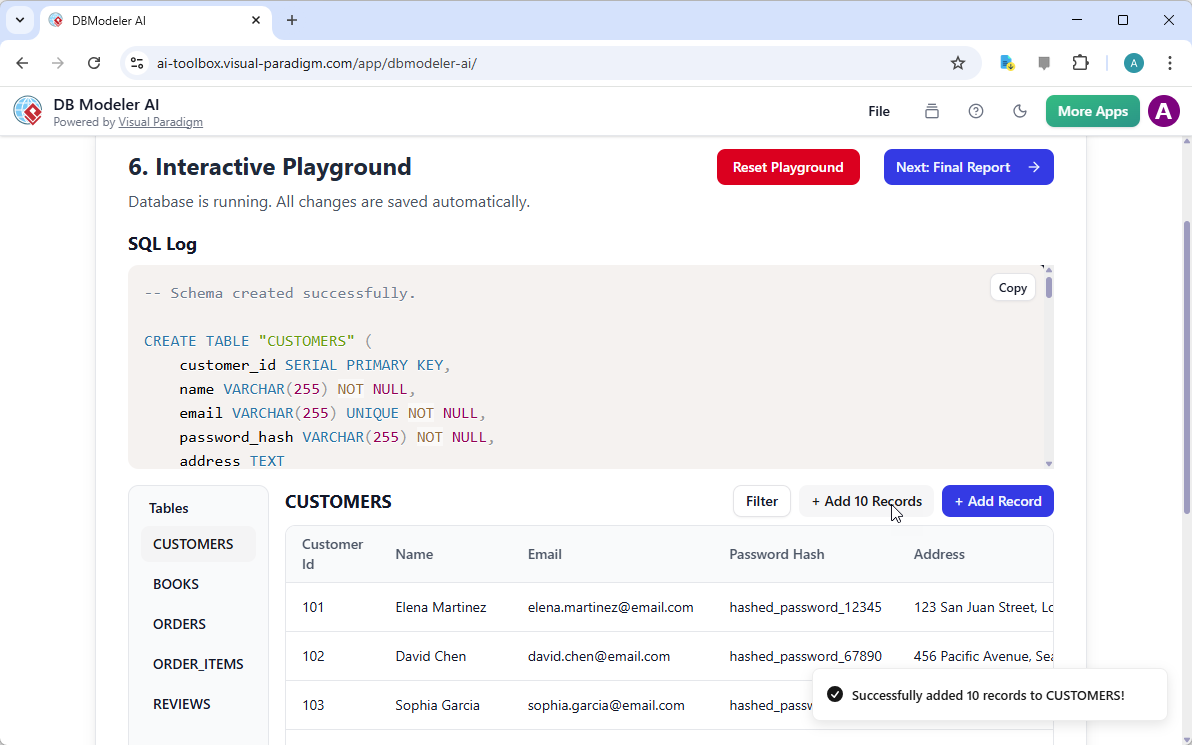
This is where the fun really starts! The Interactive Schema Playground is a unique feature that lets you test your design before you ever touch a production server. You can literally click a button to “Add 10 Records” and watch the table populate with sample data. You can see the SQL log in real-time as the app performs INSERT and SELECT operations.
Want to see if your “Reviews” table actually works? Just add a record! This sandbox environment is perfect for validating your design and making sure the relationships you built in Step 3 actually function as intended. It’s like having a simulated database environment right in your browser. No setup required, no servers to crash—just pure experimentation.
Step 7: The Grand Finale
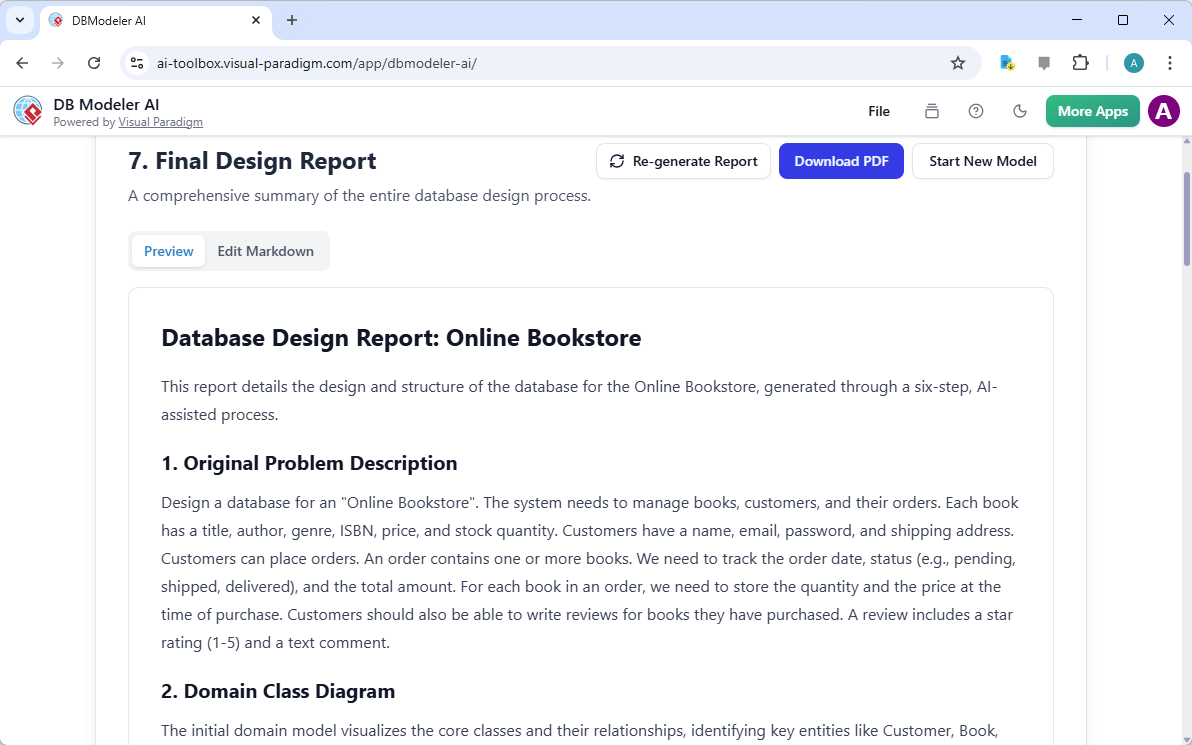
You’ve done it! The final step generates a comprehensive Design Report. This document summarizes everything you’ve built, from the original problem description to the final normalized schema. It’s the perfect artifact to hand over to a client or include in your project documentation. You can download it as a PDF and call it a day.
This 7-step guided workflow ensures that you haven’t missed a single detail. From a vague idea of selling books online to a fully documented, tested, and normalized database schema, DB Modeler AI guides you every inch of the way. It’s not just a tool; it’s a workflow that guarantees design best practices and reduces costly rework later in the development cycle.
Level Up Your Data Design Today!
Building a robust database doesn’t have to be a chore. With the right AI-powered database modeling tool, you can turn a complex architectural task into a streamlined, error-free process. 🚀 Whether you’re designing the next Amazon or just a simple inventory tracker, DB Modeler AI by Visual Paradigm Online provides the expertise you need to succeed. Don’t let your data become a tangled mess—organize it with the power of AI.
Ready to build your own masterpiece? Head over to the DB Modeler AI info page to learn more about the features, or jump straight into the action by visiting the DB Modeler AI App to start your first project. Your future self (and your database) will thank you!
Related Links
-
Visual Paradigm AI Database Modeler: Explore an AI-powered database design tool that automates the generation of database schemas and entity-relationship diagrams from natural language.
-
AI DB Modeler Application: Access a cloud-based application that leverages artificial intelligence to streamline the creation and management of database models.
-
Automating Database Design with AI: Read a comprehensive guide on how artificial intelligence is transforming traditional database design through automated modeling techniques.
-
Guide to Entity Relationship Diagrams (ERD): Learn the fundamentals of Entity Relationship Diagrams, including their components and importance in visual database design.
-
Database Design with ERD Tools: Discover powerful features for building robust database structures using professional entity-relationship diagramming software.