


Creating a Vintage E-Commerce Backlog with Agilien: AI-Powered Project Planning
Imagine you’re a product manager launching an e-commerce platform for vintage clothing — a world where every button, tag, and era matters. You need to map out seller profiles, image galleries, secure checkout, search filters, and reviews. Sounds like a mountain of work, right? Enter Agilien, the AI-powered project planning tool from Visual Paradigm — which turns your vision into a structured, visual backlog in seconds. In this guide, we’ll walk through how a real user generated a complete backlog for a vintage fashion platform using Agilien, and why this tool is a game-changer for agile teams.
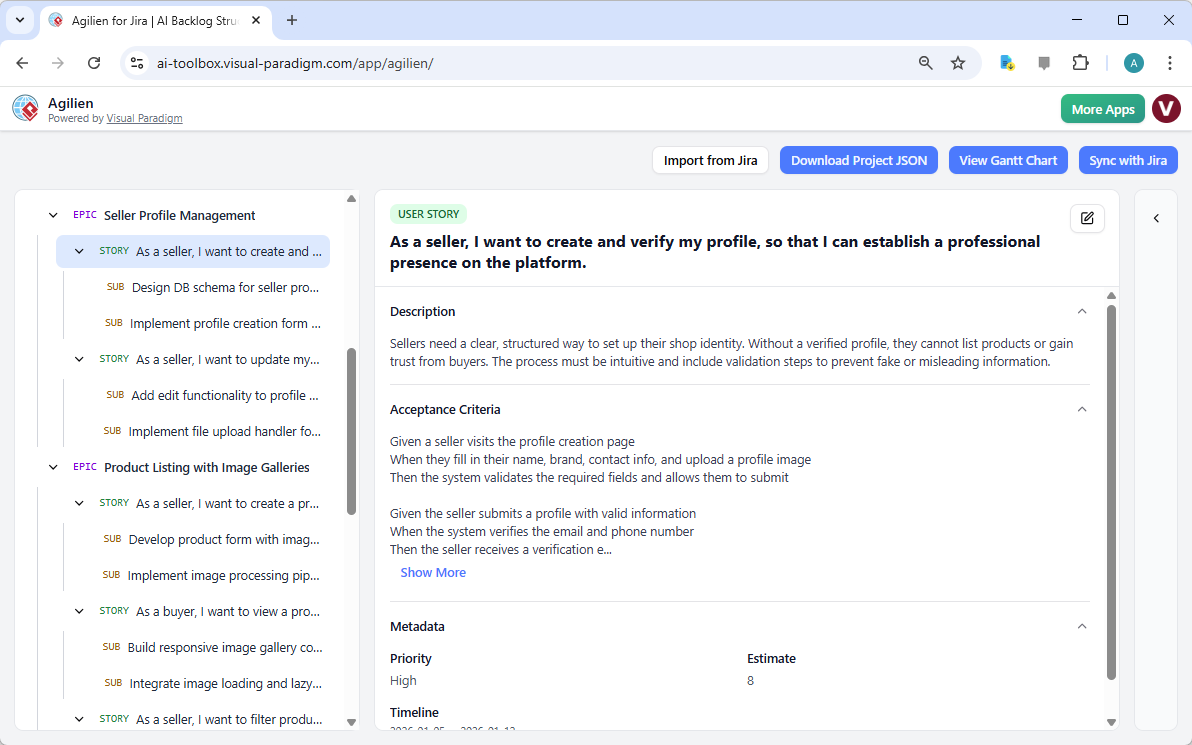
What you’re seeing in the screenshot isn’t just a screenshot — it’s a living, breathing project plan. The left side shows a clean, collapsible hierarchy: Epics, User Stories, and Sub-tasks. The right side reveals the detailed view of one user story — “As a seller, I want to create my profile” — with acceptance criteria, metadata, and even a timeline estimate. This isn’t magic — it’s the result of an AI that understands your domain and generates a realistic, actionable plan based on your inputs. And the best part? You can generate diagrams directly from these stories to visualize the architecture.
Why This Matters: The Agilien Workflow for Real-World Projects
Step 1: Define Your Project with One Sentence
Start by typing a sentence or two that describes your project. For our example, the user typed: “An e-commerce platform specializing in curated vintage and second-hand clothing.” Then added context: “The platform needs seller profiles, product listings with image galleries, a secure checkout process with Stripe integration, a search and filter system (by size, era, brand), and a user review system. The architecture will be a headless CMS with a Next.js frontend.”
That’s it. No jargon. No technical specs. Just your vision. Agilien reads it, analyzes it, and generates a full backlog — epics, stories, and sub-tasks — in under 30 seconds. It’s like having a project architect who’s also a copywriter and a diagram designer, all in one.
Step 2: See the Hierarchy — Epic, Story, Sub-task
The left panel shows your project as a tree structure. You’ll see “Epic” as the top level — like “Seller Profile Management” — then “User Story” underneath, and finally “Sub-task” for the granular work. Each item is clickable, and clicking opens its detail panel. This is the “Agile Hierarchy Management” feature — a visual roadmap that keeps your team aligned and your work organized.
Step 3: Dive into the Detail — Acceptance Criteria, Estimates, and More
When you click on a user story, like “As a seller, I want to create my profile,” you’re not just reading text — you’re seeing a full blueprint. The detail panel includes: description, acceptance criteria (e.g., “Given a seller visits, they must submit email and phone”), priority, and estimate. This is the “Detail Panel Editor” in action — allowing you to tweak, refine, or even add acceptance criteria on the fly. No more vague “this should work” — this is a documented, testable plan.
Step 4: Generate Diagrams from Stories — Visualize the Architecture
Here’s where Agilien truly shines. With the user story selected, you click into the “Diagram Workbench” on the right. You choose “Class Diagram” or “Sequence Diagram” — and the AI generates a visual representation of how that story will be implemented. For example, the “Seller Profile” story might generate a class diagram showing “Seller,” “Profile,” “Verification,” and “Image Upload” as classes with relationships. You can then click into the “Code” tab to edit the PlantUML code — making it editable, not just view-only. This is the “AI Diagram Workbench” — turning abstract requirements into visual, technical blueprints.
Key Takeaways: What You Can Do with Agilien
-
Generate a full backlog in seconds — from a single sentence, Agilien creates epics, stories, and sub-tasks.
-
Visualize architecture directly from stories — generate Sequence, Activity, or Class diagrams to map out how your software will work.
-
Keep everything in one place — the “Detail Panel” lets you edit descriptions, acceptance criteria, and estimates without switching tools.
-
Connect diagrams to stories — attach generated diagrams as “attachments” so every user story has a visual reference.
-
Integrate with Jira — import or sync your plan to Jira to keep your official records in sync (premium feature).
Why This Tool Is a Game-Changer for Agile Teams
Agilien isn’t just another project management tool — it’s a bridge between planning and design. It eliminates the “planning vs. design” disconnect that plagues many agile teams. Product managers don’t have to explain “this is how we’ll do it” — the AI generates the diagrams. Architects don’t have to manually draw UML — Agilien does it for them. And developers? They get a clear, visual understanding of what’s being built — reducing ambiguity and rework.
It’s also incredibly flexible. You can use the AI to get a quick start, then dive in and manually edit every detail — whether you’re refining the PlantUML code or adjusting the timeline. This hybrid approach lets you use Agilien as your primary planning and design workbench, while keeping your official records in Jira perfectly synced.
Final Thoughts: From Vision to Visual Plan in Minutes
Agilien is the AI-powered project planning and software design assistant that turns your project ideas into a structured, visual, and actionable plan — all in minutes. Whether you’re a product manager, software architect, or agile team member, this tool helps you move from idea to execution faster than ever before. And with features like the “Live PlantUML Editor,” you can fine-tune your diagrams with precision — even if you don’t know PlantUML.
For teams building e-commerce platforms, SaaS apps, or any complex software system, Agilien is the ultimate AI-driven project planning and design assistant. It’s not just a tool — it’s a partner in your agile journey.
Ready to Try It?
Click the link below to start your own project with Agilien — no experience required. Just type your project idea, and let the AI do the heavy lifting.
Related Links
-
Agilien – AI-Powered Agile Modeling Platform: Agilien is an AI-driven platform within Visual Paradigm that enables automated agile modeling and project planning.
-
Introducing Agilien AI Jira Backlog Generation Tool: This release introduces an AI-powered tool that automatically generates Jira backlogs from user stories and requirements.
-
Agilien Guide – Getting Started with AI-Powered Agile Modeling: A comprehensive guide to using Agilien within VP Online for AI-assisted agile project modeling and documentation.