


“A picture is worth a thousand lines of code.”
— This adage holds true in software engineering, especially when using Unified Modeling Language (UML) to visualize complex systems. In this article, we’ll explore a real-world case study of a telephone system, using a meticulously crafted UML Class Diagram as our foundation. We’ll dissect its structure, analyze relationships, and translate the design into practical development principles — all while adhering to industry best practices.
🔷 Introduction: Why UML Class Diagrams Matter
In object-oriented software design, UML Class Diagrams serve as the architectural blueprint of a system. They define the static structure — the classes, their attributes, operations, and how they relate to one another. These diagrams are not just for documentation; they are essential tools for communication among developers, stakeholders, and architects.
This article uses a well-structured UML Class Diagram of a telephone system to demonstrate how to:
-
Identify core structural components
-
Model relationships accurately
-
Apply object-oriented design principles
-
Translate visual models into clean, maintainable code
Let’s dive in.
🧱 1. Core Structural Components: The Building Blocks of UML
Every class diagram begins with the fundamental elements: classes, attributes, and operations.
✅ Class: The Blueprint of Objects
-
Represented by a blue rectangle divided into three sections:
-
Top: Class name (e.g.,
Telephone) -
Middle: Attributes (data fields)
-
Bottom: Operations (methods)
-
Example:
+-------------------+
|   Telephone       |
+-------------------+
| - hook : boolean  |
| - connection : Line|
+-------------------+
| + dial(n: int)    |
| + offHook()       |
| + onHook()        |
+-------------------+
✅ Attributes: Data That Defines State
-
Declared in the middle section of the class box.
-
Preceded by a visibility symbol:
-
-= private (only accessible within the class) -
+= public (accessible from outside) -
#= protected (accessible in subclasses)
-
Example:
- busy : boolean
This means theLineclass tracks whether it’s currently in use — but only it can modify this state directly.
✅ Operations (Methods): Behavior and Interaction
-
Defined in the bottom section.
-
Follow the syntax:
+ operationName(parameters) : returnType
Example:
+ dial(n: int) : void
Indicates that aTelephonecan initiate a call to a numbern.
💡 Best Practice: Use camelCase for method names (
offHook(),dial()), and PascalCase for class names (Telephone,AnsweringMachine).
🔗 2. Relationships and Associations: How Objects Interact
The true power of a class diagram lies not in the individual classes, but in the relationships between them. These connections define the system’s dynamic behavior.
🔄 Association: A General Link Between Classes
An association is a relationship where one class knows about another.
🔹 Role Names: Clarify Context
-
In your diagram,
connectionandconnectedPhonesare role names. -
They clarify what the relationship means in context:
-
Telephonehas aconnectionto aLine. -
Linemaintains a list ofconnectedPhones.
-
This prevents ambiguity: Is it “a phone connected to a line” or “a line connected to a phone”? Role names make it clear.
🔹 Multiplicity: The Quantitative Side of Relationships
Multiplicity defines how many instances of one class are associated with another.
| Multiplicity | Meaning | Example |
|---|---|---|
0..1 |
Zero or one | A Telephone may be connected to zero or one Line |
0..* |
Zero or many | A Line can support many Telephones |
1 |
Exactly one | A Message must belong to exactly one AnsweringMachine |
* |
Many | A Line can have many Telephones |
⚠️ Never leave multiplicity blank — it’s a critical constraint that guides implementation and prevents logic errors.
🧩 Aggregation vs. Composition: The “Whole-Part” Relationship
These are specialized forms of association that describe ownership and lifecycle dependencies.
| Relationship | Visual Indicator | Meaning | Example |
|---|---|---|---|
| Aggregation | Empty diamond (◇) | “Has-a” relationship; part can exist independently | Telephone has a Ringer. If the phone is discarded, the ringer still exists conceptually. |
| Composition | Filled diamond (◆) | Strong “has-a”; part cannot exist without the whole | AnsweringMachine owns Message. Delete the machine → all messages are destroyed. |
🔍 Key Insight:
Aggregation: Shared ownership (e.g., a car has wheels, but wheels can be reused).
Composition: Exclusive ownership (e.g., a house has rooms — if the house is demolished, so are the rooms).
✅ Pro-Tip: In code, aggregation often translates to a reference (pointer), while composition implies object instantiation inside the parent’s constructor.
📡 3. Case Study: The Telephone System — A Deep Dive
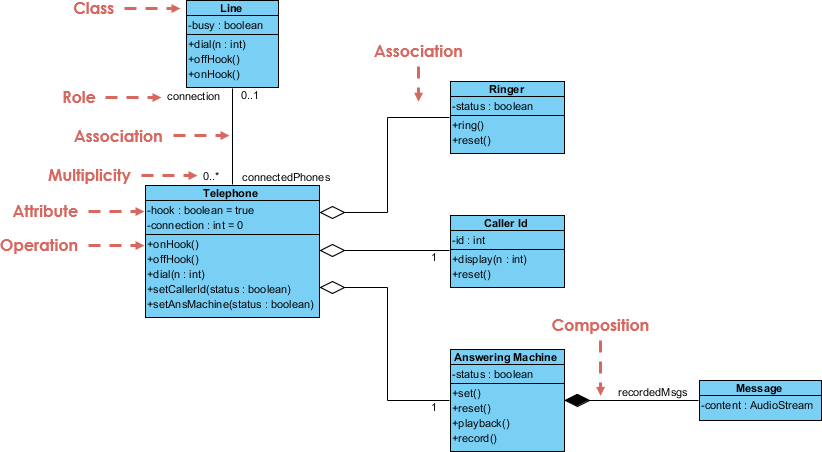
Let’s walk through the logic of the system as depicted in the diagram.
🏗️ 1. The Backbone: The Line Class
-
Manages the state of the connection (
busy : boolean) -
Acts as a central coordinator for calls
-
Has a multiplicity of
0..*on theconnectedPhonesside → a single line can serve multiple telephones
🔄 Interaction: When a
Telephonedials, it sends a request to theLineto check availability.
📱 2. The User Interface: The Telephone Class
-
Central hub of the system
-
Contains:
-
hook : boolean→ tracks if the handset is off the cradle -
connection : Line→ reference to the active line
-
-
Provides key operations:
-
dial(n: int)→ initiates a call -
offHook()→ lifts the handset -
onHook()→ places it back
-
🎯 Design Principle: The
Telephoneclass remains focused on user interaction — complex features are delegated to other components.
🛠️ 3. Modular Components: Decoupling for Maintainability
To prevent the Telephone class from becoming a “god object,” functionality is outsourced to specialized classes:
| Component | Type | Responsibility |
|---|---|---|
Ringer |
Aggregation | Plays sound when a call comes in |
CallerId |
Aggregation | Displays incoming caller number |
AnsweringMachine |
Composition | Records and stores messages |
✅ Why This Matters:
If you need to replace the ringer with a new sound engine, you only modify
Ringer— not the entireTelephone.Composition ensures data integrity: messages are tied to the machine and cannot exist independently.
✨ 4. Best Practices for Drawing Effective UML Class Diagrams
Creating a high-quality UML diagram isn’t just about drawing lines — it’s about clarity, consistency, and correctness.
✅ 1. Use Consistent Naming Conventions
-
Classes: Singular, PascalCase
→Telephone,Message,Line -
Attributes & Methods: camelCase
→offHook(),getCallerId(),isBusy()
❌ Avoid:
Telephones,call_number,DialCall()
✅ 2. Keep It Clean — The “No Spaghetti” Rule
-
Avoid crossing lines — reposition classes to minimize overlap.
-
Group related classes together:
-
Place
Ringer,CallerId, andAnsweringMachinenearTelephone -
Keep
LineandMessagein a logical cluster
-
🎨 Tip: Use layout tools (like StarUML, Visual Paradigm, or Lucidchart) to auto-align and organize.
✅ 3. Be Precise with Multiplicity
-
Never use
*when you mean1..* -
Use
0..1instead of1if the relationship is optional -
Always ask: “Can this object exist without the other?”
🧠 Example:
AMessagemust belong to anAnsweringMachine→ use1on theAnsweringMachineside and*on theMessageside.
✅ 4. Respect Encapsulation
-
Private attributes (
-) → hide internal state -
Public methods (
+) → expose controlled access
🔒 Example:
Lineshould not exposebusydirectly. Instead:
This allows validation (e.g., prevent setting
busy = trueunless the line is free).
🧩 5. From Diagram to Code: A Practical Skeleton (Java & Python)
Let’s bring the diagram to life with code. Below are skeletons in Java and Python, showing how UML translates into real-world implementation.
Java Implementation (Continued)
public class Telephone {
private boolean hook; // true = off hook
private Line connection;
private Ringer ringer;
private CallerId callerId;
private AnsweringMachine answeringMachine;
public Telephone() {
    this.hook = true; // on hook initially
    this.ringer = new Ringer();
    this.callerId = new CallerId();
    this.answeringMachine = new AnsweringMachine(); // Composition: created here
}

public void offHook() {
    this.hook = false;
    System.out.println("Phone lifted from cradle.");
    if (connection != null && !connection.isBusy()) {
        connection.setBusy(true);
        ringer.ring(); // Aggregation: Ringer is used, but not owned
    } else {
        System.out.println("Line is busy or not connected.");
    }
}

public void onHook() {
    this.hook = true;
    if (connection != null) {
        connection.setBusy(false);
    }
    ringer.stop(); // Stop ringing when hung up
    System.out.println("Phone placed back on cradle.");
}

public void dial(int number) {
    if (connection == null) {
        System.out.println("No line connected.");
        return;
    }
    if (connection.isBusy()) {
        System.out.println("Line is busy. Cannot dial.");
        return;
    }

    System.out.println("Dialing number: " + number);
    callerId.display(number); // Show caller ID

    // Simulate incoming call handling
    if (answeringMachine.isActivated()) {
        answeringMachine.recordCall(number);
    } else {
        ringer.ring(); // Alert user
    }
}

// Getters and setters
public boolean isHook() { return hook; }
public void setConnection(Line line) { this.connection = line; }
public AnsweringMachine getAnsweringMachine() { return answeringMachine; }
}
---

### 🐍 **Python Implementation (Clean, Object-Oriented)**

```python
from typing import List, Optional

class Line:
    def __init__(self):
        self._busy: bool = False
        self._connected_phones: List['Telephone'] = []

    @property
    def busy(self) -> bool:
        return self._busy

    @busy.setter
    def busy(self, value: bool):
        self._busy = value

    def add_phone(self, phone: 'Telephone'):
        self._connected_phones.append(phone)

    def __str__(self):
        return f"Line(busy={self._busy}, phones={len(self._connected_phones)})"


class Ringer:
    def ring(self):
        print("🔔 Ringing...")

    def stop(self):
        print("🔔 Ringing stopped.")


class CallerId:
    def display(self, number: int):
        print(f"📞 Incoming call from: {number}")


class Message:
    def __init__(self, caller_id: int, timestamp: str):
        self.caller_id = caller_id
        self.timestamp = timestamp

    def __str__(self):
        return f"Message from {self.caller_id} at {self.timestamp}"


class AnsweringMachine:
    def __init__(self):
        self._messages: List[Message] = []
        self._activated: bool = False

    @property
    def activated(self) -> bool:
        return self._activated

    @activated.setter
    def activated(self, value: bool):
        self._activated = value

    def record_call(self, caller_id: int):
        from datetime import datetime
        timestamp = datetime.now().strftime("%Y-%m-%d %H:%M:%S")
        message = Message(caller_id, timestamp)
        self._messages.append(message)
        print(f"✅ Message recorded: {message}")

    def get_messages(self) -> List[Message]:
        return self._messages.copy()

    def __str__(self):
        return f"AnsweringMachine(messages={len(self._messages)}, activated={self._activated})"


class Telephone:
    def __init__(self):
        self._hook: bool = True  # True = on hook
        self._connection: Optional[Line] = None
        self._ringer = Ringer()
        self._caller_id = CallerId()
        self._answering_machine = AnsweringMachine()  # Composition: created here

    def off_hook(self):
        self._hook = False
        print("📞 Phone lifted from cradle.")
        if self._connection and not self._connection.busy:
            self._connection.busy = True
            self._ringer.ring()
        else:
            print("❌ Line is busy or not connected.")

    def on_hook(self):
        self._hook = True
        if self._connection:
            self._connection.busy = False
        self._ringer.stop()
        print("📞 Phone placed back on cradle.")

    def dial(self, number: int):
        if not self._connection:
            print("❌ No line connected.")
            return
        if self._connection.busy:
            print("❌ Line is busy. Cannot dial.")
            return

        print(f"📞 Dialing: {number}")
        self._caller_id.display(number)

        if self._answering_machine.activated:
            self._answering_machine.record_call(number)
        else:
            self._ringer.ring()

    @property
    def hook(self) -> bool:
        return self._hook

    @property
    def connection(self) -> Optional[Line]:
        return self._connection

    @connection.setter
    def connection(self, line: Line):
        self._connection = line
        line.add_phone(self)

    def activate_answering_machine(self):
        self._answering_machine.activated = True
        print("🎙️ Answering machine activated.")

    def __str__(self):
        status = "off hook" if not self._hook else "on hook"
        return f"Telephone(hook={status}, connected_to={self._connection})"


# === Usage Example ===
if __name__ == "__main__":
    line = Line()
    phone = Telephone()
    phone.connection = line  # Establish association

    phone.off_hook()
    phone.dial(5551234)

    phone.activate_answering_machine()
    phone.dial(5555555)  # Will be recorded

    print("\n--- System State ---")
    print(phone)
    print(line)
    print(phone._answering_machine)
📌 Key Takeaways: From Diagram to Delivery
| UML Concept | Code Translation | Design Benefit |
|---|---|---|
Aggregation (◇) |
Reference field (e.g., Ringer ringer) |
Flexible reuse, independent lifecycle |
Composition (◆) |
Object created inside constructor | Strong ownership, automatic cleanup |
Private Attributes |
private fields with getter/setter |
Encapsulation, data integrity |
Multiplicity |
Validation logic in methods | Prevents invalid states |
Role Names |
Clear method names and variable semantics | Self-documenting code |
✅ Final Pro-Tips for Developers & Architects
-
Start with the diagram, not the code.
A well-thought-out UML diagram reduces rework and communication gaps. -
Review multiplicity with stakeholders.
Ask: “Can a message exist without a machine?” → No → Composition. -
Use tools wisely.
Tools like Visual Paradigm, or PlantUML help maintain consistency and auto-generate code. -
Refactor early.
If a class has more than 10 methods or 15 attributes, consider splitting it (Single Responsibility Principle). -
Treat UML as a living document.
Update it as requirements evolve — it should reflect reality, not just a past vision.
🛠️ 6. Tooling with Visual Paradigm: Bringing UML Diagrams to Life
While understanding UML concepts is essential, effective tooling is what transforms abstract design ideas into precise, shareable, and maintainable models. Among the leading tools for UML modeling, Visual Paradigm stands out as a powerful, intuitive, and enterprise-ready solution for creating, managing, and collaborating on class diagrams — especially for complex systems like the telephone system we’ve explored.
✅ Why Visual Paradigm? A Developer’s Perspective
Visual Paradigm (VP) is a comprehensive modeling and design tool that supports the full lifecycle of software development, from initial requirements to code generation. For teams working with UML Class Diagrams, VP offers a unique blend of accuracy, automation, and collaboration — making it ideal for both beginners and seasoned architects.
🔍 Key Advantages of Visual Paradigm:
| Feature | Benefit |
|---|---|
| Drag-and-Drop Interface | Instantly create classes, attributes, operations, and relationships without writing syntax. |
| Auto-Layout & Alignment | Keeps diagrams clean and professional — no more spaghetti lines or misaligned boxes. |
| Real-Time Validation | Flags invalid multiplicities, missing visibility, or inconsistent associations as you build. |
| Bidirectional Engineering | Generate code (Java, Python, C#, etc.) from diagrams — or reverse-engineer existing code into UML. |
| Team Collaboration | Share models via cloud workspace, comment on elements, and track changes across teams. |
| Integration with IDEs & DevOps | Export to PlantUML, Mermaid, or integrate with Git, Jira, and CI/CD pipelines. |
🎯 Step-by-Step: Building the Telephone System in Visual Paradigm
Let’s walk through how you’d build the telephone system class diagram using Visual Paradigm — from scratch to a professional-grade model.
Step 1: Create a New UML Project
-
Open Visual Paradigm.
-
Select “New Project” → Choose “UML” → Pick “Class Diagram”.
-
Name your diagram:
TelephoneSystem_Model.
Step 2: Add Core Classes
-
From the Palette, drag Class icons onto the canvas.
-
Rename them:
Telephone,Line,Ringer,CallerId,AnsweringMachine,Message. -
Use PascalCase for class names (as per best practice).
Step 3: Define Attributes and Operations
-
Double-click a class to open its Properties Panel.
-
In the Attributes tab, add:
- hook : boolean - connection : Line - busy : boolean -
In the Operations tab, add:
+ offHook()
+ onHook()
+ dial(n: int) : void
+ isBusy() : boolean
💡 Tip: Use the “Add” button to quickly insert attributes/operations. VP auto-suggests syntax based on language settings.
Step 4: Model Relationships with Precision
Now, connect the classes using the Association Tool (the line with an arrowhead):
-
Line ↔ Telephone (Association with Roles)
-
Draw a line between
LineandTelephone. -
In the Properties Panel, set:
-
Role A (Line side):
connectedPhones→ Multiplicity:0..* -
Role B (Telephone side):
connection→ Multiplicity:0..1
-
-
-
AnsweringMachine → Message (Composition)
-
Use the Composition tool (filled diamond).
-
Drag from
AnsweringMachinetoMessage. -
Set multiplicity:
1onAnsweringMachineside,*onMessageside.
-
-
Telephone → Ringer & CallerId (Aggregation)
-
Use Aggregation (empty diamond).
-
Connect
TelephonetoRingerandCallerId. -
Set multiplicity:
1(Telephone) →1(Ringer) — meaning one ringer per phone.
-
✅ Visual Paradigm automatically renders the correct symbols: ◇ for aggregation, ◆ for composition.
Step 5: Validate and Refine
-
Use “Check Model” (under Tools > Validate) to detect:
-
Missing multiplicities
-
Inconsistent visibility
-
Circular dependencies
-
-
Use “Auto-Layout” to organize the diagram neatly.
Step 6: Generate Code (or Reverse Engineer)
-
Right-click on the diagram → “Generate Code”.
-
Choose language: Java or Python.
-
Select output folder → Click Generate.
📌 Result: VP generates clean, well-structured classes with proper encapsulation, method signatures, and relationships — exactly like the code skeletons we built earlier.
Step 7: Export & Share
-
Export the diagram as:
-
PNG/SVG for reports or presentations
-
PDF for documentation
-
PlantUML/Mermaid code for integration into Markdown or Confluence
-
-
Share via Visual Paradigm Cloud — collaborate in real time with team members.
🔄 Bidirectional Engineering: The Game-Changer
One of Visual Paradigm’s most powerful features is bidirectional engineering — the ability to go from diagram to code and back.
Example Workflow:
-
Start with UML → Design the telephone system.
-
Generate Java/Python code → Use it in your IDE.
-
Modify the code (e.g., add a
callHistorylist inAnsweringMachine). -
Reverse Engineer → VP detects changes and updates the diagram automatically.
✅ No more manual synchronization! The model stays in sync with the implementation.
💼 Use Cases for Teams & Organizations
| Use Case | How VP Helps |
|---|---|
| Onboarding New Developers | Visual diagrams serve as instant documentation. |
| System Architecture Reviews | Share diagrams with stakeholders for feedback. |
| Legacy System Modernization | Reverse-engineer old code into UML to understand it. |
| Agile Documentation | Keep UML diagrams updated with each sprint. |
| Academic & Training Environments | Teach UML concepts visually with real-time feedback. |
📦 Getting Started with Visual Paradigm
-
What Is a Class Diagram? – A Beginner’s Guide to UML Modeling: This resource provides an informative overview explaining the purpose, components, and importance of class diagrams in software development and system design.
-
Complete UML Class Diagram Tutorial for Beginners and Experts: A step-by-step guide that walks users through the process of creating and understanding diagrams to master software modeling.
-
AI-Powered UML Class Diagram Generator by Visual Paradigm: This advanced tool utilizes artificial intelligence to automatically generate UML class diagrams from natural language descriptions, streamlining the design process.
-
From Problem Description to Class Diagram: AI-Powered Textual Analysis: This article explores how AI can convert natural language problem descriptions into accurate class diagrams for efficient software modeling.
-
Learning Class Diagrams with Visual Paradigm – ArchiMetric: An article highlighting the platform as an excellent choice for developers to model the structure of a system in object-oriented design.
-
How to Draw Class Diagrams in Visual Paradigm – User Guide: A detailed technical guide explaining the step-by-step software process of creating class diagrams within the environment.
-
Free Online Class Diagram Tool – Create UML Class Diagrams Instantly: This resource introduces a free, web-based tool for building professional UML class diagrams quickly without local installation.
-
Mastering Class Diagrams: An In-Depth Exploration with Visual Paradigm: A comprehensive guide that provides an in-depth technical exploration of class diagram creation for UML modeling.
-
Class Diagram in UML: Core Concepts and Best Practices: A video tutorial that explains how to represent the static structure of a system, including attributes, methods, and relationships.
-
Step-by-Step Class Diagram Tutorial Using Visual Paradigm: This tutorial outlines the specific steps needed to open the software, add classes, and build a diagram for system architecture.
🏁 Final Thoughts: Tooling as a Design Enabler
Visual Paradigm isn’t just a diagramming tool — it’s a design companion that turns theoretical UML concepts into actionable, executable blueprints. By automating tedious tasks, enforcing best practices, and enabling collaboration, it empowers teams to:
-
Design faster
-
Communicate clearer
-
Code with confidence
🌟 Whether you’re a solo developer sketching a small system or a team architect building enterprise software, Visual Paradigm bridges the gap between vision and reality.
📌 Next Steps: Try It Yourself
Want to see the telephone system diagram in action?
👉 I can generate a ready-to-import Visual Paradigm project file (.vp) or provide the PlantUML code for easy sharing.
Just say the word — and let’s build your next system, one class at a time. 🛠️💡
🎯 Conclusion: Design First, Code Second
The telephone system case study demonstrates how a simple UML Class Diagram can model a real-world system with precision and clarity. By understanding:
-
The structure of classes,
-
The relationships between them,
-
And the principles of OOP like encapsulation and composition,
You can design systems that are:
-
Maintainable
-
Scalable
-
Testable
-
Collaborative
🌟 Remember: A great diagram isn’t just a picture — it’s a contract between designers, developers, and users.
🔗 Want More? Try This Challenge
✍️ Exercise: Extend the telephone system to support:
Call forwarding
Call waiting
Multiple lines per phone
Use UML to model the new classes and relationships. Then implement them in your preferred language.
Let me know — I’d be happy to generate the updated diagram and code for you!
Related posts:
 Comprehensive Guide to Using Use Case and Sequence Diagrams Together
The Key Benefits of Using UML Use Case Diagrams in Requirements Gathering
Comprehensive Guide to Levels of Abstraction in Sequence Diagrams
AI Flipbook Maker Review: Revolutionizing Digital Publishing with AI and Virtual Bookshelves
Comprehensive Guide to Using Use Case and Sequence Diagrams Together
The Key Benefits of Using UML Use Case Diagrams in Requirements Gathering
Comprehensive Guide to Levels of Abstraction in Sequence Diagrams
AI Flipbook Maker Review: Revolutionizing Digital Publishing with AI and Virtual Bookshelves