Building robust software systems begins with a clear understanding of what needs to be built and how it should behave. This process, known as Object-Oriented Analysis and Design (OOAD), bridges the gap between abstract user needs and concrete technical implementations. The journey from raw requirements to a structured object model is critical. It ensures that the final product is maintainable, scalable, and aligned with business goals.
Many projects stumble not because of coding errors, but because the foundational analysis was skipped or misunderstood. We often see teams jumping straight into implementation without a clear map. This approach leads to technical debt and rigid systems that resist change. By following a disciplined path from requirements to object models, we create a blueprint that guides development effectively.
📋 Understanding the Starting Point: Requirements
The foundation of any successful object model lies in the requirements. These are the statements that define what the system must do. They are the “what” before the “how.” Requirements come in various forms, from user stories to functional specifications.
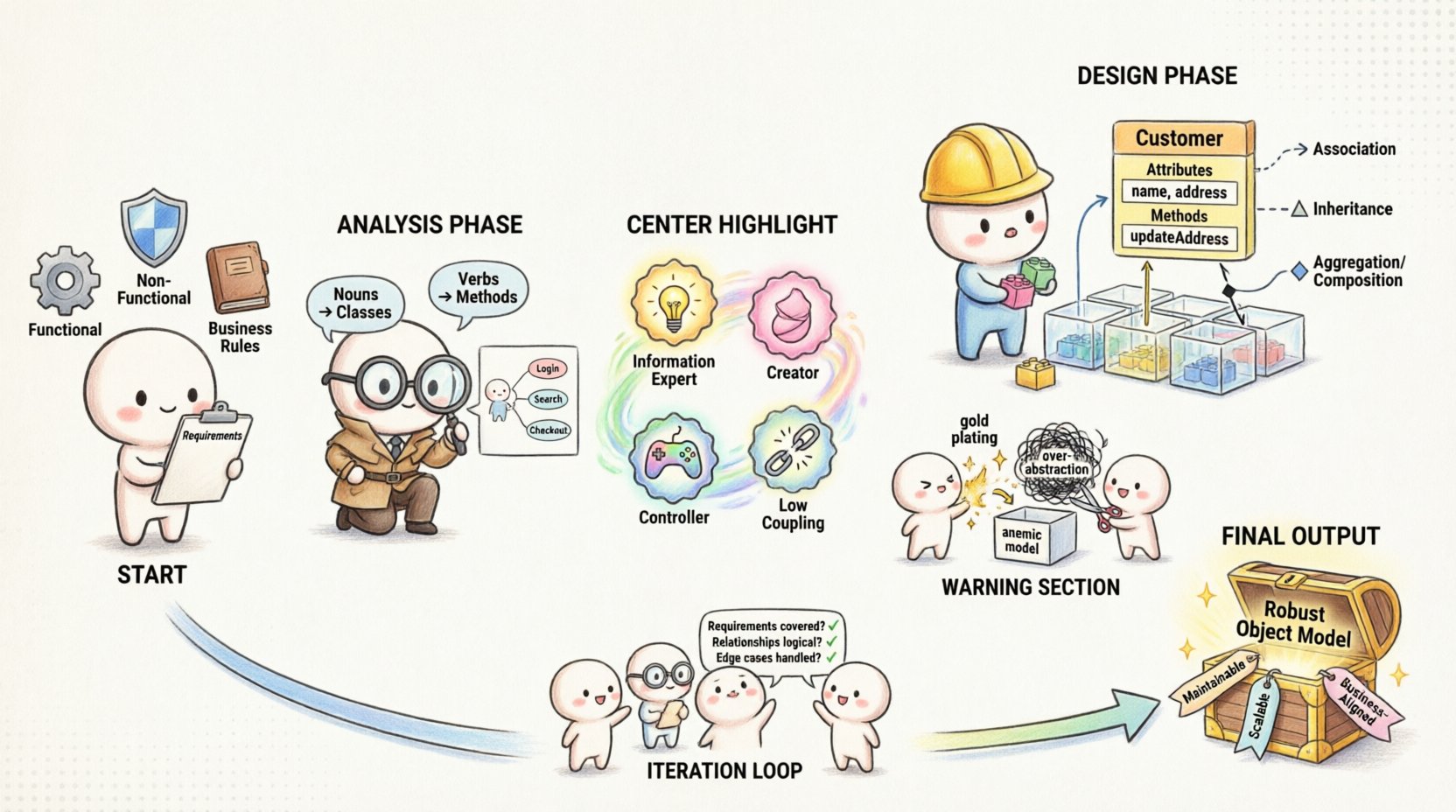
- Functional Requirements: These describe specific behaviors or functions. For example, “The system shall calculate tax based on the user’s location.”
- Non-Functional Requirements: These describe qualities of the system, such as performance, security, and reliability. For example, “The system must respond within 200 milliseconds.”
- Business Rules: Constraints and logic that govern the domain. For example, “A user cannot be assigned to more than three active projects.”
Collecting these requirements is an investigative process. It involves talking to stakeholders and observing workflows. The goal is to capture the intent, not just the feature list. When requirements are vague, the resulting object model will be flawed. Ambiguity in the early stages compounds exponentially during design and coding.
🔍 The Analysis Phase: Identifying the Domain
Once requirements are gathered, the analysis phase begins. This stage focuses on understanding the problem domain rather than the solution domain. We are looking for the concepts that exist within the business context. These concepts become the candidates for our objects and classes.
🧩 Finding the Nouns and Verbs
A common technique involves analyzing the text of the requirements. We look for nouns and verbs.
- Nouns: Often represent entities, objects, or classes. In a banking context, “Account,” “Transaction,” and “Customer” are strong candidates for classes.
- Verbs: Often represent behaviors or methods. “Deposit,” “Withdraw,” and “Transfer” suggest methods or actions performed on the classes.
However, not every noun is a class. Some nouns are attributes, while others are roles played by objects in different contexts. Careful judgment is required to distinguish between a persistent entity and a transient value.
🗺️ Use Case Modeling
Use cases provide a structured way to describe interactions between users (actors) and the system. They help identify the scope of the system and the triggers for functionality.
When creating a use case model, consider the following steps:
- Identify the actors: Who interacts with the system?
- Identify the goals: What are the actors trying to achieve?
- Define the flow: What are the steps to achieve the goal?
- Identify exceptions: What happens if things go wrong?
This activity helps reveal hidden requirements and clarifies the boundaries of the system. It ensures that the object model will support the necessary interactions.
🏗️ Transitioning to Object Models
The transition from analysis to design is where the abstract concepts become structured blueprints. This is where we define the classes, their attributes, and their relationships. The object model is the heart of the design, representing the static structure of the system.
📝 Defining Classes and Attributes
A class is a blueprint for creating objects. It defines a set of properties and behaviors. When defining classes, we must be precise.
- Attributes: The data held by an object. For a
Customerclass, attributes might includename,address, andaccountBalance. - Methods: The behaviors the object can perform. For
Customer, methods might includeupdateAddressorgetHistory.
It is vital to ensure that classes follow the Single Responsibility Principle. A class should have one reason to change. If a class handles both user authentication and report generation, it is likely doing too much.
🔗 Establishing Relationships
Objects do not exist in isolation. They interact with each other. The object model must clearly define these relationships.
- Association: A link between objects. A
Studentis associated with aCourse. - Inheritance: A relationship where one class derives from another. A
SpecialAccountinherits fromAccount. - Aggregation: A whole-part relationship where the parts can exist independently. A
DepartmenthasEmployees, but employees can exist without the department. - Composition: A stronger whole-part relationship where parts cannot exist without the whole. A
HousehasRooms; if the house is destroyed, the rooms cease to exist in that context.
Defining these relationships correctly is crucial for data integrity and system behavior. Misinterpreting aggregation as composition can lead to data loss or resource leaks.
📊 Comparing Analysis and Design Artifacts
To clarify the distinction between the analysis phase and the design phase, the following table outlines the differences in artifacts and focus.
| Aspect | Analysis Phase | Design Phase |
|---|---|---|
| Focus | Problem domain and requirements | Solution domain and implementation |
| Primary Artifact | Use Case Diagrams, Domain Models | Class Diagrams, Sequence Diagrams |
| Granularity | High-level concepts | Specific data structures and algorithms |
| Technology | Independent of technology | Tied to specific platforms or languages |
| Validation | Does it meet user needs? | Is it efficient and maintainable? |
🛠️ Refining Responsibilities
Once classes and relationships are defined, the next step is assigning responsibilities. This is often guided by the GRASP principles (General Responsibility Assignment Software Patterns).
- Information Expert: Assign responsibility to the class with the necessary information.
- Creator: Assign responsibility to create an object to the class that contains the aggregate.
- Controller: Assign responsibility for handling a system event to a non-UI class.
- Low Coupling: Keep dependencies between classes minimal to reduce complexity.
By applying these patterns, we ensure that the object model remains flexible. Changes in one area of the system do not cascade destructively throughout the codebase.
⚠️ Common Pitfalls to Avoid
Even with a solid framework, errors can occur during the transition from requirements to models.
- Gold Plating: Adding features or complexity that were not required. Stick to the specifications.
- Anemic Domain Model: Creating classes that only hold data without behavior. This pushes logic into service classes, violating encapsulation.
- Over-Abstraction: Creating too many layers of abstraction that make the code hard to understand. Simplicity is often better.
- Ignoring Constraints: Focusing on functionality while ignoring performance or security requirements defined early in the process.
🔄 Iteration and Validation
The design process is rarely linear. It is iterative. As you build the object model, you may discover new requirements or realize that the initial analysis was incomplete. This is normal.
Validation involves checking the model against the requirements.
- Does every requirement have a corresponding class or method?
- Are the relationships logical and consistent?
- Can the system handle the expected load and edge cases?
Peer reviews are essential here. Another pair of eyes can spot inconsistencies that the primary designer missed. This collaborative approach strengthens the model and reduces risk.
🚀 Finalizing the Model
When the model is stable, it serves as the contract for the development team. Developers use the class diagrams to write code. Testers use the use cases to create test plans. Project managers use the model to estimate effort and timeline.
The object model is not just a document; it is a living representation of the system. As the project evolves, the model should be updated to reflect changes. Keeping the documentation synchronized with the code ensures that the system remains understandable over time.
By adhering to these practices, teams can navigate the complex path from requirements to object models with confidence. The result is a system that is robust, aligned with business needs, and ready for the future.