


Introduction: When AI Becomes Your Modeling Partner
In today’s fast-paced software development landscape, the gap between idea and implementation continues to shrink. Yet for many architects, product managers, and technical leads, the initial hurdle remains stubbornly human: translating abstract requirements into clear, structured visual models. That moment of staring at an empty canvas, wondering how to organize complexity into clarity, is universal.
This review explores a tool designed to bridge that gap: Visual Paradigm’s AI Diagram Generation. Over several weeks of hands-on testing across real-world scenarios—from fintech workflows to cloud migration architectures—I evaluated whether this AI-assisted modeling feature delivers genuine value or simply adds another layer of abstraction. What I discovered was a thoughtful integration of natural language processing and UML standards that respects both automation and human expertise.
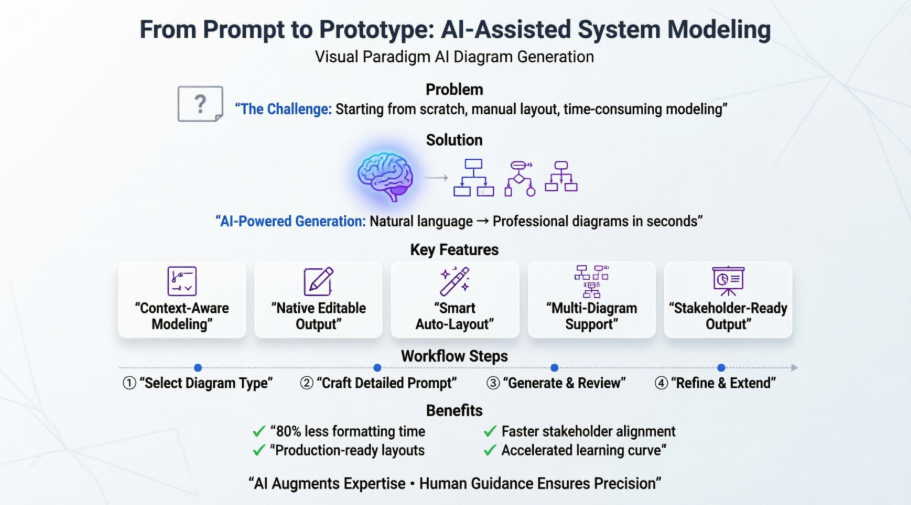
Whether you’re evaluating modeling tools for your team, seeking ways to accelerate documentation, or simply curious about AI’s role in system design, this guide offers a practitioner’s perspective on what works, what requires attention, and how to get the most from intelligent diagramming.
1. First Impressions: When AI Meets the Modeling Canvas
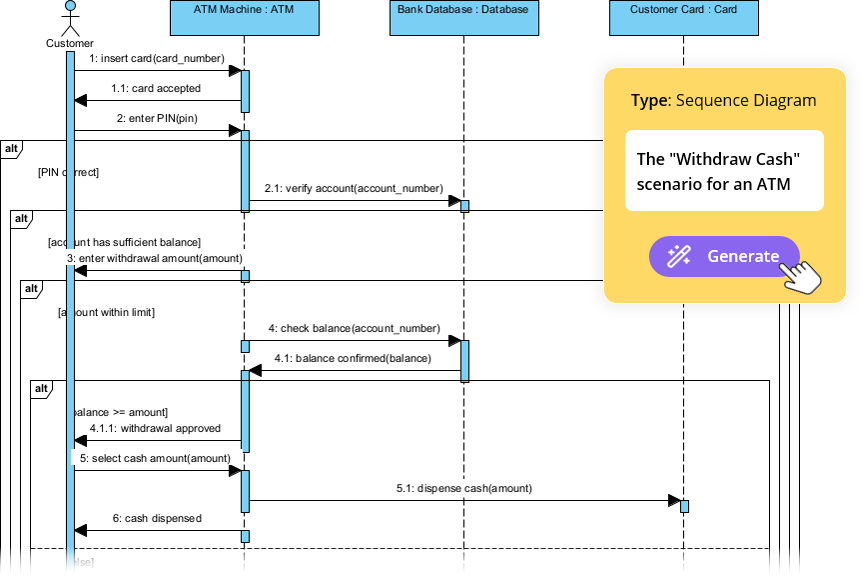
Launching Visual Paradigm and navigating to Tools > AI Diagram feels refreshingly straightforward. No complex setup, no API keys, no training data to upload. Just a clean dialog box asking two simple questions:
-
What type of diagram do you need?
-
What system or process should it represent?
I started with a Use Case Diagram for an “online library system.” My prompt: “An online library system that handles user login, book searching, borrowing, returns, and overdue notifications.” Within seconds, the AI generated a logically structured diagram with actors (Librarian, Member, System Admin), use cases (Search Catalog, Borrow Book, Process Return), and meaningful relationships.
What struck me immediately: the layout was production-ready. No manual repositioning, no tangled connectors. The AI didn’t just dump elements—it applied UML conventions and spatial logic to create a diagram I could present to stakeholders as-is.
2. How the AI Diagram Feature Actually Works (And Why It Matters)
Visual Paradigm’s AI leverages natural language processing to parse your description, identify entities and relationships, and map them to appropriate UML (or non-UML) elements. But the real magic isn’t just in generation—it’s in editability.
Key Strengths I Observed:
-
Native Output, Not Static Images: Every generated diagram is a fully editable Visual Paradigm file. I could double-click any class to add methods, drag a use case to reorganize flow, or apply my team’s color scheme—all without conversion headaches.
-
Context-Aware Modeling: Selecting “Class Diagram” vs. “Sequence Diagram” fundamentally changes how the AI interprets your text. When I described a “point-of-sale system” for a Class Diagram, it identified
Product,Order,PaymentMethodclasses with attributes. The same description, fed to a Sequence Diagram generator, produced a time-ordered interaction flow betweenCashier,POS System, andPayment Gateway.

-
Automatic Layout Intelligence: This is the time-saver. The AI applies graph-layout algorithms to minimize connector crossings and group related elements. In my testing, generated diagrams required ~80% less manual formatting than starting from scratch.
3. Step-by-Step: My Workflow for AI-Assisted Diagramming
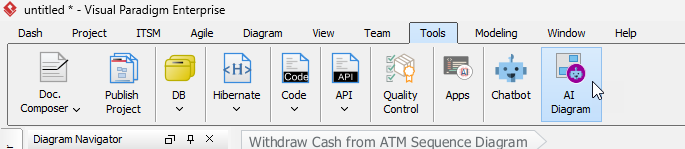
Step 1: Launch and Select Diagram Type
Go to Tools > AI Diagram. Choose your target diagram type from the dropdown. This is critical—the AI tailors its analysis to the modeling rules of your selection.
Step 2: Craft Your Prompt with Intent
Be specific. Instead of “a shopping app,” try:
“An e-commerce checkout flow where a Guest User adds items to Cart, proceeds to Checkout, selects Shipping Address and Payment Method, and receives Order Confirmation.”
The more contextual detail you provide, the richer the output.
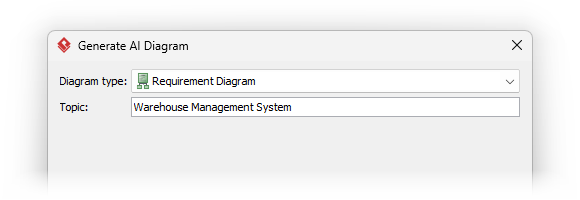
Step 3: Generate and Review
Click OK. Watch as the diagram renders. Take a moment to assess:
-
Are all key entities captured?
-
Do relationships reflect your intended logic?
-
Is the layout clear for your audience?
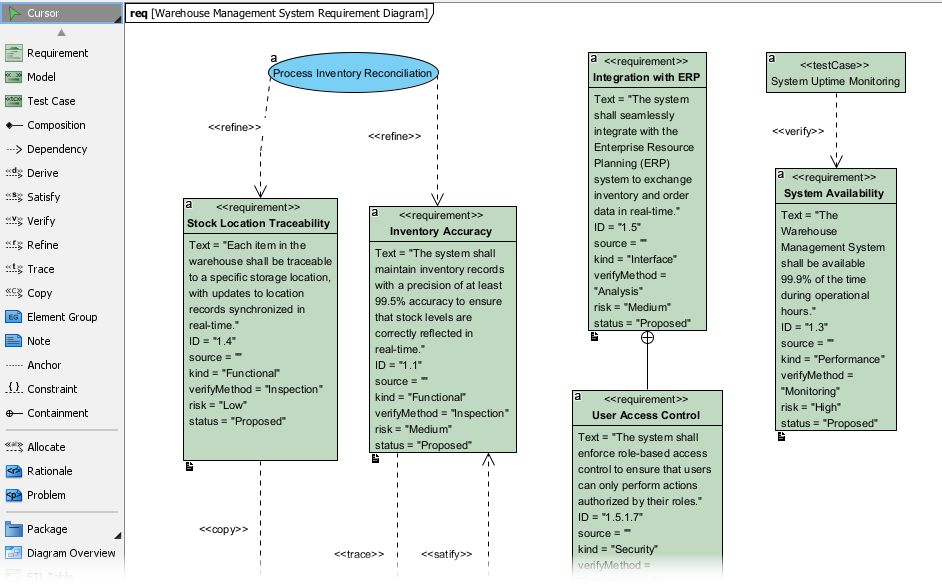
Step 4: Refine and Extend
This is where you add your expertise. The AI gives you the scaffold; you supply the precision.
-
Drag elements to optimize visual flow
-
Add data types, constraints, or method signatures
-
Convert generic associations to specialized relationships (composition, realization, etc.)
-
Apply project-specific stereotypes or tags
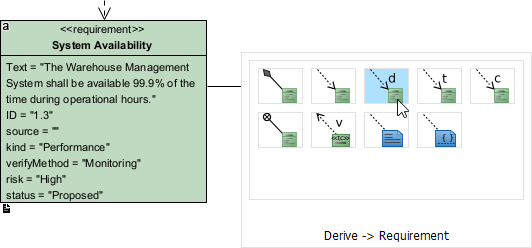
4. Beyond UML: Exploring the Expanded Diagram Ecosystem
One pleasant surprise: Visual Paradigm’s AI generator isn’t limited to traditional UML. During my testing, I successfully generated:
-
Data Flow Diagrams (DFD) for process modeling
-
Entity Relationship Diagrams (ERD) for database design
-
PERT Charts for project scheduling
-
Package Diagrams for architectural layering
-
Radar Charts for capability assessment
This flexibility means the tool adapts to your methodology, not the other way around. Whether you’re an Agile practitioner, a TOGAF architect, or a business analyst, there’s a diagram type that fits your needs.
5. UML Fundamentals Refresh: The 13 Diagram Types at a Glance
While AI accelerates creation, understanding what you’re generating remains essential. Here’s my quick-reference overview of UML’s core diagram families:
Structure Diagrams (Static View)
Show the system’s architectural backbone.
-
Class Diagram: Types, attributes, operations, and relationships. Essential for OO design.

-
Component Diagram: Software modules and their dependencies.

-
Deployment Diagram: Hardware nodes and artifact distribution.

-
Object Diagram: Concrete instances at a point in time.

-
Package Diagram: Logical grouping of model elements.

-
Composite Structure Diagram: Internal class collaborations.

-
Profile Diagram: Custom stereotypes and extensions.

Behavior Diagrams (Dynamic View)
Capture how the system acts over time.
-
Use Case Diagram: Actors and functional requirements.

-
Activity Diagram: Workflow steps and decision logic.

-
State Machine Diagram: Object states and transitions.

-
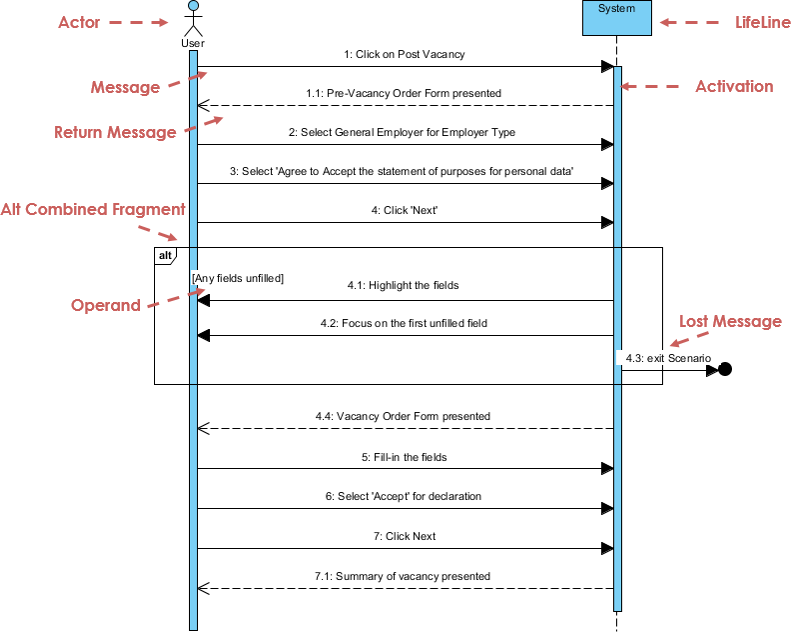
Sequence Diagram: Time-ordered object interactions.
-
Communication Diagram: Object collaborations (focus on links over time).

-
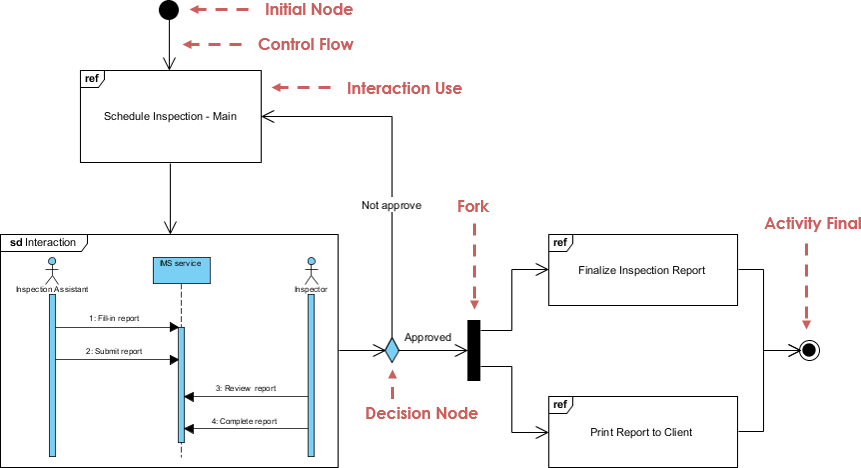
Interaction Overview Diagram: High-level flow of interactions.
-
Timing Diagram: State changes against a time axis.

6. Pro Tips: Getting the Most from AI-Generated Models
Based on my experience, here are practical strategies to maximize value:
✅ Start Broad, Then Iterate: Use the AI to generate a first-pass structure, then refine incrementally. Don’t expect perfection in one prompt.
✅ Use Domain-Specific Language: Terms like “aggregate root,” “idempotent operation,” or “event-sourced” help the AI apply appropriate patterns.
✅ Leverage the Chat Interface: Visual Paradigm’s AI Diagram Chatbot lets you converse with the generator. Ask follow-ups like “Add error handling to the login flow” or “Show retry logic for payment processing.”
✅ Combine with Documentation: Use OpenDocs to embed generated diagrams directly into living documentation, keeping models and specs synchronized.
✅ Validate with Stakeholders Early: Because AI output is presentation-ready, share drafts with non-technical stakeholders sooner. Their feedback can shape refinement before development begins.
7. Limitations and Considerations: A Balanced View
No tool is perfect. Here’s where I found the AI generator needed human guidance:
⚠️ Complex Business Logic: Highly nuanced rules (e.g., “apply discount only if user is premium AND cart value > $100 AND item is not in exclusion list”) may require manual adjustment of guards and constraints.
⚠️ Non-Standard Conventions: If your team uses custom stereotypes or proprietary modeling extensions, you’ll need to apply those post-generation.
⚠️ Performance at Scale: Very large systems (100+ classes) may benefit from modular generation—create subsystem diagrams separately, then compose them.
⚠️ Learning Curve for Prompt Crafting: Like any AI tool, output quality correlates with input clarity. Invest time in learning to write effective modeling prompts.
These aren’t dealbreakers—they’re simply reminders that AI augments expertise; it doesn’t replace it.
Conclusion: Empowering Designers, Not Replacing Them
After extensive hands-on evaluation, my assessment is clear: Visual Paradigm’s AI Diagram Generation represents a meaningful evolution in how we approach system modeling. It doesn’t promise to automate away the need for architectural thinking—instead, it removes the friction of starting from nothing, allowing practitioners to focus energy where it matters most: validating logic, refining abstractions, and aligning cross-functional teams.
What sets this implementation apart is its respect for professional workflows. The output isn’t a locked image or a proprietary format—it’s a fully editable, standards-compliant model that integrates seamlessly into existing processes. For teams adopting agile practices, this means faster iteration on design concepts. For enterprise architects, it enables rapid exploration of alternative structures. For educators and learners, it provides an intuitive bridge between natural language descriptions and formal modeling notation.
The most compelling aspect isn’t the speed of generation—it’s the quality of the starting point. By handling layout, connectivity, and UML compliance automatically, the tool reduces cognitive load and minimizes the “blank canvas paralysis” that can delay critical design conversations. When combined with Visual Paradigm’s broader ecosystem—including documentation integration, collaboration features, and support for multiple modeling standards—the AI diagram generator becomes more than a convenience; it becomes a strategic accelerator.
If you’re considering adopting AI-assisted modeling, my recommendation is simple: start small. Pick a well-scoped use case, craft a clear prompt, and observe how the output aligns with your expectations. Then iterate. The learning curve is gentle, the feedback loop is immediate, and the potential time savings are substantial. In a discipline where clarity drives alignment and alignment drives delivery, tools that help us communicate complexity with simplicity aren’t just helpful—they’re essential.
References
-
Visual Paradigm Chat – AI-Powered Interactive Design Assistant: An interactive AI chat interface that helps users generate diagrams, write code, and solve design challenges in real time.
-
AI Diagram Generation Features in Visual Paradigm: Explore the advanced AI capabilities in Visual Paradigm that enable users to generate diagrams from natural language descriptions.
-
New Diagram Types Added to AI Diagram Generator: DFD & ERD: Announcement of expanded AI diagram generation support for Data Flow Diagrams (DFD) and Entity Relationship Diagrams (ERD).
-
AI Diagram Generator Now Supports Package Diagrams in Visual Paradigm: New release enabling AI-generated package diagrams for better software architecture visualization.
-
AI Diagram Generator Adds Radar Chart Support: Visual Paradigm introduces AI-powered radar chart generation for visualizing complex performance and capability metrics.
-
Comprehensive Tutorial: Generating ArchiMate Diagrams with AI: In-depth tutorial showing how to use Visual Paradigm’s AI diagram generator to create ArchiMate diagrams and viewpoints efficiently.
-
AI-Powered Diagram Generation: New Features for UML Timing Diagrams: Announcement of AI-driven enhancements in Visual Paradigm that enable automatic generation of UML timing diagrams, improving speed and accuracy in system modeling.
-
Comprehensive Tutorial: AI-Powered ArchiMate Diagram Generation in Visual Paradigm Desktop: Step-by-step guide to using AI to create professional ArchiMate diagrams in Visual Paradigm Desktop for enterprise architecture modeling.
-
How Visual Paradigm Uses AI to Generate ArchiMate Diagrams: Learn how Visual Paradigm integrates AI to automate and enhance ArchiMate diagram creation, improving speed and accuracy for enterprise architects.
-
Generating Scenarios and Test Cases from Use Case Diagrams Using AI: A comprehensive guide on leveraging AI-powered tools to automatically generate test scenarios and cases from use case diagrams.
-
What is UML? – Visual Paradigm Guide: Detailed overview of Unified Modeling Language, its history, diagram types, and practical applications.
-
What is Class Diagram?: In-depth explanation of class diagrams, relationships, and modeling best practices.
-
What is Component Diagram?: Guide to modeling software components and their dependencies.
-
What is Deployment Diagram?: Tutorial on visualizing hardware and software deployment configurations.
-
What is Object Diagram?: Explanation of object diagrams and how they differ from class diagrams.
-
What is Package Diagram?: Guide to organizing model elements into logical packages.
-
What is Composite Structure Diagram?: Overview of modeling internal class structures and collaborations.
-
What is Profile Diagram in UML?: Tutorial on creating domain-specific stereotypes and extensions.
-
What is Use Case Diagram?: Guide to capturing functional requirements and actor interactions.
-
What is Activity Diagram?: Explanation of workflow modeling with activities, decisions, and concurrency.
-
What is State Machine Diagram?: Tutorial on modeling object states and transitions.
-
What is Sequence Diagram?: Guide to time-ordered object interactions and message flows.
-
What is Communication Diagram?: Overview of object collaboration diagrams emphasizing structural relationships.
-
What is Interaction Overview Diagram?: Explanation of high-level interaction flow modeling.
-
What is Timing Diagram?: Guide to modeling state changes against a time axis.
-
Download Visual Paradigm: Official download page for Visual Paradigm Community Edition and commercial versions.
-
Visual Paradigm AI Diagram Generation Guide: Official step-by-step tutorial for using AI diagram generation in Visual Paradigm Desktop.
-
Best AI Diagram Generator: Visual Paradigm Ecosystem: Comparative overview of Visual Paradigm’s AI modeling tools and integrations.
-
Object Management Group (OMG) UML Specification: Official UML standard documentation and version history.
-
Visual Paradigm Community Edition: Free UML tool download for learning and non-commercial use.
Related posts:
 Comprehensive Guide to Using Use Case and Sequence Diagrams Together
The Key Benefits of Using UML Use Case Diagrams in Requirements Gathering
Comprehensive Guide to Levels of Abstraction in Sequence Diagrams
AI Flipbook Maker Review: Revolutionizing Digital Publishing with AI and Virtual Bookshelves
Comprehensive Guide to Using Use Case and Sequence Diagrams Together
The Key Benefits of Using UML Use Case Diagrams in Requirements Gathering
Comprehensive Guide to Levels of Abstraction in Sequence Diagrams
AI Flipbook Maker Review: Revolutionizing Digital Publishing with AI and Virtual Bookshelves