


Enterprise architecture is complex. It involves mapping relationships between business processes, software applications, and underlying technology infrastructure. To manage this complexity, the ArchiMate framework provides a structured language. However, a common source of friction within architecture teams is the misunderstanding of Viewpoints. Many practitioners struggle to distinguish between what a Viewpoint is versus what a View represents, or which specific lens to apply when documenting a specific concern.
This guide cuts through the noise. We will provide a straightforward breakdown of ArchiMate Viewpoints. We will focus on the core layers—Business, Application, and Technology—alongside the cross-cutting concerns that tie them together. By the end of this article, you will have a clear mental model for selecting the right representation for your stakeholders.
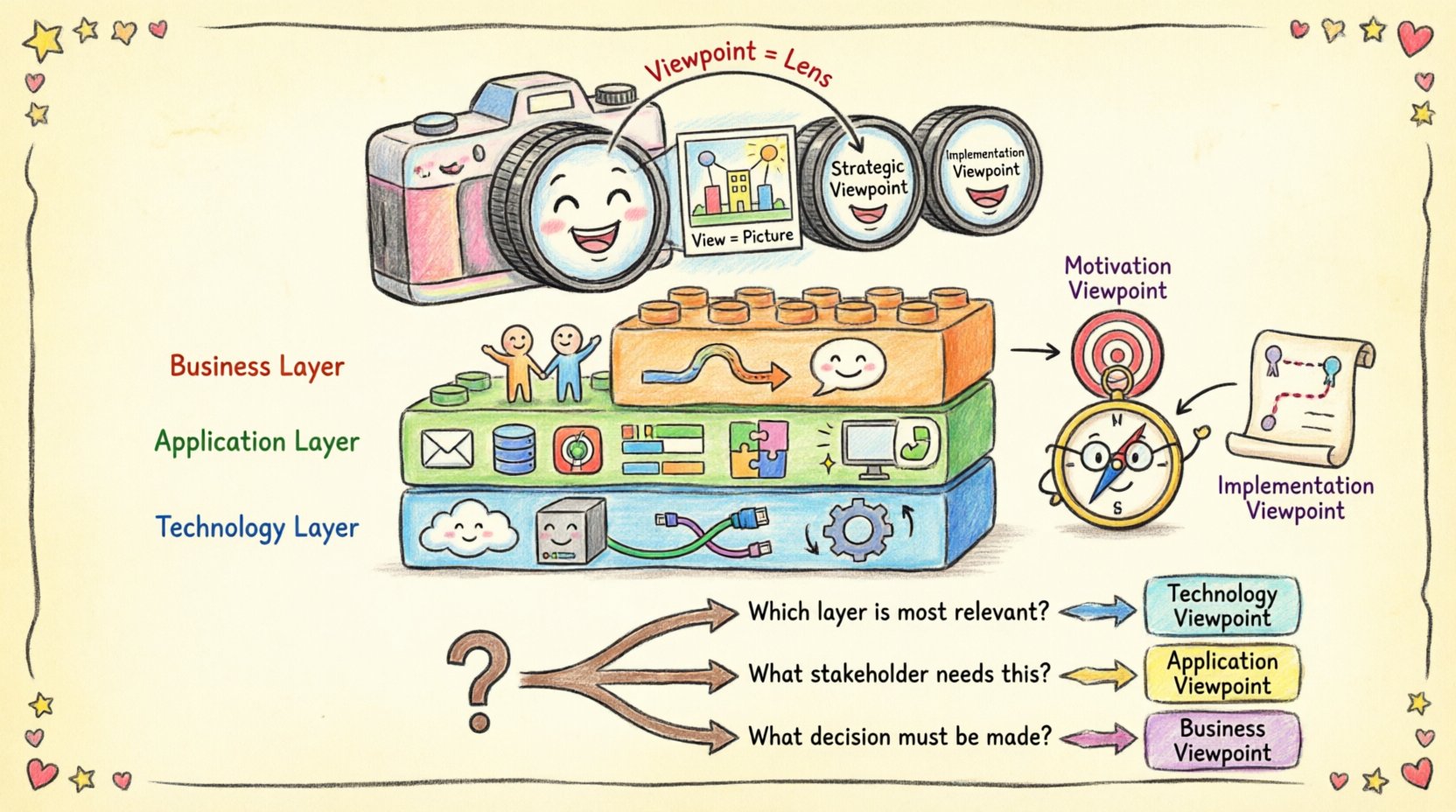
What Exactly Is an ArchiMate Viewpoint? 🤔
Before diving into the specific layers, it is crucial to define the foundational concept. In ArchiMate, a Viewpoint defines the perspective from which a specific aspect of the architecture is viewed. It specifies the stakeholder, the concerns, and the rules for constructing the diagram.
Think of it like a camera lens. You can use the same camera (the architecture data) but switch lenses to focus on different details. A wide-angle lens captures the whole landscape (Business), while a telephoto lens zooms in on the specific engine components (Technology). The Viewpoint dictates:
- Who is looking at the architecture (Stakeholders).
- Why they are looking at it (Concerns/Goals).
- How the information is structured (Notation rules).
- What information is included or excluded.
This is distinct from a View. A View is the actual output—the specific diagram or document created using the rules defined by the Viewpoint. Confusion often arises when architects create a diagram and label it with a Viewpoint name, but the diagram itself does not adhere to the constraints of that Viewpoint.
The Core Triad: Business, Application, and Technology 🧱
ArchiMate is built on three primary layers. These layers represent the fundamental domains of an enterprise. Understanding the distinct Viewpoints for each layer is the first step to clarity.
1. Business Architecture Viewpoints 🏢
The Business layer focuses on the organization itself, independent of how it is supported by IT. This layer describes how the organization functions to deliver value to its customers and stakeholders.
Key Elements in Business Viewpoints:
- Actors: People or organizations performing activities.
- Roles: Sets of responsibilities assigned to Actors.
- Business Processes: Sequences of activities.
- Business Objects: Information used or produced.
- Business Services: Functionality offered to a stakeholder.
Common Business Viewpoints:
- Business Service Viewpoint: Focuses on the services provided by the business to external or internal stakeholders. Useful for customer-facing documentation.
- Business Process Viewpoint: Details the flow of activities and events. Essential for operational efficiency analysis.
- Business Structure Viewpoint: Maps the organizational hierarchy, roles, and actors. Ideal for HR and governance alignment.
2. Application Architecture Viewpoints 💻
The Application layer represents the software that supports the business processes. It describes the logical software components and how they interact. This layer acts as the bridge between business requirements and technical infrastructure.
Key Elements in Application Viewpoints:
- Application Components: Modular software units.
- Application Services: Functionality offered by components.
- Application Interfaces: Points of interaction between components.
- Data Objects: Information stored or processed by applications.
Common Application Viewpoints:
- Application Communication Viewpoint: Shows how components interact via interfaces. Crucial for understanding data flow between systems.
- Application Usage Viewpoint: Maps which business processes utilize which application components. This is vital for impact analysis when a system is deprecated.
- Application Functionality Viewpoint: Details the specific functions provided by the software stack.
3. Technology Architecture Viewpoints ⚙️
The Technology layer describes the physical and logical infrastructure that hosts the applications. This includes servers, networks, and devices.
Key Elements in Technology Viewpoints:
- Nodes: Computational resources (servers, containers).
- Devices: End-user devices (laptops, phones, IoT).
- Networks: Communication infrastructure (LAN, WAN, Cloud).
- System Software: Operating systems and middleware.
Common Technology Viewpoints:
- Technology Deployment Viewpoint: Maps how software components are deployed onto infrastructure nodes. Essential for capacity planning and security.
- Technology Communication Viewpoint: Details the network topology and connectivity.
- Technology Infrastructure Viewpoint: Focuses on the physical layout of the data centers or cloud regions.
How to Choose the Right Viewpoint: A Comparison Table 📊
Selecting the correct Viewpoint depends on the question you are trying to answer. Use this table to quickly identify which lens fits your current task.
| Question to Answer | Recommended Viewpoint | Primary Layer |
|---|---|---|
| How does this process affect the customer? | Business Service Viewpoint | Business |
| Which systems are involved in this workflow? | Application Usage Viewpoint | Application |
| Where is this data physically stored? | Technology Deployment Viewpoint | Technology |
| How do these two applications exchange data? | Application Communication Viewpoint | Application |
| Who is responsible for this role? | Business Structure Viewpoint | Business |
| What is the network topology for this region? | Technology Communication Viewpoint | Technology |
Cross-Cutting Viewpoints: Strategy and Motivation 🧭
While the three core layers define the structure of the architecture, they do not explain the why. Cross-cutting Viewpoints address the motivations, strategies, and implementation plans that drive the architecture forward. These Viewpoints span across all three layers.
1. Motivation Viewpoint 🎯
Architecture does not exist in a vacuum. It exists to solve problems or achieve goals. The Motivation Viewpoint introduces concepts like:
- Drivers: Internal or external factors forcing change (e.g., new regulations).
- Goals: Desired states the organization wants to reach.
- Principles: Rules or guidelines that govern design decisions.
- Requirements: Specific constraints or needs.
Using this Viewpoint ensures that every diagram you create ties back to a strategic objective. It prevents “shelf-ware” architecture where diagrams are created but have no business justification.
2. Implementation & Migration Viewpoint 🚀
Change rarely happens instantly. Projects and initiatives bridge the gap between the current state and the target state. This Viewpoint helps visualize:
- Projects: Initiatives designed to implement changes.
- Assignments: Linking projects to the capabilities they deliver.
- Work Packages: Smaller chunks of work within a project.
This is critical for program management. It allows leadership to see which projects are driving which architectural capabilities.
Common Pitfalls and Misconceptions 🚫
Even experienced architects make mistakes when working with Viewpoints. Identifying these errors early saves time and reduces confusion.
1. Confusing View with Viewpoint
A Viewpoint is the template or the set of rules. A View is the result. If you create a diagram, that is a View. If you say “I used the Business Process Viewpoint,” you are referring to the rules you followed to create that View. Mixing these terms leads to documentation that is hard to maintain because the rules are not clearly defined.
2. Mixing Layers Indiscriminately
While ArchiMate allows cross-layer relationships, a single Viewpoint should usually focus on one layer to maintain clarity. A diagram showing Business Actors directly connecting to Network Nodes without Application intermediaries is often technically valid in the model but confusing in a View. It obscures the logical separation of concerns. Stick to the appropriate Viewpoint for the intended audience.
3. Ignoring Stakeholders
A Viewpoint is defined by the stakeholder. A technical Viewpoint is useless for a CEO. A strategic Viewpoint is useless for a DevOps engineer. If you create a Viewpoint without defining the specific stakeholder group, you risk creating artifacts that no one reads.
4. Over-Engineering the Notation
ArchiMate has many relationship types (assignment, flow, realization, composition, etc.). Do not use every relationship type in every diagram. Select the relationships that add meaning to the specific Viewpoint you are constructing. Excessive detail can lead to clutter, making the architecture difficult to understand.
Building a Coherent Architecture Description 📝
Once you understand the individual Viewpoints, the next challenge is integrating them into a cohesive Architecture Description. This is the collection of all Views and Viewpoints that provide a complete picture of the enterprise.
Step 1: Identify Stakeholders
Start by listing who needs to see the architecture. Group them by their primary concerns:
- Executive Leadership: Focus on Strategy, Motivation, and Business Value.
- Business Managers: Focus on Processes, Services, and Organizational Structure.
- IT Managers: Focus on Application Portfolio, Deployment, and Infrastructure.
- Developers: Focus on Interfaces, Components, and Data Objects.
Step 2: Map Concerns to Viewpoints
For each stakeholder group, select the Viewpoints that address their concerns. Create a matrix that links stakeholders to their required Views. This ensures coverage without redundancy.
Step 3: Ensure Consistency
ArchiMate models are typically stored in a central repository. Ensure that the elements used in the Business Viewpoint (e.g., “Customer Service Process”) match the elements referenced in the Application Viewpoint (e.g., “CRM System”). Consistency in naming and definition is the glue that holds the architecture together.
Practical Implementation Strategies 💡
How do you bring this into practice without overwhelming your team? Here are actionable steps to implement Viewpoint management.
1. Define a Viewpoint Library
Create a standardized catalog of Viewpoints for your organization. Instead of every architect inventing their own diagram style, provide a set of approved templates. For example, mandate that all project initiation documents use the Implementation & Migration Viewpoint.
2. Document the Rationale
When creating a View, include a brief description of why this Viewpoint was chosen. This helps future maintainers understand the context. If a diagram looks unusual, the rationale note explains the exception.
3. Review and Refine
Architecture is not static. Review your Viewpoints periodically. Are the Business Viewpoints still relevant to the current operating model? Are the Technology Viewpoints reflecting the move to cloud infrastructure? Update your definitions as the enterprise evolves.
4. Train Your Team
Ensure all architects understand the difference between layers. Conduct workshops where teams practice creating Views from specific Viewpoints. Role-playing helps reinforce the distinction between Business, Application, and Technology concerns.
Frequently Asked Questions ❓
Can I combine Business and Technology layers in one Viewpoint?
Technically, yes, ArchiMate supports relationships across layers. However, best practice suggests keeping them separate for clarity. If you must combine them, use a Unified Viewpoint specifically designed for integration, ensuring you clearly label the layer boundaries. Mixing them indiscriminately often leads to diagrams that are too complex for any single stakeholder to interpret.
How often should I update my ArchiMate models?
There is no fixed rule. Update the models when significant changes occur in the business strategy, application portfolio, or infrastructure. The goal is to keep the architecture description current enough to be useful, not so current that it becomes a maintenance burden. Use the Viewpoints to determine the granularity of updates.
Do I need to use all 11 ArchiMate layers?
No. The three core layers (Business, Application, Technology) plus the Motivation, Implementation, and Strategy layers are the most common. The remaining layers (Physical, Data, etc.) are specialized. Use only the layers that are relevant to your specific enterprise context. Do not force elements into the model just because they exist in the framework.
What if my Viewpoint requirements change?
Viewpoints are adaptable. If a new stakeholder group emerges with different concerns, create a new Viewpoint or modify the existing one to accommodate their needs. The framework is flexible, but consistency in the core layers should remain.
Final Thoughts on Architectural Clarity 🧠
Mastering ArchiMate Viewpoints is not about memorizing every definition. It is about understanding the intent behind each lens. When you select the correct Viewpoint, you ensure that the right people see the right information at the right time.
By separating Business, Application, and Technology concerns, and by utilizing cross-cutting Viewpoints for strategy and motivation, you create a structured environment for decision-making. This structure reduces ambiguity and aligns technical execution with business goals.
Focus on the stakeholder. Define the concern. Select the Viewpoint. Build the View. This simple cycle, repeated consistently, builds an architecture description that is robust, clear, and valuable.
Take the time to document your Viewpoint choices. Invest in the structure of your descriptions. The effort invested in clarity now pays dividends in faster decision-making and better alignment later.