


Enterprise architecture relies heavily on clear communication. Models are not just drawings; they are the language used to bridge the gap between business strategy and technical implementation. At the heart of this language lies the ArchiMate Viewpoint. A well-chosen viewpoint can clarify complex structures, while a poor choice can lead to confusion, rework, and lost stakeholder trust.
Junior architects often dive straight into modeling without pausing to consider the why and who behind the diagram. This oversight leads to models that look technically correct but fail to serve their intended purpose. This guide breaks down the specific pitfalls in selecting ArchiMate Viewpoints, offering a deeper understanding of how to align your modeling efforts with organizational needs.
🧩 Understanding the Foundation: View vs. Viewpoint
Before dissecting common errors, it is crucial to distinguish between two frequently conflated terms. In the ArchiMate standard, a View and a Viewpoint are distinct entities.
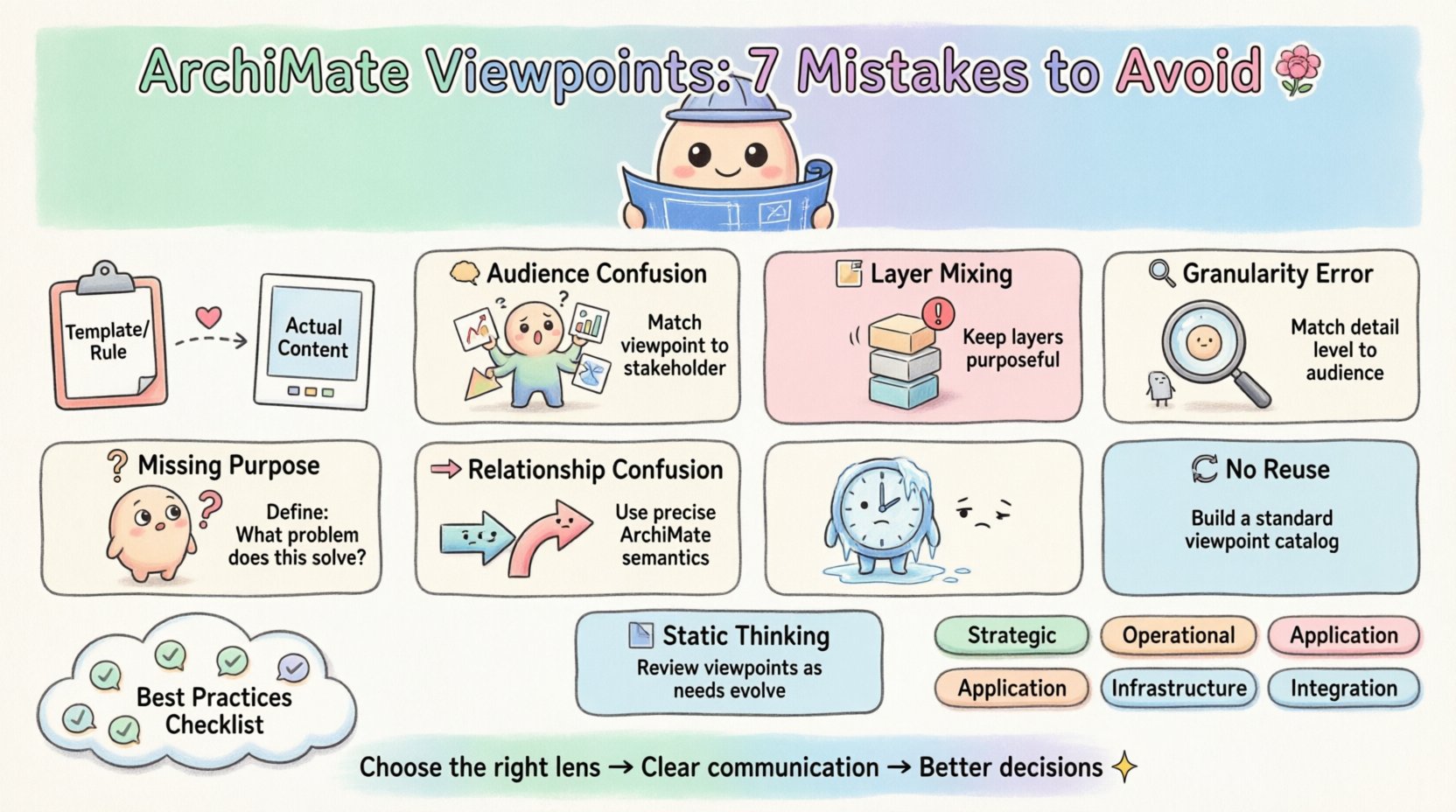
- Viewpoint: A specification of a set of modeling conventions and rules. It defines how to look at the architecture (e.g., specific layers, specific elements, specific notations). It is the template.
- View: The actual representation of the architecture from the perspective of the Viewpoint. It is the content.
One of the most frequent errors occurs when architects select a Viewpoint based on what they want to draw, rather than what the stakeholder needs to see. The Viewpoint dictates the constraints and the scope. If you select a Business Architecture Viewpoint but fill it with Application layer details, you violate the intent of that Viewpoint.
🚫 Mistake 1: Confusing the Audience with the Content
Junior architects often assume that a model must show everything. They build dense diagrams containing business processes, applications, technologies, and motivations all in one place. This is a fundamental error in Viewpoint selection.
Different stakeholders consume information differently. A C-level executive needs a high-level strategic map. A developer needs to know which application interfaces with which database. A process owner needs to see the flow of work.
If you select a Viewpoint that is too generic, you dilute the message. The mistake here is failing to map the Viewpoint to the specific information need of the audience.
- The Scenario: You present a technology-heavy diagram to a business sponsor.
- The Consequence: The sponsor feels alienated by technical jargon and loses interest in the strategic alignment.
- The Fix: Choose a Business Viewpoint for business sponsors. Choose a Technology Viewpoint for IT staff. Always ask: “What decision will this stakeholder make based on this view?”
🚫 Mistake 2: Ignoring the ArchiMate Layers
ArchiMate is structured around three core layers: Business, Application, and Technology. There are also supporting layers like Motivation and Strategy.
A common error is selecting a Viewpoint that ignores the layering principles. For instance, mixing deep Technology implementation details with high-level Business strategy in a single Viewpoint often leads to cognitive overload. While cross-layer views exist (e.g., Technology to Application), they should be purposeful.
When selecting a Viewpoint, you must decide:
- Is this view focused on a single layer?
- Is this view focused on the interaction between two layers?
- Does the Viewpoint support the specific relationships required for this context?
Using a generic Viewpoint that allows unlimited layers often results in spaghetti diagrams where the logical flow is lost. A well-defined Viewpoint restricts the scope to ensure clarity.
🚫 Mistake 3: Overlooking the “Why” (Purpose)
Every Viewpoint must have a defined purpose. It should answer the question: “What problem does this model solve?”
Junior architects often create Viewpoints simply because they have a lot of data to visualize. They treat the Viewpoint as a storage bucket rather than a communication tool. This leads to the “Data Dump” syndrome.
Consider these purposes for Viewpoints:
- Gap Analysis: Showing the difference between As-Is and To-Be.
- Impact Analysis: Showing how a change in one element affects another.
- Compliance: Showing adherence to regulations or standards.
- Planning: Showing the roadmap for implementation.
If you cannot articulate the purpose, the Viewpoint is likely unnecessary. Select a Viewpoint that aligns with that specific purpose. Do not use a “General Overview” Viewpoint for a “Compliance Audit” scenario.
🚫 Mistake 4: Mismanaging Detail Granularity
Granularity refers to the level of detail within the model. Selecting a Viewpoint without considering granularity is a recipe for failure.
If you select a Viewpoint that allows for high detail but the audience needs high abstraction, you overwhelm them. Conversely, if you select a Viewpoint that forces high abstraction for an audience that needs implementation details, they will reject the model as “useless.”
Strategies for Managing Granularity:
- Drill-Down Approach: Create a series of Viewpoints. A high-level Business Viewpoint, followed by a detailed Business Process Viewpoint.
- Consistency: Ensure that if you use specific element names in one Viewpoint, the naming conventions remain consistent in related Viewpoints.
- Scope Definition: Explicitly define the scope in the Viewpoint metadata. What is included? What is excluded?
🚫 Mistake 5: Neglecting Relationship Direction and Semantics
ArchiMate has strict semantics for relationships. An assignment, a flow, or a usage relationship has a specific direction. A common mistake is selecting a Viewpoint that encourages loose relationship definitions.
When you select a Viewpoint, you are implicitly selecting the set of allowed relationships. If you need to show a logical dependency between an Application and a Technology Service, you must ensure the Viewpoint supports that specific relationship type.
- Wrong: Using a generic flow relationship for a logical dependency.
- Right: Using the specific “Serves” or “Accesses” relationship defined in the standard.
Misusing relationships creates ambiguity. If a stakeholder sees an arrow, they should know exactly what that arrow means. If the Viewpoint allows multiple interpretations of the same arrow, it has failed its purpose.
🚫 Mistake 6: Lack of Reusability and Standardization
In many organizations, architects create a new Viewpoint for every single project. This leads to fragmentation. Junior architects often miss the opportunity to build a standard catalog of Viewpoints.
Think of Viewpoints as templates. If you have a standard “Organizational Structure” Viewpoint, use it across all domains. If you have a standard “Application Portfolio” Viewpoint, reuse it.
Benefits of Reusable Viewpoints:
- Faster Delivery: You do not need to redefine the structure for every engagement.
- Consistency: Stakeholders learn the standard patterns and can read models faster.
- Comparison: It becomes easier to compare models from different projects if they use the same Viewpoint.
Do not reinvent the wheel. Establish a library of Viewpoints that matches the common needs of your organization.
🚫 Mistake 7: Static Viewpoints for Dynamic Contexts
Enterprise architecture is not static. Strategies change, applications are retired, and business processes evolve. A common mistake is treating a Viewpoint as a one-time artifact.
If a Viewpoint is designed for a “Current State” assessment, it should not be used for a “Future State” roadmap without adjustment. The elements and relationships may shift. The Viewpoint might need to evolve to accommodate new types of data or new layers of complexity.
Regularly review your Viewpoints. Ask:
- Is this Viewpoint still relevant to the current business strategy?
- Are there new types of elements we need to model that the Viewpoint does not support?
- Is the audience still finding value in this specific representation?
📊 Comparing Viewpoint Selection Strategies
To help visualize the differences between effective and ineffective Viewpoint selection, consider the following comparison table.
| Aspect | Ineffective Selection | Effective Selection |
|---|---|---|
| Focus | Shows all available data in the repository. | Focuses on specific stakeholder questions. |
| Layers | ||
| Granularity | Mixed levels of detail (high and low). | Consistent level of detail appropriate for the audience. |
| Relationships | Generic arrows with unclear meaning. | Specific ArchiMate relationships with clear semantics. |
| Reusability | Created once per project. | Standardized across the enterprise architecture practice. |
| Maintenance | Ignored after creation. | Reviewed and updated as business needs change. |
✅ Best Practices Checklist
Before finalizing your ArchiMate Viewpoint selection, run through this checklist to ensure you are on the right track.
- Identify the Stakeholder: Who is the primary consumer of this model?
- Define the Question: What specific decision or insight does this model provide?
- Select the Layers: Which ArchiMate layers are required to answer the question?
- Check the Notation: Do the allowed elements and relationships match the context?
- Validate Granularity: Is the level of detail appropriate for the audience?
- Ensure Traceability: Can the elements in the view be traced back to the full model?
- Document the Rationale: Write down why this Viewpoint was chosen over others.
🛠️ Building a Viewpoint Catalog
For an architecture practice to mature, it should move from ad-hoc Viewpoint creation to a managed catalog. This involves defining standard Viewpoints that cover the most common scenarios.
Example Categories for a Catalog:
- Strategic Viewpoints: Focus on Business Drivers, Goals, and Principles.
- Operational Viewpoints: Focus on Business Processes, Roles, and Objects.
- Application Viewpoints: Focus on Application Services, Components, and Interfaces.
- Infrastructure Viewpoints: Focus on Devices, Networks, and System Software.
- Integration Viewpoints: Focus on the interaction between layers.
By maintaining this catalog, you reduce the cognitive load on the architect. They do not need to decide from scratch; they select from the approved list based on the requirements. This standardization is a hallmark of a professional architecture function.
🔍 The Cost of Poor Viewpoint Selection
Why does this matter? The cost of selecting the wrong Viewpoint is not just wasted time. It impacts the credibility of the architecture function.
When a model is confusing or irrelevant, stakeholders stop engaging. They stop trusting the data. They stop providing input. Eventually, the architecture repository becomes a graveyard of unused diagrams.
Conversely, when Viewpoints are selected with precision, they become active tools. They drive decision-making. They highlight risks. They align teams. The investment in selecting the right Viewpoint pays dividends in adoption and impact.
🎯 Moving Forward
Mastering the selection of ArchiMate Viewpoints is a skill that develops over time. It requires a shift in mindset from “modeling what I have” to “modeling what is needed.”
Start by auditing your existing models. Do they serve a clear purpose? Are they aligned with the stakeholders who use them? If not, revisit the Viewpoint definitions. Adjust the scope. Clarify the notation. Ensure the layers match the context.
Remember that the model is a means to an end, not the end itself. The Viewpoint is the lens through which that model is viewed. If the lens is dirty or the wrong size, the picture will be blurry. Take the time to clean the lens.
By avoiding these common pitfalls, junior architects can transition into confident practitioners who deliver value through clear, structured, and purposeful architecture modeling.