


Introduction
In the modern business landscape, ambiguity is the enemy of efficiency. Whether you are a business analyst drafting initial requirements, a developer implementing workflows, or a manager monitoring performance, everyone needs to speak the same language. That language is Business Process Model and Notation (BPMN).
A business goal is a target that an organization aims to achieve by performing correctly the related business process. A business process consists of a set of activities that are performed in coordination in an organizational and technical environment. These activities jointly realize a business goal.
The primary goal of the BPMN effort was to provide a notation that is readily understandable by all business users. It bridges the gap between high-level business strategy and technical implementation. This guide is designed for absolute beginners. We will move beyond dry definitions to provide a “learn by example” approach, helping you create clear, actionable, and standardized process diagrams.
Part 1: What is BPMN and Why Does It Matter?
The Bridge Between Business and IT
BPMN creates a standardized bridge for the gap between business process design and process implementation. It allows for the generation of executable code (such as BPEL4WS), meaning your diagram isn’t just a picture—it can potentially drive software automation.
BPMN can be applied at three different levels of maturity:
-
Descriptive Process Models: Suitable for high-level modeling. These should feel comfortable for analysts who have used basic flowcharts.
-
Analytic Process Models: Contains the concepts most commonly used and covered in BPMN training, allowing for deeper analysis of bottlenecks and efficiencies.
-
Common Executable Process Models: Focuses on the specific elements required for executable process models that can be run by process engines.
A Brief History
Understanding the evolution of BPMN helps contextualize its current robustness:
-
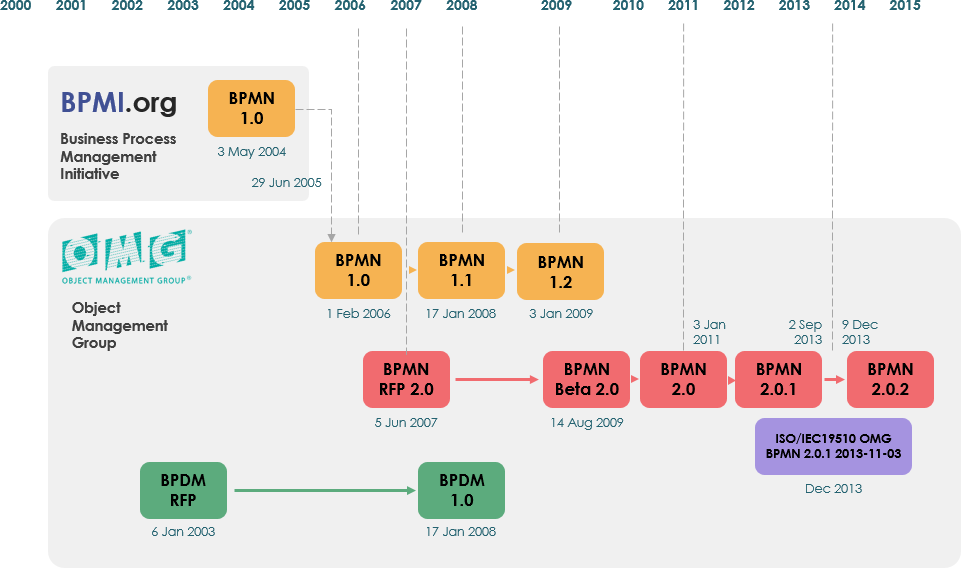
Origins: Originally developed by the Business Process Management Initiative (BPMI).
-
BPMN 1.0: Released to the public in May 2004 after two years of effort by the BPMI Notation Working Group.
-
OMG Adoption: The Object Management Group (OMG) released a specification in February 2006.
-
BPMN 2.0: Developed in 2010, with the actual version of the specification released in December 2013.
-
ISO Standard: The latest version (2.0.2) has been formally published by ISO as the 2013 edition standard: ISO/IEC 19510.
Part 2: The Core Building Blocks (Learn by Example)
A Business Process Diagram (BPD) is made up of graphical elements. To keep things simple yet powerful, BPMN organizes these into four basic categories:
-
Flow Objects (The “What”)
-
Connecting Objects (The “How it moves”)
-
Swimlanes (The “Who”)
-
Artifacts (The “Extra Context”)
1. Flow Objects
These are the core elements of any BPD. There are only three types, ensuring you don’t have to memorize hundreds of shapes.
A. Events (Circles)
An Event is something that “happens” during the course of a business process. Events affect the flow and usually have a cause (trigger) or an impact (result). They are represented by circles with open centers to allow internal markers.
-
Start Event: Triggers the process.
-
Intermediate Event: Happens between start and end.
-
End Event: The result of the process.

Beginner Tip: Think of events as the “bookends” and “chapter breaks” of your story. The Start Event is “Customer clicks buy,” and the End Event is “Order Confirmed.”
B. Activities (Rounded Rectangles)
An Activity is a generic term for work that the company performs. It can be atomic (a single step) or nonatomic (a compound sub-process).
-
Task: A single unit of work.
-
Sub-Process: A collection of tasks, distinguished by a small plus sign (+) in the bottom center.

Example: In an “Employee Onboarding” process, “Setup IT Equipment” might be a Task. However, if that involves ordering a laptop, creating email accounts, and assigning software licenses, it should be a Sub-Process that can be expanded later.
C. Gateways (Diamonds)
Gateways control the divergence and convergence of Sequence Flow. They determine decisions, forkings, mergings, and joinings of paths.
| Gateway Type | Behavior | Visual Cue |
|---|---|---|
| Exclusive | Follow only one path based on a condition (e.g., Yes/No). | Empty diamond or with an ‘X’ inside. |
| Inclusive | Follow one or more paths. Multiple conditions can be true simultaneously. | Diamond with a circle inside. |
| Parallel | Follow all paths simultaneously. No condition is evaluated; everything happens at once. | Diamond with a ‘+’ inside. |
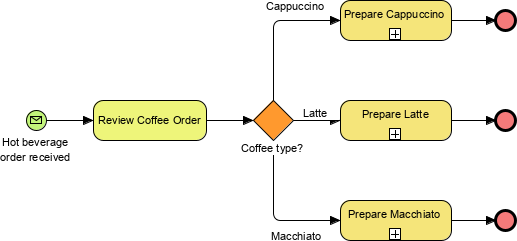
Exclusive Gateway Example: Either approve OR reject.
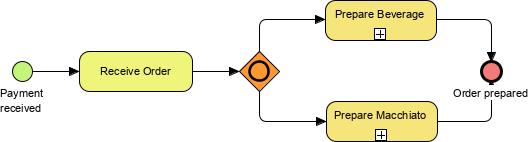
Inclusive Gateway Example: Send email AND update database AND notify manager (any combination).
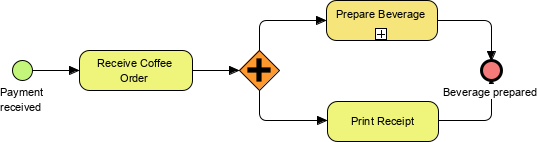
Parallel Gateway Example: Perform background check AND prepare desk simultaneously.

2. Connecting Objects
Flow objects are connected to create the skeletal structure of the process.
-
Sequence Flow: A solid line with a solid arrowhead. Shows the order activities are performed within a pool. Note: BPMN generally avoids the term “control flow.”
-
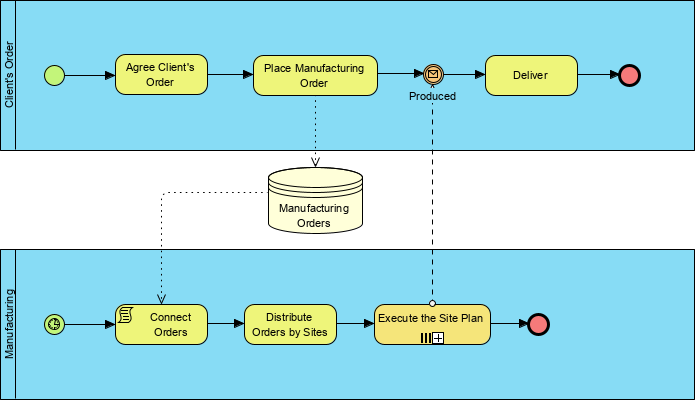
Message Flow: A dashed line with an open circle at the start and an open arrowhead at the end. Symbolizes information flow across organizational boundaries (between different Pools).
-
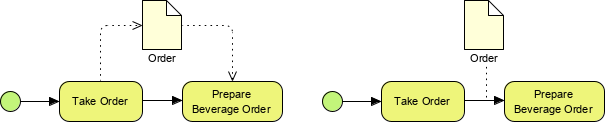
Association: A dotted line. Used to connect artifacts (like data or text) to flow objects.

Critical Rule: Never use a Message Flow to connect activities within the same Pool. Use Sequence Flow for internal steps and Message Flow only when talking to an external participant (like a Customer or Vendor).
3. Swimlanes
Swimlanes organize activities into visual categories to illustrate responsibility.
-
Pool: Represents a Participant in a Process. It acts as a graphical container partitioning activities from other Pools. Common in B2B situations (e.g., “Company A” vs. “Supplier B”).
-
Lane: A sub-partition within a Pool. Lanes extend the entire length of the Pool and are used to categorize activities by role, department, or system (e.g., “Sales Dept,” “Finance Dept,” “CRM System”).
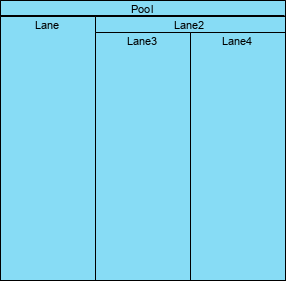
Best Practice: Always define your Pools first. Who is involved in this process? Once you have the participants, divide them into Lanes based on who does the work.
4. Artifacts
Artifacts add context without affecting the sequence flow.
-
Data Object: Shows how data is required or produced by activities (e.g., “Invoice PDF,” “Customer Record”). Connected via Associations.
-
Data Store: A place where data persists beyond the scope of the process (e.g., a Database). The process can read from or write to it.
-
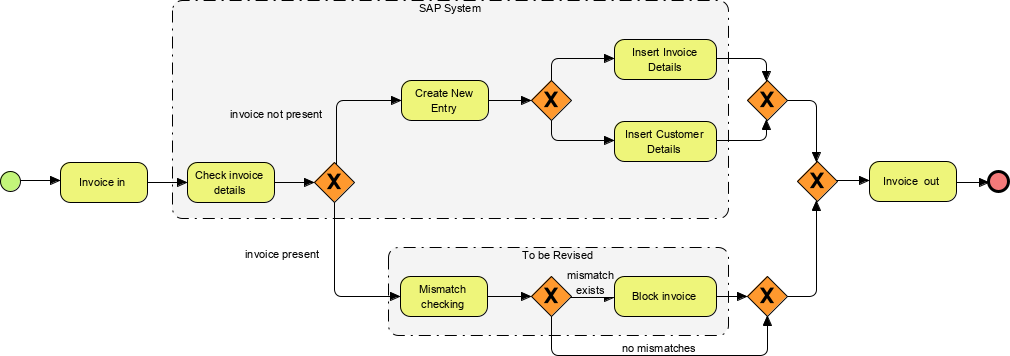
Group: A rounded-corner rectangle with a dashed line. Used for documentation or analysis (e.g., grouping all steps related to “Compliance Check”). It does not affect flow.
-
Annotation: Text notes to provide additional information for the reader.
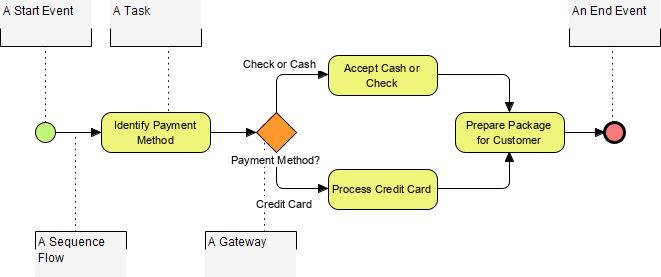
Part 3: Handling Complexity Without Chaos
One of BPMN’s strengths is its ability to handle complexity while maintaining a familiar look-and-feel. This is achieved through variations of the core elements, particularly Events.
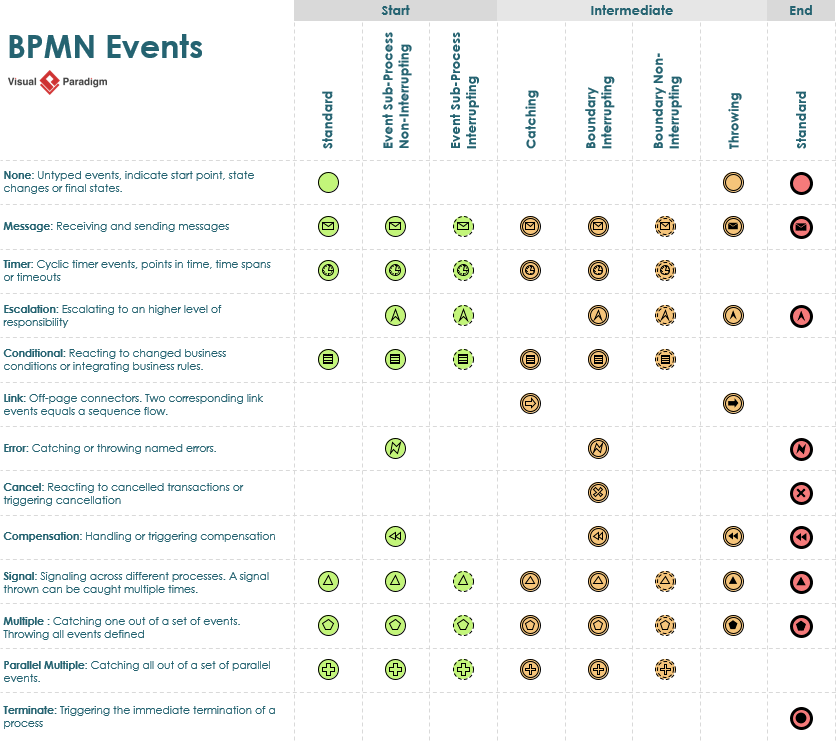
By using different borders (thin, thick, double) and internal icons (envelope, clock, gear), you can specify exactly what triggers an event (Message, Timer, Error, Signal) without changing the fundamental shape. This allows you to scale from simple flowcharts to complex, executable logic.
Part 4: Tooling That Amplifies BPMN’s Value
While knowing the notation is essential, the right tooling significantly enhances its practical impact. Modern BPMN tools offer features that turn static diagrams into dynamic management assets.
Process Drill-Down and Sub-Process Management


Collapsing complex sub-processes for executive views, then expanding them for technical deep-dives, maintains diagram readability across stakeholder levels. This allows you to present a high-level overview to leadership while keeping the detailed logic accessible for developers.
Integrating BPMN with Other Modeling Standards


Linking BPMN workflows to UML class diagrams for system design or wireframes for UI planning creates a holistic view that prevents siloed thinking. This ensures that the business process aligns perfectly with the technical architecture.
Working Procedure Editor for Detailed Specifications
While Business Process Diagrams provide the strategic overview, the working procedure editor enables documentation of step-by-step instructions for individual tasks. Exporting combined diagrams plus procedures creates self-contained operational playbooks.
As-is and To-be Process Modeling for Transformation Projects

Maintaining traceability between current and future state models helps demonstrate ROI to leadership. Side-by-side “before and after” views streamline change management conversations by clearly highlighting inefficiencies being removed.
RACI & CRUD Charts: Visual Accountability Assignment

Generating RACI (Responsible, Accountable, Consulted, Informed) charts directly from BPMN diagrams saves significant manual effort. Automatically assigning “Responsible” roles based on swimlane placement reduces ambiguity in team handoffs.
Process Animation and Simulation: Bringing Diagrams to Life


Animating process flows helps stakeholders intuitively understand bottlenecks. Simulation capabilities enable testing of resource allocation scenarios before implementation—reducing costly production trial-and-error.
Note: Advanced features like animation, simulation, and RACI chart generation typically require professional-tier tools (e.g., Visual Paradigm Standard/Professional/Enterprise editions), but core BPMN notation remains accessible through free or open-source alternatives.
Conclusion: Why BPMN Earns Its Place in Modern Toolkits
After evaluating numerous process documentation approaches, BPMN distinguishes itself as a rare standard that delivers on both clarity and capability. It’s not without challenges—the learning curve exists, and over-engineering diagrams remains a genuine risk—but when applied thoughtfully, it fundamentally transforms how teams collaborate on process improvement.
Key Takeaways for Practitioners:
🔹 Begin with focus: Model one core process end-to-end before attempting enterprise-wide workflows.
🔹 Prioritize communication: If stakeholders can’t grasp your diagram within 60 seconds, simplify the representation.
🔹 Select tools strategically: Leverage advanced features (simulation, RACI) when they solve documented problems, not merely because they’re available.
🔹 Embrace iteration: BPMN diagrams should evolve alongside processes—treat them as living artifacts rather than one-time deliverables.
Whether you’re a business analyst, product owner, or operations leader, BPMN offers a shared visual language that converts process ambiguity into actionable clarity. Based on this practitioner’s experience, that capability isn’t just valuable—it’s becoming indispensable in today’s complex business landscape.
Reference List
-
BPMN Diagram and Tools: Intuitive Business Process Modeling: Comprehensive overview of Visual Paradigm’s BPMN 2.0 modeling capabilities, including drag-and-drop interface, auto-routing flows, and real-time standards validation.
-
Comprehensive Guide to BPMN and Using Visual Paradigm’s BPMN Tool: Detailed walkthrough of BPMN fundamentals paired with practical guidance on leveraging Visual Paradigm for process modeling, documentation, and automation.
-
Visual Paradigm: The Ultimate All-in-One Software for Software Development: Blog post highlighting Visual Paradigm’s integrated suite, including BPMN modeling, simulation, cost evaluation, and multi-standard support for end-to-end development workflows.
-
BPMN Tools: Professional Business Process Modeling Software: Product page detailing Visual Paradigm’s BPMN-specific tooling, featuring swimlane architecture, as-is/to-be analysis, and process drill-down capabilities for enterprise process management.
-
Professional Guide: Mastering BPMN with Visual Paradigm from Concept to Execution: Advanced tutorial covering BPMN best practices, from initial modeling through executable export, with emphasis on Visual Paradigm’s professional-tier features.
-
How to Document Working Procedures for BPMN Tasks: Step-by-step tutorial on using Visual Paradigm’s Working Procedure Editor to create detailed operational instructions linked to BPMN task elements.
-
Business Process Modeling: From Analysis to Execution: Solution overview describing how Visual Paradigm supports the full BPM lifecycle, including BPMN modeling, simulation, RACI/CRUD matrix generation, and export to execution engines like Camunda and Activiti.
-
From Business Process to Use Cases: Tutorial demonstrating how to transition from BPMN business process models to UML use case diagrams, enabling seamless handoff between business analysis and system design teams.