


Introduction
In today’s rapidly evolving technology landscape, the ability to quickly translate complex ideas into clear, actionable visual models has become a critical competency for software teams, business analysts, and enterprise architects. Traditional diagramming tools, while powerful, often require significant manual effort, deep technical expertise, and considerable time investment—creating bottlenecks in agile development cycles and strategic planning sessions.
This case study examines how Visual Paradigm’s AI Diagram Generator is reshaping the visual modeling paradigm by integrating artificial intelligence directly into the design workflow. Through an analysis of its features, capabilities, and real-world applications, we explore how this platform enables organizations to accelerate system design, improve model accuracy, and foster better cross-functional collaboration. As enterprises increasingly adopt AI-assisted development practices, understanding the tangible benefits and implementation strategies of such tools becomes essential for maintaining competitive advantage and delivering high-quality solutions at scale.
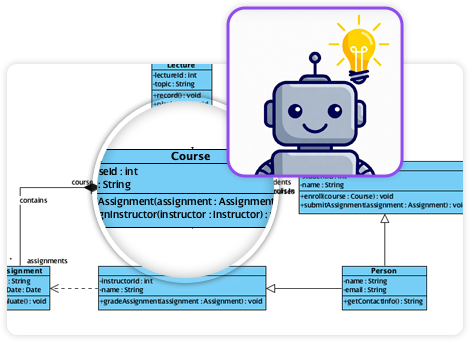
Evolution of the AI Diagram Generator
Originally designed to support core UML 2.x diagram types, the AI Diagram Generator has expanded significantly over the past few years. What began as a tool for automating basic diagram creation—through text prompts or structured inputs—has matured into a comprehensive modeling ecosystem where AI not only generates diagrams but actively guides users through the modeling process.
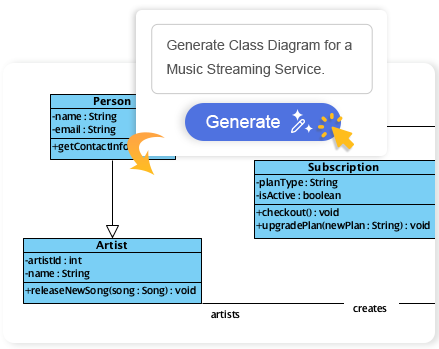
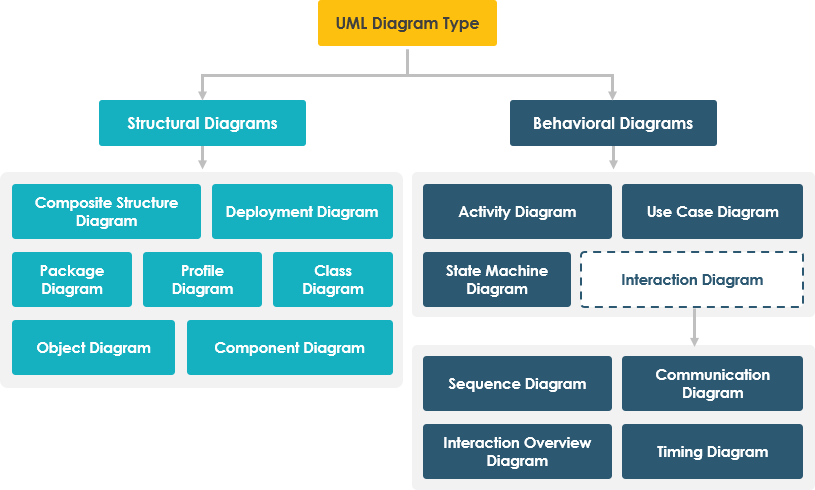
The system now supports over 14 standard UML diagrams, aligning fully with the UML 2.0 specification. However, its true value lies in its ability to extend beyond pure object-oriented modeling into data, process, systems, and business domains—making it a versatile solution across software development, database design, and enterprise architecture.
Core UML Diagram Support with AI-Powered Assistance
The AI Generator provides robust, intelligent support for all 14 UML 2.x diagram types, with special emphasis on those requiring high abstraction or complex relationships. The integration of AI-driven tools ensures not only diagram accuracy but also contextual intelligence during creation.
Key UML Diagrams with AI Features
-
Use Case Diagram: AI assists in identifying actors, system boundaries, and use cases from textual descriptions. It suggests logical groupings, helps avoid cyclomatic complexity, and supports the creation of modular, readable models.
-
Class Diagram: A cornerstone of OOP modeling, this diagram benefits from AI-assisted step-by-step generation. The AI breaks down class hierarchies, identifies inheritance patterns, suggests associations, and even flags potential inconsistencies (like circular dependencies or missing visibility).
-
Sequence Diagram: Ideal for modeling interactions between objects in time. The AI interprets natural language prompts (e.g., “Show how a login request flows through the system”) and generates accurate message sequences, including sequence points, lifelines, and return values.
-
State Machine (Statechart) Diagram: Supports modeling complex behavioral states (e.g., order processing, user authentication). The AI analyzes transitions, identifies guard conditions, and ensures proper event triggers and entry/exit actions.
-
Object Diagram: Enables validation of a specific instance of a class structure. AI can generate instances based on use-case scenarios or automatically infer object references from existing class models.
-
Deployment Diagram: Crucial for understanding hardware-software interactions. AI helps define nodes, communication links, and network topologies, especially useful in distributed system design.
-
Requirement Diagram: Bridges business and technical domains. AI parses functional and non-functional requirements, maps them to use cases, and ensures traceability throughout the development lifecycle.
-
Package Diagram: Added in recent updates, this is essential for architectural modeling. AI assists in organizing components by module, layer, or subsystem, with intelligent suggestions for visibility, inheritance, and dependency resolution.
-
Component Diagram: Enhances modeling of internal software architecture. AI supports dynamic layout generation, interface definition, and dependency clarity—especially helpful when working with microservices or modular systems.
-
Activity Diagram: Offers specialized support for converting use cases into flow-oriented process models. The AI generates structured activities, control flows, and decisions, making it ideal for business process modeling and workflow automation.
-
Timing Diagram: Addresses the temporal behavior of systems. AI supports the generation of time-based interactions—such as timer events or periodic polling—within a clear, readable timeline format.
Complementary and Domain-Specific Diagrams
While UML forms the foundation, the AI Generator’s true power emerges when it supports non-UML, domain-specific modeling. These diagrams are vital in data modeling, project planning, business analysis, and stakeholder communication.
Key Complementary Diagrams
-
Entity Relationship Diagram (ERD): Supports both Chen Notation and modern entity-attribute-relationship (E-A-R) styles. AI can infer relationships from text descriptions, suggest normalization rules, and generate primary/foreign key constraints—directly supporting database design.
-
Data Flow Diagram (DFD): With support for multiple notations (Gane-Sarson, Yourdon & Coad, Yourdon DeMarco), AI interprets textual descriptions of data flows and processes to produce clean, readable diagrams suitable for business process analysis or system integration planning.
-
PERT Chart: A project management tool used for scheduling tasks with dependencies. AI generates activity nodes, durations, and critical paths from project descriptions, aiding in risk assessment and resource planning.
-
Decision Table: Enables formalization of business rules. AI constructs tables from rule sets, clarifies conditions and actions, and ensures completeness and consistency—especially useful in compliance and regulatory domains.
-
Mind Maps: Ideal for ideation and brainstorming. AI generates hierarchical idea structures from free-text inputs, helping teams explore concepts without committing to a final structure.
-
SysML Diagrams: Includes Internal Block Diagrams (IBD), which model system structure and decomposition. AI assists in breaking down complex systems into manageable components, supporting systems engineering in aerospace, automotive, and industrial software.
AI Features Beyond Diagram Generation
Visual Paradigm’s AI ecosystem includes more than just diagram creation. It features an AI-powered Chatbot embedded within the interface that serves as a modeling assistant:

-
Interprets natural language prompts (e.g., “Create a class diagram for a library management system with borrowing and returns”)
-
Provides real-time suggestions for classes, attributes, methods, and relationships
-
Validates model consistency and suggests improvements
-
Generates model explanations in plain language for stakeholders
In addition to the AI Chatbot, the platform supports text-to-diagram generation, where users can paste a paragraph, paragraph list, or system description and receive a fully rendered, structured diagram. This capability reduces the time required for early-stage modeling and enables rapid prototyping.
Use Cases Across Industries
The versatility of this tool makes it applicable across diverse domains:
-
Software Development: From initial class modeling to deployment planning, the AI speeds up design phases.
-
Database Design: ERD generation with AI-driven normalization ensures data integrity.
-
Business Process Modeling: DFDs and activity diagrams help visualize end-to-end workflows.
-
Systems Engineering: SysML and component diagrams enable precise modeling of complex systems.
-
Project Management: PERT charts and decision tables provide visibility into timelines and rule-based logic.
-
Stakeholder Communication: Mind maps and simplified diagrams make abstract concepts accessible.
Best Practices for Effective Use
To maximize the value of the AI Diagram Generator, consider the following best practices:
-
Start with clear, domain-specific inputs: The quality of the generated diagram depends on the clarity and specificity of the prompt.
-
Use AI as a co-pilot, not a replacement: Review and refine AI-generated outputs to ensure accuracy, completeness, and alignment with organizational standards.
-
Apply iterative modeling: Generate a diagram, use it to refine the prompt, and iterate until the model reflects business or technical needs.
-
Integrate with version control and traceability: Leverage the platform’s capabilities to maintain consistent, auditable models across development cycles.
Conclusion: Realizing the Strategic Value of AI-Assisted Modeling
Visual Paradigm’s AI Diagram Generator represents more than a technological upgrade—it embodies a fundamental shift in how organizations approach system design, documentation, and collaborative problem-solving. By embedding artificial intelligence into the visual modeling workflow, the platform empowers teams to move faster without sacrificing precision, bridge communication gaps between technical and non-technical stakeholders, and maintain model integrity throughout complex development lifecycles.
The case study demonstrates that successful adoption of AI-powered diagramming tools hinges on three critical factors: clear prompt engineering, human-AI collaboration mindsets, and integration with existing development practices. Organizations that invest in training their teams to leverage these capabilities strategically will see measurable improvements in design velocity, model quality, and cross-functional alignment.
As AI capabilities continue to evolve—with advances in natural language understanding, contextual reasoning, and domain-specific knowledge—the potential for visual modeling tools to serve as intelligent co-pilots in system design will only expand. For enterprises navigating digital transformation, adopting platforms like Visual Paradigm’s AI Diagram Generator is not merely about keeping pace with technology trends; it is about building a foundation for more agile, resilient, and innovative engineering practices.
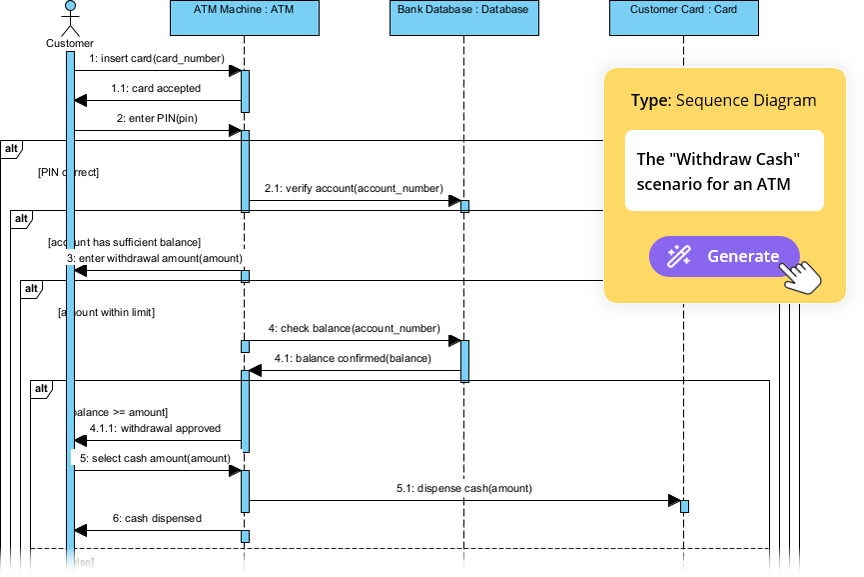
For teams engaged in agile development, system design, or enterprise architecture, this represents a paradigm shift in how visual models are created, reviewed, and maintained. The most forward-thinking organizations will treat AI-assisted modeling not as a replacement for human expertise, but as a force multiplier that amplifies creativity, reduces cognitive load, and accelerates the journey from concept to implementation.
For the most current list of supported diagrams or to explore live features, refer to the official Visual Paradigm Updates Portal or try the tool directly in a trial environment.
Reference
- AI Flowchart Generator | Visual Paradigm AI: Support documentation for AI-powered flowchart generation focused on support ticket workflows and process automation.
- UML modeling – Visual Paradigm: Official documentation covering UML modeling fundamentals and implementation within Visual Paradigm.
- Overview of the 14 UML Diagram Types: Comprehensive guide explaining each of the standard UML 2.x diagram types and their applications.
- Visual Paradigm Product Overview: Product documentation detailing Visual Paradigm’s capabilities, features, and UML 2.0 compliance.
- Tutorial: First UML Diagram with Visual Paradigm AI: Step-by-step beginner tutorial for creating UML diagrams using Visual Paradigm’s AI generator.
- UML Class Diagram Tutorial – Visual Paradigm: Detailed tutorial on creating and understanding UML class diagrams for object-oriented design.
- Sequence Diagram Tutorial: Guide to modeling object interactions and message flows using sequence diagrams.
- All You Need to Know about State Diagrams: Resource explaining state machine diagrams for modeling behavioral states and transitions.
- What is Object Diagram? – Visual Paradigm: Explanation of object diagrams and their role in validating class structure instances.
- Deployment Diagram: Handbook resource on modeling hardware-software architecture and network topologies.
- Beginner’s Guide to Requirement Diagrams in SysML – Visual …: Introductory guide to using requirement diagrams for bridging business and technical specifications.
- AI UML Package Diagram Generator | Visual Paradigm Product …: Product update announcement for AI-assisted package diagram generation capabilities.
- Component Diagram Tutorial: Tutorial on modeling software components, interfaces, and dependencies.
- Elaborating Use Cases with Activity Diagrams: Visualizing Scenarios for Normal, Alternative, and Exception Paths – Visual Paradigm Guides: Guide on using activity diagrams to model business processes and workflow scenarios.
- What is Timing Diagram?: Explanation of timing diagrams for modeling temporal behavior and time-based interactions.
- Drawing Entity Relationship Diagram in Visual Paradigm: Documentation on creating ERDs with support for multiple notation styles and database design features.
- How to Create Data Flow Diagram ( DFD )?: Tutorial on generating data flow diagrams using various notations for process analysis.
- PERT Chart – A Comprehensive Tutorial: Guide to using PERT charts for project scheduling, dependency mapping, and critical path analysis.
- What is Use Case Diagram?: Foundational resource on use case diagrams for capturing functional requirements and actor interactions.
- How to Draw a Mind Map ?: Tutorial on creating hierarchical mind maps for brainstorming and idea organization.
- SysML : How to Use Activity Diagrams to Model System Behavior?: Guide on applying SysML activity diagrams for systems engineering and behavioral modeling.
- Visual Paradigm – AI-Powered Visual Modeling Platform: Official homepage for Visual Paradigm’s AI-enhanced visual modeling and design platform.
- AI Chatbot | Diagramming & Modeling with Visual Paradigm: Access point for the AI-powered chatbot assistant integrated within Visual Paradigm’s modeling environment.
- Free UML , BPMN and Agile Tutorials – Learn Step-by-Step: Collection of free tutorials covering UML, BPMN, database modeling, and agile practices.
- AI-Powered Visual Modeling and Design Solutions by Visual Paradigm: Central portal for exploring Visual Paradigm’s AI-driven tools for visual modeling, diagramming, and software design workflows.
- AI Chatbot Feature – Intelligent Assistance for Visual Paradigm Users: Feature page describing the AI chatbot’s capabilities for natural language instruction interpretation and task automation within the modeling environment.
- Visual Paradigm Chat – AI-Powered Interactive Design Assistant: Interactive AI chat interface for real-time diagram generation, code writing, and collaborative design problem-solving.
- AI Textual Analysis – Transform Text into Visual Models Automatically: Tool description for AI-powered analysis of unstructured text to automatically generate structured UML, BPMN, and ERD diagrams.
- AI-Assisted UML Class Diagram Generator – Visual Paradigm: Interactive tool for step-by-step UML class diagram creation with AI suggestions, validation, and PlantUML export support.
- AI Tree Diagram Maker | Visualize Hierarchical Data Instantly: IntelliTree tool combining generative AI with Markdown editing to create mind maps, organizational charts, and work breakdown structures from text descriptions.
- C4-PlantUML Studio | AI-Powered C4 Diagram Generator: Specialized tool for transforming natural language prompts into layered C4 architecture diagrams covering Context, Container, Component, and Code levels.
- AI-Powered SWOT Analysis in Visual Paradigm: Resource explaining AI-facilitated strategic planning within the SWOT framework, enabling teams to develop actionable TOWS strategies.
- AI Powered Chart Generator Archives: Article collection detailing AI tools for transforming raw data into ready-to-use bar charts, column charts, and other data visualizations.
- AI Table Generator Launch for Rapid Data Modeling: Release announcement for an AI-driven tool that generates database tables and models from data inputs to accelerate schema design.
Related posts:
 Comprehensive Guide to Visual Paradigm’s AI-Powered UML and Agile Development
 Automate Use Case Documentation: Turn PlantUML Code into a Report
A Comprehensive Guide to C4 and ArchiMate: Choosing the Right Modeling Approach for Modern Software Architecture
Visual Paradigm 18.0: The AI-Powered Revolution in Visual Modeling and Enterprise Architecture
Automate Use Case Documentation: Turn PlantUML Code into a Report
A Comprehensive Guide to C4 and ArchiMate: Choosing the Right Modeling Approach for Modern Software Architecture
Visual Paradigm 18.0: The AI-Powered Revolution in Visual Modeling and Enterprise Architecture