


Enterprise architecture models often end up gathering digital dust. They are created with technical precision but fail to communicate effectively with the people who need them. The gap between a technically correct model and a useful artifact lies in the design of the ArchiMate Viewpoints. A viewpoint defines how specific information is presented to a specific audience. Without careful design, even the most comprehensive data repository remains inaccessible.
This guide explores how to construct ArchiMate viewpoints that serve their purpose: enabling decision-making. We will move beyond basic diagramming rules to discuss the strategy behind visualization, stakeholder engagement, and model governance. The goal is not just to create diagrams, but to create tools that drive business value.
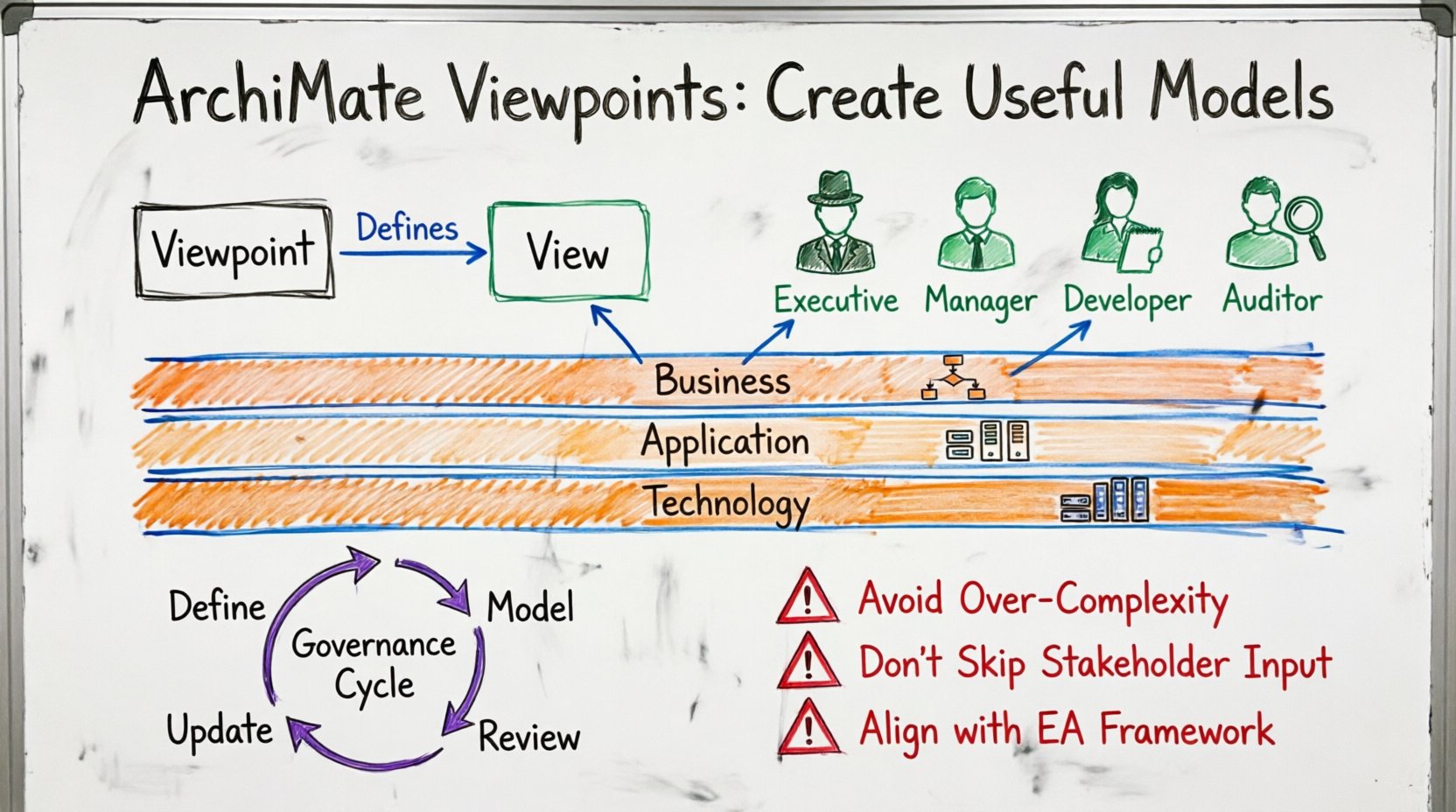
Understanding the Core Distinction: Viewpoints vs. Views 🧩
Before creating any visual artifact, it is essential to distinguish between a Viewpoint and a View. In ArchiMate terminology, these are not interchangeable terms, and confusing them leads to disorganized repositories.
- Viewpoint: A specification for constructing a view. It defines the conventions, rules, and notations used. It answers the question: “How should this information be represented?” It is the template.
- View: The actual representation of the architecture tailored for a specific stakeholder. It answers the question: “What does this specific stakeholder need to see right now?” It is the content.
Creating a model that gets used requires designing the Viewpoint first. If the Viewpoint is too generic, the View will be cluttered. If the Viewpoint is too rigid, the View will lack necessary context. A well-defined Viewpoint ensures consistency across multiple Views.
Consider the following scenario. A business architect creates a Viewpoint for “Process Optimization.” This Viewpoint might specify that only Business Actors and Process elements are visible, hiding Application components. If a developer then uses this Viewpoint to build a “System Integration” View, they must adhere to the rules of that Viewpoint to maintain consistency.
Stakeholder Analysis: Who Are We Talking To? 👥
The most common failure in enterprise architecture is ignoring the audience. A Viewpoint designed for a Technical Architect will confuse a Business Stakeholder, and vice versa. Effective modeling begins with a detailed analysis of the stakeholders.
Identifying Key Roles
Different roles require different levels of detail. You should categorize your stakeholders into groups to define appropriate Viewpoints:
- Strategic Leadership: These individuals care about alignment with business goals, high-level capabilities, and investment risks. They do not need to see specific software instances. They need a Strategic Viewpoint.
- Operational Managers: These people focus on process efficiency, resource allocation, and day-to-day workflow. They require a Process Viewpoint that highlights actors and workflows without technical clutter.
- Technical Teams: Developers and system administrators need to see the Application and Technology layers. They require a Technical Viewpoint that details interfaces, technology nodes, and deployment artifacts.
- Compliance and Auditors: These stakeholders need to see relationships between controls, risks, and business processes. A Compliance Viewpoint should explicitly map governance rules to architecture elements.
Defining the Information Need
Once roles are identified, determine what information drives their decisions. Ask specific questions:
- Do they need to know the cost of a specific component?
- Do they need to see the dependency between two business processes?
- Do they need to verify that a technology standard is being followed?
If the answer is no, do not include that element in the Viewpoint. Removing unnecessary data reduces cognitive load and increases the likelihood of the model being read and understood.
Managing Complexity Through Abstraction 📉
Enterprise environments are complex. Trying to show everything in a single diagram is a recipe for failure. Abstraction is the primary tool for managing this complexity. You must control the level of detail presented in each Viewpoint.
Layer Separation
ArchiMate defines several layers: Business, Application, Technology, Infrastructure, Physical, and Strategy. While a model may contain all layers, a Viewpoint should typically focus on one or two related layers.
- Business Layer: Focus on capabilities, value streams, and organizational units. Hide the underlying applications that support them unless there is a direct mapping to be made.
- Application Layer: Focus on software functions and data objects. Do not show the specific server hardware unless the view is specifically about infrastructure migration.
- Technology Layer: Focus on nodes, devices, and networks. Do not show the business processes running on them unless illustrating a business continuity scenario.
Zoom Levels
Think of your architecture like a map. A city map looks different from a street map. Similarly, you need different zoom levels.
- High-Level Overview: Shows major domains and their relationships. Useful for steering committees.
- Mid-Level Detail: Shows specific capabilities and the applications supporting them. Useful for project planning.
- Low-Level Specification: Shows individual interfaces and data structures. Useful for development teams.
When designing a Viewpoint, explicitly state which zoom level it targets. If a Viewpoint allows users to toggle between zoom levels, it often becomes too complex to maintain. It is better to create distinct Viewpoints for different levels of abstraction.
Ensuring Notation Discipline and Consistency 📐
Consistency builds trust. If every architect draws a “Business Process” differently, the model loses credibility. A Viewpoint must enforce strict notation rules.
Standardizing Symbols
While ArchiMate provides standard shapes, the interpretation of connections can vary. Define clear rules for:
- Relationships: Always use the correct relationship type. For example, use Assignment when a user is assigned to a process, not Access. Use Realization for models, not Specification.
- Directionality: Ensure flow arrows point logically. Information flow should move from source to destination. Control flow should indicate triggers clearly.
- Color Coding: If you use colors to denote status (e.g., red for deprecated, green for active), this must be documented in the Viewpoint specification.
Limiting Connectivity
A common issue is the “spaghetti diagram.” This occurs when too many elements are connected on a single canvas. To prevent this:
- Limit the number of elements per Viewpoint (e.g., max 50 nodes).
- Use sub-diagrams or drill-down links for complex sections.
- Remove elements that are not directly relevant to the specific question the Viewpoint answers.
Governance and Maintenance of the Model Repository 🔗
A model is not a static document; it is a living representation of the organization. Without governance, it becomes outdated within months. Establishing a maintenance process is part of the Viewpoint design strategy.
Version Control
Every Viewpoint should be versioned. When a change is made, the old version should be archived, and the new version should be published. This allows stakeholders to track how the architecture has evolved over time.
- Change Log: Include a summary of changes in the Viewpoint metadata.
- Review Cycles: Schedule regular reviews (e.g., quarterly) to verify that the Viewpoints still match stakeholder needs.
Access Control
Not everyone should be able to edit every Viewpoint. Define roles for:
- Viewpoint Owners: Responsible for the definition and rules of the Viewpoint.
- View Creators: Authorized to build specific Views based on the Viewpoint.
- Viewers: Can consume the information but cannot modify it.
Common Pitfalls and How to Avoid Them 🚫
Even experienced architects fall into traps when designing Viewpoints. The table below outlines frequent issues and practical solutions.
| Pitfall | Consequence | Solution |
|---|---|---|
| Showing All Layers | Diagram becomes cluttered and unreadable. | Filter layers in the Viewpoint definition. Focus on Business + App, or App + Tech. |
| Ignoring Stakeholders | Stakeholders ignore the model because it does not answer their questions. | Conduct interviews before defining the Viewpoint. Validate with users. |
| Inconsistent Naming | Confusion about whether “Order Process” and “Order Management” are the same. | Enforce a naming convention in the Viewpoint specification. Use a glossary. |
| Static Models | Model becomes obsolete quickly after release. | Integrate model updates into the project delivery lifecycle. Automate where possible. |
| Overusing Relationships | Connections obscure the main message. | Limit relationships per element. Remove “logical” links that add no value. |
Building Feedback Loops for Continuous Improvement 🔄
Creating the Viewpoint is only the first step. You must establish a mechanism to gather feedback. This ensures the Viewpoint evolves as the organization changes.
Feedback Channels
Provide clear ways for users to report issues:
- Commenting System: Allow users to flag confusing elements directly on the View.
- Surveys: Periodically ask stakeholders if the Viewpoint provides the necessary information.
- Usage Metrics: Track which Views are accessed most frequently. If a Viewpoint is never used, analyze why.
Iterative Refinement
Use the feedback to refine the Viewpoint. If users consistently ask for a specific data element that was hidden, consider adding it to the Viewpoint specification. If users find a relationship confusing, simplify the notation.
Measuring the Value of Your Architectural Models 📈
How do you know if your Viewpoints are successful? Success is not measured by the number of diagrams created. It is measured by the impact on decision-making.
Adoption Metrics
- View Access Frequency: Are people opening the Views?
- Time to Find Information: How long does it take for a stakeholder to find the data they need?
- Project Alignment: Are projects referencing the architecture models during planning?
Decision Impact
Look for instances where the architecture model influenced a decision. For example:
- A migration strategy was changed because the Viewpoint revealed a dependency.
- A budget was saved by identifying redundant applications through the Viewpoint.
- Risks were mitigated by visualizing single points of failure.
If you cannot identify these impacts, the Viewpoint may be too theoretical. Revisit the Stakeholder Analysis section and ensure the Viewpoint addresses real business problems.
Integrating Viewpoints into the Delivery Lifecycle 🛠️
Viewpoints should not exist in a vacuum. They must be integrated into the way the organization delivers projects. This ensures the models remain current.
Project Gates
Require that project deliverables include updates to the relevant Views. For example, if a new application is deployed, the Application Viewpoint must be updated before the project is closed.
- Design Phase: Update the Viewpoint to reflect the proposed architecture.
- Implementation Phase: Update the Viewpoint to reflect actual implementation details.
- Handover Phase: Verify that the Viewpoint matches the final state of the system.
Automation
Where possible, automate the generation of Views from the underlying data. This reduces the burden on architects to manually redraw diagrams. Focus the human effort on defining the Viewpoint rules and interpreting the data.
Conclusion on Usability
Creating ArchiMate Viewpoints that get used requires a shift in mindset. It is not about drawing perfect diagrams; it is about communicating value. By focusing on stakeholder needs, managing complexity through abstraction, and enforcing strict governance, you can build a repository that serves the organization.
Remember that a model is a tool. If the tool does not help the user solve a problem, it is not useful. Regularly review your Viewpoints, listen to feedback, and be willing to change. The architecture function succeeds when the models drive action.
Start by auditing your current Viewpoints against the criteria in this guide. Identify which ones are gathering dust and which ones are driving value. Then, focus your effort on refining the high-value ones. This targeted approach ensures that your enterprise architecture remains a strategic asset rather than a technical liability.