


Enterprise Architecture is inherently complex. It spans business strategies, application systems, data structures, and physical infrastructure. Without a structured approach to presenting this information, stakeholders become overwhelmed. This is where ArchiMate Viewpoints become essential. They act as lenses, focusing on specific concerns relevant to different audiences. This guide breaks down the mechanics of ArchiMate Viewpoints, providing a clear understanding of how to model enterprise architecture effectively without relying on specific software products.
Understanding the Core Concepts 🔍
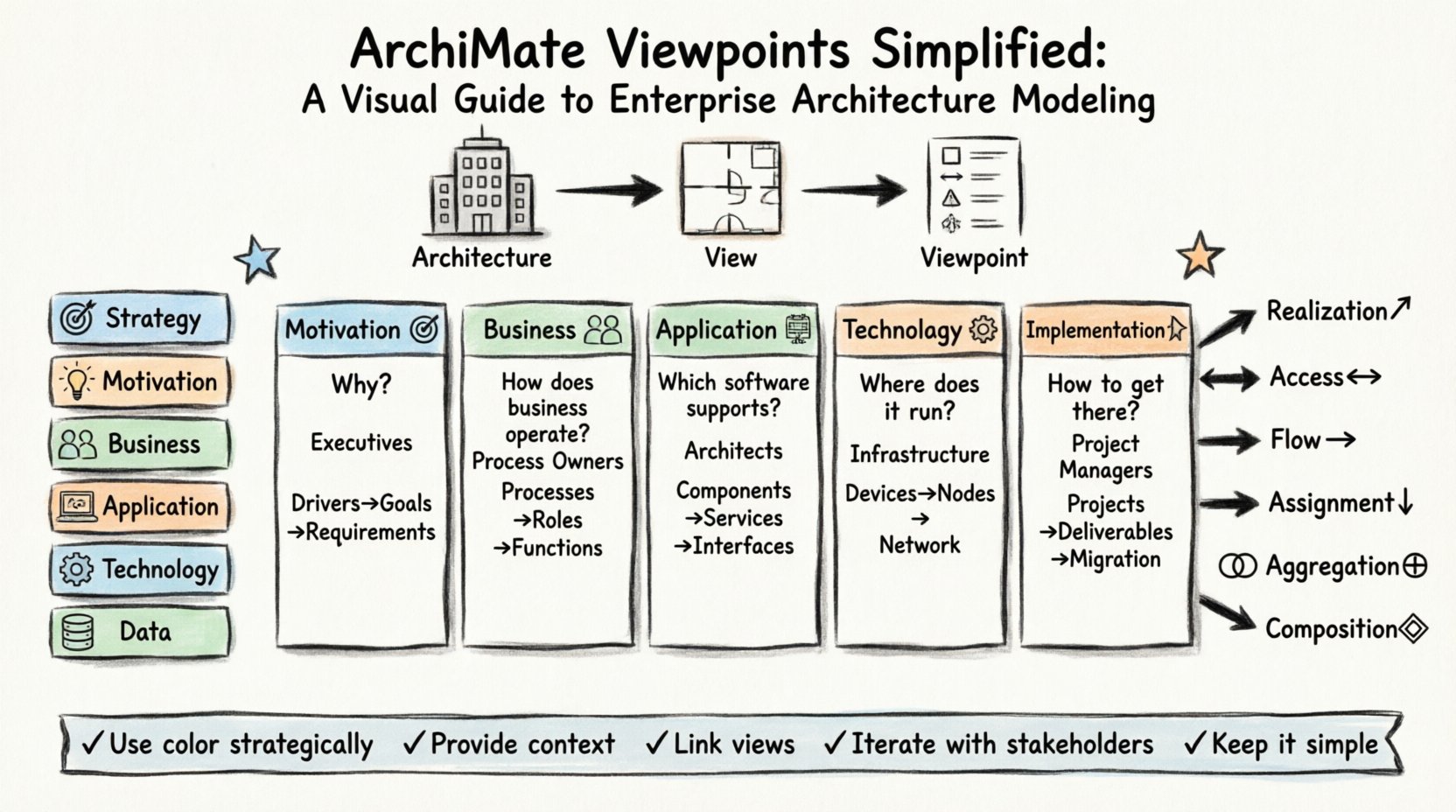
To navigate Enterprise Architecture Modeling successfully, one must distinguish between three fundamental terms: Architecture, View, and Viewpoint. While often used interchangeably, they serve distinct purposes in the modeling framework.
- Architecture: The conceptual representation of the structure and behavior of a system. It encompasses the entire model, including all layers and relationships.
- View: A specific representation of the architecture for a particular set of stakeholders. It is what you actually see on the screen or paper at a given moment.
- Viewpoint: The specification of the conventions for constructing and using a view. It defines the language, perspective, and scope.
Think of the Architecture as the entire building. The View is a specific floor plan or a utility diagram. The Viewpoint is the legend that tells you how to read that specific floor plan.
Why Viewpoints Matter 🌟
A single model cannot communicate effectively with everyone. A Chief Technology Officer (CTO) needs to understand technology infrastructure and dependencies. A Business Analyst needs to understand business processes and value streams. A Developer needs to understand application interfaces and data flows.
Using a generic, all-encompassing diagram creates noise. Important details get lost in the clutter. Viewpoints solve this by filtering information. They ensure that:
- Stakeholders receive information relevant to their decision-making.
- Communication remains clear and concise.
- Consistency is maintained across different diagrams.
- Complexity is managed by isolating concerns.
The ArchiMate Layers 🏛️
Before diving into specific viewpoints, it is necessary to understand the layers that make up the ArchiMate language. These layers provide the vocabulary for your models.
- Business Layer: Represents the business organization, including business processes, roles, functions, and products. It focuses on what the organization does.
- Application Layer: Represents the software applications and their interactions. It focuses on the systems that support the business processes.
- Technology Layer: Represents the hardware and software infrastructure that hosts the applications. It focuses on the physical and logical resources.
- Data Layer: Represents the data and information objects. It focuses on the content being processed.
- Strategy Layer: Represents the strategic elements like goals, objectives, and principles. It drives the other layers.
- Motivation Layer: Represents the drivers, assessments, and requirements that explain why decisions are made.
Each viewpoint typically focuses on one or more of these layers to maintain focus. Mixing layers indiscriminately can lead to confusion.
Standard Viewpoints Explained 📋
The ArchiMate standard defines a set of recommended viewpoints. While you can create custom viewpoints, understanding these standards is the foundation of effective modeling.
1. Motivation Viewpoint 🎯
This viewpoint addresses the “Why” behind the architecture. It connects business drivers to the actual implementation.
- Focus: Drivers, Assessments, Goals, Principles, Requirements.
- Target Audience: Executives, Strategy Planners.
- Key Relationships: Influenced By, Satisfied By, Realized By.
- Use Case: Explaining why a new application is being procured to meet a specific regulatory requirement.
2. Business Viewpoint 👥
This is perhaps the most common viewpoint. It focuses purely on the business processes and organizational structure.
- Focus: Business Processes, Business Roles, Business Functions, Business Objects.
- Target Audience: Business Managers, Process Owners.
- Key Relationships: Assigned To, Aggregation, Composition.
- Use Case: Visualizing the flow of an order from receipt to delivery without technical details.
3. Application Viewpoint 💻
This viewpoint zooms in on the software systems. It shows how applications interact with each other and the business processes they support.
- Focus: Application Components, Application Services, Application Functions.
- Target Audience: System Architects, Developers, IT Managers.
- Key Relationships: Access, Communication, Aggregation.
- Use Case: Mapping which applications provide data to which other applications.
4. Technology Viewpoint ⚙️
This viewpoint deals with the infrastructure. It is crucial for understanding performance, hosting, and physical dependencies.
- Focus: Devices, Nodes, System Software, Network.
- Target Audience: Infrastructure Engineers, Operations Teams.
- Key Relationships: Access, Communication, Deployment.
- Use Case: Mapping servers to the applications running on them.
5. Implementation & Migration Viewpoint 🚀
This viewpoint is dynamic. It looks at the transition from the current state to the target state. It is essential for planning projects.
- Focus: Projects, Programs, Deliverables, Work Packages.
- Target Audience: Project Managers, Portfolio Managers.
- Key Relationships: Assignment, Aggregation.
- Use Case: Showing which projects deliver which capabilities to reach the future architecture.
Comparison of Viewpoint Focus Areas 📊
The table below summarizes the primary focus of each standard viewpoint to aid in quick selection.
| Viewpoint | Primary Layer | Key Question Answered | Typical Stakeholder |
|---|---|---|---|
| Motivation | Motivation | Why are we doing this? | Executives |
| Business | Business | How does the business operate? | Process Owners |
| Application | Application | Which software supports the process? | Application Architects |
| Technology | Technology | Where does the software run? | Infrastructure Managers |
| Implementation & Migration | Implementation | How do we get from here to there? | Project Managers |
Creating Custom Viewpoints 🛠️
While standard viewpoints cover many scenarios, Enterprise Architecture is rarely one-size-fits-all. You may need to create custom viewpoints to address specific organizational needs.
Steps to Define a Custom Viewpoint
- Identify the Stakeholder: Who is the audience? What is their role?
- Define the Concern: What specific question must this diagram answer?
- Select the Layer: Which ArchiMate layers contain the relevant information?
- Choose the Notation: Which elements and relationships are necessary? Exclude the rest.
- Establish Layout Conventions: Decide on the visual style (e.g., left-to-right flow, top-down hierarchy).
- Document the Definition: Record the rules so others can create consistent views.
For example, a Security Architect might create a custom “Security Control Viewpoint” that focuses heavily on the Technology and Application layers, highlighting encryption points and access control mechanisms.
Common Pitfalls to Avoid 🚫
Even with a solid framework, modeling can go astray. Be aware of these common mistakes when working with ArchiMate Viewpoints.
- Overloading the Diagram: Trying to show everything in one view defeats the purpose of a viewpoint. Keep it focused.
- Inconsistent Notation: Using different symbols for the same element across different views creates confusion.
- Ignoring Relationships: Focusing only on elements without showing how they connect renders the model useless.
- Mixing Layers Indiscriminately: While cross-layer relationships exist, a view should usually maintain a primary layer focus to prevent cognitive overload.
- Static Models: Failing to update the model when the enterprise changes leads to a “phantom” architecture that does not match reality.
Best Practices for Communication 💬
The goal of architecture modeling is communication, not just documentation. Follow these practices to ensure your models are understood.
- Use Color Strategically: Use color to indicate status (e.g., red for deprecated, green for active) rather than just decoration.
- Provide Context: Always include a legend or title that explains the scope of the view.
- Link Views Together: Use references to link related views. If a Business View references an Application View, the link should be explicit.
- Iterate with Stakeholders: Review drafts with the intended audience before finalizing. They will spot ambiguities you missed.
- Keep it Simple: If a diagram requires a manual to explain it, simplify the diagram.
Integrating Viewpoints into Workflow 🔄
Viewpoints should not be an afterthought. They must be integrated into the development lifecycle.
During Planning
Use the Motivation Viewpoint to align projects with strategic goals. Ensure every initiative has a clear “why” before resources are committed.
During Design
Use the Business and Application Viewpoints to design the solution. Ensure the applications match the business processes they support.
During Implementation
Use the Implementation & Migration Viewpoint to track progress. Ensure the work packages align with the architectural targets.
During Operations
Use the Technology Viewpoint for monitoring and maintenance. Understand the infrastructure dependencies to troubleshoot issues effectively.
The Relationship Between Layers 🧩
Understanding how layers interact is critical for accurate modeling. ArchiMate defines specific relationships that bridge these layers.
- Realization: A lower layer element realizes a higher layer element (e.g., an Application realizes a Business Process).
- Access: A service is accessed by another service or function.
- Flow: Information or data flows between elements.
- Assignment: A role is assigned to a function or process.
- Aggregation: A whole is composed of parts.
- Composition: A whole is composed of parts, where the parts cannot exist independently.
When creating a Viewpoint, you must decide which of these relationships are relevant. For a high-level Business View, “Flow” and “Assignment” might be key. For a Technology View, “Deployment” and “Access” might be more important.
Ensuring Consistency Across Models 📐
Consistency is the hallmark of a mature Enterprise Architecture practice. When multiple architects create views, they must adhere to shared standards.
- Element Naming: Establish a naming convention for all elements (e.g., “App-ERP-01”).
- Layer Definitions: Clearly define what constitutes a Business Process versus a Business Function.
- Relationship Types: Agree on when to use “Access” versus “Communication”.
- Version Control: Ensure all views are versioned and linked to the specific architecture release.
Without consistency, the architecture becomes a collection of disconnected diagrams rather than a cohesive model. Viewpoints help enforce this consistency by acting as templates.
Addressing Scalability Challenges ⚖️
As the enterprise grows, the architecture model grows. Large models can become difficult to manage. Viewpoints are the solution to scalability.
Instead of one massive diagram, you create a suite of smaller, focused diagrams. This approach allows the architecture to scale without overwhelming the viewer. It also allows for parallel work streams. One team can focus on the Application View while another focuses on the Technology View, knowing they will integrate later.
Final Thoughts on Modeling Success ✅
Mastering ArchiMate Viewpoints is a journey of clarity. It is about stripping away the noise to reveal the structure that matters. By adhering to the standard layers, utilizing the recommended viewpoints, and creating custom lenses for specific needs, you create an architecture that serves the organization effectively.
Remember that the model is a tool for decision-making. If it does not aid in that decision, it needs to be refined. Regular reviews, stakeholder feedback, and adherence to these principles will ensure your Enterprise Architecture Modeling remains valuable and relevant over time.
Start small. Define one Viewpoint for your next project. Document the rules. Share it. Iterate. Over time, this disciplined approach will transform how your organization understands and manages its technology landscape.