


Introduction: Why I Turned to AI for Diagramming
As a freelance business analyst who’s worked with startups and enterprise teams alike, I’ve spent countless hours translating messy requirement documents into clean system diagrams. The process was always the same: read, sketch, revise, repeat. Sometimes a single use case diagram would take half a day to draft, validate, and share.
When I first heard about Visual Paradigm’s AI chatbot for diagramming, I was skeptical. Could an AI really understand my vague client notes and turn them into professional UML models? After testing it across three real projects over the past two months, I’m ready to share my honest, hands-on experience—what worked, what surprised me, and whether it’s worth adding to your toolkit.
This review walks through my workflow, includes real screenshots from my sessions, and offers practical tips for analysts, consultants, and product teams looking to speed up their modeling process without sacrificing quality.
Why This Matters for Analysts and Consultants (From My Desk)
Before discovering this tool, my documentation workflow looked like this:
-
Client sends a bullet-point email with feature requests
-
I schedule a clarification call
-
I manually sketch diagrams in a modeling tool
-
I share drafts for feedback, often leading to multiple revision cycles
With the ai diagram generator, that process condensed dramatically. I can now paste the same bullet points into the chatbot and get a first-draft diagram in under two minutes. It’s not about replacing my expertise—it’s about freeing me to focus on validation, stakeholder alignment, and strategic thinking instead of dragging shapes around a canvas.
When to Use the AI Chatbot for Diagramming: My Go-To Scenarios
I’ve found the chatbot most valuable in these situations:
-
Kickoff meetings: When a client shares user stories via email, I generate a use case diagram on the spot to confirm understanding.
-
Sprint planning: Turning acceptance criteria into activity flows helps the dev team visualize edge cases.
-
Stakeholder demos: Non-technical clients grasp a visual sequence diagram faster than a paragraph of requirements.
-
Onboarding docs: New team members get up to speed quicker with AI-generated system context diagrams.
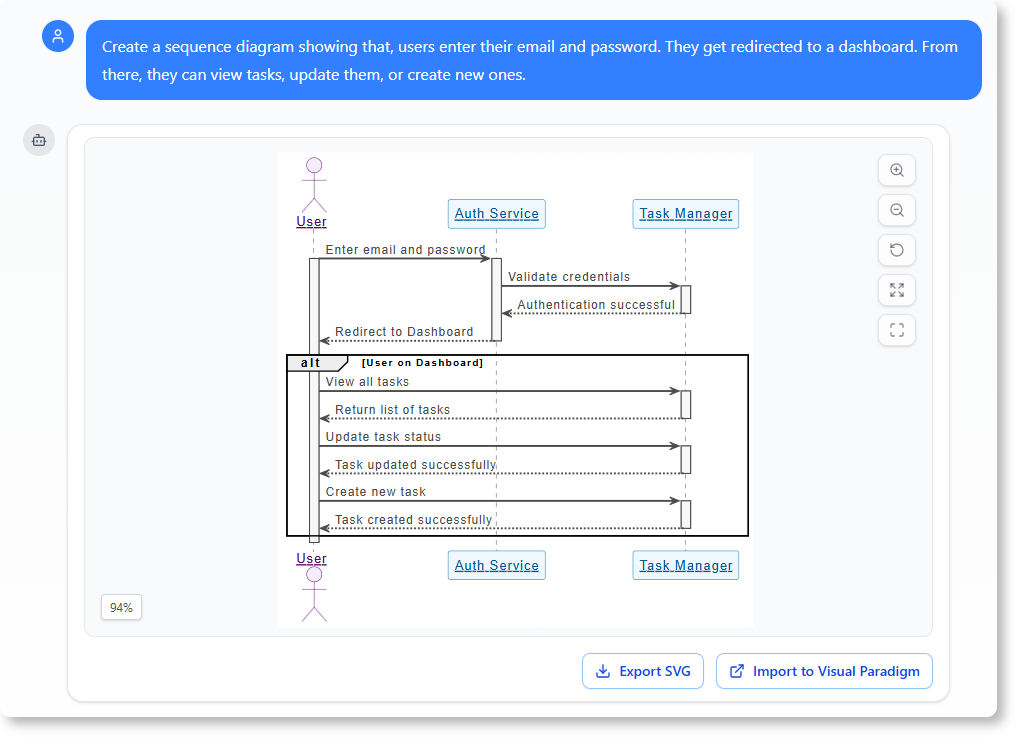
For example, a product manager recently shared this note:
“Users enter their email and password. They get redirected to a dashboard. From there, they can view tasks, update them, or create new ones.”
I pasted that into the chatbot and received a polished UML use case diagram within seconds—no modeling syntax required.
How to Use It: My Real-World Workflow (Step-by-Step)
Let me walk you through how I used the tool for a recent task management app project.
Step 1: Describe the System in Plain Language
I opened my browser and navigated to the Visual Paradigm AI chatbot. My prompt was intentionally conversational:
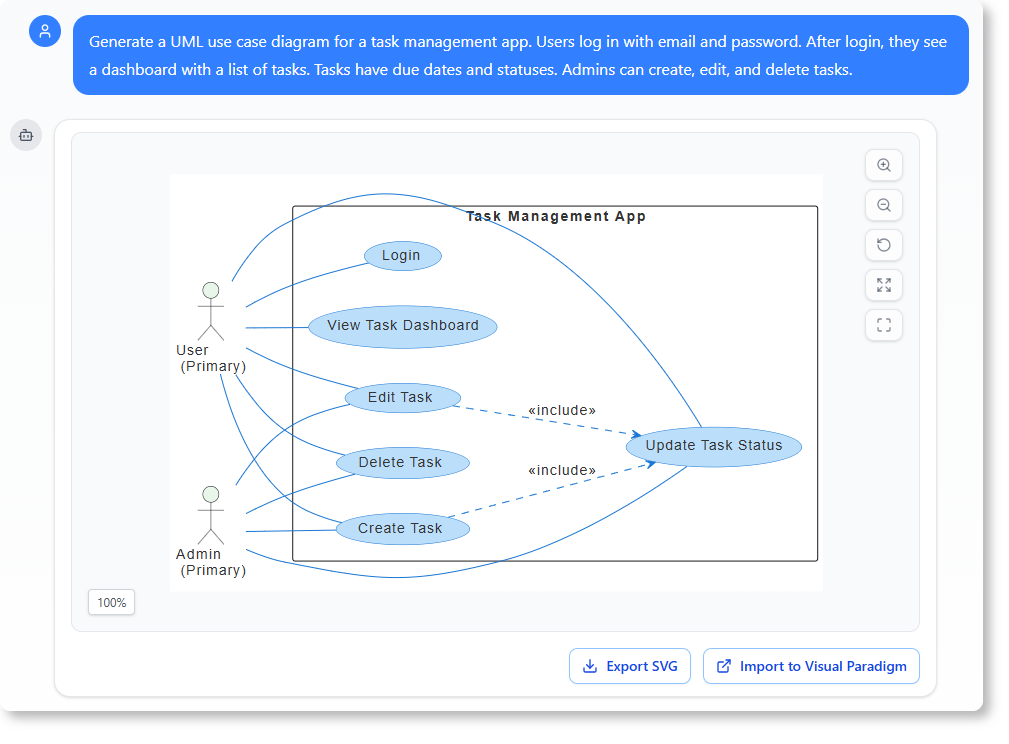
“Generate a UML use case diagram for a task management app. Users log in with email and password. After login, they see a dashboard with a list of tasks. Tasks have due dates and statuses. Admins can create, edit, and delete tasks.”
Step 2: Watch the AI Turn Text into a Diagram
Within ~30 seconds, the chatbot returned a clean, standards-compliant diagram. What impressed me wasn’t just the speed—it correctly identified:
-
Actor roles (standard user vs. admin)
-
Authentication flow
-
Task lifecycle actions (create, view, update, delete)
-
Relationship boundaries (which actors can perform which actions)
Step 3: Review and Refine Iteratively
I noticed the initial diagram didn’t include reminder functionality. Instead of redrawing anything, I simply replied:
“Add a task reminder use case that triggers when a task is due in 24 hours.”
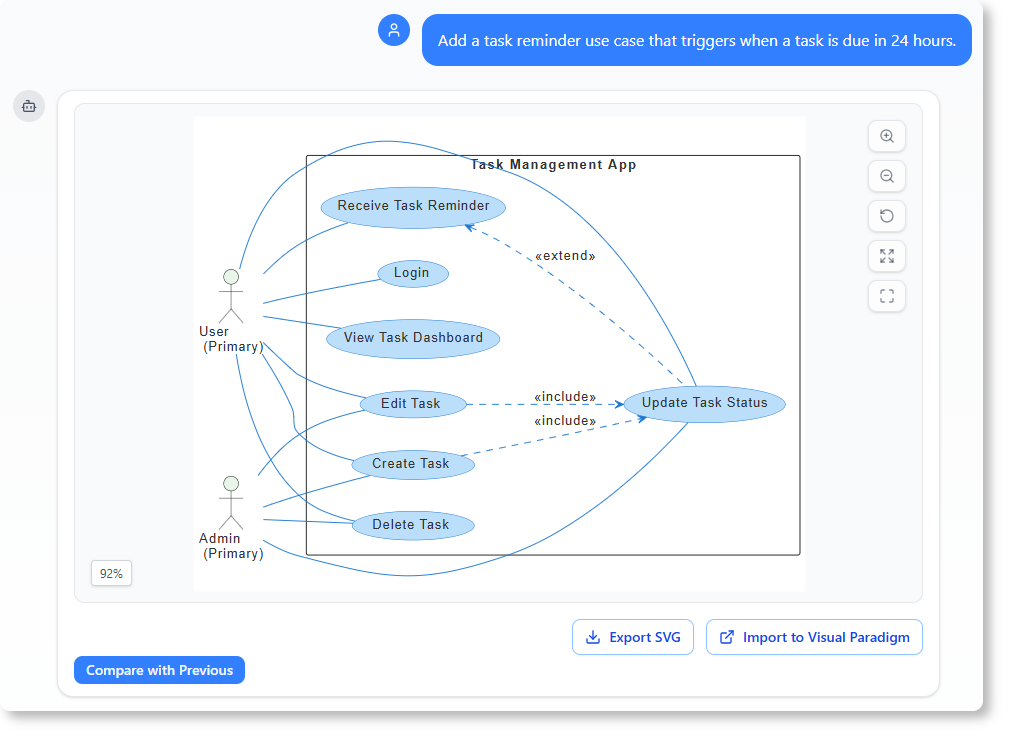
The chatbot updated the diagram instantly. I also tested contextual questions:
“Explain how the login flow works in this diagram.”
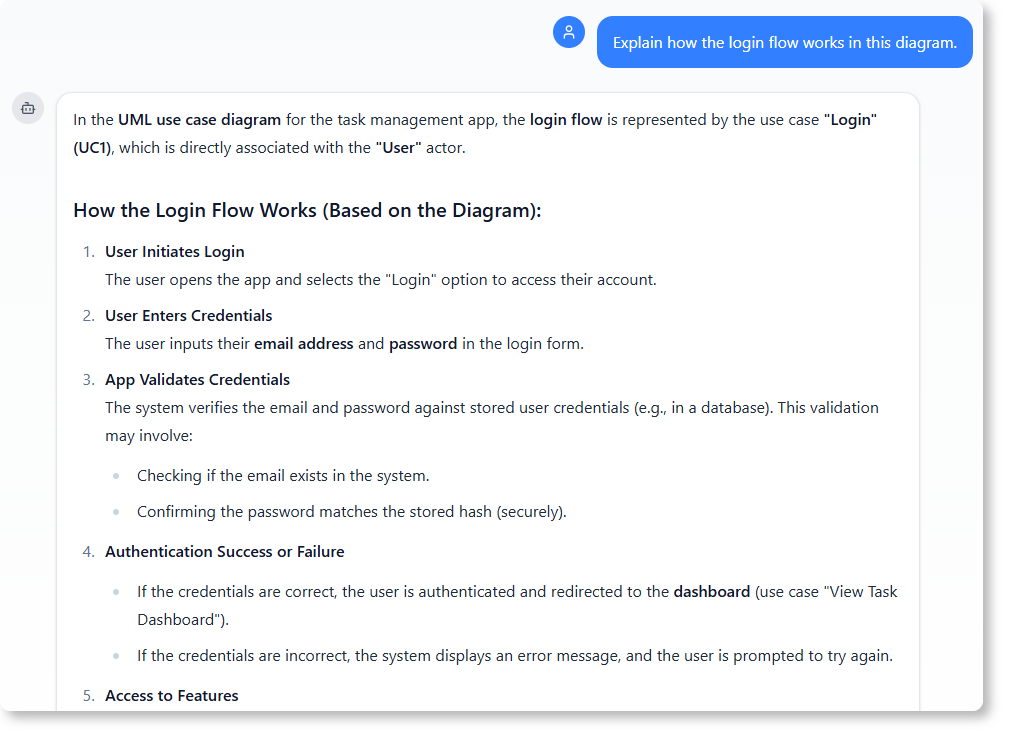
The AI provided a clear, plain-English breakdown—perfect for sharing with non-technical stakeholders. I could then click through to review the full chat history for audit purposes.
What Makes This AI-Powered Modeling Software Unique? (My Take)
I’ve tried several diagramming tools with AI features, but Visual Paradigm’s approach stands out for three reasons:
-
Natural language first: No need to learn UML syntax. Describe your system like you would to a colleague.
-
Iterative refinement: Treat the chatbot like a collaborative partner—ask follow-ups, request tweaks, or demand explanations.
-
Standards compliance: Generated diagrams adhere to UML, C4, and ArchiMate specifications, so they’re ready for professional use.
The tool supports a surprisingly wide range of modeling types:
-
UML (class, sequence, use case, activity, state machine)
-
C4 (system context, container, deployment)
-
ArchiMate (enterprise architecture layers)
-
Business frameworks (SWOT, Eisenhower Matrix, Ansoff Matrix)
Whether I’m consulting for a fintech startup or documenting an internal tool, this flexibility means I rarely need to switch tools mid-project.
How It Helps with System Documentation: A Practical Example
One of my favorite use cases is generating ai-powered system documentation directly from conversational prompts. For a recent web app project, I typed:
“Generate a deployment diagram for a web app with a frontend, backend, and database.”
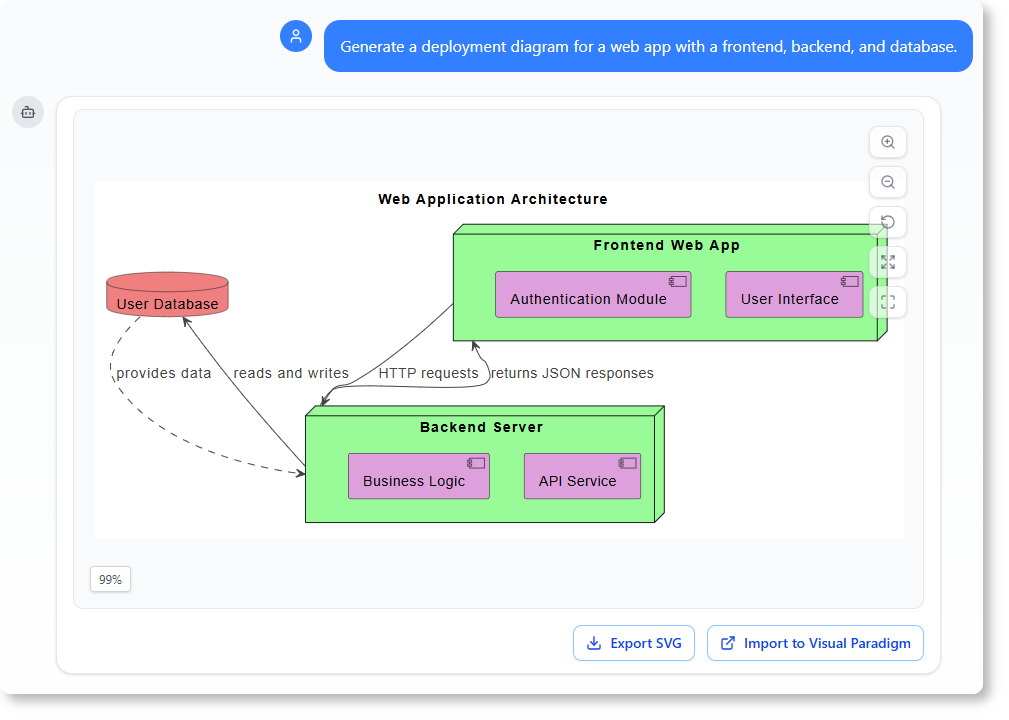
The output gave me a solid foundation for our technical design doc. From there, I asked targeted follow-ups:
-
“How would I add a load balancer to this setup?”
-
“What are the responsibilities of the backend service?”
-
“Can you explain the data flow between the frontend and database?”
Each question deepened the documentation—not as a static artifact, but as a living, explorable model. This interactive approach has dramatically improved alignment between my clients’ expectations and the engineering team’s implementation.
Compare: Traditional Modeling vs. AI-Driven Modeling (My Experience)
| Feature | Traditional Approach | AI-Powered Modeling |
|---|---|---|
| Time to generate diagram | Hours (manual drafting) | Minutes (from natural language) |
| Requires modeling knowledge | Yes | No – just describe the system |
| Accuracy | Depends on user input | AI validates structure and relationships |
| Collaboration | Limited to meetings | Real-time clarification with chat |
| Accessibility | Tech-heavy | Anyone with a basic understanding of business processes |
My note: The time savings are real, but the bigger win is accessibility. I’ve shared AI-generated diagrams with marketing leads and executives who previously glazed over at UML notation. The conversational interface lowers the barrier to meaningful technical discussion.
Where to Use It in Your Workflow: My Top Recommendations
Based on my projects, here’s where I now integrate the chatbot:
-
Requirement workshops: Capture notes → generate diagrams → validate in real time.
-
Client proposals: Turn written scope into visual system context diagrams to build confidence.
-
Internal tech reviews: Use AI-generated sequence diagrams to spot edge cases before coding begins.
-
Knowledge transfer: Onboard new devs with AI-explained architecture diagrams.
The tool doesn’t replace human judgment—it amplifies it. I still review every diagram for business logic accuracy, but I spend far less time on the mechanical drafting.
Getting Started Is Simple: My Onboarding Experience
-
Go to chat.visual-paradigm.com.
-
Type your system description in plain English (no jargon needed).
-
Ask the AI to generate a diagram (e.g., “Draw a sequence diagram for user login”).
-
Review, refine, or ask follow-up questions.
-
Export the result or import it into Visual Paradigm desktop for advanced editing.
I was generating useful diagrams within my first 10 minutes. No tutorials, no syntax memorization—just describe what you need.
Frequently Asked Questions (Answered From My Usage)
Q: Can I generate diagrams from text without knowing modeling standards?
Yes. In my testing, the AI correctly mapped plain descriptions to appropriate diagram types. I described a “user signs up, verifies email, then accesses dashboard” flow, and it generated a valid sequence diagram without me mentioning “sequence” once.
Q: Can I ask follow-up questions about the generated diagram?
Absolutely. I regularly ask things like “What happens if the database is unavailable during login?” and the AI updates the diagram or explains the failure path.
Q: Is this tool suitable for enterprise architecture?
Yes. I’ve used it to draft ArchiMate business layer diagrams for a client’s digital transformation roadmap. The AI understood concepts like “business capability” and “value stream” from context.
Q: Can I use this for non-technical stakeholders?
Definitely. I shared an AI-generated use case diagram with a client’s leadership team, and they provided clearer feedback than when I’d shared text-based requirements.
Q: Can I refine a diagram after it’s generated?
Yes. I’ve added actors, renamed use cases, and adjusted relationships via simple chat commands. The iterative workflow feels natural.
Conclusion: My Final Verdict
After two months of using Visual Paradigm’s AI chatbot for diagramming across multiple client projects, I can confidently say it’s become a core part of my workflow. It won’t replace deep architectural thinking or stakeholder interviews—but it dramatically accelerates the translation of ideas into visual models.
Who should try it?
✅ Business analysts drowning in requirement documents
✅ Consultants who need to visualize systems quickly for clients
✅ Product managers bridging technical and non-technical teams
✅ Developers who want to validate designs before coding
Who might not need it?
❌ Teams with highly specialized, non-standard modeling needs
❌ Projects requiring pixel-perfect diagram customization from the start
For everyone else, this tool turns a traditionally tedious task into a collaborative, conversational experience. The ability to go from “here’s what we need” to “here’s how it works visually” in minutes—not hours—is a game-changer.
If you’re curious, start with a simple prompt at https://chat.visual-paradigm.com/. Describe one feature of your project. See what the AI generates. Then iterate. That’s exactly how I started—and now I can’t imagine going back to manual diagramming for first drafts.
References
- Visual Paradigm AI Chatbot: Turn Your Ideas Into Diagrams Instantly: Blog post introducing the AI chatbot’s core capabilities for instant diagram generation from natural language prompts.
- Generate UML Class Diagrams with AI: Guide focused on using AI to create UML class diagrams from textual requirements.
- Visual Paradigm UML Tool Features: Official overview of Visual Paradigm’s UML modeling capabilities and AI integrations.
- Comprehensive Guide to Visual Paradigm’s AI-Powered UML and Modeling Ecosystem 2025-2026: Third-party analysis of Visual Paradigm’s AI features, licensing, and use cases.
- How to Turn Requirements into Diagrams with an AI Chatbot: Step-by-step tutorial demonstrating the workflow reviewed in this article.
- Visual Paradigm AI Textual Analysis Features: Details on the AI-powered textual analysis tool for extracting model elements from problem descriptions.
- YouTube – Class Diagram Tutorial: Video tutorial demonstrating AI-assisted class diagram creation in Visual Paradigm.
- AI Profile Diagram Generator UML Tool Update: Release notes covering new AI capabilities for UML profile diagrams.
- Tutorial: First UML Diagram with Visual Paradigm AI Generator: Beginner-friendly walkthrough for creating your first AI-generated UML diagram.
- Visual Paradigm AI Core Applications Overview: Official portal detailing Visual Paradigm’s suite of AI-powered modeling applications and subscription options.
- Use Case Modeling Studio with AI: Dedicated tool page for AI-assisted use case diagram generation and refinement.
- YouTube – Object Diagram Tutorial: Video guide on generating object diagrams using Visual Paradigm’s AI features.
- YouTube – Package Diagram Tutorial: Tutorial demonstrating AI-powered package diagram creation.
- YouTube – Composite Structure Diagram Tutorial: Video walkthrough for generating composite structure diagrams via AI prompts.
- YouTube – Component Diagram with AI: Tutorial showing how to transform system architecture text into component diagrams using AI.
- YouTube – Use Case Diagram Tutorial: Step-by-step video guide for AI-assisted use case diagram generation.
- YouTube – Activity Diagram with AI Chatbot: Video demonstration of creating activity diagrams through conversational AI prompts.