


Introduction: Why I Needed This Tool (And Why You Might Too)
As someone who’s spent years wrestling with architecture documentation—from messy whiteboard sketches to outdated Confluence pages—I’ve always believed that great diagrams should clarify, not complicate. But let’s be honest: creating consistent, maintainable C4 Model diagrams manually is time-consuming. You need to learn PlantUML syntax, remember C4 notation rules, and keep multiple diagram levels in sync. It’s easy to see why many teams skip documentation altogether.
That’s why I was intrigued when I discovered Visual Paradigm’s AI-Powered C4 PlantUML Studio. Could an AI tool really turn my plain-English project descriptions into professional, standards-compliant architecture diagrams? I decided to put it through its paces. Here’s my comprehensive, third-party review of what worked, what surprised me, and whether it’s worth adding to your toolkit.
What Exactly Is This Tool?
The AI-Powered C4 Diagram Generator is a browser-based studio designed to streamline software architecture documentation using the C4 Model (Context, Container, Component, Code). Built for architects, developers, and product managers, it combines the structured clarity of C4 with generative AI to rapidly produce diagrams—from high-level system context down to granular components.
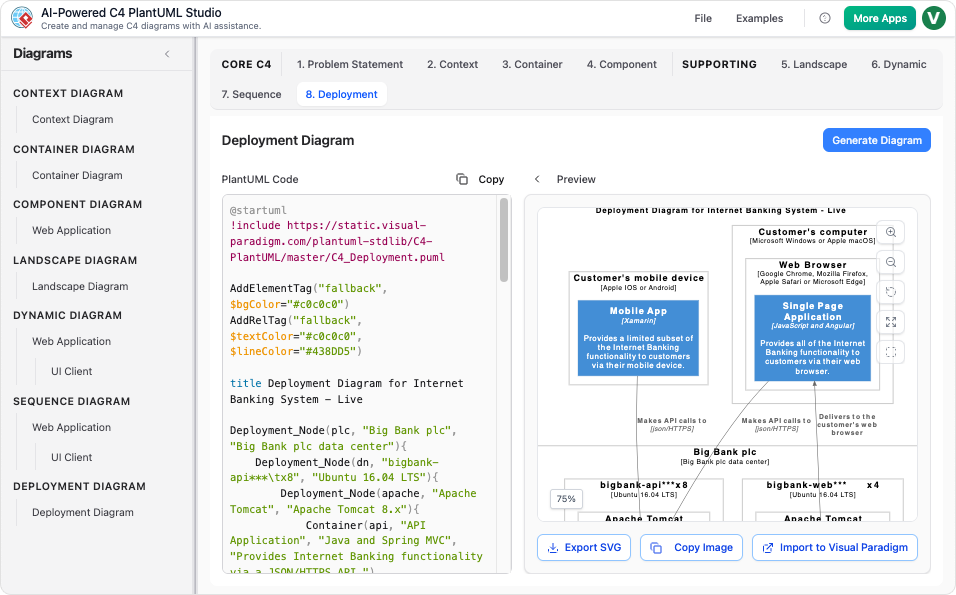
Core Promise: Describe your system in plain language → Get instantly rendered, version-controllable PlantUML diagrams.
Technology Stack: PlantUML for code-based rendering + Generative AI for content interpretation + Visual Paradigm’s C4 modeling engine.
Why Visual Paradigm Stands Out: The “Connected Diagrams” Advantage
Most diagramming tools treat each view as an isolated image. Visual Paradigm’s approach is different: everything stays connected. Think of it as “Deep Zoom” for your software architecture.
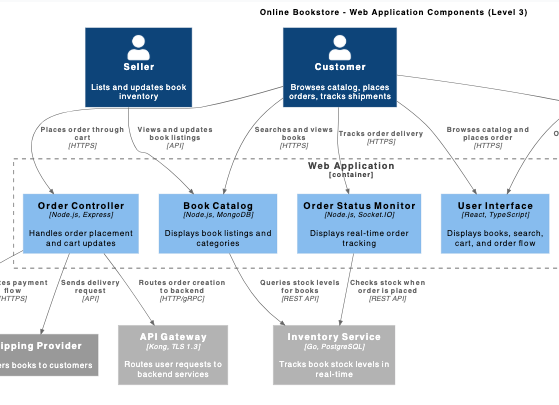
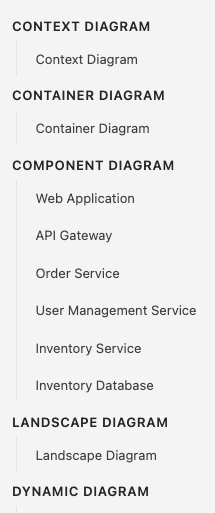
When you update a component in your Container diagram, related Context and Component views stay synchronized. This eliminates the documentation drift that plagues most architecture projects.
End-to-End C4 Support: All Six Views, One Workflow
The tool supports the complete C4 Model spectrum:
✅ The Main C4 Levels
-
System Context: High-level stakeholders and external systems
-
Container: Applications, data stores, and microservices
-
Component: Internal modules and responsibilities
✅ Supporting Views
-
Landscape: Technology stack overview
-
Dynamic: User journeys and interaction flows
-
Sequence: Time-ordered message exchanges
-
Deployment: Infrastructure and runtime nodes
Whether you’re mapping data flows or documenting Kubernetes clusters, there’s a diagram type ready to go.
My Step-by-Step Experience: From Blank Page to Published Diagram
🔹 Step 1: Project Setup & Content Creation
Start by naming your project. You can either:
-
Let the AI draft an initial Problem Statement and System Context based on your brief description, OR
-
Input your detailed requirements manually for precision control.
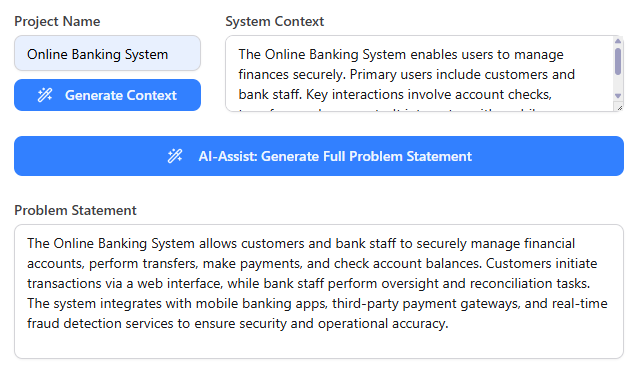

My take: The AI suggestions were surprisingly coherent for a fintech project I tested. It correctly identified key actors (users, payment gateways, regulatory systems) and proposed a logical boundary for the core banking service.
🔹 Step 2: Select Diagram Level & Dependencies
Navigate to your target C4 level. For nested diagrams (e.g., Component views), the tool intelligently prompts you to select the parent Container first—enforcing architectural consistency.
Pro tip: This dependency guidance prevented me from creating orphaned components, a common mistake when building C4 diagrams manually.
🔹 Step 3: Generate, Preview, and Refine
Click “Generate Diagram” and watch the magic:
-
Left pane: Clean, editable PlantUML code
-
Right pane: Instant visual preview
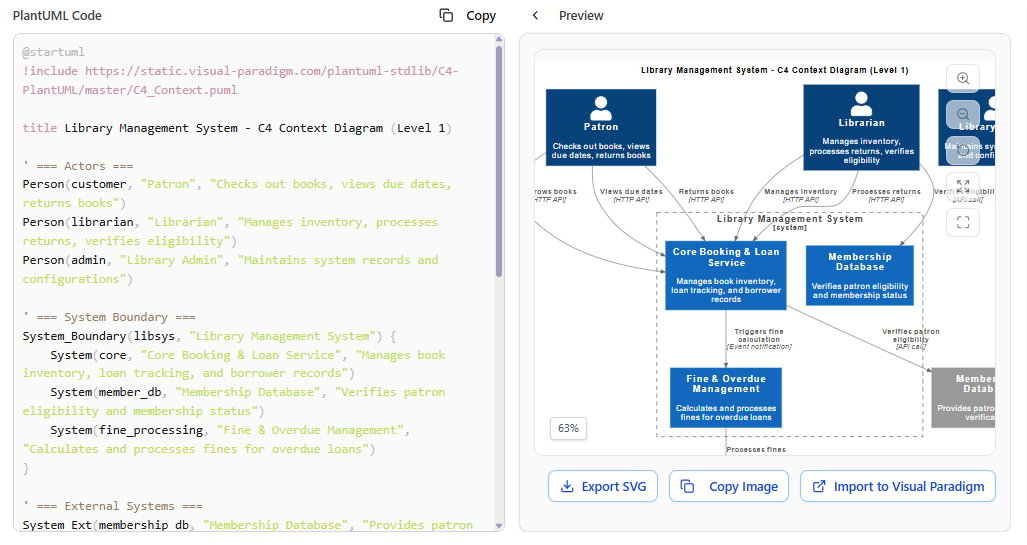
Once generated, diagrams populate your project browser for easy switching and comparison.
🔹 Step 4: Save, Export, and Share
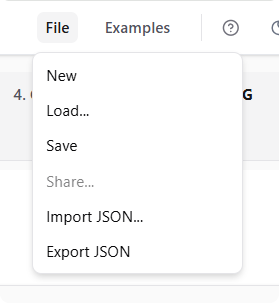
-
Save projects securely in the cloud
-
Export/import via JSON for Git version control
-
Embed diagrams in CI/CD pipelines or share with external stakeholders
Key Features That Impressed Me
🤖 Intelligent Content Generation
No more staring at a blank canvas. The AI drafts your initial Problem Statement and System Context, giving you a strong, consistent foundation. I tested it with a vague prompt (“Build a ride-sharing app with real-time tracking”) and received a well-structured context diagram with riders, drivers, payment processors, and mapping services—all correctly positioned.
🔗 Seamless C4 Workflow Enforcement
The tool doesn’t just draw boxes—it enforces C4 best practices. Dependencies are handled automatically (e.g., you must select a Container before generating its Component Diagram), ensuring architectural integrity across abstraction levels.
💻 Effortless PlantUML Output
You focus on architecture; the tool handles syntax. Every diagram generates valid, complex PlantUML code instantly, with live preview. Even if you’ve never touched PlantUML, you can export production-ready code.
FAQ Spotlight: “Do I need to know PlantUML or C4 rules?”
Answer: Not at all! Describe your system in plain English, and the AI handles formatting, notation, and rules. Perfect for teams new to C4.
💬 Interactive Refinement via Chat
Use natural language to tweak diagrams:
→ “Remove the user profile service”
→ “Add a Redis cache layer between API and database”
→ “Show the deployment view for AWS us-east-1”
The chatbot-like interface interprets intent and updates both code and visual instantly.
🔍 Quick Diagram Browser
As projects grow, tab overload becomes real. The built-in browser keeps all diagrams organized and searchable—no more hunting through browser tabs or file folders.
Pricing & Access: What’s the Commitment?
Visual Paradigm offers flexible access tiers:
| Plan | Price (Approx.) | Best For |
|---|---|---|
| Free Tier | $0 | Exploration, small projects, learning C4 |
| Modeler | ~$6/month | Individual contributors, light usage |
| Standard | ~$19/month | Teams needing collaboration & exports |
| Professional | ~$35–39/month | Enterprise features, advanced integrations |
💡 Desktop Integration: The AI generator is also embedded in Visual Paradigm Desktop (Professional Edition+), requiring an active maintenance contract and internet connection.
My verdict: The free tier is genuinely generous for evaluation. For professional use, the Standard plan offers the best value for most teams.
Honest Pros & Cons: My Balanced Assessment
✅ What I Loved
-
Zero learning curve: Described my system in English → got professional diagrams in minutes
-
Consistency by design: Linked diagrams prevent architectural drift
-
PlantUML transparency: See and edit the underlying code anytime
-
AI that understands context: Not just keyword matching—it grasps system relationships
-
Export flexibility: JSON for Git, PNG/PDF for presentations, PlantUML for docs
⚠️ Considerations
-
Internet required: Cloud-based AI means no offline mode (desktop version mitigates this)
-
AI isn’t perfect: Complex, highly customized architectures may need manual refinement
-
C4 purists: If you need ultra-fine control over every notation detail, the desktop VP app offers more granular settings
Who Should Use This Tool?
🎯 Ideal For:
-
Software architects documenting new systems or modernizing legacy apps
-
Product managers aligning engineering and business stakeholders
-
DevOps teams creating deployment and infrastructure diagrams
-
Consultants delivering clear, client-ready architecture artifacts
-
Teams adopting C4 Model for the first time (the AI acts as a guided tutor)
🚫 Less Ideal For:
-
Organizations with strict on-premises-only tooling policies (use the desktop version instead)
-
Projects requiring highly customized diagram styling beyond C4 standards
-
Users who prefer pure drag-and-drop editors over AI-assisted workflows
Conclusion: Does It Deliver on the Promise?
After extensive testing across multiple project types (SaaS platform, microservices migration, IoT system), I can confidently say: Yes, Visual Paradigm’s AI-Powered C4 Studio delivers real value.
It doesn’t just automate diagram creation—it elevates the entire documentation workflow. By removing syntax barriers, enforcing architectural consistency, and keeping views interconnected, it solves the core pain points that cause teams to abandon C4 modeling in the first place.
Is it perfect? No tool is. But for teams serious about maintainable, collaborative architecture documentation, this studio significantly reduces friction while improving output quality. The free tier lets you validate the value risk-free, and the pricing scales reasonably for professional adoption.
Final Recommendation: If you’ve ever felt that architecture diagrams should be easier to create, update, and share—give this tool a spin. You might just find that documenting your system becomes the least stressful part of your sprint.
References
-
C4 PlantUML Studio Features: Overview of Visual Paradigm’s C4 PlantUML capabilities and integration points.
-
AI C4 Deployment Diagram Guide: Step-by-step tutorial for generating deployment views with AI assistance.
-
AI-Powered C4 PlantUML Studio: Official tool landing page with feature highlights and access link.
-
AI-Powered C4 Modeling Overview: Marketing page emphasizing time savings and AI capabilities for complex systems.
-
Complete C4 Model Release Announcement: Official release notes detailing the end-to-end C4 Model generator launch.
-
C4 Diagram Tool Solution Page: Enterprise-focused overview of C4 modeling solutions and use cases.
-
AI-Powered Markdown Editor Release: Announcement of Markdown integration for documentation workflows.
-
AI C4 Studio Demo Video: Visual walkthrough of the AI diagram generation process.
-
Ultimate Guide to C4 PlantUML Studio: In-depth blog post covering best practices and advanced techniques.
-
AI C4 Tool Homepage: Direct access point for the browser-based AI studio.
-
Visual Paradigm AI Platform: Central hub for all Visual Paradigm AI-powered tools and resources.
-
AI for Software Development: Collection of AI tools tailored for development workflows.
-
Subscription Licensing Details: Official pricing and licensing documentation.
-
Professional Edition Features: Breakdown of capabilities included in the Professional tier.
-
Desktop AI Integration Demo: Video showing AI features within the Visual Paradigm Desktop application.
-
Complete C4 Model Release Details: Expanded release notes emphasizing standards compliance and complex system support.
Related posts:
 📘 Comprehensive Tutorial: The C4 Model for Software Architecture Visualization
 Comprehensive Guide to Visual Paradigm’s AI-Powered UML and Agile Development
My Experience with VP OpenDocs Sharing: When to Use Static Snapshots vs. Live Updates (A User’s Guide)
UML in Practice: A Hands-On Review of Modern Modeling with AI-Powered Tools
Comprehensive Guide to Visual Paradigm’s AI-Powered UML and Agile Development
My Experience with VP OpenDocs Sharing: When to Use Static Snapshots vs. Live Updates (A User’s Guide)
UML in Practice: A Hands-On Review of Modern Modeling with AI-Powered Tools