


Introduction: The Modern Developer’s Documentation Dilemma
In today’s fast-paced software development landscape, technical documentation often becomes an afterthought—scattered across Confluence pages, stale Visio diagrams, outdated README files, and disconnected code repositories. This fragmentation creates knowledge silos, slows onboarding, and increases the risk of architectural drift. Development teams waste valuable time searching for information, reconciling conflicting sources, or recreating diagrams that should already exist.
Visual Paradigm OpenDocs emerges as a purpose-built solution to this challenge. Designed specifically for IT professionals, system architects, and DevOps teams, OpenDocs unifies writing, diagramming, and knowledge organization into a single, AI-powered platform. By embedding professional diagramming tools directly within a rich text editor and leveraging AI to generate visuals from natural language, OpenDocs enables teams to create living, visual documentation that evolves alongside their codebase.
This case study explores how OpenDocs addresses the core pain points of technical documentation, walks through practical implementation workflows, and demonstrates how development teams can leverage its features to build a scalable, maintainable knowledge base that accelerates collaboration and reduces technical debt.
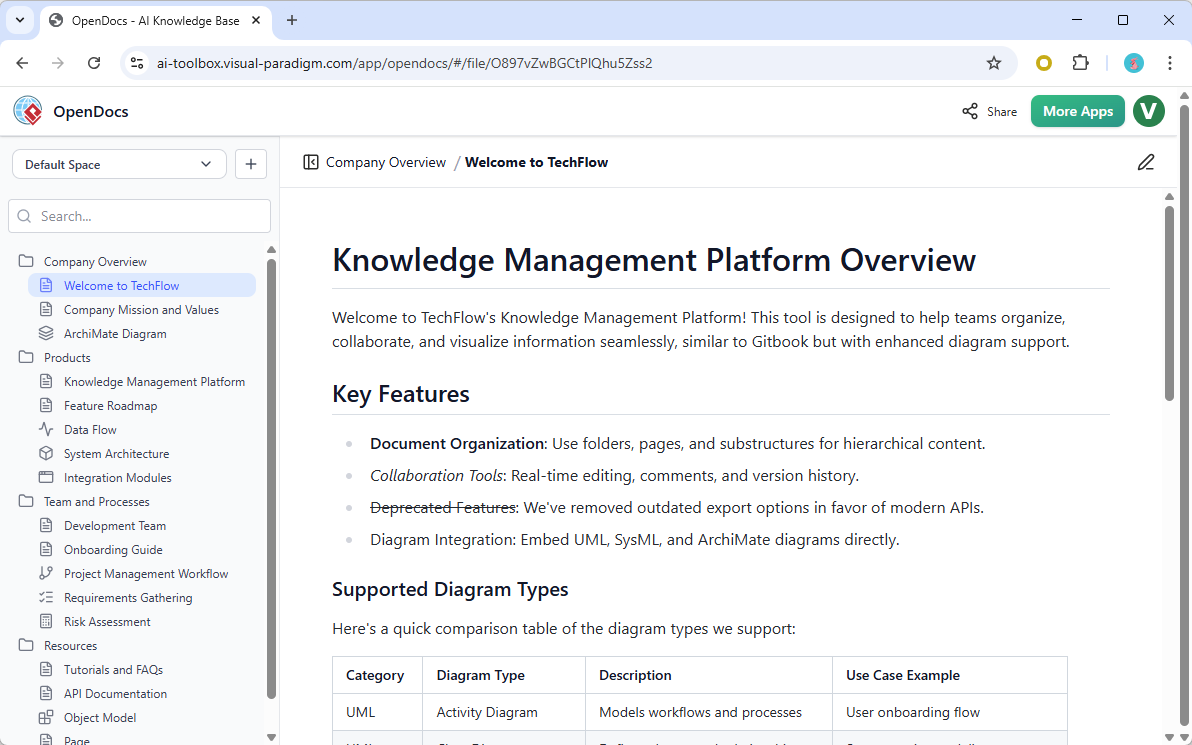
The OpenDocs Advantage: Core Capabilities for Technical Teams
Unified Editor: Write and Visualize in One Place
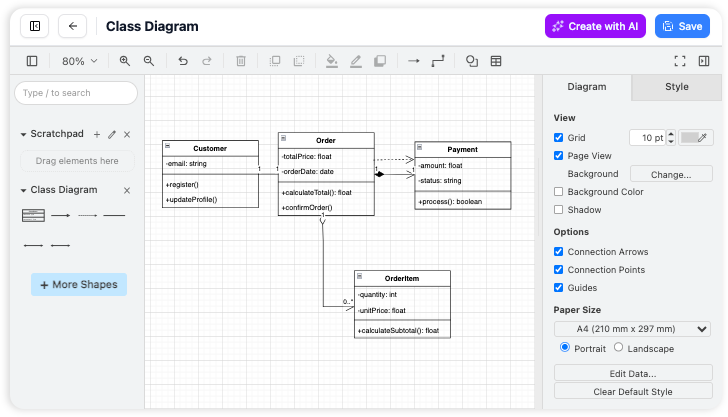
OpenDocs eliminates context-switching by embedding a powerful diagram editor directly inside your workspace. Developers can write technical specifications, API references, or architecture decisions while simultaneously creating or editing visual models—all without leaving the page.
Key Benefits:
- Maintain focus by keeping text and visuals in the same workspace
- Embed UML diagrams, flowcharts, ERDs, and architecture maps directly into documentation
- Use professional shape libraries for cloud services, databases, APIs, and infrastructure components
- Apply snap-to-grid alignment and drag-and-drop editing for polished visuals
AI-Powered Diagram Generation: From Text to Architecture in Seconds
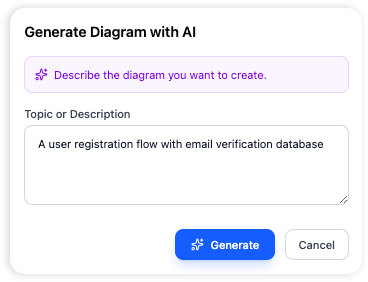
One of OpenDocs’ most transformative features is its AI diagram generator. Instead of manually dragging boxes and connectors, developers can describe their system in plain English and receive a complete, editable diagram instantly.
Example Prompts for Developers:
- “Create a microservices architecture diagram with API Gateway, User Service, Order Service, and PostgreSQL database”
- “Generate an ERD for e-commerce platform with Users, Orders, Products, and Payments tables”
- “Draw a deployment diagram for microservices on AWS with ECS, RDS, and ElastiCache”
Supported AI Diagram Types:
- Flowcharts & Process Maps
- Entity-Relationship Diagrams (ERDs)
- UML Diagrams (Use Case, Class, Sequence, Activity, Component)
- Mind Maps & Decision Trees
- Network Diagrams & Cloud Architecture
- BPMN Workflows
After generation, diagrams remain fully editable using the visual editor, allowing teams to refine layouts, add technical annotations, and apply consistent styling.
Hierarchical Organization: Structure That Scales with Your Codebase
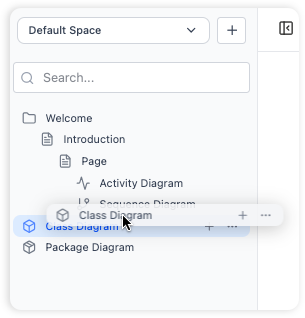
OpenDocs functions as a true information organizer, letting teams build tree-like folder systems that mirror their project architecture.
Organization Features:
- Nested Folder Architecture: Create logical hierarchies (e.g.,
/Backend/APIs/UserService/Documentation) - Drag-and-Drop Reorganization: Restructure documentation as your project evolves
- Scalable Design: From single-service docs to enterprise microservices documentation
- Visual Navigation: Expand/collapse sections to focus on specific components
Sample Documentation Structure:
Project Root
 ├── Architecture
 │   ├── System Overview.md
 │   ├── High-Level Design.vpp
 │   └── Deployment Diagram.vpp
 ├── APIs
 │   ├── REST API Reference.md
 │   ├── Authentication Flow.md
 │   └── API Sequence Diagrams.vpp
 ├── Database
 │   ├── Schema Design.md
 │   ├── ERD Diagram.vpp
 │   └── Migration Guide.md
 ├── Services
 │   ├── User Service
 │   ├── Order Service
 │   └── Payment Service
 └── DevOps
     ├── CI/CD Pipeline.md
     └── Infrastructure Setup.md
Built for Developer Workflows
OpenDocs includes a rich text editor designed specifically for technical content creation.
Editor Capabilities:
- Syntax Highlighting: Support for code blocks in multiple programming languages
- Live Preview: Real-time rendering as you type
- Rich Text Tools: Tables, lists, code blocks, blockquotes, and technical formatting
- Keyboard-First Workflow: Format without touching your mouse—essential for developers
Example: API Reference Template
| Section | Content |
|---|---|
| Overview | Service purpose and scope |
| Base URL | Production and staging endpoints |
| Authentication | Token requirements and headers |
| Endpoints | Method, path, parameters, examples |
| Error Codes | HTTP status codes and resolutions |
| Rate Limits | Throttling policies and headers |
Practical Implementation: A Developer’s Workflow with OpenDocs
Step 1: Initialize Your Technical Documentation Workspace
Open OpenDocs in your browser and create a workspace named after your project (e.g., “E-Commerce Platform Documentation” or “Microservices Architecture”).
Step 2: Set Up Your Documentation Structure
Create a folder hierarchy that matches your development workflow using the nested folder system and drag-and-drop organization.
Step 3: Write Technical Documentation
Use the rich text editor to create rich technical content. Leverage code blocks, tables, and callouts to document APIs, write technical specs, and create code examples with professional formatting.
Step 4: Generate Architecture Diagrams with AI
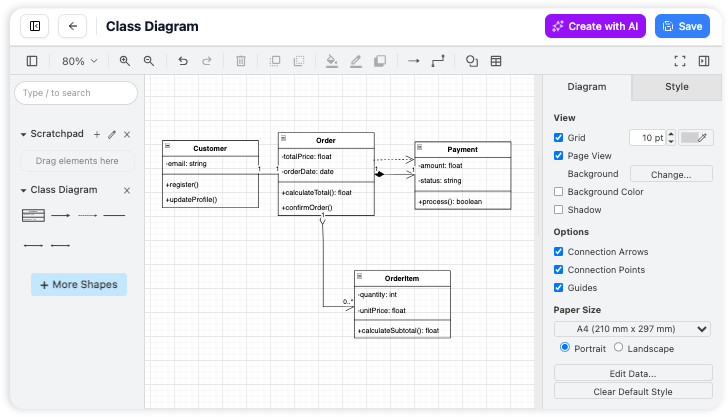
Click “New Diagram” → “AI Generate” and use natural language prompts to create system visuals instantly. Refine using the visual editor or regenerate with updated prompts.
Step 5: Organize and Link Documentation
Use internal linking and folder structure to create a navigable knowledge base. Drag and drop to reorganize as your architecture evolves.
Advanced Use Cases: Database Design, API Docs, and DevOps Integration
AI-Powered ERD Generation for Database Design
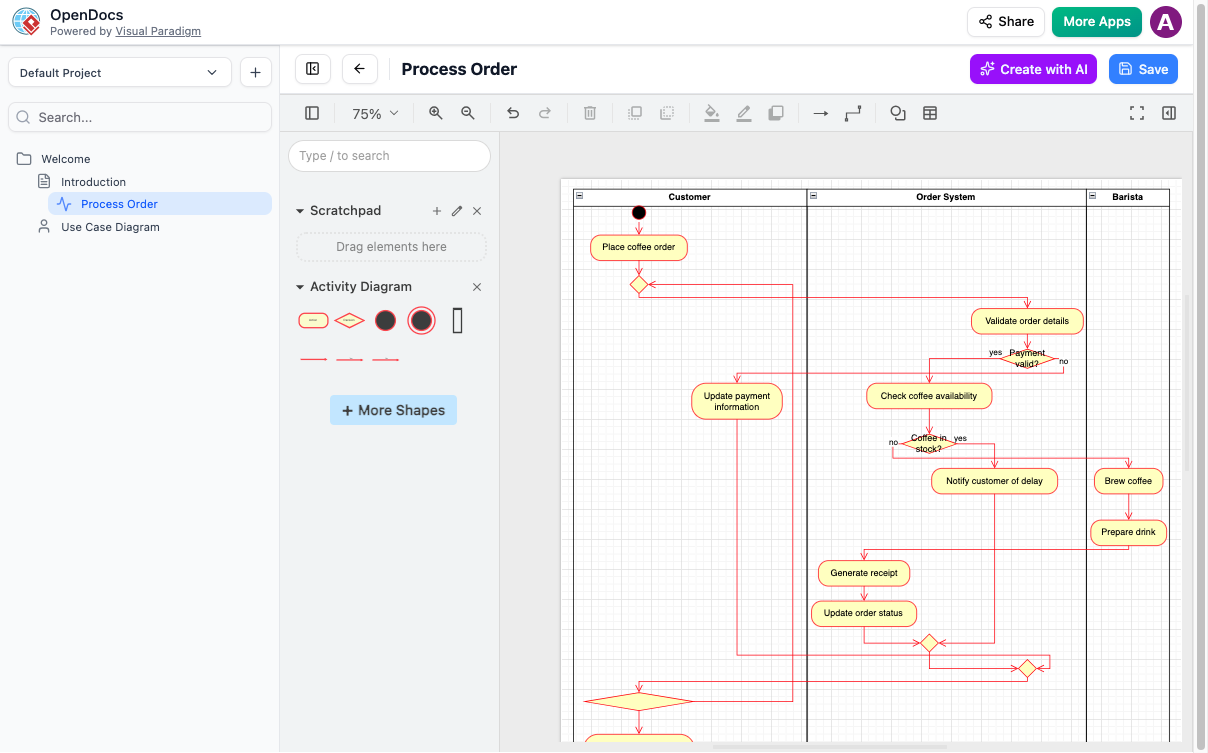
OpenDocs excels at database design documentation through AI-assisted ERD creation.
Example Workflow:
- Describe Your Schema: “Create an ERD for an e-commerce database with these entities: Customers (id, name, email), Orders (id, customer_id, order_date, total), OrderItems (id, order_id, product_id, quantity, price), Products (id, name, description, price, stock). Show relationships with cardinality.”
- AI Generates Initial ERD: The system creates entities with attributes and relationships
- Refine in Visual Editor: Add indexes, constraints, data types, and key notation
- Embed in Documentation: Insert the ERD into your database design document with additional notes
Comprehensive API Documentation
Create API reference documentation that developers actually want to use by intuitive page editor with visual sequence diagrams.
Structure Your API Docs:
| Section | Purpose | Example Content |
|---|---|---|
| Base URL | Endpoint root | https://api.example.com/v1/payments |
| Authentication | Security requirements | OAuth2 Bearer token in Authorization header |
| Endpoints | Available operations | POST /payments/intent, GET /payments/{id} |
| Request Schema | Input validation | JSON body with required/optional fields |
| Response Format | Output structure | Success and error response examples |
| Error Codes | Troubleshooting | 400 Bad Request, 401 Unauthorized, 404 Not Found |
Integration Sequence Diagrams
Document complex integrations with AI-generated sequence diagrams:
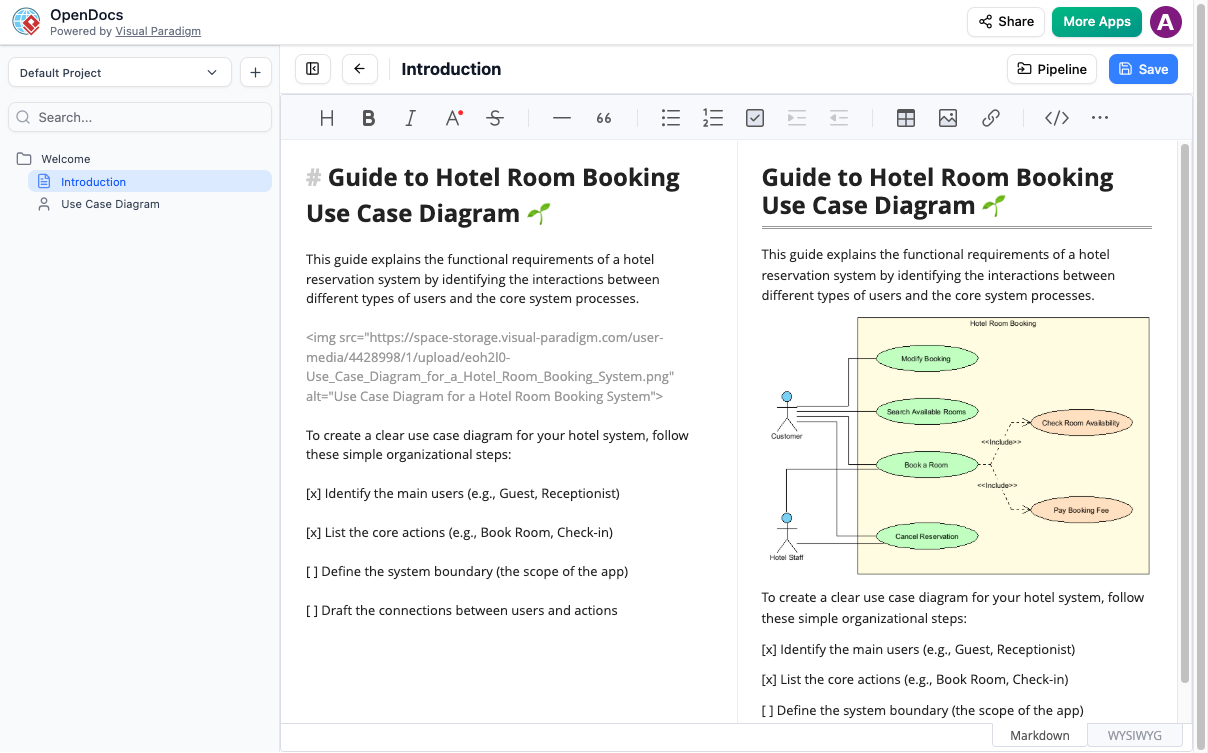
Use AI to Generate: “Create a sequence diagram for payment processing: Customer → Frontend → API Gateway → Payment Service → Stripe API → Webhook → Order Service → Database”
Pipeline Integration: Connecting Visual Paradigm Desktop & Online
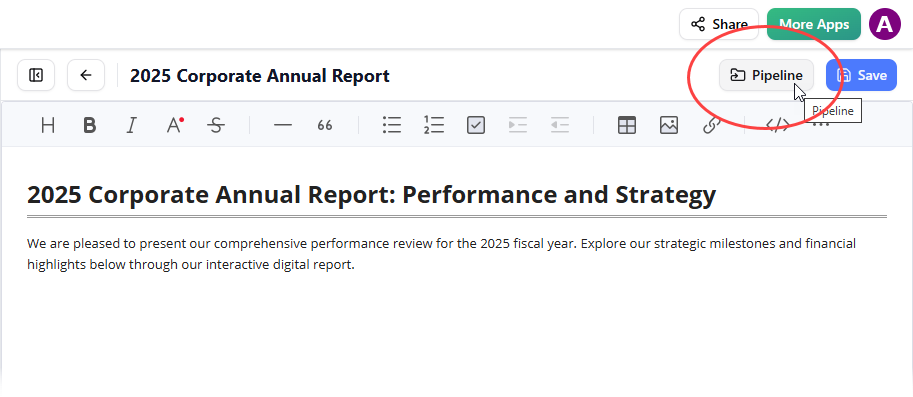
The Pipeline feature bridges your development tools, enabling seamless diagram synchronization.
Workflow:
- Design in Visual Paradigm Desktop: Create detailed UML models and architecture diagrams
- Send to OpenDocs: Use Pipeline button to push diagrams to documentation
- Maintain Single Source of Truth: Updates sync automatically between tools
- Share with Stakeholders: Non-technical team members access via OpenDocs
Flipbooks: Interactive Technical Manuals for Enhanced Engagement
Announced April 1, 2026
Transform static PDFs into engaging technical documentation with OpenDocs’ flipbook feature.
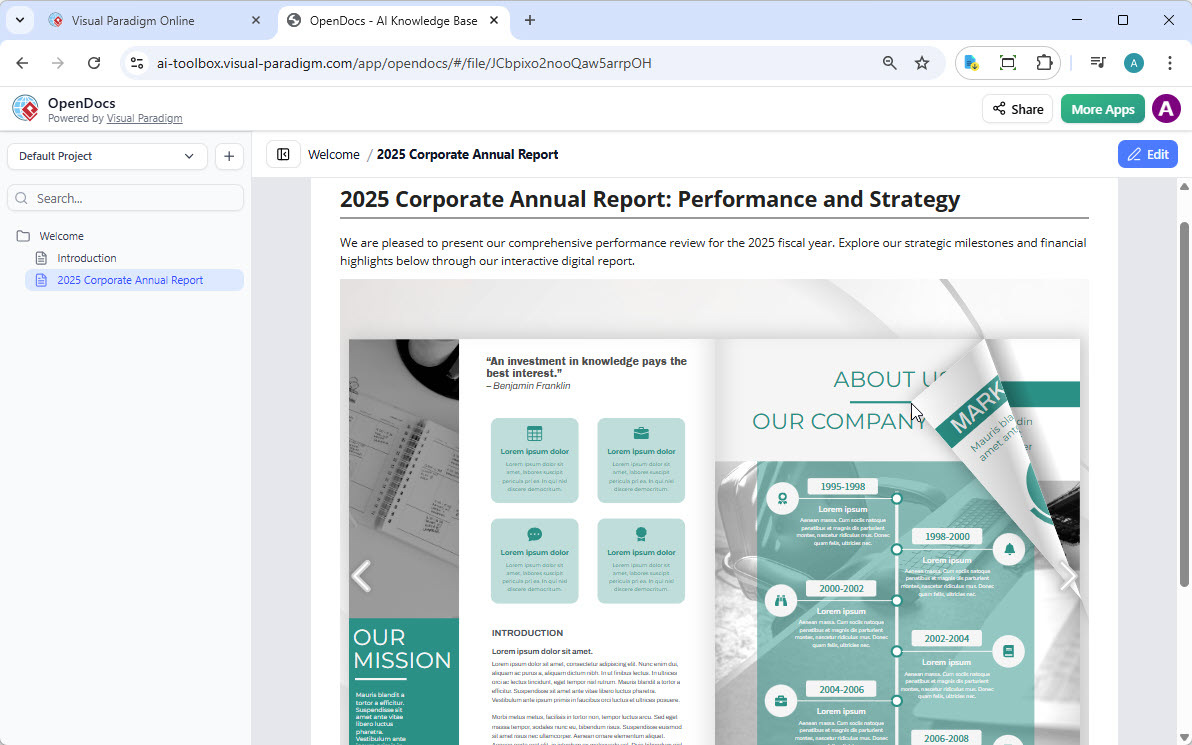
Use Cases for Developers:
- API Reference Manuals: Convert PDF specs to interactive flipbooks
- System Architecture Guides: Create visual technical documentation
- Onboarding Guides: Interactive new developer orientation
- Release Notes: Version-specific documentation with page-flipping UX
What You Can Do:
✅ Convert & Create: Transform existing PDFs, Word docs, and PowerPoint presentations into flipbooks
✅ AI-Powered Generation: Use AI to generate book outlines, write technical content, and create diagrams
✅ Interactive Elements: Embed code examples, video tutorials, and clickable navigation
✅ Professional Branding: Customize with your company’s technical documentation style
✅ Mobile-First: Responsive design for developers reading on any device
Sharing Flipbooks to OpenDocs
From Visual Paradigm Online:
- Open Visual Paradigm Online
- Navigate to Flipbooks in the left menu
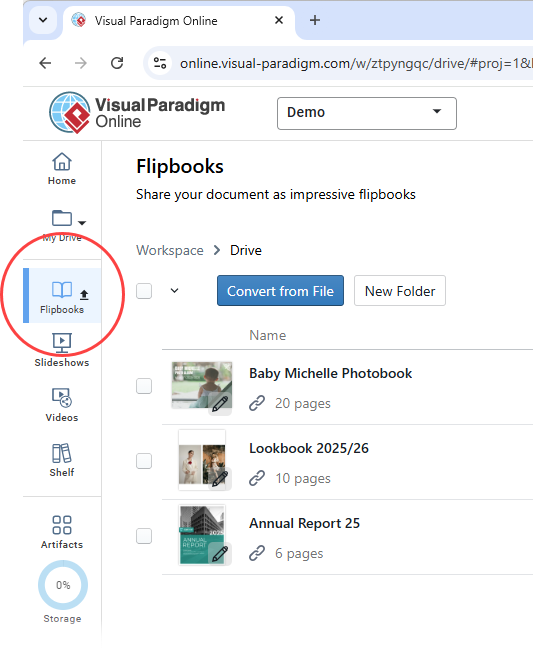
- Select your flipbook → More… → Send to OpenDocs [Pipeline]
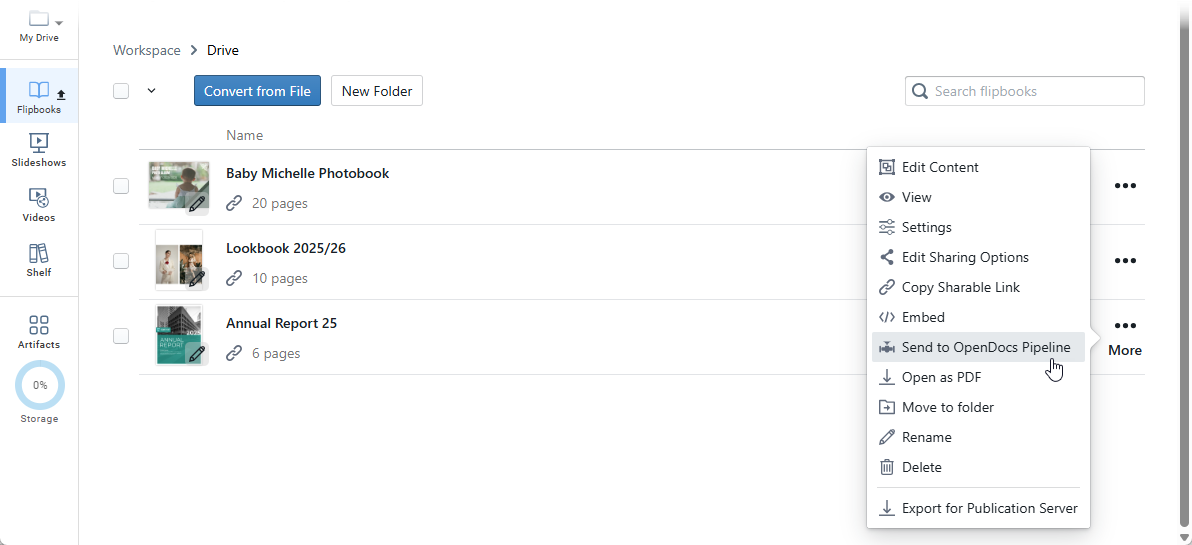
- Add optional comment → Click OK
Embedding in OpenDocs:
- Open your target page → Click Edit
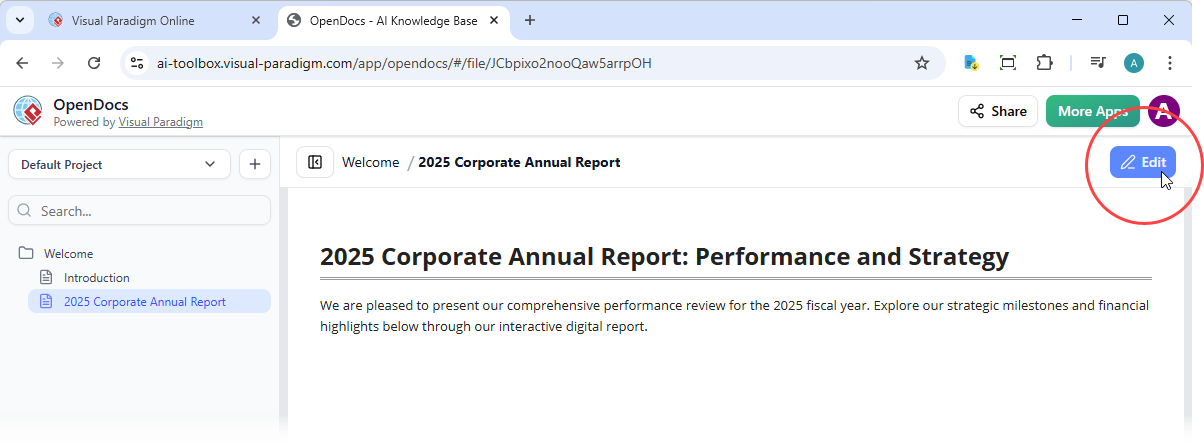
- Position cursor where flipbook should appear
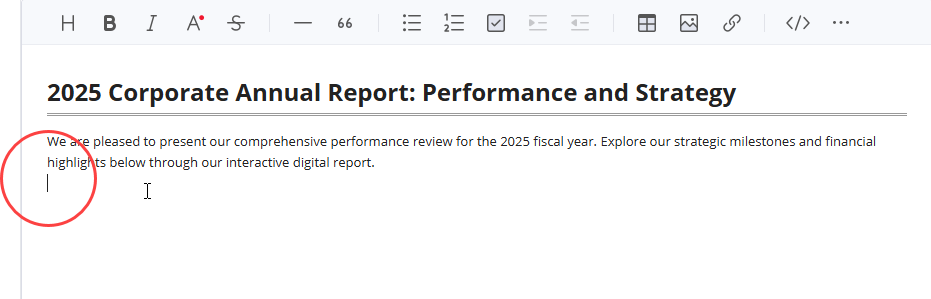
- Click Pipeline button (top right)
- Open Library tab → Select your flipbook
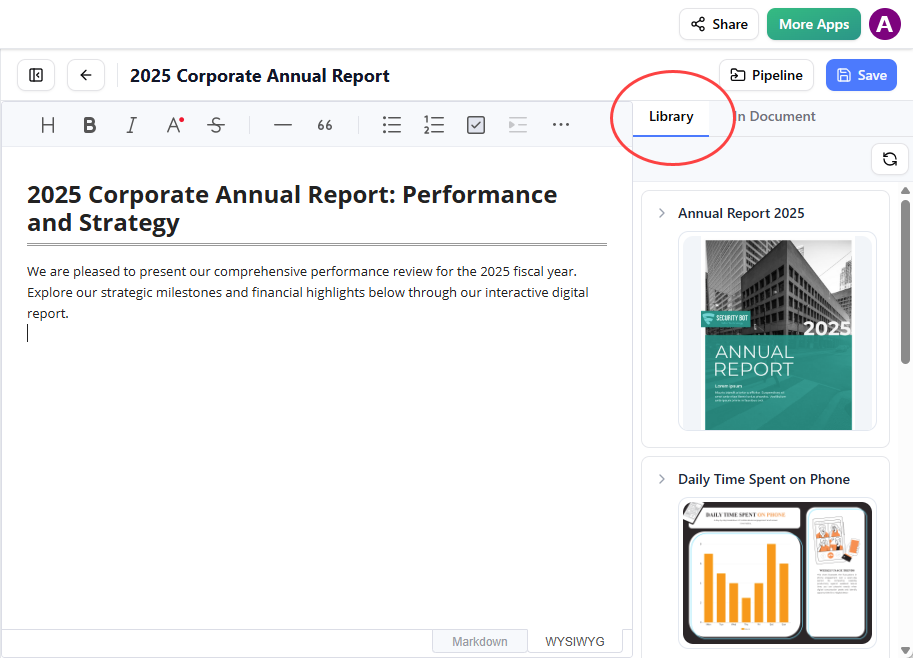
- Click to insert
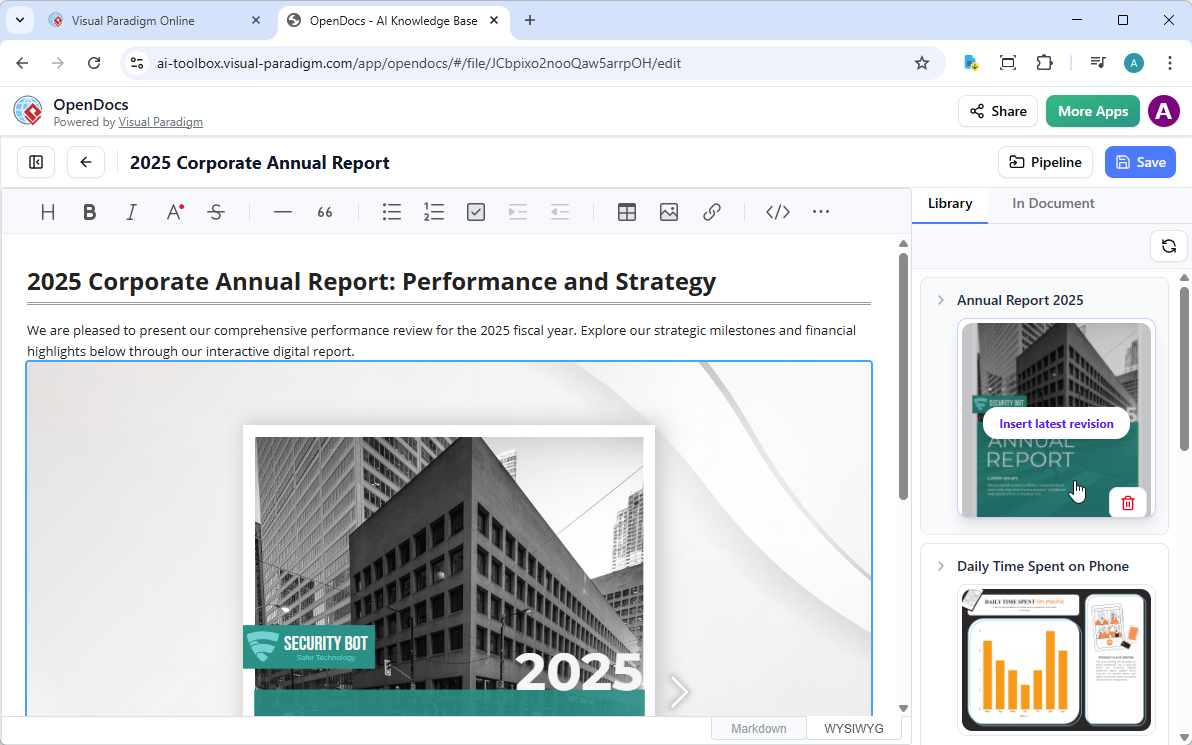
💡 Tip: Flipbooks appear static in Edit mode. Save and exit to interact with the live flipbook.
Productivity Tips: Maximizing Your OpenDocs Workflow
Keyboard Shortcuts & Efficiency
Rich Text Editing:
- Use
Ctrl/Cmd + Bfor bold,Ctrl/Cmd + Ifor italic - Use keyboard navigation to avoid mouse dependency
Diagram Creation:
- Use AI generation for initial drafts, then refine manually
- Save common diagram templates for reuse
- Use snap-to-grid for professional alignment
Documentation Organization Strategy
Folder Structure:
Project/
 ├── 01-Architecture/
 ├── 02-APIs/
 ├── 03-Database/
 ├── 04-Deployment/
 ├── 05-Testing/
 └── 06-Troubleshooting/
Naming Conventions:
- Use consistent naming:
service-name-api-reference.md - Include version numbers:
v2-user-service-erd.vpp - Date-stamp releases:
2026-04-release-notes.md
AI Prompt Engineering for Better Diagrams
Effective Prompts:
- Be specific: “Create a class diagram for User, Order, and Product entities with attributes: id (UUID), createdAt (timestamp), updatedAt (timestamp)”
- Include relationships: “Show one-to-many relationship between Customer and Orders”
- Specify notation: “Use UML 2.5 notation with visibility modifiers (+/-/#)”
Iterative Refinement Process:
- Generate with broad prompt
- Review and identify missing elements
- Regenerate with specific additions
- Fine-tune manually in visual editor
Collaboration & Sharing Best Practices
Sharing Documentation:
- Generate secure read-only links for stakeholders
- Use folder permissions for sensitive architecture docs
- Create executive summaries with high-level diagrams
- Maintain detailed technical docs for developers
Version Control Strategies:
- Document changes in each update
- Use descriptive page names with version numbers
- Maintain changelog in root folder
- Archive deprecated documentation
Key Benefits Summary for IT Development Teams
| Benefit | Developer Impact |
|---|---|
| 🧠 All-in-One Knowledge Hub | Eliminate tab-switching between Confluence, Lucidchart, and code repos |
| 🗂️ Hierarchical Organization | Structure documentation to mirror your codebase architecture |
| 🤝 Instant Sharing | Share entire knowledge base with one secure link—no more “where’s the doc?” |
| 🎨 Visual-First Documentation | Communicate complex systems with professional architecture diagrams |
| 🌐 Browser-Based | Access from anywhere—no desktop installation or VPN required |
| 🤖 AI Acceleration | Generate ERDs, sequence diagrams, and flowcharts in seconds |
| 🔗 Pipeline Integration | Sync diagrams from Visual Paradigm Desktop to documentation automatically |
Conclusion: Building a Living Knowledge Base for Sustainable Development
Technical documentation should be an asset, not a burden. Visual Paradigm OpenDocs reimagines documentation as a dynamic, visual, and AI-enhanced practice that grows alongside your codebase. By unifying writing, diagramming, and organization in a single platform, OpenDocs addresses the fragmentation that plagues modern development teams.
The platform’s AI-powered diagram generation dramatically reduces the time required to create and maintain architecture visuals. Hierarchical folder structures enable scalable organization, and the Pipeline integration ensures that diagrams created in Visual Paradigm Desktop remain synchronized with your living documentation.
For teams adopting OpenDocs, the journey begins with a simple shift: treating documentation as code—versioned, structured, and visually expressive. By implementing the workflows and best practices outlined in this case study, development teams can transform their documentation from a static obligation into a strategic asset that accelerates onboarding, improves architectural clarity, and reduces the cognitive load of maintaining complex systems.
In an era where software complexity continues to grow, tools like OpenDocs don’t just make documentation easier—they make sustainable development possible. By investing in a unified, visual, and AI-powered knowledge base, teams can ensure that their documentation evolves as quickly as their code, keeping knowledge accessible, accurate, and actionable for everyone who builds, maintains, and extends their systems.
Reference
- OpenDocs: AI-Powered Knowledge Management Platform | Visual Paradigm: Official product page detailing OpenDocs features, capabilities, and use cases for individuals and teams seeking integrated documentation and diagramming.
- Visual Paradigm OpenDocs: The Complete Guide to AI-Powered Knowledge Management and Diagram Generation: Comprehensive third-party guide covering setup, workflows, AI features, and best practices for maximizing OpenDocs productivity.
- Visual Paradigm Online to OpenDocs Export: Release announcement detailing the workflow for exporting diagrams and content from Visual Paradigm Online directly into OpenDocs via the Pipeline integration.
- OpenDocs: AI-Powered Knowledge Platform Release: Official launch announcement introducing OpenDocs as Visual Paradigm’s unified knowledge management solution with AI diagram generation.
- OpenDocs Entity-Relationship Diagram (ERD) AI Generation: Feature update highlighting AI-powered ERD creation, allowing users to generate database schema diagrams from natural language descriptions.
- AI Flowchart Generator: OpenDocs Update: Release notes covering enhancements to the AI flowchart generation engine, including improved prompt understanding and layout optimization.
- OpenDocs WYSIWYG Editor Update: AI Knowledge Management Tool: Announcement of the optional WYSIWYG editor mode.
- OpenDocs Professional Mind Map Integration: Feature release adding advanced mind mapping capabilities with collapsible branches, styling options, and export-ready layouts.
- AI Breakdown Structure Chart Maker in OpenDocs: Update introducing AI-assisted creation of Work Breakdown Structures (WBS) and hierarchical decomposition charts for project planning.