


Introduction
The transition to sustainable transportation is accelerating worldwide, and with it comes the urgent need for intelligent, scalable infrastructure to support electric vehicle adoption. Designing a city-wide EV charging network is not merely a hardware challenge—it is a complex software architecture problem requiring seamless integration of mobile applications, real-time data processing, payment systems, and energy grid coordination. In this context, clear architectural communication becomes critical: misaligned understanding between developers, architects, product owners, and stakeholders can lead to costly rework, delayed deployments, and compromised user experiences.
Enter the C4 model—a hierarchical, developer-friendly framework that brings clarity to software architecture by breaking systems into four intuitive levels of abstraction. When paired with modern AI-powered tooling like Visual Paradigm, the C4 model evolves from a documentation technique into a dynamic, collaborative design workflow. This case study demonstrates how the C4 model, implemented through Visual Paradigm’s intelligent features, can be applied to architect a Smart EV Charging Network. We walk through each abstraction level—from strategic system context down to implementation details—showcasing how AI-assisted diagram generation accelerates design, enhances precision, and fosters shared understanding across technical and non-technical audiences. Whether you’re leading a green-tech initiative or modernizing legacy infrastructure, this guide offers actionable insights for leveraging visual architecture to drive successful, sustainable outcomes.
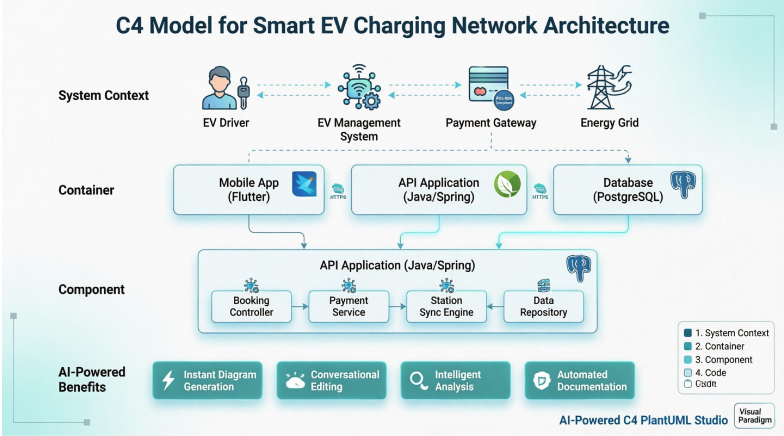
Understanding the C4 Model Framework
The C4 model is a hierarchical, developer-friendly framework for diagramming software architecture, comprising four core abstraction levels: System Context, Containers, Components, and Code. It offers a standardized way to visualize system structures, fostering clear communication, onboarding, and documentation among teams. While the paradigm is tool-independent, Visual Paradigm provides specific templates, drag-and-drop elements, and AI-powered generation to create these diagrams efficiently.
Core Levels of the C4 Model
-
System Context Diagram: A high-level overview showing the system, users, and external systems.
-
Container Diagram: Depicts applications, databases, or microservices within the system, showing how they interact.
-
Component Diagram: Breaks down containers into individual components, illustrating internal structure and relationships.
-
Code Diagram: Provides an extremely detailed view (rarely used) of component implementation.
Practical Applications in Visual Paradigm
-
Software Design & Documentation: Creating diagrams for up-front design or documenting existing systems.
-
Technical Planning: Mapping out software architecture for developers and technical leads.
-
System Analysis: Visualizing complex systems to understand components and dependencies.
-
Collaborative Design: Using online tools for real-time collaboration on, and editing of, diagrams during workshops.
Related Concepts
-
Software Architecture Visualization
-
Hierarchical Software Diagrams
-
Component-Container-Context Modeling
-
System Structure Documentation
Case Study: Smart EV Charging Network
Problem Description
Context: A city-wide network of Electric Vehicle (EV) chargers needs a management system.
Requirements:
-
Drivers use a Mobile App to find, reserve, and pay for charging sessions.
-
Charging Stations report real-time status and energy consumption to a central server.
-
The system integrates with a Third-Party Payment Gateway and an External Energy Grid to manage power load.
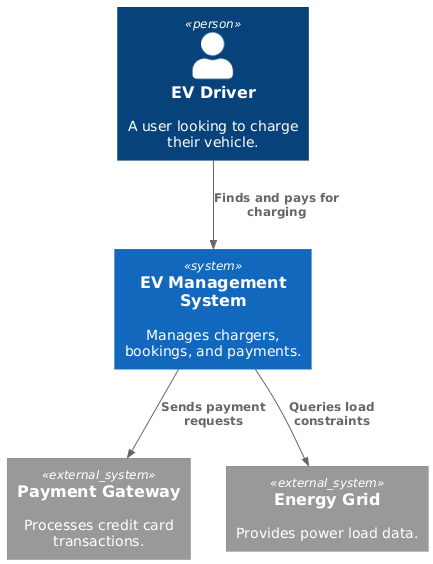
Level 1: System Context Diagram
Shows the high-level scope of the EV Management System, illustrating key actors and external dependencies.
PlantUML Code
@startuml
!include https://raw.githubusercontent.com/plantuml-stdlib/C4-PlantUML/master/C4_Component.puml

Person(driver, "EV Driver", "A user looking to charge their vehicle.")
System(ev_system, "EV Management System", "Manages chargers, bookings, and payments.")
System_Ext(payment_gw, "Payment Gateway", "Processes credit card transactions.")
System_Ext(energy_grid, "Energy Grid", "Provides power load data.")

Rel(driver, ev_system, "Finds and pays for charging")
Rel(ev_system, payment_gw, "Sends payment requests")
Rel(ev_system, energy_grid, "Queries load constraints")
@enduml
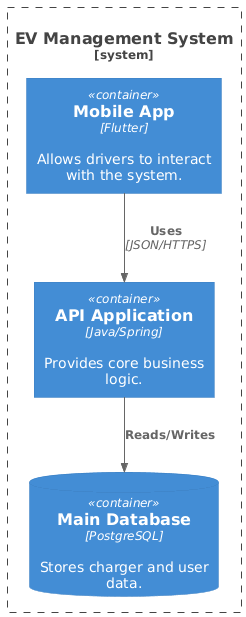
Level 2: Container Diagram
Breaks down the system into high-level technical building blocks, revealing the core applications and data stores.
PlantUML Code
@startuml
!include https://raw.githubusercontent.com/plantuml-stdlib/C4-PlantUML/master/C4_Component.puml

System_Boundary(ev_boundary, "EV Management System") {
    Container(mobile_app, "Mobile App", "Flutter", "Allows drivers to interact with the system.")
    Container(api_app, "API Application", "Java/Spring", "Provides core business logic.")
    ContainerDb(database, "Main Database", "PostgreSQL", "Stores charger and user data.")
}

Rel(mobile_app, api_app, "Uses", "JSON/HTTPS")
Rel(api_app, database, "Reads/Writes")
@enduml
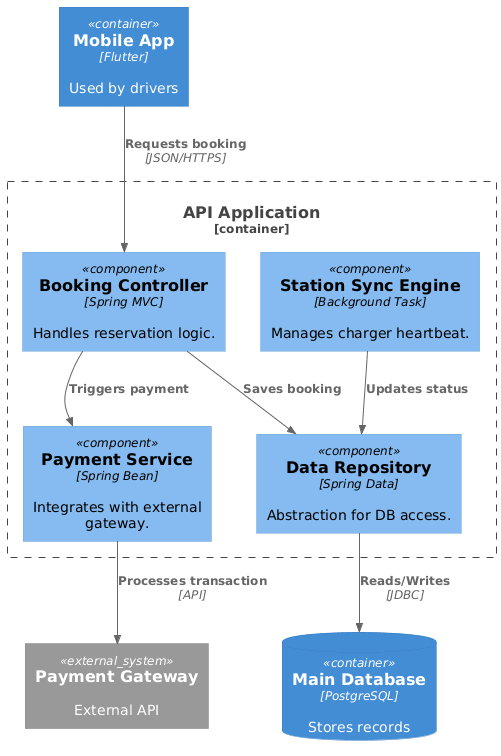
Level 3: Component Diagram
Drills into the API Application container to show internal logic, responsibilities, and integration points.
PlantUML Code
@startuml
!include https://raw.githubusercontent.com/plantuml-stdlib/C4-PlantUML/master/C4_Component.puml

' Define external elements to fix the isolation
Container(mobile_app, "Mobile App", "Flutter", "Used by drivers")
ContainerDb(database, "Main Database", "PostgreSQL", "Stores records")
System_Ext(payment_gw, "Payment Gateway", "External API")

Container_Boundary(api_boundary, "API Application") {
Component(booking_comp, "Booking Controller", "Spring MVC", "Handles reservation logic.")
Component(payment_comp, "Payment Service", "Spring Bean", "Integrates with external gateway.")
Component(station_sync, "Station Sync Engine", "Background Task", "Manages charger heartbeat.")
Component(repo, "Data Repository", "Spring Data", "Abstraction for DB access.")
}

' Logical Flow
Rel(mobile_app, booking_comp, "Requests booking", "JSON/HTTPS")
Rel(booking_comp, payment_comp, "Triggers payment")
Rel(payment_comp, payment_gw, "Processes transaction", "API")
Rel(booking_comp, repo, "Saves booking")
Rel(station_sync, repo, "Updates status")
Rel(repo, database, "Reads/Writes", "JDBC")
@enduml
Level 4: Code Diagram (Class Diagram)
Visualizes the internal implementation details of the Booking Controller component, providing developers with precise contractual guidance.
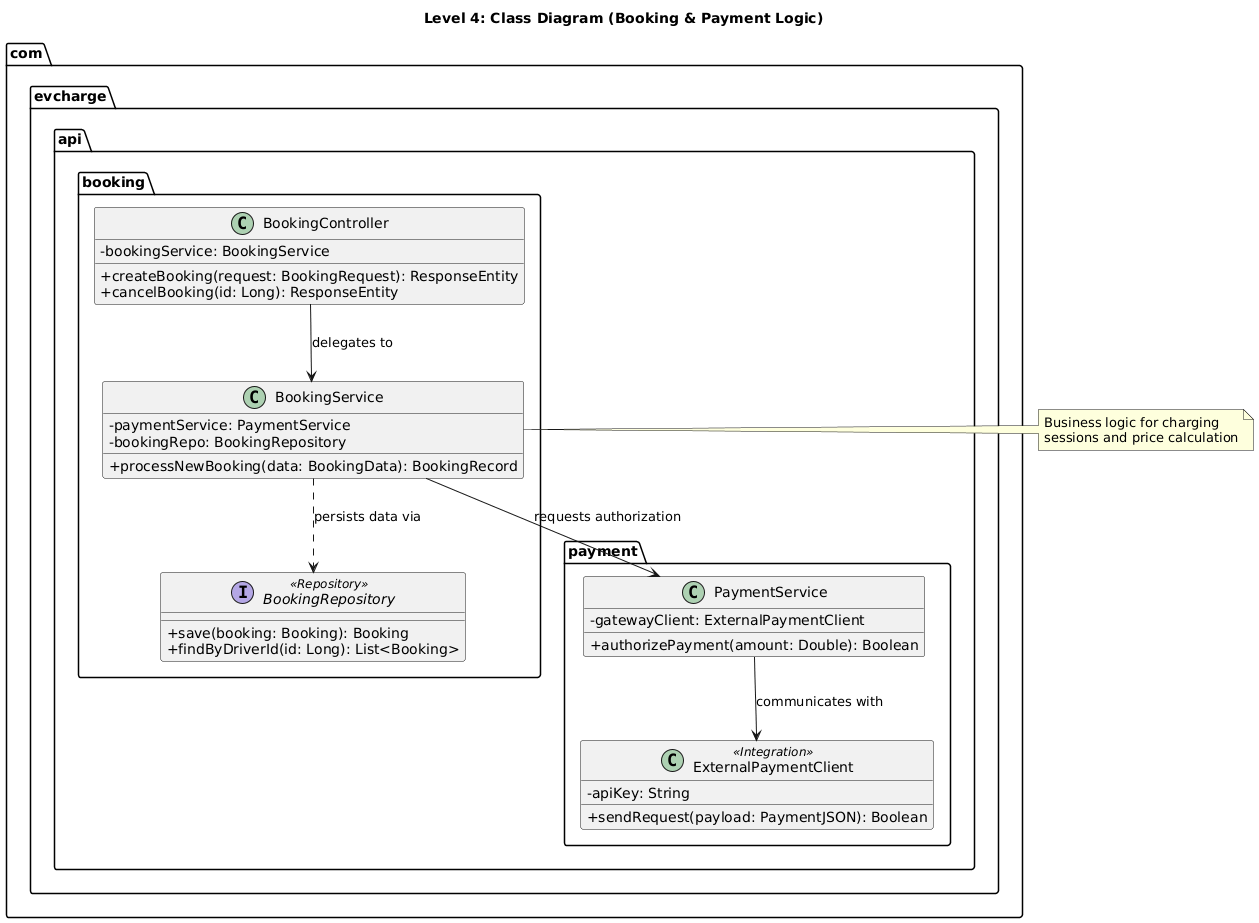
@startuml
title Level 4: Class Diagram (Booking & Payment Logic)

' Layout settings
skinparam ClassAttributeIconSize 0

package "com.evcharge.api.booking" {
class BookingController {
-bookingService: BookingService
+createBooking(request: BookingRequest): ResponseEntity
+cancelBooking(id: Long): ResponseEntity
}

class BookingService {
-paymentService: PaymentService
-bookingRepo: BookingRepository
+processNewBooking(data: BookingData): BookingRecord
}

interface BookingRepository <<Repository>> {
+save(booking: Booking): Booking
+findByDriverId(id: Long): List<Booking>
}
}

package "com.evcharge.api.payment" {
class PaymentService {
-gatewayClient: ExternalPaymentClient
+authorizePayment(amount: Double): Boolean
}

class ExternalPaymentClient <<Integration>> {
-apiKey: String
+sendRequest(payload: PaymentJSON): Boolean
}
}

' Relationships mirroring L3 logic
BookingController --> BookingService : "delegates to"
BookingService --> PaymentService : "requests authorization"
BookingService ..> BookingRepository : "persists data via"
PaymentService --> ExternalPaymentClient : "communicates with"

note right of BookingService
Business logic for charging
sessions and price calculation
end note

@enduml
Implementing with Visual Paradigm’s AI-Powered Tools
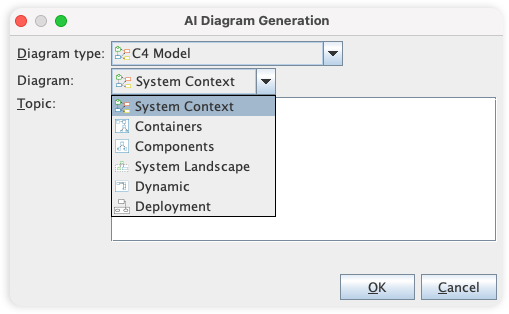
You can generate these views using the AI-Powered C4 PlantUML Studio by navigating to Tools > AI Diagram Generation. The AI instantly converts your natural language descriptions into structured PlantUML code.
Visual Paradigm provides comprehensive support for the C4 model through dedicated modeling tools and advanced AI-powered features that automate the creation of architectural views. You can generate complete, multi-layered C4 suites from simple text descriptions, bypassing the manual setup of complex structures.
AI-Powered C4 Features
The platform integrates several intelligent tools designed to streamline architectural documentation:
-
Instant Diagram Generation: By describing your system in plain English, the AI instantly builds diagrams across all C4 levels—Context, Container, Component, and Code.
-
Conversational Editing: You can refine diagrams using a chatbot interface. Simple commands like “Add payment gateway” or “Rename Customer to Buyer” update the visual model immediately.
-
AI-Powered C4 PlantUML Studio: This specialized tool converts natural language into PlantUML code, rendering diagrams that are version-controllable and precise.
-
Intelligent Analysis: The AI can detect missing steps, suggest design improvements, and identify gaps in your architectural logic.
-
Automated Content Drafting: Beyond visuals, the AI engine can draft your initial Problem Statement and System Context based on a project name or brief description.
Supported C4 Diagram Types
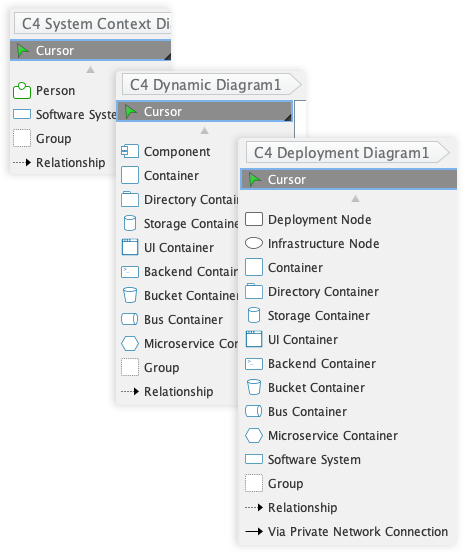
Visual Paradigm supports all six essential views of the C4 methodology:
-
System Context: Shows the system as a “black box” and its relationships with users and other systems.
-
Container: Illustrates high-level technology choices (e.g., applications, databases) and their communication.
-
Component: Breaks down containers into their internal software building blocks and responsibilities.
-
System Landscape: Provides a high-level “big picture” of how the system fits into the broader enterprise IT environment.
-
Dynamic Diagram: Visualizes runtime behavior and the sequence of interactions between elements.
-
Deployment Diagram: Maps software containers to physical or virtual infrastructure.
Access and Availability
-
Visual Paradigm Online: Offers a browser-based C4 Model tool with real-time collaboration, a library of C4 symbols, and AI chatbot access.
-
Visual Paradigm Desktop: Provides deep modeling features, custom attributes, and an integrated AI Diagram Generator (available via Tools > AI Diagram Generation).
Benefits and Outcomes for the EV Charging Project
Applying the C4 model with Visual Paradigm’s AI capabilities delivered measurable value to the Smart EV Charging Network initiative:
✅ Accelerated Onboarding: New team members could grasp system boundaries and data flows within hours, not weeks, thanks to clear, layered diagrams.
✅ Stakeholder Alignment: Non-technical stakeholders engaged meaningfully with System Context diagrams, reducing requirement ambiguities early.
✅ Technical Precision: Developers used Component and Code diagrams as living documentation, reducing integration errors during sprint cycles.
✅ Agile Adaptation: When requirements shifted—such as adding solar integration—the AI chatbot allowed rapid diagram updates without manual redrawing.
✅ Audit-Ready Documentation: Generated PlantUML code enabled version control integration, ensuring architectural decisions were traceable and reproducible.
The hierarchical nature of the C4 model ensured that every audience received the right level of detail: executives saw strategic interactions, architects reviewed container boundaries, and developers implemented against precise component contracts.
Powerful and Intuitive Diagramming Experience
Visual Paradigm’s tooling is packed with features that make diagramming fast, easy, and precise.
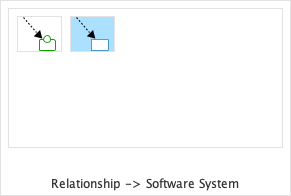
Resource-Centric Interface
Create and connect elements with ease using a drag-and-drop interface that is optimized for speed and accuracy.
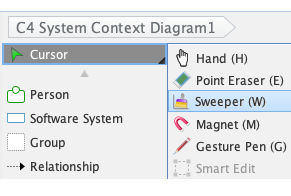
Sweeper
Easily create space for new elements or clean up your diagram layout with the sweeper tool, which intelligently moves shapes and connectors.
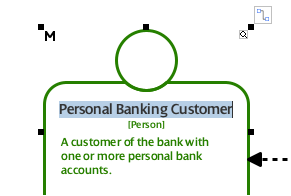
Inline Editing
Edit text and properties directly on the diagram, without the need for separate dialog boxes, for a faster and more intuitive workflow.
Manage Complexity with Advanced Modeling Features
Our tool helps you to manage complex models by breaking them down into smaller, more manageable parts.
-
Sub-Diagrams: Decompose complex diagrams into multiple layers of abstraction. This is extremely useful for drilling down from a C4 Context Diagram into a detailed Container Diagram.
-
Referenced Diagrams: Create links between diagrams to establish relationships and navigate your model easily, even across different projects.
Share Your Vision with Powerful Reporting and Publishing
Our tool provides flexible options to generate documents and share your C4 diagrams with a wider audience.
-
Project Publisher: Export your project into an interactive HTML website for easy sharing and browsing.
-
Report Composer: Generate comprehensive reports in various formats (PDF, Word, etc.) to document your architecture.
Collaborate and Innovate as a Team
Our tool is built for teamwork, with features that help you to work together efficiently and effectively.
-
Centralized Repository: Store your projects in a central repository for easy access and management.
-
Version Control: Track changes, compare revisions, and resolve conflicts with our built-in version control system.
-
Cloud-Based Platform: Collaborate with your team in real-time, from anywhere in the world, with our cloud-based platform.
C4 Diagram Gallery: AI-Generated Examples
These C4 diagrams were automatically created using Visual Paradigm’s AI Diagram Generator, turning system architecture ideas into clear, structured visuals in seconds.
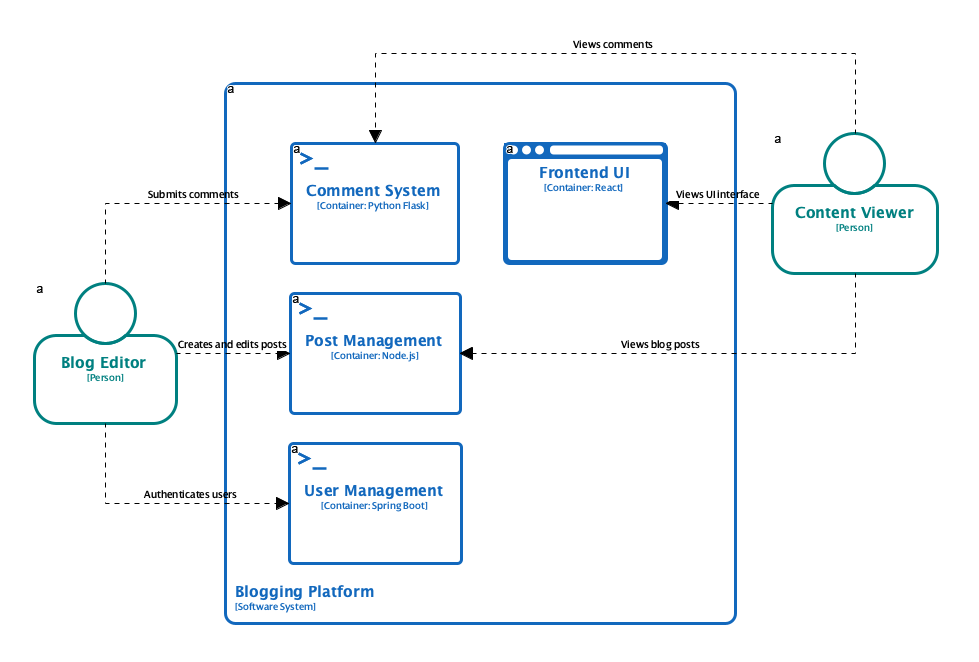
C4 Containers Diagram
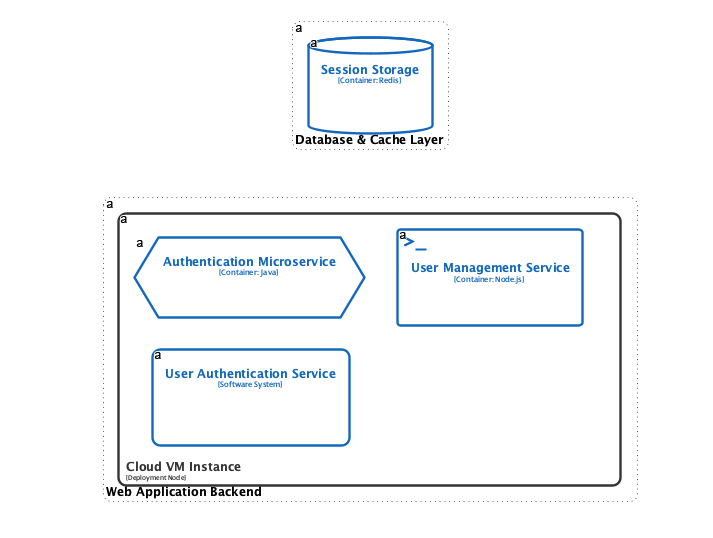
C4 Deployment Diagram
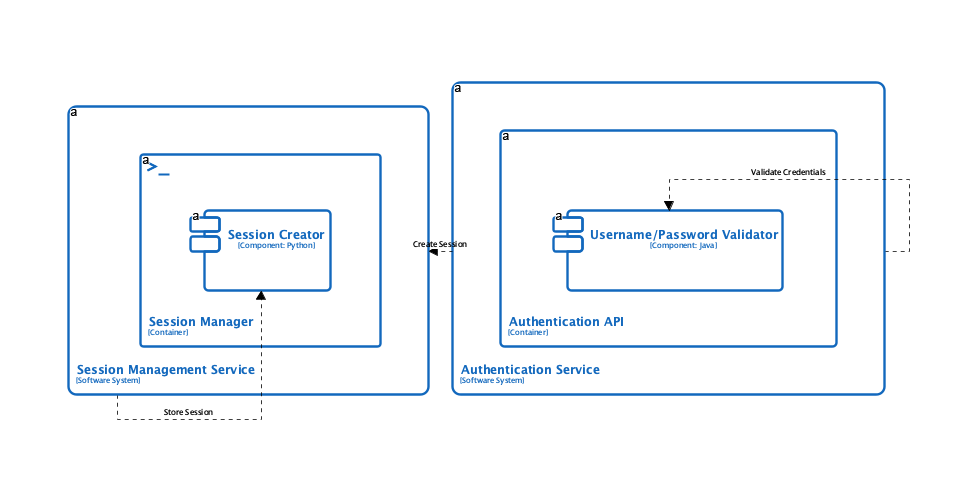
C4 Dynamic Diagram
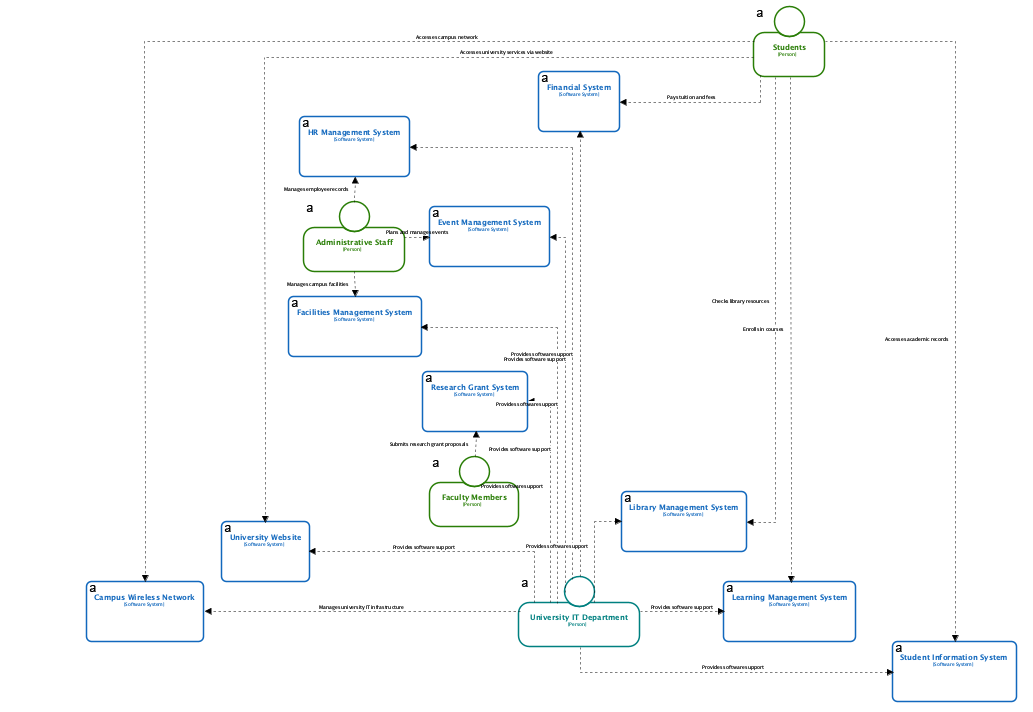
C4 System Landscape Diagram
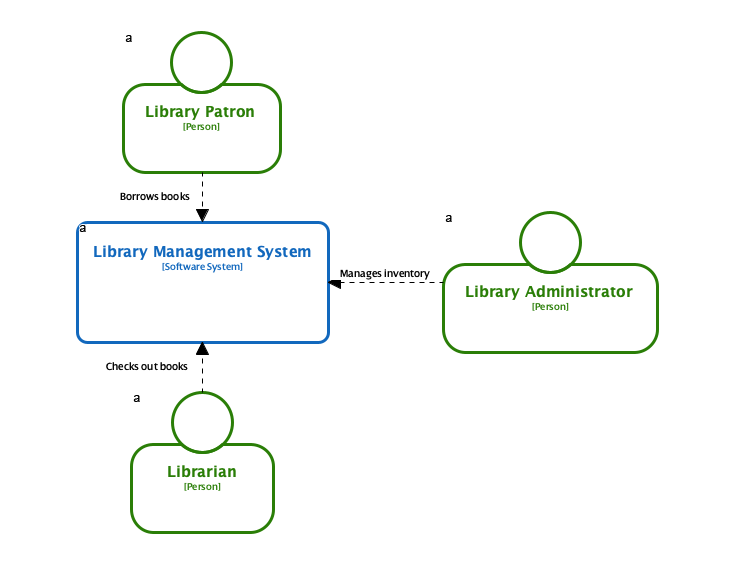
C4 System Context Diagram
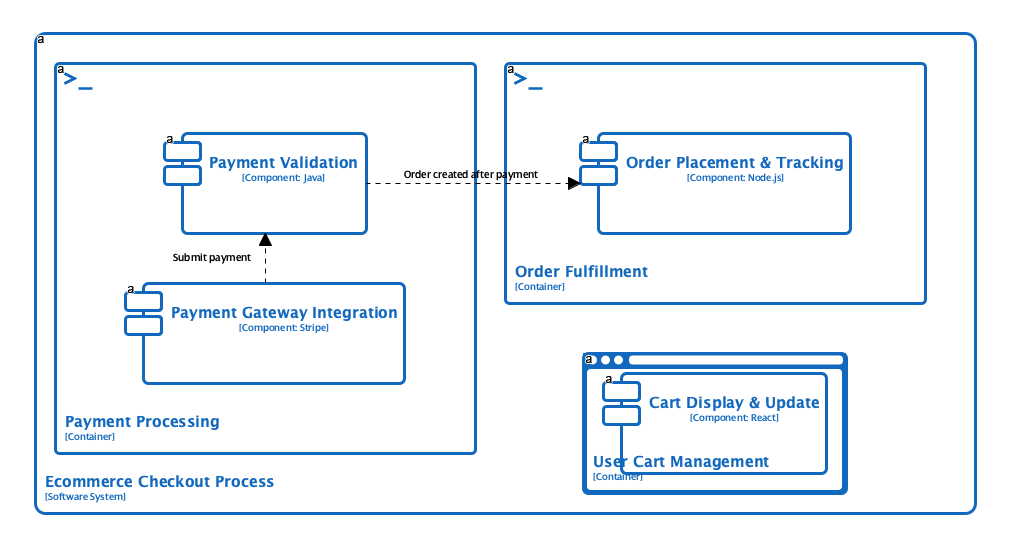
C4 Components Diagram
Explore the Full C4 Diagram Gallery
Use Cases
-
Software Architects: Quickly generate comprehensive C4 diagrams from system descriptions to visualize architecture.
-
System Engineers: Create documentation for complex systems with multiple interconnected components.
-
DevOps Teams: Document deployment architectures with AI-generated deployment diagrams.
-
Technical Leads: Communicate system design to both technical and non-technical stakeholders.
Tips & Best Practices
-
Define your audience clearly to generate diagrams with appropriate level of abstraction and detail.
-
Use the full C4 hierarchy to document all aspects of your architecture for comprehensive understanding.
-
Review and validate AI-generated diagrams with your team to ensure accuracy and completeness.
Conclusion
The Smart EV Charging Network case study illustrates a fundamental truth about modern software development: technical excellence alone is insufficient without clarity, collaboration, and adaptability. By adopting the C4 model through Visual Paradigm’s AI-powered platform, teams can transform abstract requirements into living, navigable architectural artifacts that serve everyone from product owners to backend engineers.
The true power lies not just in generating diagrams, but in creating a shared language for system design. With AI handling the heavy lifting of diagram creation and maintenance, architects and developers can focus on what matters most: solving complex problems, delivering value to users, and building resilient systems for a sustainable future.
Whether you’re designing green infrastructure, fintech platforms, or enterprise SaaS products, the combination of C4 modeling and intelligent tooling offers a proven path to architectural excellence. Start with a simple description, let AI generate your first diagram, and watch your system’s story unfold—one clear, collaborative layer at a time. As the world accelerates toward electrified mobility, the ability to architect with precision, communicate with clarity, and adapt with agility will define the success of tomorrow’s smart infrastructure.
References
- C4 Diagram Tool & Modeling Software: Comprehensive overview of Visual Paradigm’s C4 modeling capabilities, including tool features, use cases, and enterprise architecture support.
- AI Diagram Generator: Complete C4 Model Support: Release announcement detailing AI-powered generation of full C4 model suites from natural language descriptions.
- AI Diagram Generator Release Notes: Technical updates and feature enhancements for Visual Paradigm’s AI diagram generation engine.
- AI-Powered C4 PlantUML Studio: Dedicated tool page for converting plain English into precise, version-controllable PlantUML diagrams.
- Visual Paradigm AI Platform: Central hub for Visual Paradigm’s AI-powered diagramming and modeling tools.
- AI Chatbot for Diagramming: Feature page describing conversational AI capabilities for refining and editing architectural diagrams.
- AI-Powered C4 PlantUML Markdown Editor: Release notes for the integrated markdown editor that combines natural language input with PlantUML rendering.
- AI Chatbot Tool Page: Direct access to the AI chatbot interface for interactive diagram refinement and architectural guidance.
- Use Case to Activity Diagram Feature: Documentation on automated transformation of use case models into activity diagrams within the Visual Paradigm suite.
- C4 Model Tool in Visual Paradigm Online: Feature overview of the browser-based C4 modeling environment with collaboration and AI integration.
- What Is C4 Model? : Educational article introducing the C4 model methodology, its levels, and benefits for software architecture communication.