


Introduction: The End of Outdated Documentation
If you have ever worked on a software project, you know the pain of “documentation debt.” You spend hours drawing beautiful architecture diagrams in Visio or Lucidchart, only to watch them become hopelessly outdated the moment the development team changes a database schema or adds a new microservice. Documentation becomes a chore, and developers stop trusting it.
Enter Living Documentation—a paradigm where your documentation is automatically generated, continuously updated, and perfectly synchronized with your actual codebase.
This tutorial will guide you through building a Visual Paradigm (VP) DevOps & Documentation Pipeline. We will transform static visual models into an automated, living knowledge base. By the end of this guide, you will understand how to connect desktop design tools, AI assistants, and CI/CD pipelines to create a seamless “Living Documentation” lifecycle.
Recommended Tooling & Prerequisites
To follow along with this pipeline, you will need access to the Visual Paradigm ecosystem and standard DevOps tools:
-
Visual Paradigm Desktop or Online: For creating rich UML, SysML, and BPMN diagrams.
-
VP Chatbot / AI Assistant: For generating initial diagrams using natural language prompts.
-
Git: For version controlling your textual models and code.
-
CI/CD Platform: GitHub Actions, GitLab CI, or Jenkins (we will use GitHub Actions for this tutorial).
-
OpenDocs / PlantUML: For rendering the textual models into visual outputs.
Phase 1: The Design Layer (Capturing the Architecture)
The pipeline begins where you capture requirements and design your system architecture. Visual Paradigm offers three primary ways to draft your models:
-
VP Desktop: The full-featured powerhouse for complex enterprise architecture, UML, and BPMN.
-
VP Online: A cloud-based, collaborative tool perfect for quick vector graphics and agile planning.
-
VP Chatbot / AI: A conversational interface that generates diagrams directly from text descriptions or user stories.
Realistic Example: Designing an E-Commerce Checkout Flow
Imagine you are tasked with designing the checkout architecture for a new e-commerce platform. Instead of dragging and dropping shapes manually, you can use the VP Chatbot with the following prompt:
“Generate a component diagram for an e-commerce checkout system. It should include a Web Frontend, an Order Service, a Payment Gateway, and an Inventory Database.”
The AI instantly generates the structural diagram. Under the hood, this visual model can be represented using standard textual syntax like PlantUML, which is natively supported by Visual Paradigm for its textual modeling features.
Here is the PlantUML code representing our AI-generated design:
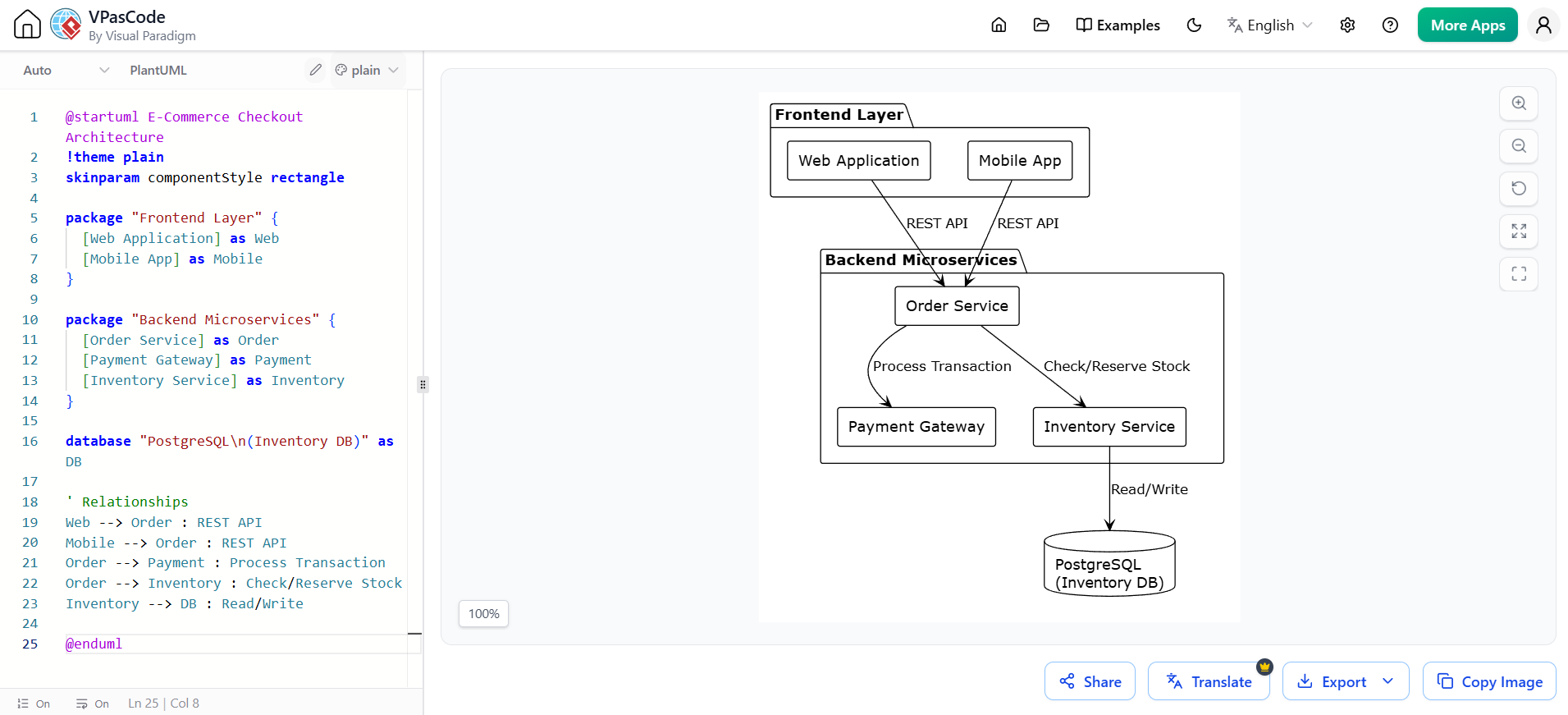
@startuml E-Commerce Checkout Architecture
!theme plain
skinparam componentStyle rectangle

package "Frontend Layer" {
  [Web Application] as Web
  [Mobile App] as Mobile
}

package "Backend Microservices" {
  [Order Service] as Order
  [Payment Gateway] as Payment
  [Inventory Service] as Inventory
}

database "PostgreSQL\n(Inventory DB)" as DB

' Relationships
Web --> Order : REST API
Mobile --> Order : REST API
Order --> Payment : Process Transaction
Order --> Inventory : Check/Reserve Stock
Inventory --> DB : Read/Write

@enduml
Phase 2: The Abstraction Layer (VPasCode)
Visual models are great for humans, but machines need text. This is where VPasCode (Visual Paradigm as Code) bridges the gap.
VPasCode allows you to treat your diagrams exactly like software code.
-
Textual Modeling: You define diagrams using human-readable text (like the PlantUML code above).
-
Version Control: You save these diagram definitions as
.pumlor.vpucfiles directly in your Git repository alongside your application code. -
SDK/CLI Automation: You can use Visual Paradigm’s APIs to programmatically query or modify visual elements.
Realistic Example: Committing to Git
Instead of saving your diagram as an isolated .png file, you save the PlantUML code into a file named checkout-architecture.puml inside your project’s /docs/architecture/ folder.
git add docs/architecture/checkout-architecture.puml
git commit -m "docs: add initial checkout architecture diagram"
git push origin main
Now, your diagram is version-controlled. If a developer changes the Order Service, they update the text file in the same pull request.
Phase 3: The Automation Layer (OpenDocs & CI/CD)
This is where the magic happens. We no longer manually export diagrams to PDF or Word. We automate the process using OpenDocs and a CI/CD Pipeline.
-
OpenDocs: An open-standard document generation framework that reads your model data (the PlantUML/VPasCode files) and maps it to text templates.
-
Pipeline Integration: We use CI/CD tools (like GitHub Actions) to listen for changes in the repository.
-
Automated Triggers: Every time code or models change, the pipeline automatically rebuilds the documentation.
Realistic Example: GitHub Actions Workflow
Here is a realistic .github/workflows/build-docs.yml file that triggers whenever the architecture files are updated. It uses PlantUML to render the diagrams and packages them into a static HTML site.
name: Build Living Documentation

# Trigger the workflow only when files in the docs/architecture folder change
on:
  push:
    paths:
      - 'docs/architecture/**'
  workflow_dispatch: # Allows manual triggering

jobs:
  generate-and-deploy:
    runs-on: ubuntu-latest
    steps:
      - name: Checkout Repository
        uses: actions/checkout@v3

      - name: Set up Java (Required for PlantUML/VP CLI)
        uses: actions/setup-java@v3
        with:
          distribution: 'temurin'
          java-version: '17'

      - name: Generate Diagrams with OpenDocs/PlantUML
        run: |
          # Download PlantUML jar
          wget https://github.com/plantuml/plantuml/releases/download/v1.2023.10/plantuml-1.2023.10.jar -O plantuml.jar
          # Render all .puml files in the architecture directory to SVG/PNG
          java -jar plantuml.jar -tsvg docs/architecture/*.puml

      - name: Compile Living Documentation HTML
        run: |
          # Assuming a custom OpenDocs script or VP CLI command to wrap images in HTML templates
          mkdir -p public/docs
          cp -r docs/architecture/*.svg public/docs/
          # Generate index.html with metadata and embedded diagrams
          echo "<html><body><h1>Living Architecture Docs</h1>" > public/docs/index.html
          echo "<img src='checkout-architecture.svg' />" >> public/docs/index.html
          echo "</body></html>" >> public/docs/index.html

      - name: Deploy to GitHub Pages
        uses: peaceiris/actions-gh-pages@v3
        with:
          github_token: ${{ secrets.GITHUB_TOKEN }}
          publish_dir: ./public
Phase 4: The Output Layer (Living Doc)
The final product of this pipeline is your Living Doc. Because it is generated automatically from the source of truth (your code and text models), it never goes out of date.
-
Single Source of Truth: Code, visual models, and text explanations remain perfectly synchronized.
-
Format Flexibility: The pipeline can output responsive HTML websites (hosted on GitHub Pages or internal wikis), PDFs for compliance, or push directly to Confluence.
-
Dynamic Metadata: Advanced setups can embed active system metrics, data dictionaries, and Jira requirement tracking directly into the generated user-facing text.
Your team now has a beautiful, up-to-date URL (e.g., docs.yourcompany.com) that always reflects the exact current state of the software.
Step-by-Step Implementation Workflow
To summarize, here is the daily workflow your team will follow to maintain this ecosystem:
-
Draft: Create a UML class, component, or BPMN process diagram in VP Desktop/Online, or prompt the VP Chatbot to generate it from a user story.
-
Export: Save or commit the design file using VPasCode/PlantUML text formats inside your project’s Git repository.
-
Build: Push the changes to Git. This action automatically triggers your CI/CD Pipeline (e.g., GitHub Actions).
-
Generate: The pipeline runs OpenDocs/PlantUML to extract the new diagram images, compile the metadata, and build the HTML/PDF outputs.
-
Publish: The tool deploys the freshly updated Living Doc to your internal team portal, wiki, or public documentation site.
Conclusion: Embracing the Living Documentation Mindset
Transitioning to a Visual Paradigm DevOps pipeline requires a shift in mindset. Documentation is no longer an afterthought or a separate task assigned to a junior developer at the end of a sprint. Instead, it becomes an automated byproduct of the development process itself.
By leveraging the Design Layer (VP Desktop & AI), the Abstraction Layer (VPasCode), the Automation Layer (CI/CD & OpenDocs), and the Output Layer (Living Doc), you eliminate documentation debt forever. Your diagrams will finally evolve at the same speed as your code, providing your team with a reliable, single source of truth that empowers better decision-making and faster onboarding.
Start small: pick one core microservice, write its architecture in PlantUML, commit it to Git, and set up a basic GitHub Action to render it. Once you see your first “Living Document” update itself automatically, you will never want to go back to manual diagramming again.
Reference
- Case Study: Accelerating Software Architecture Documentation with VPasCode – A Diagram-as-Code Revolution: A case study on how VPasCode bridges the gap between code and visualization through AI-ready Diagram-as-Code and automated layout engineering.
- Comprehensive Guide to VPasCode by Visual Paradigm: A detailed overview of VPasCode’s core philosophy, user interface, multi-engine support, and collaboration workflows.
- From Code to Clarity: A Beginner’s Guide to Seamless Diagramming with VPasCode and OpenDocs: A tutorial on using VPasCode with OpenDocs for AI-powered documentation, including practical PlantUML examples and pipeline integration.
- Mastering VPasCode: The Ultimate Guide to AI-Powered Diagram-as-Code with Multi-Engine Support: An advanced guide covering VPasCode’s unique advantages, AI-native architecture, and multi-engine support.
- Revolutionizing Diagram Maintenance: How VPasCode’s AI Auto-Fix Eliminates Syntax Frustrations: An in-depth look at VPasCode’s AI-driven auto-fix feature for automatic detection and correction of syntax errors.
- How the Visual Paradigm AI Chatbot and VPasCode function as an integrated ecosystem for diagramming: Explains the integrated two-phase workflow combining the AI Chatbot for rapid generation and VPasCode for precise diagram refinement.
- Clarity by Design: Streamlining Infrastructure Documentation with VPasCode and Graphviz: A case study on using VPasCode and Graphviz DOT language for modernizing infrastructure documentation as code.
- VPasCode: Unified Diagram-as-Code Platform: Official feature page detailing supported diagram types, multi-engine support, real-time preview, and export capabilities.