
Mastering UML Class Diagrams: A Step-by-Step Guide to System Modeling
In the world of software engineering, few tools are as critical as the Unified Modeling Language (UML). Specifically, the Class Diagram serves as the blueprint for your system’s static structure. It defines the building blocks of your software—classes, their attributes, operations, and the relationships that bind them together.
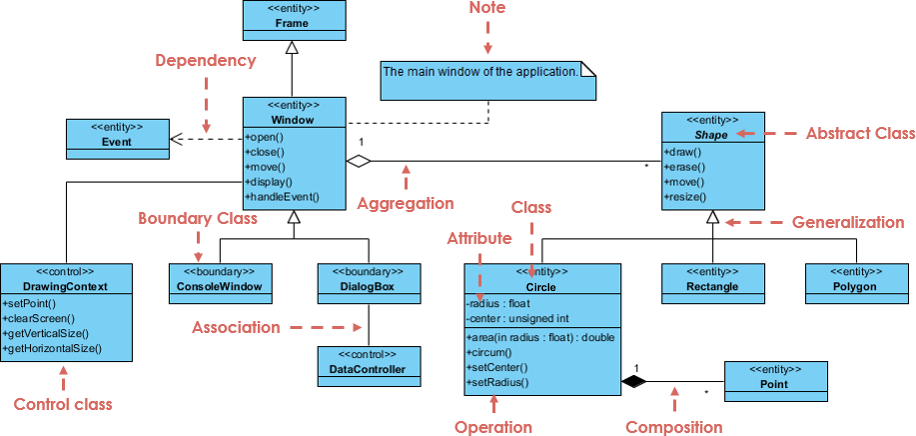
Based on the architectural diagram provided, we will deconstruct a comprehensive example of a Drawing Application. This tutorial will walk you through identifying core entities, understanding inheritance hierarchies, and distinguishing between the various types of associations used to model complex logic.
1. The Core Hierarchy: Generalization and Inheritance
The most fundamental aspect of object-oriented modeling is the “is-a” relationship, known in UML as Generalization. In the diagram, we see a clear hierarchy starting with the Shape class.
- Abstract Class: The
Shapeclass is marked as an abstract class (indicated by the dashed arrow and specific notation). It defines the contract for all shapes but cannot be instantiated directly. It declares methods likedraw()anderase()that all specific shapes must implement. - Concrete Subclasses: Below
Shape, we seeCircle,Rectangle, andPolygon. These are concrete implementations. For example, aCirclehas specific attributes likeradiusandcenter, and operations likearea()andcircum().
Understanding this hierarchy is crucial because it promotes code reusability. If you need to add a feature to all shapes, you add it to the parent Shape class, and all children inherit it automatically.
2. The Application Shell: Inheritance and Boundaries
Just as we have geometric shapes, our application needs windows. The diagram introduces a parallel hierarchy for user interface elements.
- Window & Frame: The
Windowclass inherits fromFrame. This represents the main container of the application. It has behaviors likeopen(),close(), anddisplay(). - Boundary Classes: The diagram explicitly labels
ConsoleWindowandDialogBoxas Boundary Classes. In the context of Model-View-Controller (MVC) or layered architecture, boundary classes represent the interface between the system and the outside world (users or other systems). They handle input and output.
3. The Controller Pattern: Separation of Logic
A robust system separates the data (Model) from the logic that manipulates it (Controller). The diagram illustrates this perfectly with the DataController and DrawingContext classes.
- Control Class:
DataControlleris labeled as a Control class. It acts as the intermediary, managing the flow of data between the boundary classes (like theDialogBox) and the core entities. - Dependency: Notice the dashed arrow pointing from
WindowtoDataController. This is a Dependency relationship. It implies that theWindowneeds to know about theDataControllerto function, but theWindowdoes not own theDataController.
4. Relationships: Association, Aggregation, and Composition
The lines connecting these classes are not random; they define how objects interact in memory. The diagram highlights three specific types of relationships:
Association
Association is the most basic relationship, representing a structural link between two objects. In the diagram, there is a dashed line with an arrow pointing from Window to DataController, explicitly labeled as Association. This indicates a navigable link where one object knows about the other.
Aggregation
Aggregation represents a “whole-part” relationship where the parts can exist independently of the whole. The diagram shows a white diamond at the end of the line connecting Window and Shape.
Interpretation: A Window contains Shapes (e.g., a canvas). If you delete the Window, the Shapes might still exist in the database or memory, but they are no longer displayed. The white diamond signifies a weak ownership.
Composition
Composition is a stronger form of aggregation, representing a “part-of” relationship where parts cannot exist without the whole. Look at the connection between Circle and Point (marked with a filled black diamond).
Interpretation: A Circle is defined by its center (a Point). If you destroy the Circle object, the specific Point that defined its center is also destroyed. The black diamond indicates strong ownership and lifecycle dependency.
5. Attributes and Operations
Inside the class boxes, we define the state and behavior of the object. The diagram uses standard UML notation:
- Attributes: Listed in the middle section (e.g.,
radius: float,center: unsigned int). The colon indicates the data type. - Operations: Listed in the bottom section (e.g.,
+setCenter(),-clearScreen()). The symbols indicate visibility: +: Public (accessible by all)-: Private (accessible only within the class)#: Protected (accessible within the class and subclasses)
Conclusion
By mastering these elements—classes, attributes, operations, and relationships—you can translate complex software requirements into a clear, visual design. Whether you are using tools like Visual Paradigm or drawing by hand, the principles of Generalization, Aggregation, and Composition remain the foundation of robust software architecture.