
Mastering BPMN Tasks: A Visual Paradigm Guide to Atomic Workflow Steps
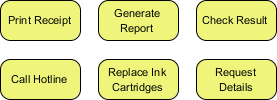
In the world of Business Process Model and Notation (BPMN), clarity is king. When modeling complex workflows using tools like Visual Paradigm, it is crucial to distinguish between high-level activities and the granular steps that make them up. The image provided illustrates a set of standard BPMN elements known as Tasks. These are the fundamental building blocks of any business process diagram.
This tutorial will deconstruct the concept of the BPMN Task, explain its visual representation, and demonstrate how to effectively model atomic work items within your business processes.
Understanding the BPMN Task
The core concept presented in the diagram is the Task. In BPMN terminology, a Task is defined as an atomic unit of work. This means it represents a single, indivisible action within the context of your specific process model. Unlike a Sub-Process, which is a container for other elements, a Task is the endpoint of decomposition.
Visually, as seen in the provided example, a Task is rendered as a rounded rectangle. This shape is distinct from the diamond shape of a Gateway (decision point) or the cylinder shape of a Data Object. The rounded rectangle signifies a “doing” action—a specific piece of work that needs to be completed.
The Concept of Atomicity
The defining characteristic of a Task is its atomicity. When you define a step as a Task in Visual Paradigm, you are making a statement about the granularity of your model. You are asserting that this step cannot (or does not need to) be broken down further for the current level of abstraction.
For example, consider the task Print Receipt. In a high-level “Order Fulfillment” process, this is a single action. You do not need to model the internal mechanics of the printer driver, the paper feed mechanism, or the ink drying time. The process treats the printing of the receipt as a single, instantaneous, or atomic event.
Decoding the Provided Diagram
The diagram displays six distinct tasks arranged in a grid. Let’s analyze the specific examples to understand their roles in a business context:
- Print Receipt: A post-transactional task. This indicates the system or operator must generate a physical or digital record of a completed event.
- Generate Report: A data processing task. This involves aggregating information and formatting it for consumption.
- Check Result: A verification task. This implies a review process where the outcome of a previous action is validated.
- Call Hotline: A communication task. This represents an interaction between the process participant and an external entity.
- Replace Ink Cartridges: A maintenance or resource management task. This is a physical action required to keep a system operational.
- Request Details: An inquiry task. This involves gathering specific information, likely from a database or a user.
These examples demonstrate the versatility of the Task element. Whether the work is digital, physical, or communicative, it is modeled using the same rounded rectangle shape.
Implementing Tasks in Visual Paradigm
When using Visual Paradigm to create these diagrams, the workflow is straightforward. To add a Task to your Business Process Diagram (BPD):
- Select the Task tool from the toolbar.
- Click on the diagram canvas to drop the rounded rectangle.
- Double-click the shape to edit the label (e.g., change “Task” to “Print Receipt”).
Once added, these tasks can be connected using Sequence Flows (solid arrows) to define the order of execution. They can also be associated with Participants (who performs the task) and Events (what triggers or concludes the task).
When to Decompose a Task
One of the most common questions in process modeling is: “When do I stop decomposing?” The answer lies in the concept of Atomicity mentioned earlier. You should stop breaking down a task when:
- The step is performed by a single resource (person or system) without interruption.
- The internal logic of the step is irrelevant to the overall business flow you are trying to visualize.
- The step is a “black box” to the current observer of the process.
Conclusion
Mastering the BPMN Task is essential for creating clean, understandable process models. By correctly identifying atomic work items and representing them with the standard rounded rectangle shape, you ensure that your diagrams communicate the business logic clearly without unnecessary complexity. Whether you are modeling a simple office procedure or a complex enterprise system, the principles of the Task remain the same: keep it simple, keep it atomic, and keep it clear.
/* Conceptual Logic for Task Decomposition */

IF (work_item.can_be_broken_down) {
    create SubProcess(work_item);
} ELSE {
    create Task(work_item);
}

// Example: "Print Receipt" is atomic
// Logic: No internal steps needed for the high-level flow.
print("Task: Print Receipt added to diagram.");