
Introduction
Sequence diagrams are the connective tissue of system design—they translate abstract requirements into concrete, ordered interactions that developers, architects, and testers can all reason about. Yet for all their value, they remain one of the most time-consuming artifacts to produce: identifying lifelines, sequencing messages, and placing combined fragments correctly demands both modeling discipline and patience. This is precisely where Visual Paradigm changes the equation. By combining rigorous UML compliance with AI-assisted generation, it transforms sequence diagramming from a manual drafting exercise into a rapid, iterative modeling workflow.
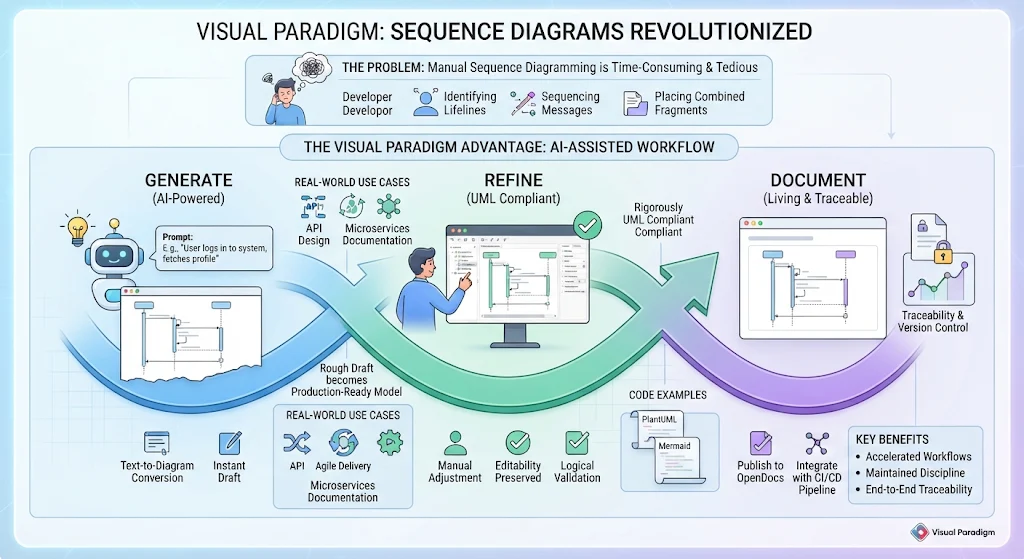
This guide explores how Visual Paradigm’s sequence diagram capabilities and AI features work in practice—from prompt-based generation and refinement techniques to real-world use cases across API design, agile delivery, and microservices documentation. Along the way, we provide concrete PlantUML and Mermaid examples, examine the broader tooling ecosystem, and share the tips and tricks that separate a rough AI draft from a production-ready interaction model.
1. Why Visual Paradigm for Sequence Diagrams?
Sequence diagrams are the backbone of interaction modeling—they show who calls whom, in what order, and how responses flow back. Visual Paradigm distinguishes itself in this space for several reasons:
-
True modeling, not just drawing: It enforces UML syntax, supports element reuse, and maintains traceability between diagrams, use cases, and requirements.
-
AI-powered generation: Transform natural-language use case descriptions into fully editable sequence diagrams in seconds, complete with lifelines, messages, fragments, and activation bars.
-
End-to-end ecosystem: From AI generation in VP Desktop to living documentation in OpenDocs, and Diagram-as-Code via VPasCode, the toolchain covers the full lifecycle.
-
Standards compliance: Users consistently note that Visual Paradigm produces professional, UML-compliant diagrams that other tools often fail to match.
Who benefits most:
| Role | Primary Benefit |
|---|---|
| System Architects | Validate component interactions and API contracts before coding |
| Developers | Generate implementation-ready interaction specs from use cases |
| Business Analysts | Turn textual requirements into visual models without manual drawing |
| QA Engineers | Derive test scenarios from sequence flows (happy path + alternatives) |
| Technical Writers | Embed live, editable diagrams directly into documentation |
2. AI-Assisted Sequence Diagram Generation: How It Works
Visual Paradigm’s AI engine parses your use case specification—main success scenario, alternatives, exceptions, pre/postconditions—and automatically creates:
-
Lifelines for actors, system boundaries, and internal components (UI, Controller, Service, Repository)
-
Synchronous and asynchronous messages with operation names derived from verbs
-
Return messages (dashed arrows) showing data flow back
-
Combined fragments for loops (
loop), alternatives (alt), options (opt), and parallel flows (par) -
Activation bars indicating processing periods
-
Notes and guards for conditions, timeouts, and error cases
The generated diagram is a native, fully editable Visual Paradigm file—not a static image. You can rename messages, adjust layout, add parameters, or insert additional fragments immediately.
Generation Workflow (VP Desktop)
-
Navigate to Tools → AI Diagram Generation
-
Select Sequence Diagram as the target type
-
Enter a detailed natural-language description (see example below)
-
Click OK—the diagram appears in the editor
-
Refine manually: adjust message ordering, add activation bars, create/edit fragments, link to use cases
Effective prompt example (Library Management System):
“Sequence diagram for Borrow Book use case: Patron searches and selects a book, system checks availability, Patron requests borrow, system validates member status and borrowing limit, records loan, assigns due date, confirms success. Include alternative: if book unavailable, notify Patron. Participants: Patron, LibrarySystem, Book, Member, Loan.”
3. Example Diagrams (PlantUML / Mermaid Code)
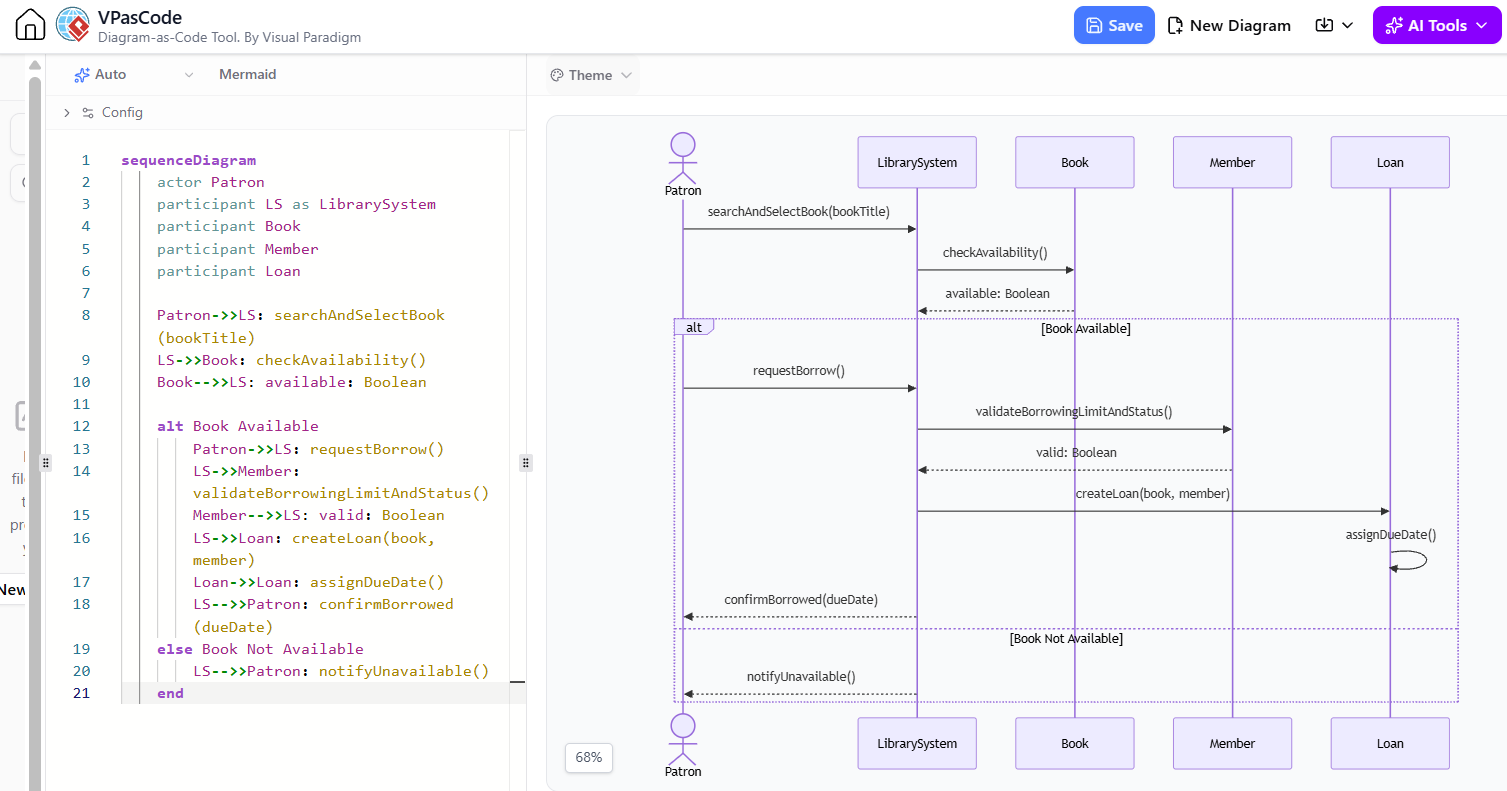
Example 1: Library Book Borrowing (Happy Path + Alternative)
This Mermaid diagram mirrors the AI-generated output structure from Visual Paradigm’s Use Case Modeling Studio.
sequenceDiagram
    actor Patron
    participant LS as LibrarySystem
    participant Book
    participant Member
    participant Loan

    Patron->>LS: searchAndSelectBook(bookTitle)
    LS->>Book: checkAvailability()
    Book-->>LS: available: Boolean

    alt Book Available
        Patron->>LS: requestBorrow()
        LS->>Member: validateBorrowingLimitAndStatus()
        Member-->>LS: valid: Boolean
        LS->>Loan: createLoan(book, member)
        Loan->>Loan: assignDueDate()
        LS-->>Patron: confirmBorrowed(dueDate)
    else Book Not Available
        LS-->>Patron: notifyUnavailable()
    end
Key elements demonstrated:
-
altfragment with guarded branches -
Dashed return messages for synchronous calls
-
Self-message on
Loanfor internal state update -
Actor lifeline separate from system lifelines
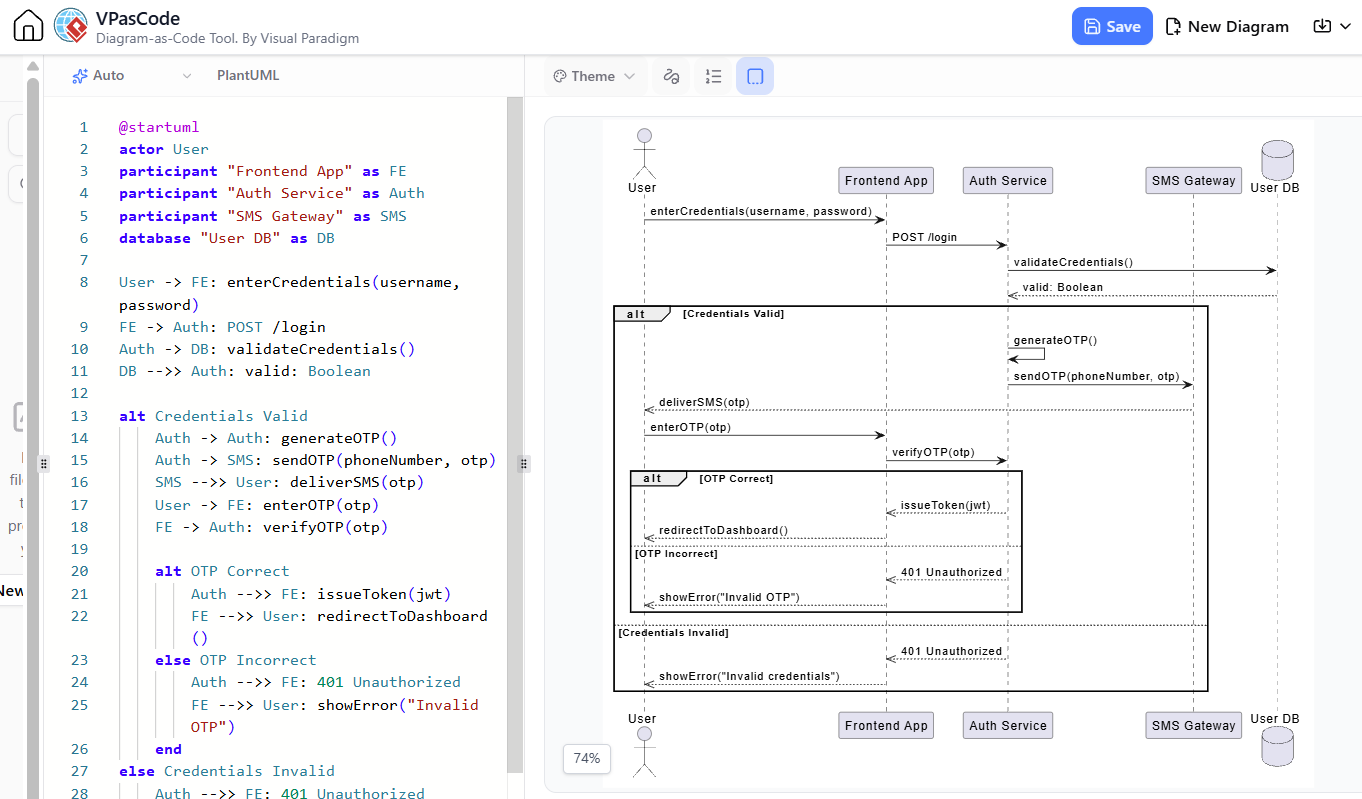
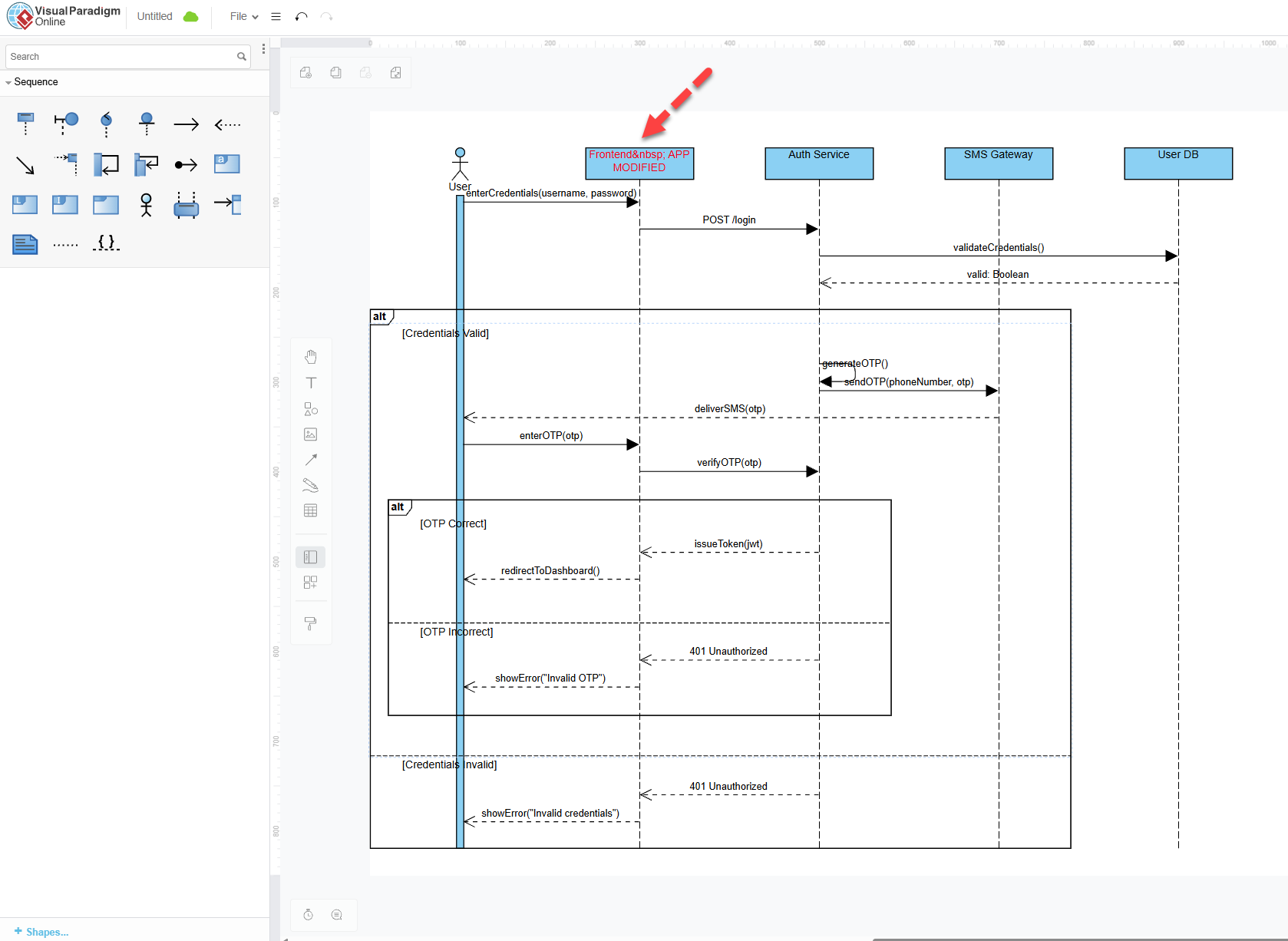
Example 2: User Authentication with 2FA (Security Flow)
This PlantUML example reflects a scenario commonly used in Visual Paradigm AI demos.
@startuml
actor User
participant "Frontend App" as FE
participant "Auth Service" as Auth
participant "SMS Gateway" as SMS
database "User DB" as DB

User -> FE: enterCredentials(username, password)
FE -> Auth: POST /login
Auth -> DB: validateCredentials()
DB -->> Auth: valid: Boolean

alt Credentials Valid
    Auth -> Auth: generateOTP()
    Auth -> SMS: sendOTP(phoneNumber, otp)
    SMS -->> User: deliverSMS(otp)
    User -> FE: enterOTP(otp)
    FE -> Auth: verifyOTP(otp)

    alt OTP Correct
        Auth -->> FE: issueToken(jwt)
        FE -->> User: redirectToDashboard()
    else OTP Incorrect
        Auth -->> FE: 401 Unauthorized
        FE -->> User: showError("Invalid OTP")
    end
else Credentials Invalid
    Auth -->> FE: 401 Unauthorized
    FE -->> User: showError("Invalid credentials")
end
@enduml
Visual Paradigm mapping notes:
-
The outer
altcorresponds to a combined fragment with two operands -
The nested
altdemonstrates Visual Paradigm’s support for nested fragments -
Auth -> Authis a self-message, easily created via the Resource Catalog drag-and-drop
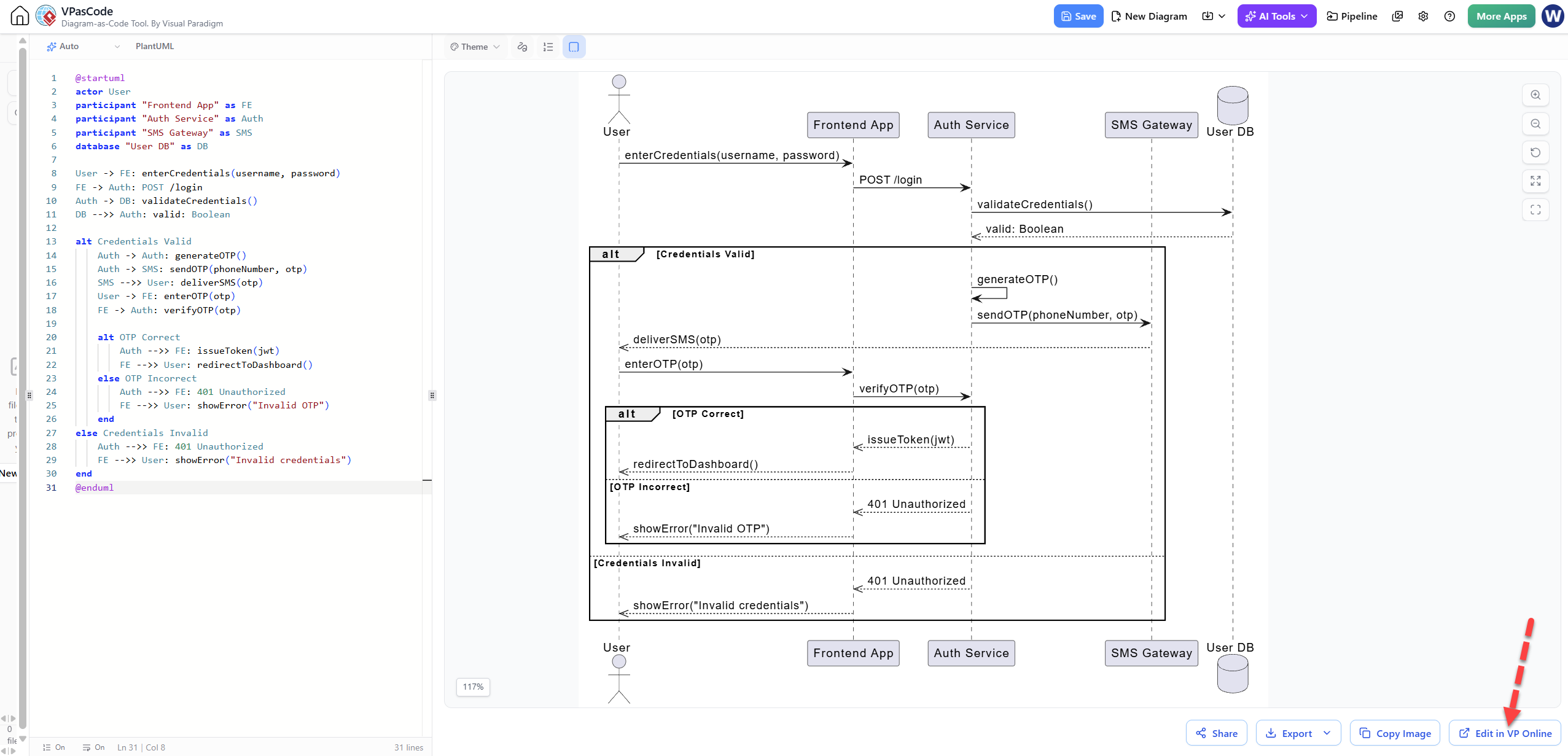
Refinement in VP Online:
4. Example Use Cases & Workflow in System Development
Use Case A: API Contract Definition
Scenario: A team is designing a payment processing API.
Workflow:
-
BA writes use case in Visual Paradigm’s AI Use Case Modeling Studio: “Process credit card payment: validate card, check funds, authorize transaction, capture payment, send receipt.”
-
AI generates sequence diagram with lifelines for
PaymentController,CardValidator,FundsService,PaymentGateway, andReceiptService. -
Architect refines the diagram: adds
altfragment forfundsInsufficient, addstimeoutguard on gateway call. -
Developer uses the diagram as the specification for implementing the controller layer.
-
QA derives test cases directly from the diagram’s message flows and guards.
Use Case B: Agile Sprint Behavioral Simulation
Scenario: A Scrum team needs to clarify a user story before implementation.
Workflow (from Visual Paradigm’s practical guide):
-
Link the sequence diagram to the originating use case via right-click → Sub Diagrams → Existing Diagrams.
-
During sprint planning, walk through the diagram with the team.
-
Use OpenDocs to embed the live diagram in the sprint documentation—updates propagate automatically when the model changes.
-
Developers reference the diagram during coding; QA uses the
alt/optfragments to enumerate test conditions.
Use Case C: Microservices Interaction Documentation
Scenario: A platform team maintains a knowledge base for 12 microservices.
Workflow:
-
For each service interaction, the team generates a sequence diagram via AI.
-
Diagrams are embedded in OpenDocs pages alongside service descriptions.
-
When a service API changes, the architect updates the sequence diagram; the OpenDocs page reflects the change immediately.
-
New team members onboard by reading the living documentation—no stale screenshots.
5. Tooling Ecosystem
| Component | Function | Best For |
|---|---|---|
| VP Desktop | Full-featured modeling environment with AI generation, syntax checking, and code engineering | Architects, senior developers |
| AI Use Case Modeling Studio | Web-based tool that generates use case specs, sequence/activity/class diagrams, and SDD reports | BAs, product owners |
| OpenDocs | Living documentation platform with embedded, editable diagrams | Technical writers, teams |
| VPasCode | Diagram-as-Code editor supporting PlantUML, Mermaid, Graphviz, D2 | Developers preferring code-based modeling |
| AI Visual Modeling Chatbot | Conversational AI that generates and iteratively refines diagrams | Rapid prototyping |
The OpenDocs Pipeline ties these together:
Generate (AI) → Author (VPasCode) → Publish (OpenDocs) → Version Control (Git)
6. Standout Features
1. AI generates editable models, not images. The output is a native Visual Paradigm diagram with full semantic structure—not a PNG or SVG.
2. Traceability built in. Link sequence diagrams to use cases, requirements, and class diagrams. Changes in one artifact can be traced across the model.
3. Syntax-aware Resource Catalog. When you drag from a lifeline, only valid message types appear—preventing UML violations.
4. Automatic layout that actually works. The AI produces well-arranged diagrams from the start, eliminating hours of manual alignment.
5. Nested combined fragments. Support for alt inside alt, loop inside opt, and other complex nesting patterns—essential for real-world exception handling.
6. Cross-platform. Windows, Mac, Linux—plus web-based options for teams.
7. Tips & Tricks
Prompt Engineering for Better AI Output
-
Name the participants explicitly. “Participants: Patron, LibrarySystem, Book, Member, Loan” yields more accurate lifelines than leaving it implicit.
-
Specify alternatives. “Include alternative: if book unavailable, notify Patron” triggers an
altfragment. -
Use verb-noun message names. “processPayment” not “pay”—the AI derives operation names from your verbs.
-
State pre/postconditions. These help the AI infer state changes and return messages.
Diagram Refinement
-
Start coarse, refine later. Begin with actor + system boundary; then add UI/Service/Repository layers as detail emerges.
-
Use activation bars sparingly. Show processing time only where it clarifies concurrency or blocking behavior.
-
Guard every
altoperand. A fragment without[condition]guards is ambiguous and hard to test against. -
Add time constraints for performance-critical interactions (e.g.,
{< 2s}on a gateway response).
Workflow Integration
-
Link diagrams to use cases immediately after generation (right-click use case → Sub Diagrams). This creates navigable traceability.
-
Use OpenDocs for stakeholder review. Embed the live diagram so reviewers see updates without exporting files.
-
Pair sequence diagrams with class diagrams. The lifelines should correspond to classes or components defined elsewhere in the model.
Common Pitfalls to Avoid
-
Don’t treat the AI output as final. It is a draft accelerator—review and refine before sharing with stakeholders.
-
Avoid orphan lifelines. Every lifeline should participate in at least one message.
-
Don’t mix abstraction levels. A diagram with both
User(actor) andUserDAO(implementation detail) on the same level confuses readers.
Conclusion
Visual Paradigm’s combination of rigorous UML modeling, AI-assisted generation, and living documentation capabilities makes it a uniquely complete solution for sequence diagram work. The AI accelerates the tedious parts—lifeline identification, message ordering, fragment placement—while preserving full editability and standards compliance. Teams that adopt the generate → refine → document → version-control pipeline can move from use case text to validated interaction models in minutes rather than hours, with traceability that survives the entire development lifecycle.