
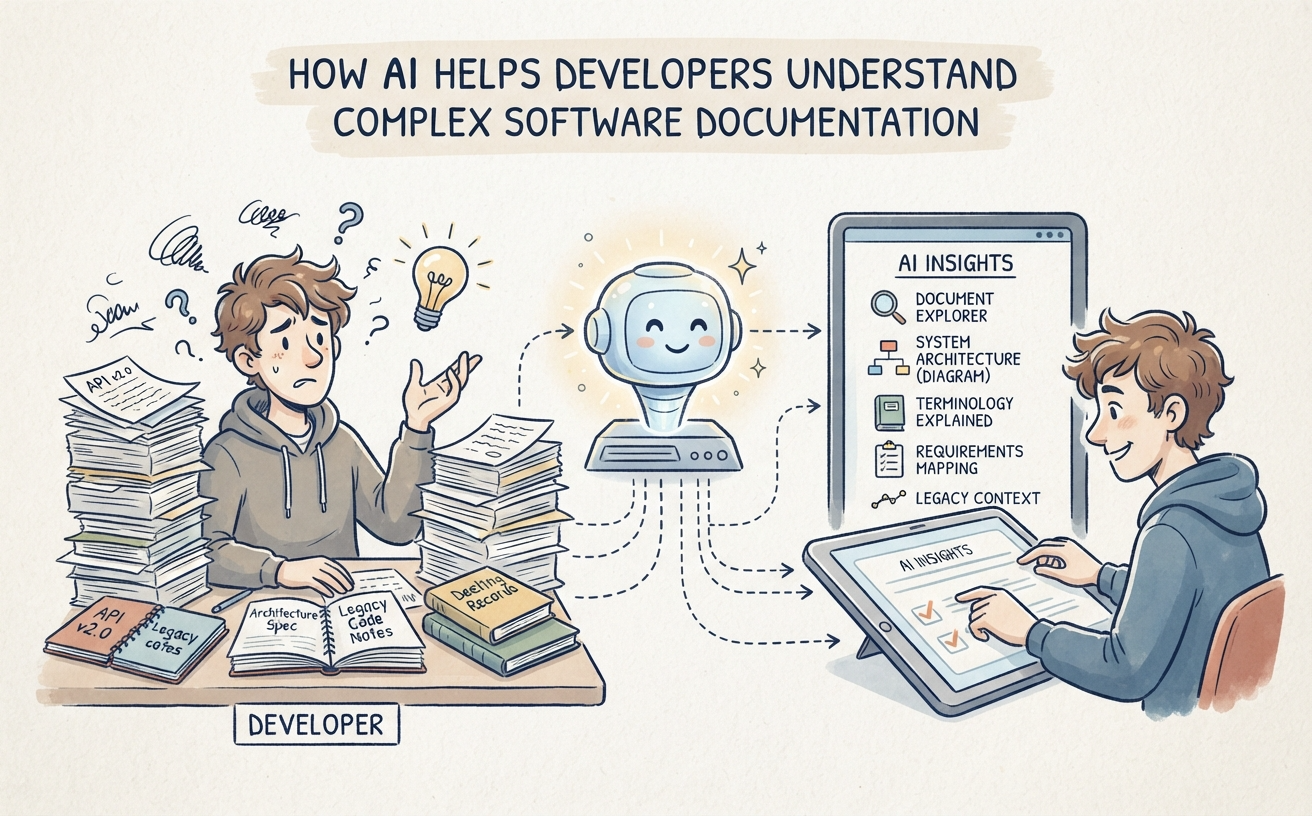
Software developers rarely work with code in isolation. Before modifying an existing system, fixing a defect or introducing a new feature, they often need to understand how the system works, why certain decisions were made and which components may be affected.
That information is usually spread across many sources: technical specifications, architecture documents, API references, database schemas, development notes, issue records, meeting summaries and internal project documentation.
Finding the right information can take considerable time, especially when working with a large system or a project that has been maintained by several teams over many years.
AI can help developers navigate this complexity. An AI assistant connected to relevant technical knowledge can answer questions, summarize documents, explain terminology and help users discover relationships between different pieces of project information.
Rather than replacing developers’ technical judgment, AI can reduce the effort involved in understanding existing knowledge and help engineers focus on analysis, implementation and problem-solving.
Why Software Documentation Can Be Difficult to Understand
Software projects generate documentation throughout their development and maintenance. Some documents explain the overall architecture, while others describe individual components, interfaces, data structures or business requirements.
As a system evolves, this information can become difficult to navigate for several reasons.
Documentation is distributed across multiple sources
A developer may need to consult a design specification, API reference, database document and project wiki to understand one feature. Important details may also be recorded in issue trackers, meeting notes or discussions that are not part of the formal documentation.
Technical documents assume prior knowledge
Documentation is often written for people who already understand the system. It may use internal terminology, abbreviations and architectural concepts without explaining them in detail.
This creates difficulties for new team members and developers who need to work on unfamiliar components.
Legacy systems contain historical decisions
Older software systems may have been developed over many years. Their current architecture may reflect technical constraints, business requirements and design decisions made by people who are no longer part of the team.
Understanding why a component behaves in a particular way may require reviewing several generations of documents and project records.
Documents may be incomplete or outdated
Software changes frequently. A specification written during an earlier development phase may no longer reflect the current implementation. A developer who relies on outdated documentation can misunderstand the system or make incorrect assumptions.
Understanding one component often requires understanding others
A change to an application interface may affect a service, database table, integration or business process. Developers need to understand these relationships before making changes safely.
The challenge is therefore not simply finding a document. It is understanding how different pieces of technical information fit together.
How AI Can Help Developers Work with Technical Documentation
An AI assistant can provide a natural-language interface to selected technical documents and project knowledge.
Instead of searching manually for a particular phrase, developers can ask questions that describe what they are trying to understand.
For example:
- Explain the main components of this software system.
- Which documents describe the authentication process?
- Summarize the responsibilities of the order management service.
- What are the documented dependencies of this module?
- Which requirements relate to customer account management?
- What decisions were recorded about the database design?
When connected to suitable knowledge sources, an AI assistant can retrieve relevant content and use it to prepare an explanation or summary.
One approach used for this purpose is retrieval-augmented generation (RAG). The system retrieves relevant information from selected documents and supplies it as context when generating a response.
This can make internal technical knowledge easier to explore without requiring developers to remember the exact document name or terminology used by its original author.
However, retrieval does not guarantee correctness. The quality of an answer depends on the source documents, their currency, the retrieval configuration and the AI model’s interpretation. Developers should verify important technical conclusions against authoritative specifications and the actual system.
Seven Practical Ways Developers Can Use AI to Understand Software Documentation
1. Summarize Large Technical Documents
Technical specifications can be lengthy and contain many details that are not immediately relevant to a developer’s current task.
AI can help produce a structured overview of a document, allowing developers to understand its main purpose before examining the details.
For example, a developer could ask:
Summarize this system design document. Explain the main components, their responsibilities, external integrations and important design constraints.
The assistant could organize the information into sections such as system overview, architecture, interfaces, data handling and dependencies.
This is particularly useful when developers need an initial understanding of a large document before investigating a specific feature.
2. Explain Unfamiliar Technical Concepts and Terminology
Internal documentation often contains terms that are familiar to the original project team but unfamiliar to someone joining the project later.
An AI assistant can help explain terminology in the context of the available documentation.
For example:
In this project, what does the term “customer profile service” refer to? Explain its responsibilities based on the technical documents.
The assistant can help locate relevant descriptions and provide a simpler explanation. Developers can also ask follow-up questions to explore how a concept relates to other parts of the system.
This can make technical onboarding easier and reduce the time spent asking colleagues to explain terminology that may already be documented somewhere.
3. Explore System Architecture and Component Relationships
Understanding a software system often requires more than reading descriptions of individual components. Developers need to understand how those components interact.
Architecture documents may describe services, modules, interfaces, databases and external systems. AI can help developers locate and summarize these relationships.
For example, a developer might ask:
Explain how the order management component interacts with the payment service and inventory system according to the available architecture documentation.
The assistant could retrieve relevant descriptions and organize the interaction into a readable explanation.
Where appropriate, developers can also use visual modeling tools to represent these relationships as component diagrams, sequence diagrams or other architectural views.
These diagrams can make complex structures easier to discuss and review, particularly when several teams need to understand the same system.
4. Find Requirements Related to a Feature or Change
Before implementing a new feature, developers need to understand what the software is expected to do. Requirements may be distributed across specifications, change requests, user stories and meeting records.
AI can help locate relevant requirements and organize them around a particular feature.
For example:
Find the documented requirements related to password recovery. Summarize the expected user actions, system responses and stated constraints.
This can help developers identify relevant requirements before beginning implementation.
It may also help reveal questions that need clarification, such as missing acceptance criteria or conflicting descriptions. The responsible analyst or product owner should resolve these issues rather than allowing the AI to make assumptions about intended behavior.
5. Understand Legacy Systems and Historical Decisions
Legacy systems often contain knowledge that is difficult to reconstruct from the current code alone. Some decisions may have been made because of earlier business constraints, integration limitations or technical requirements.
Project records, design documents and historical discussions may help explain the reasoning behind the existing implementation.
A developer could ask:
What reasons were documented for using the current authentication approach? Summarize the relevant design decisions and any constraints recorded in the project documents.
If the relevant records are available, AI can help identify and summarize the historical context.
This is valuable when maintaining systems that have been developed over a long period, particularly when experienced team members are no longer available to explain earlier decisions.
6. Compare Technical Documents and Identify Inconsistencies
Software documentation can become inconsistent as a project evolves. An API specification may describe one field name while a separate technical document uses another. A requirements document may also describe behavior that differs from a later design specification.
AI can assist developers by comparing selected documents and highlighting possible differences.
For example, a developer could ask:
Compare these two API specifications. Identify differences in endpoint names, request parameters, response fields and authentication requirements.
The assistant can help organize the differences for further investigation.
This does not prove that one document is incorrect. The difference may reflect a deliberate change, an older specification or a documentation error. Developers and technical owners must determine which version is authoritative.
7. Turn Written Requirements into Structured Technical Models
Developers and software architects frequently need to translate written descriptions into structured representations of a system.
For example, a written requirement may describe how users interact with a service. A technical specification may describe the responsibilities of several components. A business process document may explain the steps involved in a transaction.
AI-assisted modeling can help transform such descriptions into visual artifacts, including:
- UML use case diagrams: Show actors and the functions they interact with.
- UML sequence diagrams: Illustrate interactions between system participants over time.
- UML class diagrams: Represent classes, attributes, operations and relationships.
- UML component diagrams: Show software components and their dependencies.
- Activity diagrams: Describe workflows and control flows.
- Entity-relationship diagrams: Represent data entities and their relationships.
These models can help developers examine requirements from different perspectives and communicate technical structures more clearly.
AI-generated diagrams should be reviewed and refined by people familiar with the system. A generated model is a useful starting point, not proof that the implementation or requirements have been fully understood.
AI Documentation Assistant vs. AI Coding Assistant
It is useful to distinguish between an AI assistant that helps developers understand project knowledge and an AI coding assistant.
Although their capabilities can overlap, they address different needs.
| Area | AI Documentation Assistant | AI Coding Assistant |
|---|---|---|
| Primary focus | Understanding technical knowledge and documentation | Supporting software development and coding tasks |
| Typical input | Specifications, architecture documents, manuals, project notes and technical records | Source code, programming context, development instructions and related files |
| Common tasks | Searching, summarizing, explaining and comparing technical information | Code completion, code explanation, debugging assistance and code generation |
| Typical benefit | Helps developers understand the system and its documented requirements | Helps developers perform implementation-related tasks |
These approaches can complement each other. A coding assistant may help generate or modify code, while a documentation assistant helps developers understand the system’s architecture, requirements and historical context.
Organizations should evaluate which capabilities they need rather than assuming that one type of AI tool automatically provides the other.
What Makes a Useful AI Knowledge Environment for Developers?
Connecting an AI assistant to technical documents is only one part of the solution. The quality of the underlying knowledge environment is equally important.
Organized and relevant technical information
Specifications, architecture documents, API references, requirements and project notes should be organized so that users can identify their purpose and relevance.
Clear document ownership and version information
Developers need to distinguish current technical guidance from outdated material. Documents should have appropriate owners and version information, particularly when they describe systems that change frequently.
Appropriate access permissions
Technical documentation may contain confidential system details, internal procedures or information about different projects. Access should be managed according to organizational requirements.
Useful retrieval and question-answering capabilities
The AI assistant should be able to retrieve relevant information from the selected sources and handle questions that use different terminology from the original documents.
Source verification
Where supported, the system should help users identify the documents or passages behind an answer. Developers should be able to inspect the original information before relying on an important technical conclusion.
Integration with existing engineering practices
The knowledge environment should complement the team’s documentation and development workflows. It should not create unnecessary duplication or require engineers to maintain disconnected copies of the same information.
Important Limitations: AI Does Not Automatically Understand the Actual System
An AI assistant connected to documentation can provide useful explanations, but there are important limitations developers should understand.
Documentation may not reflect the current implementation
If the source documents are outdated, an AI-generated explanation may also be outdated. Developers should verify important details against the current code, configuration and system behavior.
AI may misunderstand technical relationships
Technical documents can be ambiguous or incomplete. An AI model may interpret a description incorrectly or infer a relationship that is not explicitly supported by the available information.
Not every project detail is documented
Some implementation knowledge may exist only in source code, configuration files, development tools or the experience of individual engineers. A documentation assistant cannot retrieve information that has not been made available to it.
Generated diagrams and summaries require review
A generated diagram may omit a dependency, misinterpret a requirement or simplify an important technical detail. Developers should validate generated artifacts before using them as formal project documentation.
Confidential technical information needs appropriate protection
Software documentation may reveal internal architecture, infrastructure details, vulnerabilities or other sensitive information. Organizations should understand where information is processed, which AI services receive it and how access is controlled.
Private AI can offer deployment and data-handling options suited to organizational requirements, but the term itself does not guarantee security. The actual architecture, configuration and operational controls must be evaluated.
How to Introduce AI-Assisted Documentation for a Development Team
A practical implementation does not need to begin with every document from every software project. A focused approach can help the team test the value of AI-assisted knowledge retrieval before expanding its scope.
Step 1: Identify a documentation problem
Start with a recurring challenge. Developers may spend too much time understanding a legacy system, locating API specifications or finding the requirements associated with a feature.
Choose a problem that can be evaluated through realistic developer questions.
Step 2: Select a suitable document collection
Gather the relevant architecture documents, specifications, technical manuals, project notes or other approved materials.
Make sure the selected information is appropriate for the intended users and that any access restrictions are understood.
Step 3: Review the quality of the documentation
Identify outdated versions, duplicate documents and unclear ownership. Record which sources are authoritative and which should be treated as historical reference material.
AI can help make documentation more accessible, but it should not become a substitute for maintaining accurate technical records.
Step 4: Connect the documents to an AI assistant
Use an AI solution that can retrieve information from the selected knowledge sources. Test it with questions developers would genuinely ask during their work.
For example, ask it to explain a component, locate a requirement, summarize an API specification and compare two design documents.
Step 5: Evaluate answer quality
Ask developers to check whether the assistant finds relevant information and whether its explanations accurately reflect the source material.
Pay particular attention to ambiguous questions, outdated documents and cases where the correct answer is not available in the knowledge collection.
Step 6: Expand into related engineering workflows
Once the initial use case proves useful, consider connecting additional documentation sources or introducing AI-assisted activities such as requirements analysis, technical summaries and diagram generation.
Expansion should be guided by the team’s actual needs and the quality of the results.
Connecting Technical Knowledge with AI and Visual Modeling
Software development teams often need to move between written information and structured technical representations. A requirement may begin as a paragraph, become a specification and eventually be represented as a diagram or system model.
Using separate tools for knowledge retrieval, documentation and visual modeling can make this process fragmented.
Visual Paradigm’s Private AI for Enterprise Knowledge solution brings together capabilities that can support a more connected approach:
- NotesKeep: A knowledge management environment for organizing notes and documents that can serve as sources of organizational knowledge.
- AI Chatbot: Lets users ask natural-language questions about selected knowledge sources and explore relevant information.
- OpenDocs: Provides tools for creating and organizing technical documentation and reports.
- Diagram editing tools: Support the creation and refinement of structured visual models, including software and system diagrams.
- Implementation and support services: Include assistance with software and AI endpoint setup, team training and ongoing technical advisory.
For example, a development team could organize its architecture documents and project notes, use an AI assistant to explore the available information, and then create or refine diagrams that communicate the system’s structure and behavior.
The AI environment can use self-hosted infrastructure or connect to a cloud AI provider through an organization-managed account and endpoint, depending on the organization’s requirements.
This approach is intended to support the management and use of enterprise knowledge. It should not be confused with a dedicated source-code assistant that automatically indexes a live codebase or performs software debugging unless those capabilities are separately provided and configured.
Final Thoughts
Understanding a software system can be just as challenging as developing it. Technical knowledge is often distributed across documents, project records and the experience of individual team members.
AI can help developers navigate this information more efficiently. It can summarize lengthy specifications, explain unfamiliar concepts, retrieve relevant requirements, explore documented architecture and help transform written descriptions into structured models.
The most useful results come when AI is connected to relevant, maintained knowledge sources and used as an assistant rather than an unquestioned authority.
By combining good documentation practices with AI-assisted knowledge retrieval, software teams can make their collective technical knowledge easier to access and use throughout the software development lifecycle.
Frequently Asked Questions
Can AI help developers understand large software projects?
Yes. When connected to relevant project documentation, an AI assistant can summarize technical documents, explain system components, retrieve requirements and help developers explore documented relationships. Its usefulness depends on the completeness and accuracy of the available information.
Can AI answer questions about software architecture?
It can help answer questions based on architecture documents and other selected knowledge sources. Developers can ask about components, interfaces, dependencies and documented design decisions. Important answers should be checked against authoritative architecture records and the actual implementation.
Can AI help developers understand legacy systems?
Yes. AI can help locate and summarize historical specifications, design documents, project notes and decision records. This can make it easier to understand why certain design choices were made, although undocumented behavior and implementation details may still require direct investigation.
Is an AI documentation assistant the same as an AI coding assistant?
No. A documentation assistant focuses on understanding and retrieving technical knowledge, while a coding assistant typically supports programming tasks such as code completion, code explanation and debugging assistance. The two can complement each other.
Can AI generate software diagrams from technical documentation?
AI tools can help transform written descriptions and requirements into visual models such as UML component, sequence, class and activity diagrams. Generated diagrams should be reviewed by developers or architects to ensure that they accurately represent the intended system.
Does an AI documentation assistant automatically know the latest source code?
No. An assistant connected to documents only has access to the information made available through its configured knowledge sources. Access to a live codebase or development environment requires separate integration and capabilities. Developers should verify documentation-based answers against the current implementation.