
Introduction
From Whiteboard to Workflow: Why AI-Assisted Activity Diagrams Matter
Every system development project eventually confronts the same translation problem: the gap between what stakeholders describe and what developers build. Use case specifications, requirement documents, and meeting notes capture process logic in prose—linear, ambiguous, and easy to misinterpret. Activity Diagrams solve this by making flow visible: who does what, when decisions branch, where work happens in parallel, and how exceptions unwind. Yet manually drawing these diagrams is slow, tedious, and often skipped under delivery pressure—precisely when clear process logic matters most.
Visual Paradigm closes that gap with AI-assisted Activity Diagram generation. Instead of drafting boxes and arrows by hand, you describe a process in plain English or paste a use case specification, and the tool produces a native, editable UML model with swimlanes, decision nodes, forks, joins, and exception paths already in place. You shift from drawing to validating—a far better use of analyst and architect time.
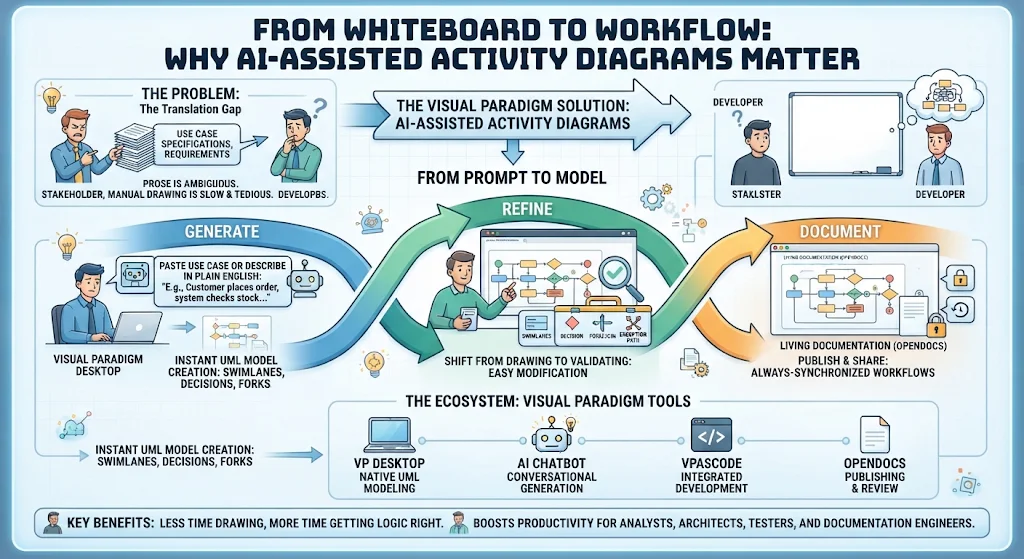
This guide walks through the complete picture: why Activity Diagrams remain essential in modern system development, who benefits most from AI-assisted modeling, how Visual Paradigm’s tooling ecosystem fits together (Desktop, VPasCode, the AI Diagramming Chatbot, and OpenDocs), and a step-by-step workflow from text prompt to published living documentation. It includes working PlantUML and Mermaid examples, a comparison of standout AI features, and practical tips—prompt templates, refinement commands, and a pre-publication checklist—drawn from real modeling practice.
Whether you are a business analyst turning use cases into reviewable workflows, an architect validating process logic before a sprint, a tester deriving coverage from decision paths, or a documentation engineer maintaining always-synchronized diagrams, the goal is the same: less time drawing, more time getting the logic right. The sections that follow show you how.
Bottom line up front: Visual Paradigm transforms Activity Diagram creation from a manual drafting chore into an AI-accelerated workflow. You can generate a draft Activity Diagram from a plain-English process description or a use case specification in seconds, then refine it in a native, fully editable Visual Paradigm model—or export to PlantUML/Mermaid for version-controlled, diagram-as-code pipelines. The result: faster requirement validation, fewer logic gaps, and living documentation that stays synchronized with system development.
1. Why Activity Diagrams (and Why AI Changes the Game)
Activity Diagrams model the dynamic flow of a system or business process: the sequence of actions, decision branches, parallel work, loops, and exception paths . In system development, they bridge the gap between linear use case text and implementable logic. They show who does what, when, and under which conditions.
Traditional manual creation is slow and error-prone, especially when flows involve swimlanes, forks, joins, and exception handling. Visual Paradigm’s AI assistance attacks this bottleneck directly: the AI analyzes textual requirements (main flow, alternative flows, preconditions) and produces an initial diagram with swimlanes, action nodes, decision diamonds, and fork/join bars already placed . You spend your time on validation and refinement, not line-drawing.
Who benefits most:
| Role | Benefit |
|---|---|
| Business Analysts | Turn use case specs into visual workflows for stakeholder review in minutes |
| Software Architects / Developers | Validate process logic before coding; generate PlantUML for version-controlled documentation |
| QA / Testers | Derive test coverage from visible decision paths and exception branches |
| Product Owners | Communicate complex flows (payment retries, authentication fallbacks) without UML expertise |
| DevOps / Documentation Engineers | Maintain always-synchronized diagrams in OpenDocs via diagram-as-code pipelines |
2. Visual Paradigm Tooling Ecosystem for Activity Diagrams
Visual Paradigm offers multiple entry points, each suited to different workflow stages:
| Tool | Best For | AI Capability |
|---|---|---|
| Visual Paradigm Desktop | Full UML modeling, native model integration | AI Diagram Generation (Tools > AI Diagram Generation) |
| VPasCode | Diagram-as-code (PlantUML/Mermaid/Graphviz/D2) with live preview | Native AI generation, modification, and auto-fix within the editor |
| AI Diagramming Chatbot | Brainstorming, multi-turn refinement, image-to-diagram | Conversational AI, image upload analysis |
| Visual Paradigm Online | Quick diagramming, templates, sharing | Template library; AI via connected tools |
| OpenDocs | Living documentation, always-synced diagrams | Pulls from VPasCode pipeline automatically |
The key architectural advantage: AI output is native and editable, not a static image. When you generate an Activity Diagram in Visual Paradigm Desktop, you get a real UML model with linked elements you can manipulate, style, and trace to requirements .
3. AI-Assisted Workflow: From Text to Validated Diagram
Step 1: Prepare the Process Description
Before opening the AI generator, gather the essential process logic :
-
Trigger: What starts the workflow?
-
Participants: Who or what performs each action? (These become swimlanes.)
-
Actions: What happens, in sequence?
-
Decisions: What conditions split the path?
-
Parallel work: What can happen concurrently?
-
Exceptions: What happens on failure, timeout, or rejection?
-
End states: How does each path conclude?
A well-scoped prompt prevents the AI from inventing out-of-scope steps.
Step 2: Generate the Initial Diagram
In Visual Paradigm Desktop Professional, navigate to Tools > AI Diagram Generation. Select Activity Diagram as the target type, paste your process description, and generate . The AI:
-
Derives action nodes from step verbs
-
Creates swimlanes for primary/secondary actors and the system
-
Places decision nodes at branch points
-
Inserts fork/join bars for parallel tasks
-
Routes exception paths to recovery actions or end states
Step 3: Refine with Conversational Commands
Use the AI Chatbot or VPasCode’s native AI to refine iteratively. Example commands:
-
“Rename the action ‘Submit payment’ to ‘Authorize payment’”
-
“Add a guard condition
[attempts < 3]on the retry loop” -
“Insert a parallel branch for sending email confirmation and scheduling a reminder”
-
“Add a 30-second timeout event on the ‘Enter amount’ step”
Step 4: Export to Diagram-as-Code (Optional but Powerful)
VPasCode supports PlantUML, Mermaid, Graphviz, and D2. You can generate the diagram natively in Visual Paradigm Desktop, then export to PlantUML code for version control, or work directly in VPasCode with AI prompts . This bridges enterprise modeling with developer-friendly Git workflows.
Step 5: Publish to Living Documentation
The OpenDocs Pipeline pushes diagram updates directly into documentation pages without manual export. When the PlantUML source changes in VPasCode, the embedded diagram in OpenDocs updates automatically .
4. Example Activity Diagrams (PlantUML & Mermaid)
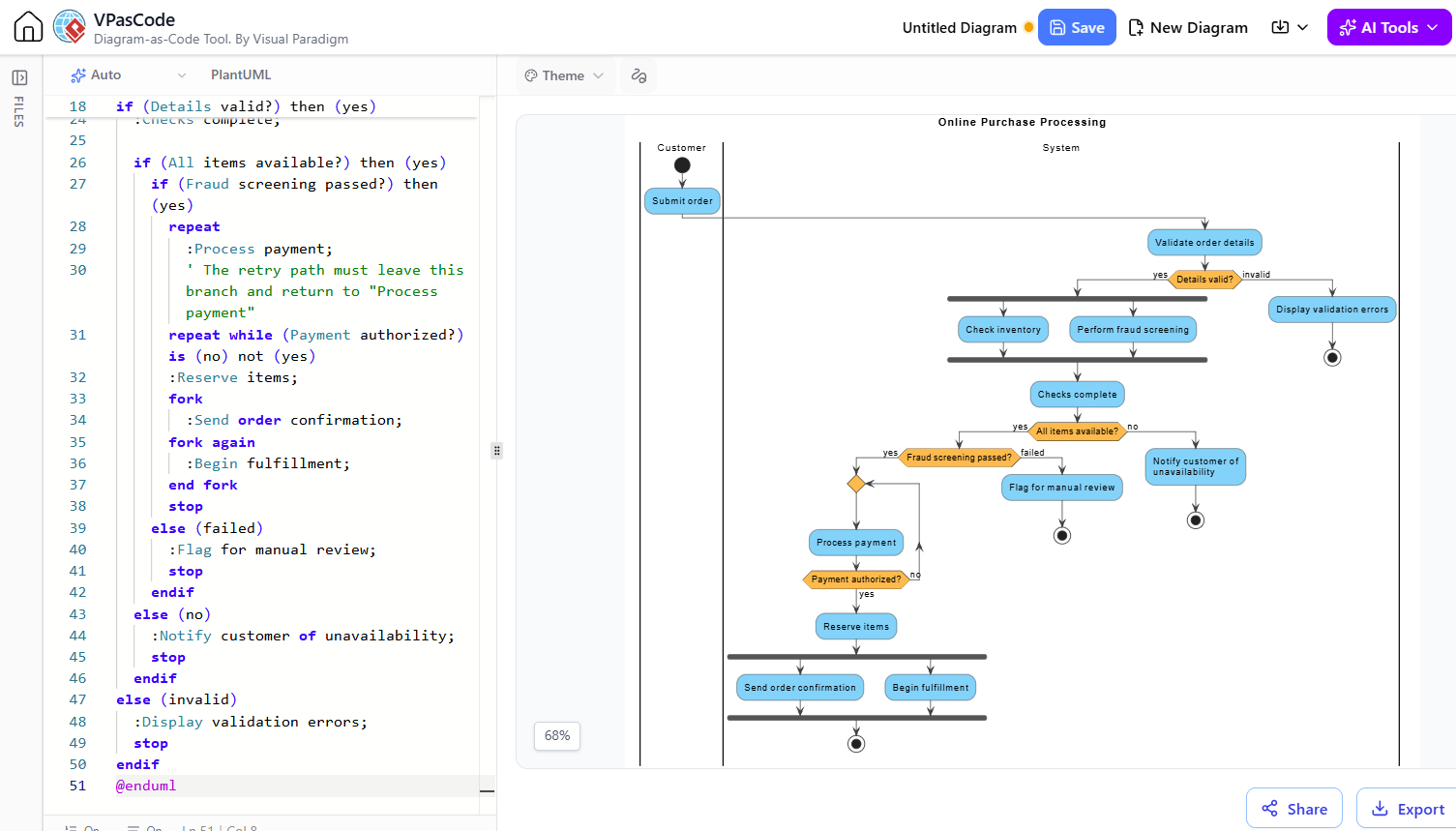
Example A: Online Purchase Processing (PlantUML)
This example, adapted from Visual Paradigm’s AI generation output, shows swimlanes, parallel checks, payment retry logic, and exception handling .
@startuml
<style>
  element { MaximumWidth 120 }
  activity { Backgroundcolor #81D4FA; MaximumWidth 150 }
  diamond { Backgroundcolor #FFB74D }
  arrow { LineColor #424242 }
  swimlane { FontSize 13 }
</style>

title Online Purchase Processing

|Customer|
start
:Submit order;

|System|
:Validate order details;
if (Details valid?) then (yes)
  fork
    :Check inventory;
  fork again
    :Perform fraud screening;
  end fork
  :Checks complete;

  if (All items available?) then (yes)
    if (Fraud screening passed?) then (yes)
      repeat
        :Process payment;
        ' The retry path must leave this branch and return to "Process payment"
      repeat while (Payment authorized?) is (no) not (yes)
      :Reserve items;
      fork
        :Send order confirmation;
      fork again
        :Begin fulfillment;
      end fork
      stop
    else (failed)
      :Flag for manual review;
      stop
    endif
  else (no)
    :Notify customer of unavailability;
    stop
  endif
else (invalid)
  :Display validation errors;
  stop
endif
@enduml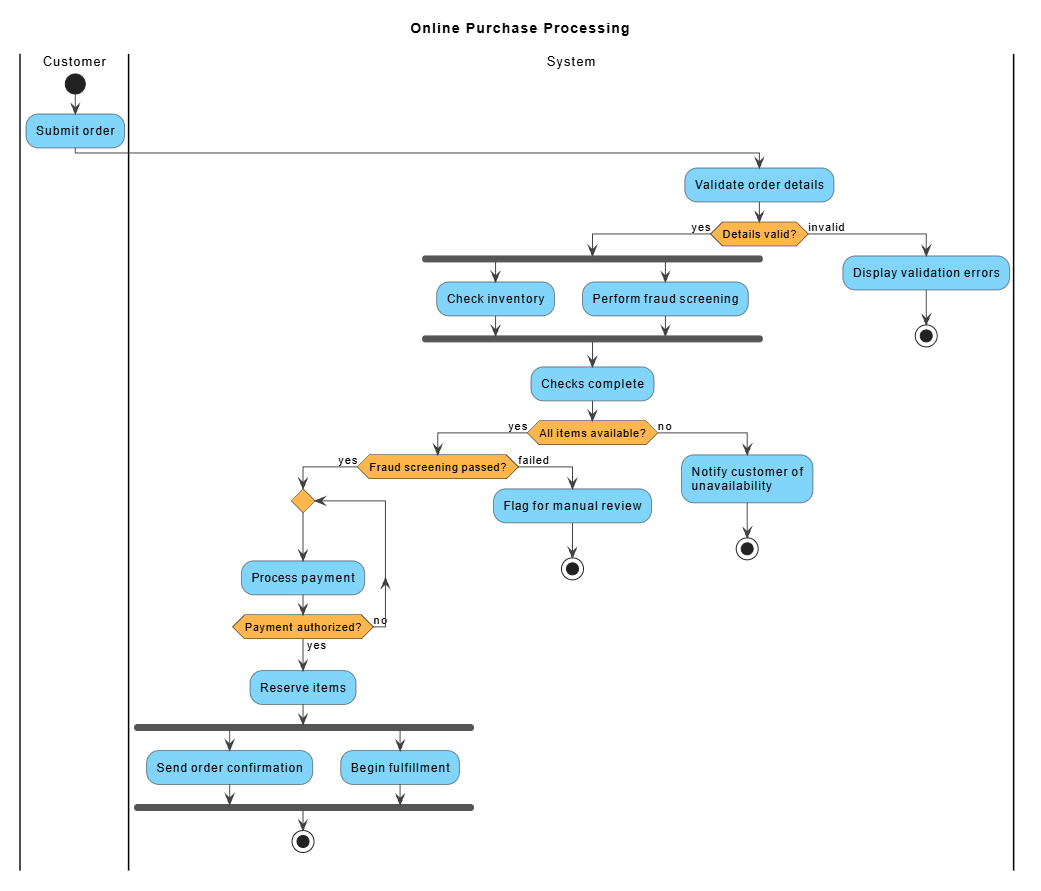
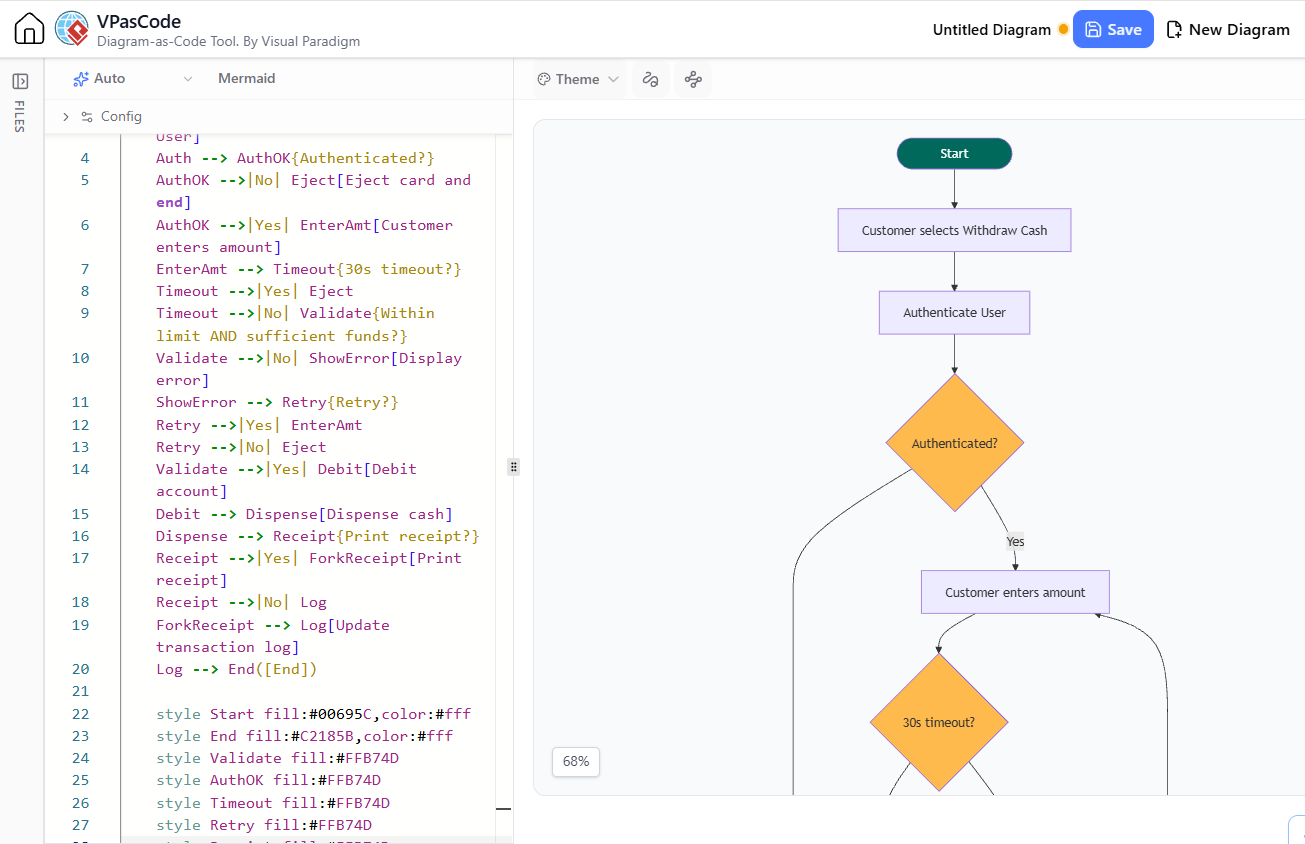
Example B: Secure ATM Withdrawal (Mermaid)
Mermaid flowchart syntax is excellent for simpler, readable Activity Diagrams and integrates well with Markdown-based documentation.
flowchart TD
    Start([Start]) --> SelectWithdraw[Customer selects Withdraw Cash]
    SelectWithdraw --> Auth[Authenticate User]
    Auth --> AuthOK{Authenticated?}
    AuthOK -->|No| Eject[Eject card and end]
    AuthOK -->|Yes| EnterAmt[Customer enters amount]
    EnterAmt --> Timeout{30s timeout?}
    Timeout -->|Yes| Eject
    Timeout -->|No| Validate{Within limit AND sufficient funds?}
    Validate -->|No| ShowError[Display error]
    ShowError --> Retry{Retry?}
    Retry -->|Yes| EnterAmt
    Retry -->|No| Eject
    Validate -->|Yes| Debit[Debit account]
    Debit --> Dispense[Dispense cash]
    Dispense --> Receipt{Print receipt?}
    Receipt -->|Yes| ForkReceipt[Print receipt]
    Receipt -->|No| Log
    ForkReceipt --> Log[Update transaction log]
    Log --> End([End])

    style Start fill:#00695C,color:#fff
    style End fill:#C2185B,color:#fff
    style Validate fill:#FFB74D
    style AuthOK fill:#FFB74D
    style Timeout fill:#FFB74D
    style Retry fill:#FFB74D
    style Receipt fill:#FFB74D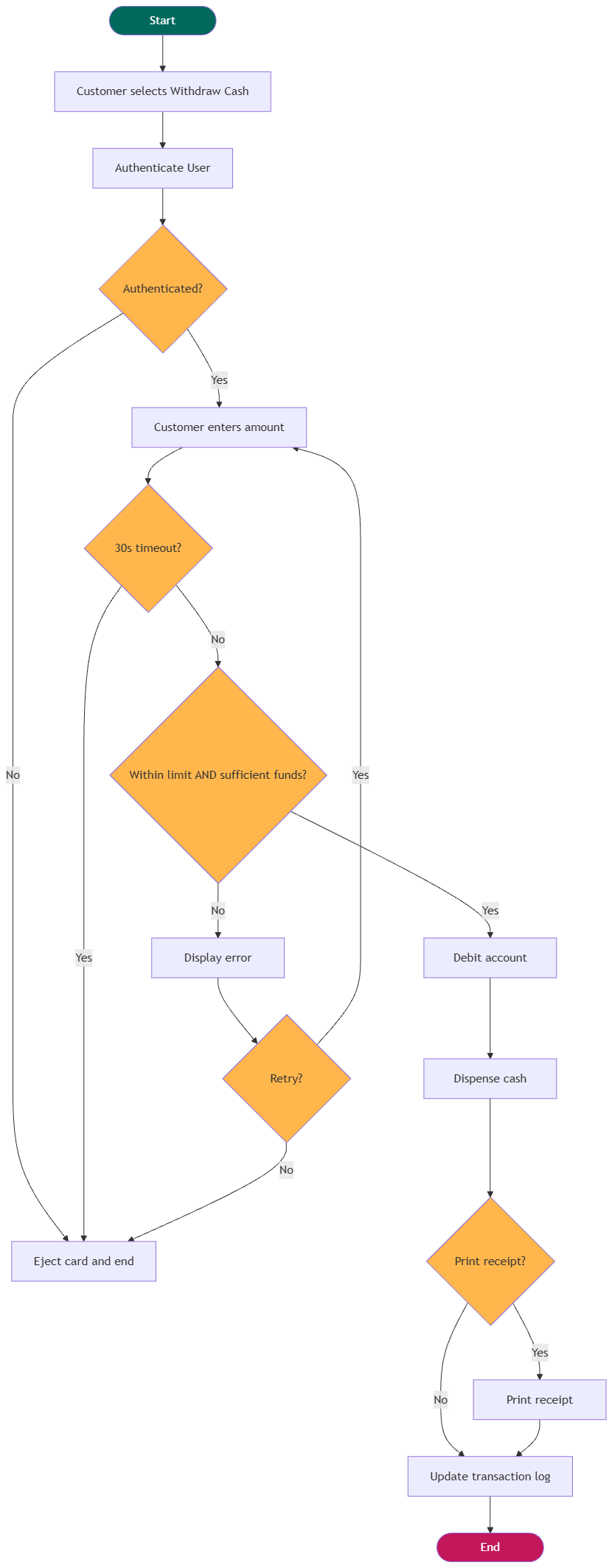
Key elements demonstrated: Swimlanes (PlantUML |Customer|, |System|), fork/join for parallelism, repeat-while loops with guards, decision diamonds with labeled branches, and explicit exception paths ending in stop.
5. Standout AI Features and Differentiators
| Feature | What It Does | Why It Matters |
|---|---|---|
| Use Case → Activity Diagram | Generates diagram directly from use case specification, including alternative and exception flows | Eliminates the manual translation gap between textual requirements and visual logic |
| Native, Editable Output | AI produces a real Visual Paradigm model file, not an image | You can immediately edit elements, add relationships, and trace to requirements |
| VPasCode Native AI | Generate, modify, and auto-fix PlantUML/Mermaid directly in the code editor with live preview and diff | Developer-friendly; supports code review of diagram changes |
| Image-to-Diagram | Upload a whiteboard photo or legacy diagram image; AI analyzes it and generates a structured diagram | Digitizes hand-drawn process sketches into formal models |
| Auto Error Fix | One-click AI repair for syntax errors in diagram code | Reduces frustration and learning curve for diagram-as-code |
| OpenDocs Pipeline | AI generates → VPasCode refines → OpenDocs publishes, all synchronized | Living documentation that never goes stale |
What sets Visual Paradigm apart from generic AI diagram tools: the deep integration between AI ideation, native UML modeling, diagram-as-code version control, and documentation publishing—all within one ecosystem. You are not locked into a single output format or forced to export/import between disconnected tools.
6. Tips and Tricks for Effective AI-Assisted Activity Modeling
Prompt Engineering for Better First Drafts
Use the five-part prompt template from Visual Paradigm’s guidance :
-
Role/Context: “You are documenting a payment processing workflow…”
-
Diagram type: “Create a UML Activity Diagram…”
-
Participants: “Include Customer, Payment Gateway, Inventory Service…”
-
Flow and decisions: “Main flow: [steps]. Decision: if payment fails, allow retry up to 3 times…”
-
Constraints: “Keep within order-submission-to-fulfillment scope. Show exception paths.”
Refinement Strategies
-
Add guards explicitly: AI often omits guard conditions on decision branches. Command: “Add guard
[stock > 0]on the ‘Reserve items’ branch.” -
Use interruptible regions for timeouts: Tell the AI to “Wrap the ‘Enter amount’ step in an interruptible region triggered by a 30-second timer.”
-
Extract sub-activities: For repeated logic (e.g., “Authenticate User”), ask the AI to replace it with a Call Behavior Action referencing a separate diagram.
-
Validate before polishing: Generate rough, validate logic with stakeholders, then refine layout and styling.
Diagram-as-Code Best Practices
-
Store
.pumlor.mmdsource files in Git alongside application code. -
Use meaningful filenames:
order-processing-activity.puml, notdiagram-v2-final.puml. -
Review AI-generated diagram code in pull requests just like application code.
-
Use
skinparamsparingly—prioritize readability over decoration.
Common Pitfalls to Avoid
-
AI invents steps: Always review for scope creep. Tell the AI: “Do not add steps outside the provided description.”
-
Missing exception paths: Explicitly list failure modes in your prompt; AI will model them only if told.
-
Overcrowded diagrams: Split complex flows into sub-activities rather than cramming everything into one diagram. Ask AI: “Simplify this diagram for executive review—keep only major decisions and outcomes.”
-
Trusting syntax over semantics: A diagram can render perfectly but be architecturally wrong. Validate logic with domain experts, not just the renderer.
7. Quick Reference: Activity Diagram Element Checklist
Before publishing any AI-generated or manually refined Activity Diagram, verify :
-
Initial node clearly marks where the flow starts
-
Activity final node(s) mark every possible end state
-
Swimlanes correctly assign responsibility (actor/system/external service)
-
Decision nodes have guards on every outgoing branch (including the “else” path)
-
Merge nodes rejoin split flows (never leave a decision branch dangling)
-
Fork/Join pairs are balanced—every fork has a corresponding join if flows reconverge
-
Exception paths are modeled, not just mentioned in comments
-
Labels are verbs or verb phrases (“Validate order,” not “Order validation”)
-
Loops have clear exit conditions (guard or timeout)
-
The diagram answers one clear question—if it needs a paragraph to explain, split it
Final recommendation: Start with Visual Paradigm Desktop’s AI Diagram Generation for stakeholder-facing Activity Diagrams. When the logic stabilizes and you need version-controlled, developer-accessible documentation, export the PlantUML to VPasCode and commit it to your repository. Use the OpenDocs Pipeline to keep architecture documentation synchronized as the system evolves. This three-tier approach—AI for ideation, native modeling for validation, diagram-as-code for longevity—leverages Visual Paradigm’s unique strength across the full system development lifecycle.
Conclusion
The Three-Tier Advantage: AI for Ideation, Modeling for Validation, Code for Longevity
AI-assisted diagramming is often oversold as a magic wand. The honest value proposition is narrower—and more useful. Visual Paradigm’s AI does not replace process thinking; it removes the mechanical friction that stops teams from doing process thinking at all. A rough first draft in seconds beats a perfect diagram that never gets drawn.
The workflow this guide recommends is deliberately three-tiered. Use AI for ideation: generate a first-pass Activity Diagram from a process description or use case spec, then treat it as a conversation starter, not a deliverable. Use native modeling for validation: refine the diagram in Visual Paradigm Desktop with stakeholders, adding guard conditions, exception paths, and swimlane assignments until the logic holds up under scrutiny. Use diagram-as-code for longevity: export to PlantUML or Mermaid, commit the source to version control alongside application code, and let the OpenDocs Pipeline keep documentation synchronized as the system evolves.
This approach plays to each format’s strengths. Visual diagrams communicate; code-based diagrams persist and diff cleanly in pull requests; living documentation stays current without manual export. No single tool does all three well—Visual Paradigm’s differentiator is that all three live in one ecosystem, so you are never forced to re-draw the same logic in a disconnected tool.
A few principles bear repeating as you adopt this workflow. Validate semantics, not just syntax—a diagram that renders beautifully can still be architecturally wrong. Model exceptions explicitly; AI will include failure paths only if you ask. Split before you cram—if a diagram needs a paragraph to explain, it needs to become two diagrams. And keep humans in the loop: the AI drafts, the team decides.
Activity Diagrams have endured for decades because process clarity never goes out of style. What has changed is the cost of achieving it. With AI handling the first draft and diagram-as-code handling the long tail of maintenance, the barrier to rigorous, visible, always-current process documentation has never been lower. Start with a single workflow—an order process, an approval chain, an authentication flow—and let the three-tier workflow prove itself before scaling across your modeling practice.
Both sections are written to slot directly around the existing article. The introduction sets up the problem (the prose-to-logic translation gap), previews the guide’s structure, and names the audience. The conclusion reinforces the three-tier workflow, distills the key principles, and ends with a concrete, low-risk call to action.