
Introduction
Use case diagrams occupy a peculiar position in software development: they are simultaneously one of the most accessible UML artifacts for stakeholders and one of the most frequently misunderstood by practitioners. A well-constructed use case model clarifies system scope, identifies actors, and establishes the behavioral contract between users and the system under development. A poorly constructed one produces ambiguous bubbles, misapplied relationships, and documentation that no one references after the kickoff meeting. Visual Paradigm addresses both ends of this spectrum—providing the rigor that experienced modelers demand while leveraging AI to lower the barrier for teams approaching use case modeling for the first time.
The tooling landscape for requirements modeling has shifted dramatically in recent years. Where teams once chose between heavyweight modeling suites and lightweight diagramming tools, Visual Paradigm now offers a third path: AI-assisted conversational modeling that generates syntactically correct UML from natural language descriptions, while preserving the traceability and lifecycle integration that distinguish professional modeling environments from drawing canvases. The addition of PlantUML and Mermaid support further acknowledges that modern teams work across visual and text-based workflows, often within version-controlled repositories.
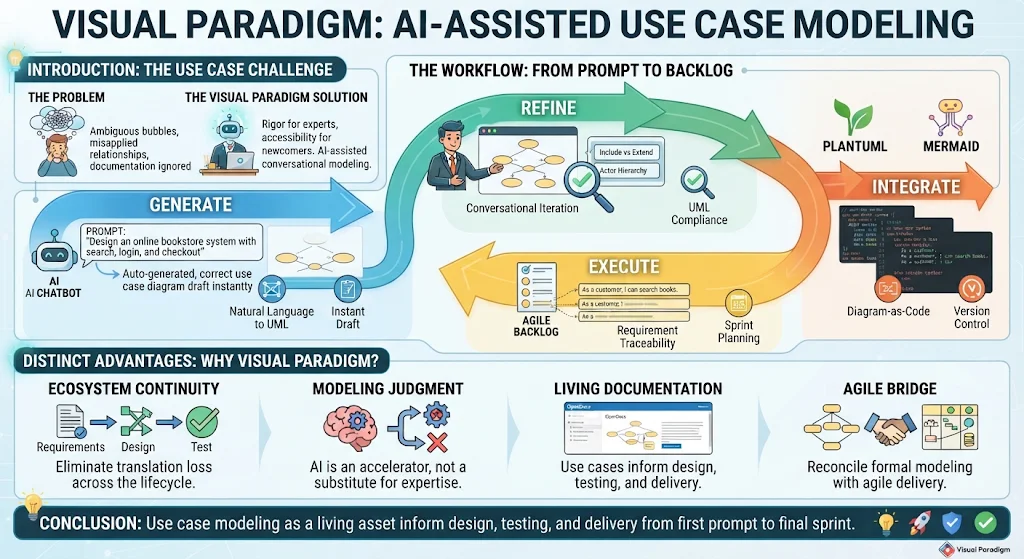
This guide examines Visual Paradigm’s use case diagram capabilities through a practical lens. It explores why the tool merits consideration, who benefits most from its features, and what distinguishes it from alternatives. It provides worked examples using both PlantUML and Mermaid syntax, walks through a complete system development workflow from initial AI prompt to agile backlog transition, and offers actionable tips for teams adopting the tool. Whether you are a business analyst producing formal requirements specifications, an agile team seeking to bridge modeling and sprint planning, or a developer who prefers diagram-as-code workflows, the sections that follow provide both strategic context and hands-on guidance.
1. Why Visual Paradigm for Use Case Modeling?
Use case diagrams bridge the gap between stakeholder expectations and technical implementation by capturing what a system must do, who interacts with it, and where the system boundary lies . Visual Paradigm elevates this practice beyond simple drawing tools in several critical ways.
Beyond a drawing tool. Unlike basic diagramming software, Visual Paradigm supports the complete use-case-driven development lifecycle: requirement capture, scenario editing, wireframe modeling, test definition, and documentation generation . It enforces UML validity rules during editing, preventing common modeling errors before they propagate downstream .
End-to-end traceability. Use cases created in Visual Paradigm remain living model elements—not static images. They can be refined into user tasks, epics, and user stories, then pushed to agile product backlogs for sprint planning . This eliminates the traditional disconnect between requirements documentation and agile execution.
Scenario-driven elaboration. Each use case supports both normal and alternative scenario flows. From these scenarios, Visual Paradigm can automatically generate sequence diagrams and activity diagrams, dramatically reducing the manual effort required to move from use case to detailed design .
2. Who Benefits?
| Role | Key Benefit |
|---|---|
| Business Analysts | Capture requirements visually; generate professional documentation via Doc Composer |
| Product Managers | Refine use cases into agile backlog items; maintain scope clarity across stakeholders |
| Software Architects | Trace use cases to design elements; ensure system boundaries are respected in implementation |
| Developers | Receive precise, testable behavioral specifications rather than ambiguous prose requirements |
| QA Engineers | Define test procedures and expected results directly against scenario steps |
| Agile Teams | Bridge the gap between formal modeling and sprint-based delivery |
The AI-assisted features particularly benefit teams facing the “blank canvas problem”—those who understand their domain but lack deep UML expertise or simply want to accelerate early-stage modeling .
3. Standout Features
AI-Driven Conversational Modeling
The most significant differentiator is Visual Paradigm’s AI Chatbot for visual modeling. Instead of dragging shapes onto a canvas, users begin with natural language descriptions. A prompt such as “Build a use case diagram for an online library system where members can search for books, reserve them, borrow, return, and pay late fees. Include librarian actors who manage inventory and process fines” produces a complete, correctly notated diagram in seconds—actors positioned, use cases sized consistently, and include/extend relationships suggested where appropriate .
Refinement becomes conversational rather than graphical. Commands like “Add the ‘Renew loan’ use case and make it extend ‘Borrow book’ when the member is premium” update the living diagram without manual reconnection or layout adjustment. The AI understands UML 2.5 syntax and preserves layout intent while applying semantic changes .
Diagram-as-Code Support (PlantUML & Mermaid)
Visual Paradigm natively supports PlantUML editing, allowing teams to version-control diagrams as text files tracked in Git . For teams already using Mermaid, the VPasCode editor now supports Mermaid’s usecase-beta syntax (Mermaid 12.0.0+), enabling text-based use case modeling with live preview .
AI-Powered Refinement
After generating a baseline diagram, the “Refine with AI” feature analyzes relationships and suggests improvements. For an online banking system, it might add an «include» relationship between “Transfer Funds” and “View Balance” because a customer logically needs to check their balance before transferring . This catches modeling omissions that even experienced practitioners might overlook.
Integrated Documentation
Doc Composer allows drag-and-drop assembly of model elements, diagrams, tables, and text into professional reports. For teams producing formal requirements specifications, this eliminates the manual effort of exporting diagrams and reformatting them for stakeholders .
4. Example Use Cases with Diagram Code
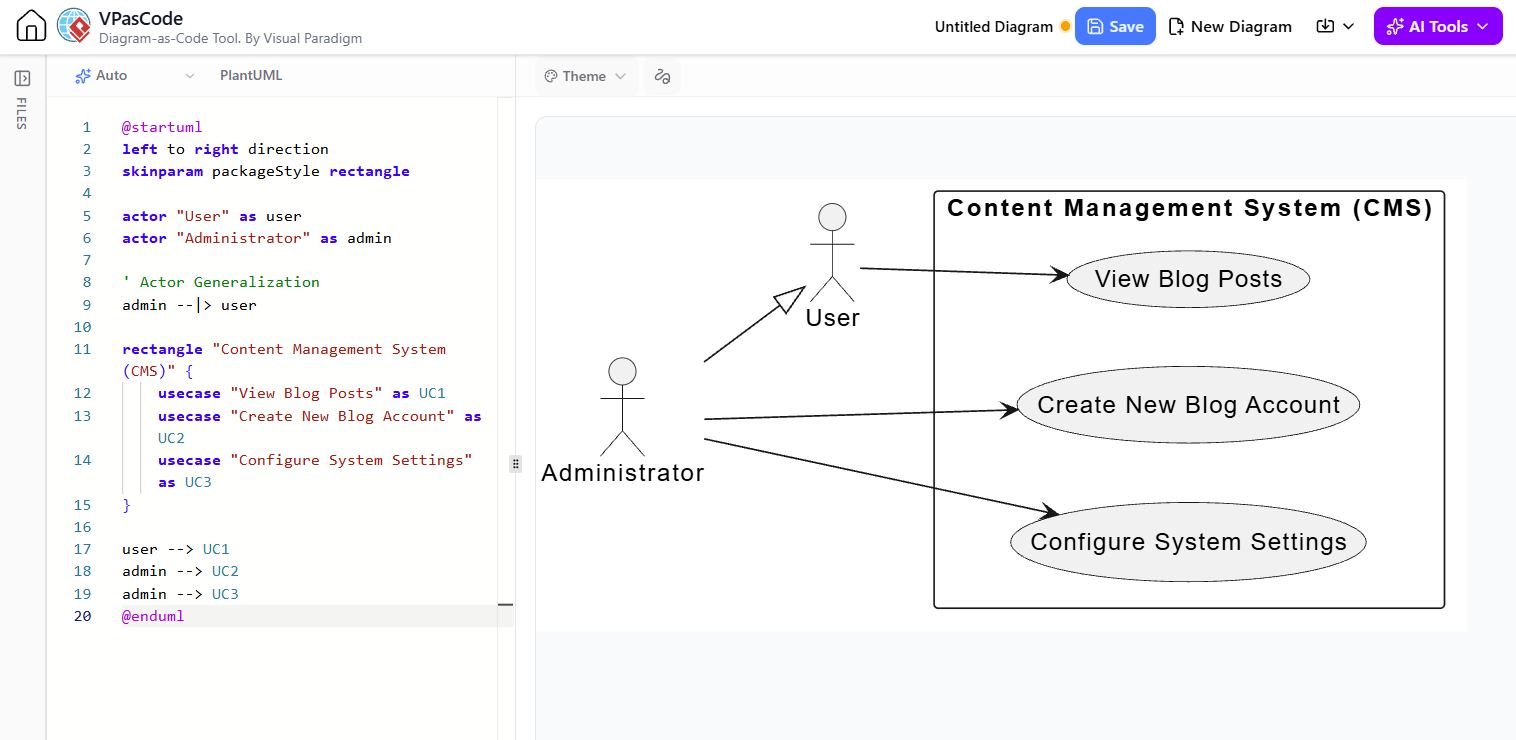
Example A: Core Mechanics with Actor Generalization (PlantUML)
This diagram establishes the system boundary and inheritance hierarchy for a Content Management System, where an Administrator inherits all standard User capabilities while retaining exclusive system-level functions .
@startuml
left to right direction
skinparam packageStyle rectangle

actor "User" as user
actor "Administrator" as admin

' Actor Generalization
admin --|> user

rectangle "Content Management System (CMS)" {
    usecase "View Blog Posts" as UC1
    usecase "Create New Blog Account" as UC2
    usecase "Configure System Settings" as UC3
}

user --> UC1
admin --> UC2
admin --> UC3
@enduml
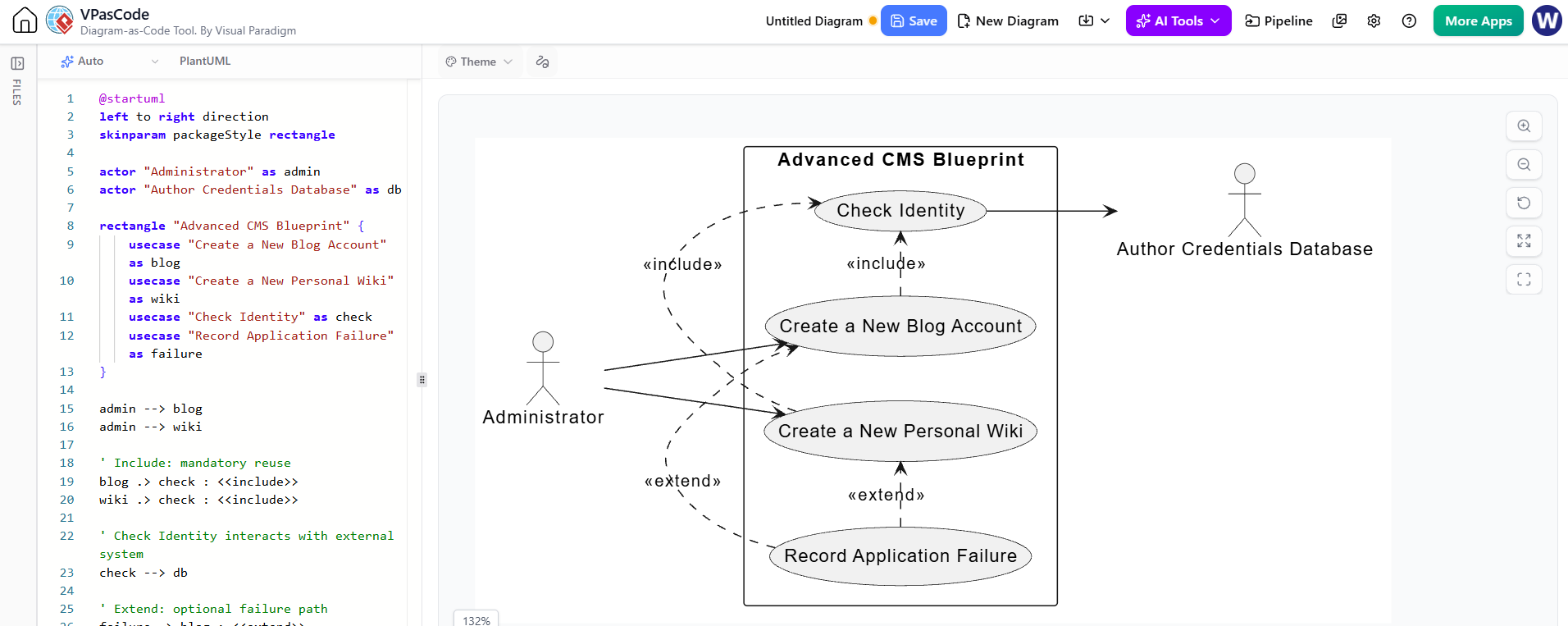
Example B: Include and Extend Relationships (PlantUML)
This model demonstrates mandatory validation («include») and optional failure handling («extend»), with an external system actor .
@startuml
left to right direction
skinparam packageStyle rectangle

actor "Administrator" as admin
actor "Author Credentials Database" as db

rectangle "Advanced CMS Blueprint" {
    usecase "Create a New Blog Account" as blog
    usecase "Create a New Personal Wiki" as wiki
    usecase "Check Identity" as check
    usecase "Record Application Failure" as failure
}

admin --> blog
admin --> wiki

' Include: mandatory reuse
blog .> check : <<include>>
wiki .> check : <<include>>

' Check Identity interacts with external system
check --> db

' Extend: optional failure path
failure .> blog : <<extend>>
failure .> wiki : <<extend>>
@enduml
Example C: ATM System (Mermaid)
Using Mermaid’s usecase-beta syntax, supported by Visual Paradigm’s VPasCode editor :
usecase-beta
direction LR
actor User("User")
actor Technician("Technician")
systemBoundary "ATM System"
  Withdraw("Withdraw Cash")
  Transfer("Transfer Cash")
  Deposit("Deposit Cash")
  SettleBills("Settle Bills")
  Repair("Repair ATM")
end
User --> Withdraw
User --> Transfer
User --> Deposit
User --> SettleBills
Technician --> Repair
Example D: Library System with AI Generation Prompt
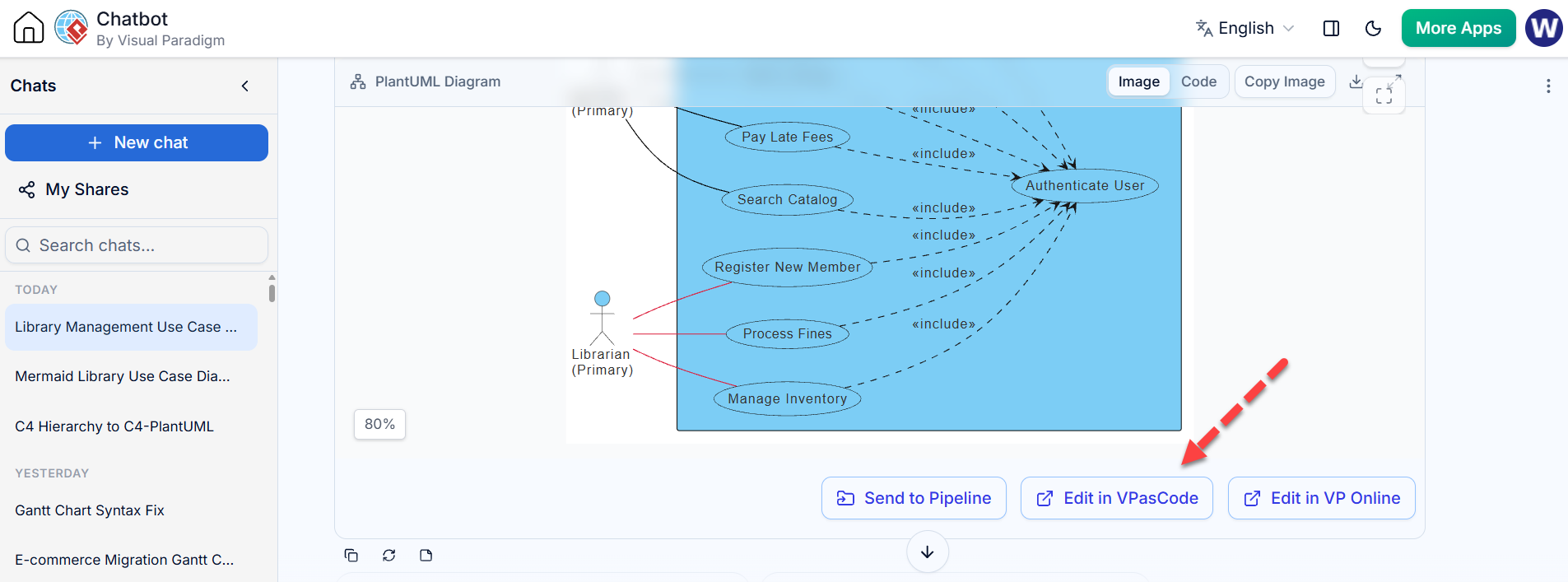
The following prompt would generate a comprehensive library use case diagram via Visual Paradigm’s AI Chatbot :
“Create a use case diagram for a library management system. Members can search the catalog, borrow books, return books, reserve unavailable items, and pay late fees. Librarians manage inventory, register new members, and process fines. The system should include authentication for both members and librarians. Show include relationships for authentication and extend relationships for reservation notifications when items become available.”
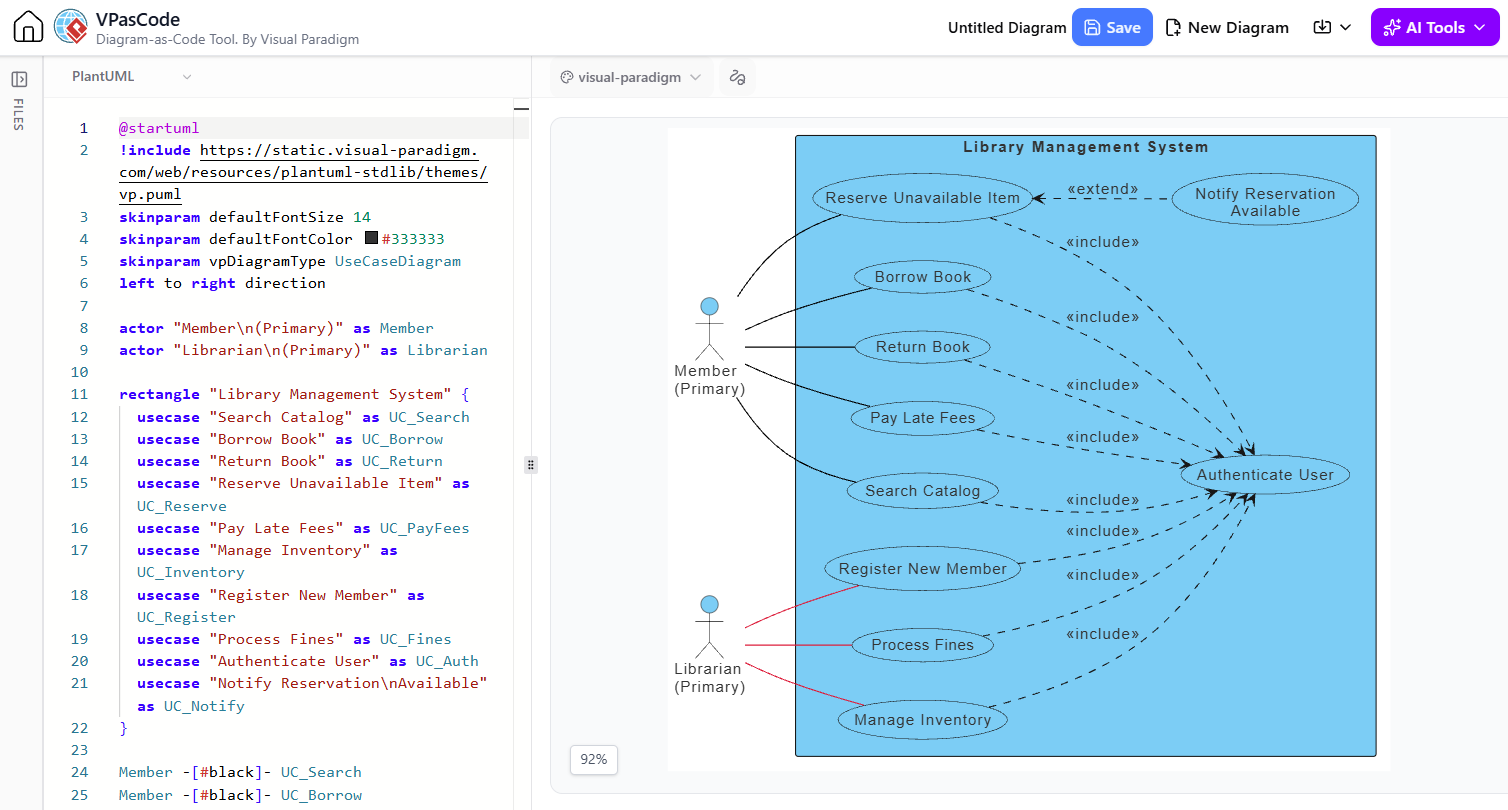
@startuml
!include https://static.visual-paradigm.com/web/resources/plantuml-stdlib/themes/vp.puml
skinparam defaultFontSize 14
skinparam defaultFontColor #333333
skinparam vpDiagramType UseCaseDiagram
left to right direction

actor "Member\n(Primary)" as Member
actor "Librarian\n(Primary)" as Librarian

rectangle "Library Management System" {
  usecase "Search Catalog" as UC_Search
  usecase "Borrow Book" as UC_Borrow
  usecase "Return Book" as UC_Return
  usecase "Reserve Unavailable Item" as UC_Reserve
  usecase "Pay Late Fees" as UC_PayFees
  usecase "Manage Inventory" as UC_Inventory
  usecase "Register New Member" as UC_Register
  usecase "Process Fines" as UC_Fines
  usecase "Authenticate User" as UC_Auth
  usecase "Notify Reservation\nAvailable" as UC_Notify
}

Member -[#black]- UC_Search
Member -[#black]- UC_Borrow
Member -[#black]- UC_Return
Member -[#black]- UC_Reserve
Member -[#black]- UC_PayFees

Librarian -[#crimson]- UC_Inventory
Librarian -[#crimson]- UC_Register
Librarian -[#crimson]- UC_Fines

UC_Search ..> UC_Auth : <<include>>
UC_Borrow ..> UC_Auth : <<include>>
UC_Return ..> UC_Auth : <<include>>
UC_Reserve ..> UC_Auth : <<include>>
UC_PayFees ..> UC_Auth : <<include>>
UC_Inventory ..> UC_Auth : <<include>>
UC_Register ..> UC_Auth : <<include>>
UC_Fines ..> UC_Auth : <<include>>

UC_Reserve <.. UC_Notify : <<extend>>
@enduml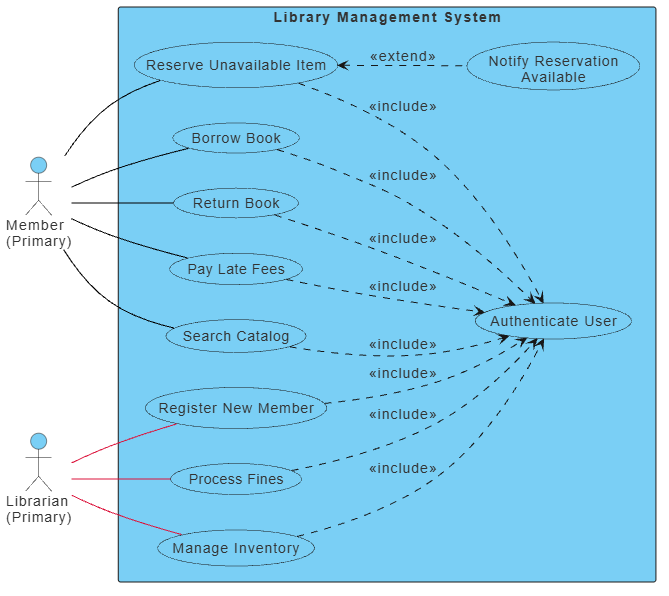
5. Workflow in System Development
Phase 1: Requirements Elicitation with AI
Begin with a natural language description of the system scope. Open the AI Chatbot (accessible via web at chat.visual-paradigm.com or within Visual Paradigm Desktop) and provide a prompt. The AI generates a baseline use case diagram with actors, use cases, system boundary, and suggested relationships .
Tip: Be specific about actor roles and system boundaries in your prompt. The AI produces better results when you explicitly mention external systems (e.g., “payment gateway,” “email service”) as secondary actors.
Phase 2: Conversational Refinement
Iterate on the diagram through chat commands. Common refinements include:
-
“Add an extend relationship from ‘Premium Support’ to ‘Login’ when the user has a premium account”
-
“Move the Admin actor to the right and group the reporting use cases together”
-
“Explain the include relationship you created between ‘Checkout’ and ‘Validate Payment'”
Each command updates the diagram while preserving layout intent and connector routing .
Phase 3: Scenario Elaboration
For each use case, define normal and alternative flows in the specification editor. Visual Paradigm can auto-generate sequence diagrams from these scenarios, providing a bridge to detailed design . At this stage, also define test procedures and expected results per scenario step, enabling test-driven development from requirements .
Phase 4: Diagram-as-Code Integration (Optional)
For teams requiring version control or programmatic diagram management, export or create diagrams using PlantUML syntax. Visual Paradigm’s PlantUML editor allows bidirectional sync: modify the text, and the visual diagram updates instantly . This is particularly valuable when use case models must evolve alongside code in a Git repository.
Phase 5: Agile Transition
Refine use cases into user stories and epics. Use Story Mapping to organize the project structure, then push items to the agile product backlog for sprint planning . The traceability from use case to backlog item ensures that no requirement is lost in the transition to agile execution.
Phase 6: Documentation and Review
Generate a requirements specification using Doc Composer. Drag use case diagrams, scenario tables, and test definitions into a professional report. Share with stakeholders for review, and incorporate feedback back into the living model .
6. Tips and Tricks
For AI prompting:
-
Include the system boundary explicitly in your prompt: “for a [system name] that…”
-
Specify actor types: human, external system, or scheduled job
-
Mention relationship types you expect: “use include for authentication”
-
Iterate one change at a time; compound instructions are less reliable
For PlantUML/Mermaid integration:
-
Use
left to right directionin PlantUML to keep actors on the left and use cases on the right—this becomes essential as diagrams grow -
Define aliases (
as UC1) for use cases to keep relationship lines short and readable -
Track
.pumlfiles in version control alongside source code for true diagram-as-code workflow -
Note that PlantUML does not have native extension point syntax; include extension points in the use case description or a note
For modeling accuracy:
-
Keep use case names verb-noun oriented (“Process Payment” not “Payment Processing”)
-
Place actors outside the system boundary rectangle; this is a common validation error
-
Use
«include»only when the included behavior is mandatory every time the base use case executes; use«extend»for optional or conditional behavior -
Avoid connecting included use cases directly to actors—they are invoked by the base use case, not by external entities
For team collaboration:
-
Use OpenDocs to embed AI-generated diagrams directly into project wikis or documentation, where they remain editable as interactive blocks
-
Leverage NotesKeep to connect meeting notes and imported documents with AI diagram generation—ask the chatbot to draft a use case diagram from a requirements document stored in the project workspace
7. Limitations and Considerations
AI accuracy requires review. While the AI produces syntactically correct UML, semantic accuracy depends on prompt clarity. Always review generated relationships for logical correctness—an «include» that should be an «extend» can invert the intended behavior.
PlantUML extension point support. PlantUML’s native syntax lacks dedicated extension point notation. Visual Paradigm’s desktop editor handles this through use case specifications, but text-based workflows require workarounds (notes or description fields) .
Learning curve for advanced features. While the AI lowers the barrier to entry for basic modeling, full utilization of traceability, Doc Composer, and agile integration requires investment in understanding Visual Paradigm’s broader ecosystem. Teams should plan for onboarding beyond the initial diagram generation.
Visual Paradigm’s combination of AI-assisted generation, rigorous UML compliance, and end-to-end lifecycle support positions it as a uniquely capable platform for use case modeling. The conversational AI interface removes the “drawing chores” barrier that has historically discouraged formal modeling, while the underlying model-aware architecture ensures that the resulting diagrams remain precise, traceable, and useful throughout the development lifecycle—from stakeholder review through agile execution .