
Bridge the Gap: VPasCode & VP AI Ecosystem for Visual Diagrams
In the modern software engineering ecosystem, the boundary between visual modeling and text-based coding is increasingly blurred. This tutorial explores a powerful workflow that leverages the Visual Paradigm Pipeline and VPasCode to transform static desktop diagrams into editable, code-centric artifacts. By understanding this architecture, teams can maintain a “single source of truth” that combines the speed of visual modeling with the version-control friendliness of code.
The Architecture: From Desktop to Code
The workflow described in the context represents a sophisticated handoff mechanism. It is not merely a file transfer; it is a format conversion process that bridges the gap between proprietary binary formats and open-source markup languages.
The Three-Step Handoff Workflow
- Create (Visual Paradigm Desktop): The process begins with the architect or developer designing the diagram using the rich, visual interface of Visual Paradigm Desktop. This environment excels at rapid prototyping and complex structural modeling.
- Send (The Pipeline): The diagram is exported to the Visual Paradigm Pipeline. The Pipeline acts as the central “handoff point” or artifact repository. It stores the diagram metadata and the visual representation, making it accessible across the ecosystem.
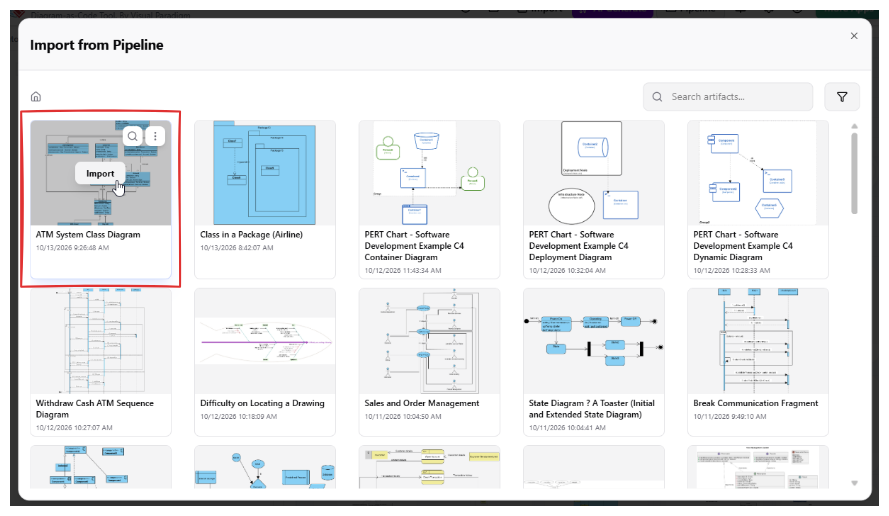
- Retrieve & Edit (VPasCode): The user logs into VPasCode, navigates to the Pipeline window, and locates the specific artifact. By clicking Import, the system retrieves the diagram and converts it into a text-based format (such as PlantUML, Mermaid, or Graphviz).
Understanding the Diagram-as-Code Conversion
When you import a diagram from the Pipeline into VPasCode, you are not opening a PNG or a JPEG. You are loading the underlying logic of the diagram into an editor. Depending on the diagram type and the supported conversion engine, the visual elements are translated into specific syntax.
The system supports several industry-standard syntaxes:
- PlantUML: Ideal for UML diagrams (Class, Sequence, State) and architecture diagrams.
- Mermaid: Excellent for flowcharts, sequence diagrams, and Gantt charts, widely used in documentation repositories.
- Graphviz: Often used for complex dependency graphs and network visualizations.
This conversion allows teams to edit diagrams using “diagram-as-code” methodologies. Instead of dragging and dropping boxes, developers can modify the logic by editing text, which is often faster for large-scale changes and easier to track in Git.
Step-by-Step: Importing from the Pipeline
To execute this workflow, follow these specific steps:
- Open VPasCode: Launch your VPasCode environment.
- Access the Pipeline: Click the Pipeline button located at the top of the page to open the artifact management window.
- Locate the Artifact: Browse the grid of available diagrams. Look for the artifact you previously sent from Visual Paradigm Desktop.
- Import: Hover your mouse over the specific diagram card (e.g., “ATM System Class Diagram”). You will see an Import button appear on the artifact preview.
- Load and Edit: Click Import. The code loads into the VPasCode editor. You can now edit the text directly.
Integrating with OpenDocs
The ecosystem extends beyond just VPasCode. The Pipeline also serves as a bridge to OpenDocs. While this tutorial focuses on the new diagram-as-code editing workflow, it is important to note that you can also retrieve artifacts from the Pipeline and use them to support documentation needs in OpenDocs. This creates a seamless lifecycle where a diagram can be modeled visually, edited as code, and published to documentation without ever leaving the Visual Paradigm ecosystem.
Limitations and Best Practices
While powerful, this workflow requires an understanding of the limitations inherent in converting between visual models and text representations.
Conversion Constraints
- Not All Diagrams Are Supported: Support for sending diagrams to the Pipeline is being improved over time. Not every diagram type may be exportable yet.
- Conversion Availability: Not every diagram supports diagram-as-code conversion. The availability depends on the specific diagram type.
- Representation Differences: Visual models and text-based code are different representations. A visual model has capabilities (like free-form layout) that text code might not replicate perfectly.
Verification Step
Because of these structural differences, the converted code and the original diagram may not match in every detail. Visual Paradigm aims to retain as much content as possible, but users should always review the imported code and its rendered diagram before relying on it as an exact reproduction of the original model.
Code Example: Expected Output
When you successfully import a diagram, you might see syntax similar to the following in the VPasCode editor:
@startuml
' This is an example of a diagram retrieved from the Pipeline

class ATM_System {
  +withdrawCash()
  +depositCash()
}

class User {
  +insertCard()
}

User --> ATM_System : interacts with
@enduml
By utilizing this workflow, you extend the usefulness of a desktop diagram beyond its original modeling environment, enabling a flexible, code-centric approach to system design.