
Mastering Parallel and Grouped Interactions in UML Sequence Diagrams with VPasCode
Designing complex software architectures requires precise modeling to ensure all system components communicate effectively. In the world of UML (Unified Modeling Language), sequence diagrams are the gold standard for visualizing how objects interact over time. However, standard linear sequences do not always represent reality, especially when dealing with modern microservices where operations often happen concurrently or conditionally. This tutorial explores how to leverage the par (parallel) and else (conditional) blocks in PlantUML, as demonstrated in the Visual Paradigm (VPasCode) editor, to create robust and accurate system models.
Understanding the Architecture: The Order Processing Flow
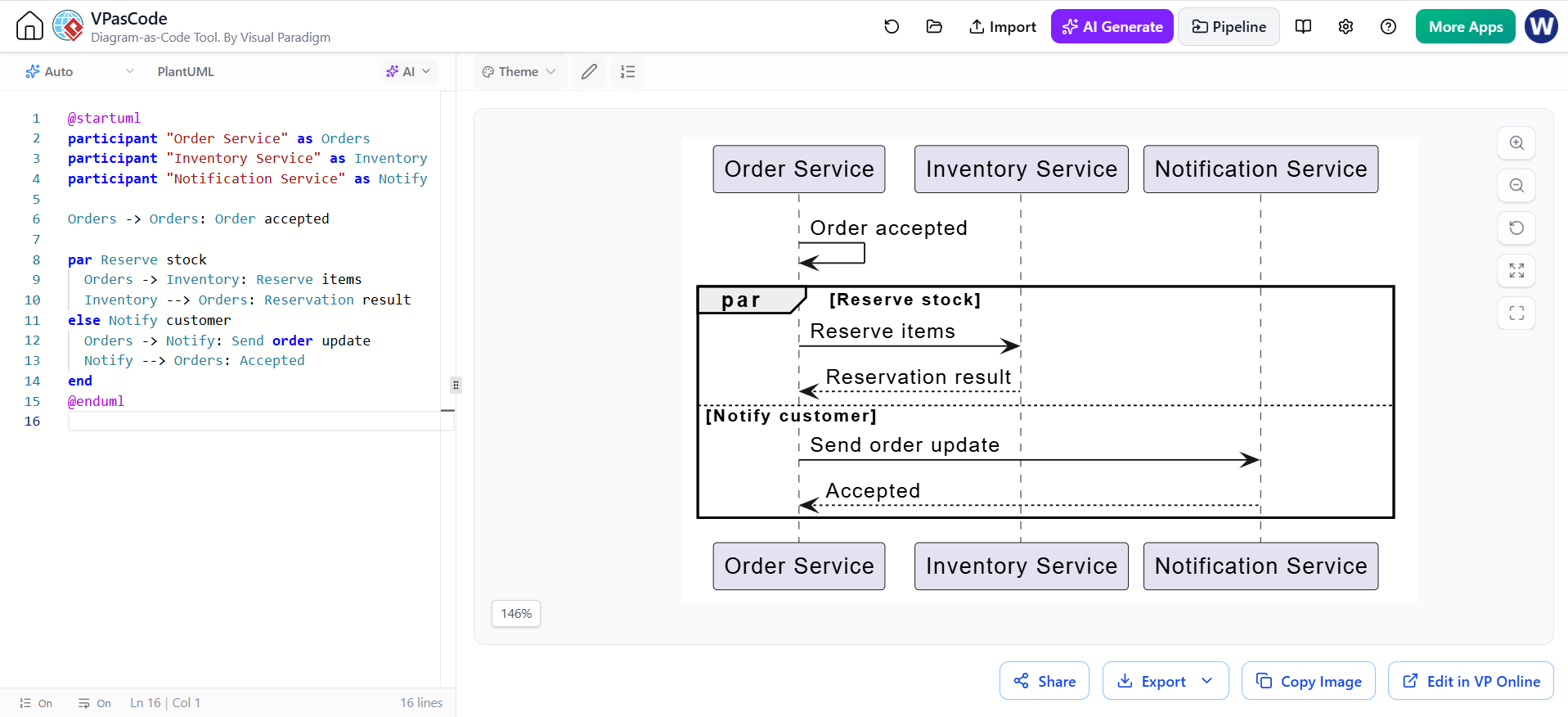
Let’s analyze the system architecture presented in the screenshot. We are looking at a distributed system with three distinct service actors:
- Order Service: The central orchestrator that handles customer requests.
- Inventory Service: Responsible for checking stock and reserving items.
- Notification Service: Handles communication with customers regarding order status.
In many legacy systems, these steps might be forced into a strict linear sequence. However, in a high-performance environment, the Order Service might attempt to reserve stock and send notifications, or decide based on the result of the reservation. The diagram in the editor illustrates a specific logic: reserving stock is the primary path, while notifying the customer is an alternative or subsequent step depending on the context.
Step-by-Step: Writing the Code in VPasCode
To achieve the diagram shown on the right side of your screen, we use PlantUML syntax within the VPasCode editor. The editor parses the text on the left and renders the visual representation on the right in real-time.
1. Defining Participants
First, we establish the actors in our system. We use the participant keyword to create lifelines. In the code below, we assign aliases (like Orders) to make the subsequent message references concise.
participant "Order Service" as Orders
participant "Inventory Service" as Inventory
participant "Notification Service" as Notify
2. The Initial Trigger
Before entering complex logic, we establish the context. The Order Service accepts an order. Note that the arrow -> points from the source to the target.
Orders -> Orders: Order accepted3. Implementing Parallel and Grouped Interactions
This is the core concept of the tutorial. We need to group a set of interactions. The diagram uses a par block, which implies that the interactions inside occur concurrently or that the order is not strictly significant, but logically grouped.
par Reserve stock
  Orders -> Inventory: Reserve items
  Inventory --> Orders: Reservation result
else Notify customer
  Orders -> Notify: Send order update
  Notify --> Orders: Accepted
end
Breaking down the logic:
par Reserve stock: Starts a parallel block labeled “Reserve stock”.Orders-> Inventory…: The actual messages inside the block.else Notify customer: Defines an alternative path or a grouped interaction that happens if the parallel condition isn’t met, or simply acts as a grouped alternative in this specific model.end: Closes the block.
Interpreting the Visual Output
When the AI-assisted VPasCode editor renders this code, it produces the frame seen on the right. The thick border box with the label par indicates the scope of the parallel or grouped interaction.
- The Dotted Line: Notice the dotted horizontal line inside the box. This is a visual cue separating the
parblock (Reserve stock) from theelseblock (Notify customer). It visually represents the branching logic. - Grouped Logic: The
parkeyword here serves to label a set of messages without implying a strict control-flow structure like a loop. It groups the “Reserve stock” logic together. - Conditional Flow: The
elseblock shows that if the “Reserve stock” condition is not the primary path (or as an alternative), the system proceeds to “Notify customer”.
Best Practices: When to Use par vs. Sequence
It is crucial to use these blocks correctly to avoid ambiguity in your system design. The context text provided in the editor highlights a vital rule:
Use par only when concurrency is meaningful. If one action must finish before another begins, show the messages in sequence instead.
If your system requires the Inventory Service to confirm the reservation before the Notification Service sends a message, do not use the par block. Instead, simply place the messages one after another in the code:
Orders -> Inventory: Reserve items
Inventory --> Orders: Reservation result
Orders -> Notify: Send order update
Notify --> Orders: Accepted
Using par implies that the system could theoretically handle these in parallel (e.g., reserving stock while simultaneously sending a “Order Received” notification), or that the order of execution is flexible.
Conclusion
By mastering the syntax of par, else, and end, you can transform a simple list of messages into a sophisticated architectural diagram. The VPasCode editor simplifies this process by allowing you to type code and instantly see the result, making it an excellent tool for validating your system’s logic before implementation.