
Mastering AI-Generated Flowcharts: A Technical Guide to Contextual Prompting with VPasCode
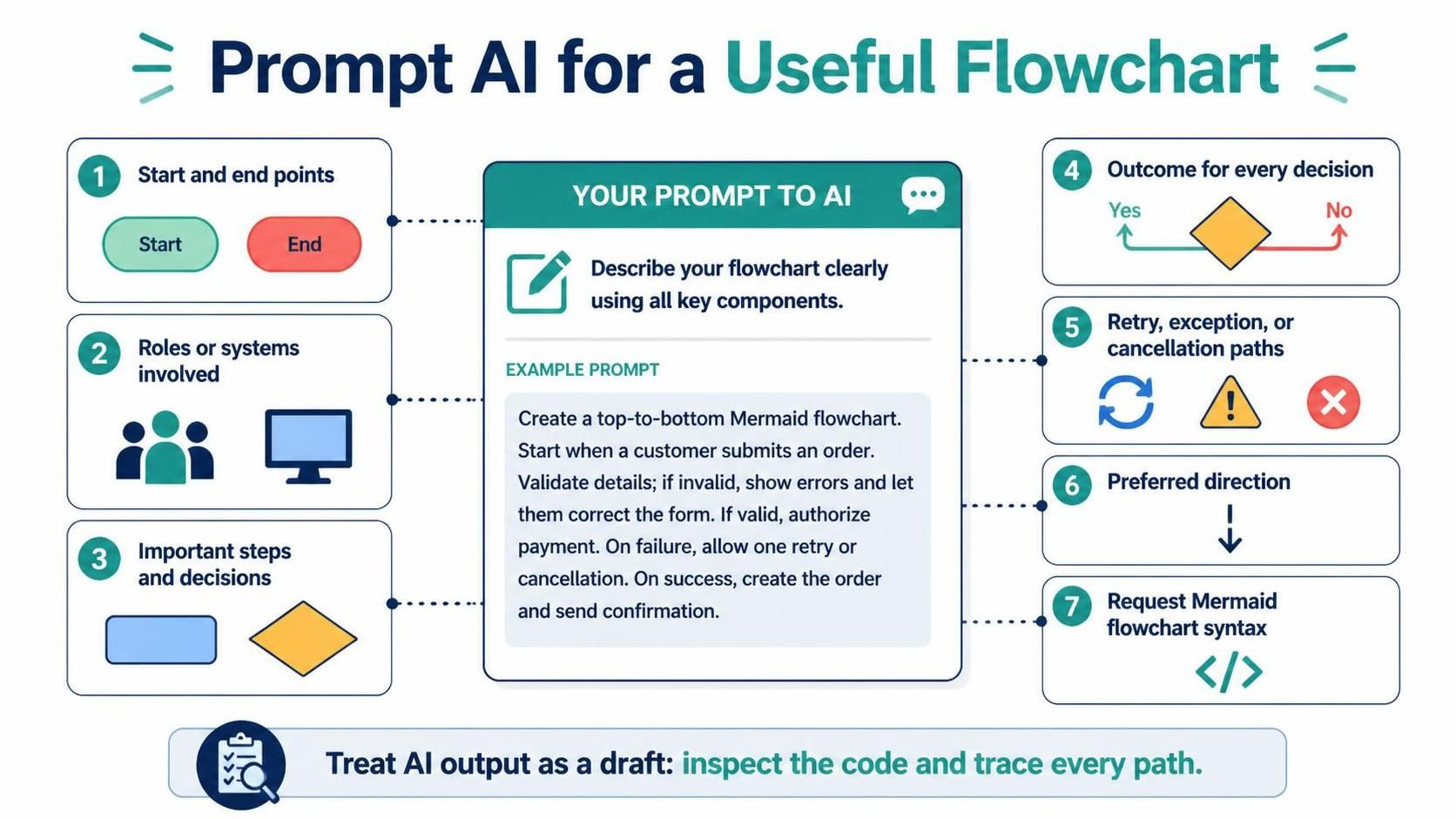
In the modern era of software development, the ability to communicate complex logic visually is paramount. However, relying on Generative AI to produce accurate technical diagrams is not as simple as asking for a chart. It requires a shift from passive observation to active architectural direction. This tutorial explores the critical components of crafting a “Contextual Flowchart Prompt,” ensuring that the output from tools like the Visual Paradigm VPasCode Editor aligns perfectly with your system’s requirements.
The Architecture of a Prompt
A standard prompt often yields generic results. To generate a high-fidelity flowchart, you must treat the prompt as a specification document. The diagram you receive is only as good as the context you provide. Based on industry best practices, a robust prompt must define the following architectural elements:
- Start and End Points: Explicitly define the entry trigger and the final termination state of the process.
- Roles and Systems: Identify the actors (e.g., Customer, Server) and the specific systems (e.g., Payment Gateway, Database) involved.
- Process Steps and Decisions: Outline the sequential actions and the specific decision nodes that branch the logic.
- Outcomes of Decisions: Clearly map the “Yes/No” (True/False) paths for every decision diamond.
- Exception and Retry Paths: Define what happens when things go wrong, such as retry loops or cancellation procedures.
- Directionality: Specify the layout preference (e.g., Top-to-Bottom) to ensure the visual flow matches the logical flow.
From Generic to Specific: The Prompt Transformation
Consider the difference between a weak, generic request and a strong, context-rich instruction. A weak prompt lacks the necessary constraints for the AI to generate a usable diagram.
Weak Prompt Example
Make an order flowchart.
This prompt is too broad. The AI does not know if this is a physical store, an e-commerce site, or a subscription service. It does not know how payments are handled or what happens if the inventory is low.
Strong Contextual Prompt Example
To utilize the Visual Paradigm VPasCode Editor effectively, you must provide the following structure:
Create a top-to-bottom Mermaid flowchart for an online order checkout.
Start when the customer reviews the cart.
Collect shipping and payment details, validate them, and show errors if invalid.
If valid, authorize payment.
If payment fails, let the customer retry with another method or cancel.
If payment succeeds, create the order and send a confirmation.
Include explicit Yes/No labels on every decision branch.
This prompt is superior because it includes the start point (“reviews cart”), the specific validation logic (“show errors if invalid”), the branching paths (“retry” vs. “cancel”), and the desired output format (“Mermaid flowchart”).
Step-by-Step Implementation in VPasCode
When working within the Visual Paradigm environment, the VPasCode Editor allows you to describe your system architecture in natural language and convert it into code. Follow these steps to ensure accuracy:
- Define the Scope: Before typing the prompt, identify the boundary of your diagram. What is the specific process you are modeling? Is it the “Order Placement” or the “Customer Login”?
- Structure the Logic: Break down the process into sequential steps. Ensure you account for the “Happy Path” (everything goes right) and the “Unhappy Path” (errors occur).
- Inject Syntax Requirements: Explicitly request the syntax (e.g., Mermaid) so the editor knows how to render the diagram.
- Review the Draft: Treat the generated output as a draft. As noted in the context, you must compare every branch against the real requirements. Look for invented steps or missing exception paths.
By rigorously inspecting the generated code, you can trace every path to ensure that no logic loop is infinite and that every error condition has a defined exit.
Conclusion
Effective diagramming with AI is an exercise in precision. By treating your prompt as a technical specification that includes start/end points, decision outcomes, and exception handling, you empower tools like VPasCode to generate diagrams that are not just visually appealing, but logically sound and ready for implementation.