
Mastering AI Modeling: The VP AI Ecosystem & OpenDocs Workflow
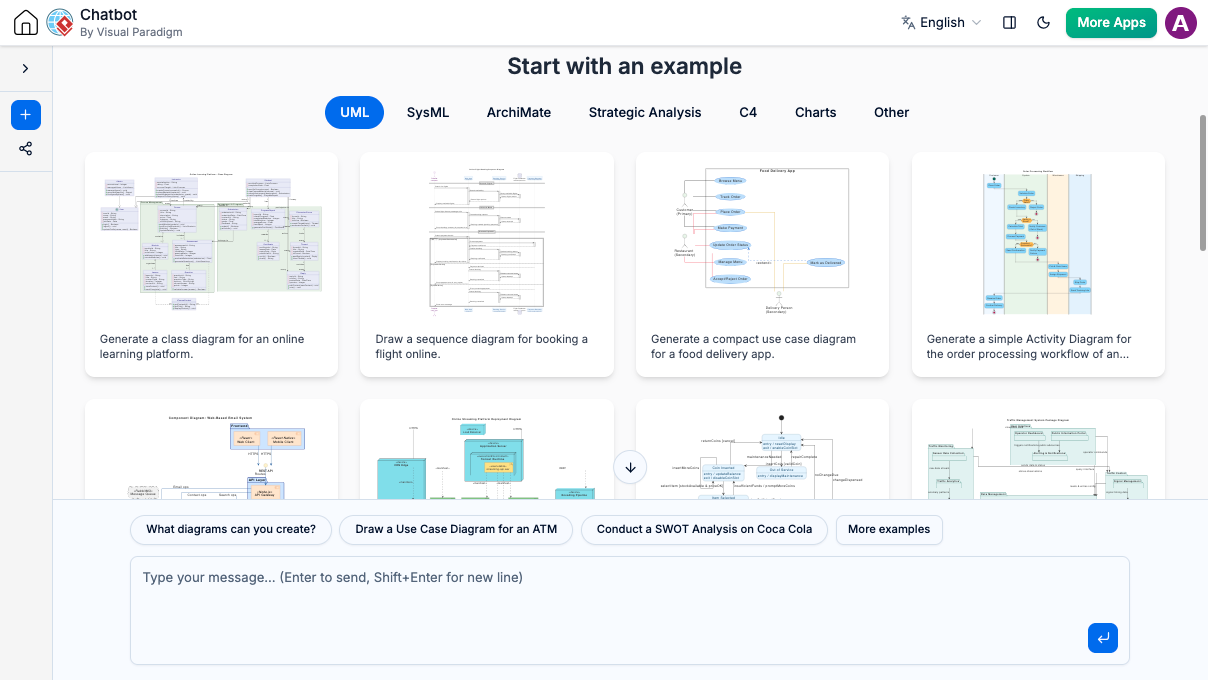
In the modern landscape of software engineering and systems analysis, the barrier between human intent and visual representation is rapidly dissolving. The Visual Paradigm Unified Platform exemplifies this shift by integrating a powerful AI Diagramming Chatbot directly into the browser. This tutorial explores how to leverage these tools to generate complex system diagrams, manage documentation, and utilize a seamless hybrid workflow between web-based creation and desktop refinement.
The Architecture of AI-Assisted Modeling
The core innovation presented in the interface is the Unified Platform. Unlike traditional modeling tools that require manual dragging and dropping of shapes, this system utilizes Natural Language Processing (NLP) to translate plain text instructions into formal diagrammatic languages. This approach democratizes complex modeling, allowing engineers to focus on the logic of the system rather than the mechanics of drawing it.
The Hybrid Cloud-Desktop Workflow
A critical component of this architecture is the “hybrid” nature of the workflow. The platform is not a siloed web application; it is a gateway to the broader Visual Paradigm ecosystem.
- Web-Based Generation: The AI Chatbot operates entirely in the browser. This allows for rapid prototyping and immediate visualization of ideas without the overhead of installing heavy software suites.
- Desktop Refinement: Once a diagram is generated, it can be imported into the Visual Paradigm Desktop application. This ensures that users have access to advanced features—such as code generation, extensive libraries, and deep system analysis—once the initial model is established.
Navigating the AI Chatbot Interface
The interface shown is designed for prompt-based interaction. It acts as a specialized interpreter for various modeling standards. By selecting a specific domain, you can ensure the AI generates diagrams that adhere to the correct notation rules.
Supported Modeling Standards
The platform supports a wide array of industry-standard languages. Understanding the distinction between these is vital for generating accurate models:
- UML (Unified Modeling Language): The standard for object-oriented software design. The AI can generate Class Diagrams (structure), Sequence Diagrams (interaction), and Use Case Diagrams (functionality).
- SysML (Systems Modeling Language): Used for multidisciplinary systems engineering. The AI can handle requirements, block definitions, and internal block diagrams.
- ArchiMate: A modeling language for enterprise architecture, focusing on business and IT alignment.
- Strategic Analysis & C4: Tools for high-level system context and component mapping, useful for architectural communication.
From Static Diagrams to Live Documentation
One of the most significant challenges in systems analysis is keeping documentation synchronized with the model. The OpenDocs feature addresses this by bridging the gap between static diagrams and dynamic web content.
How OpenDocs Works
OpenDocs transforms your diagrams into “living web pages.” This is particularly useful for collaborative environments where stakeholders need to review specifications without needing the modeling tool installed.
graph TD
    A[Model Created in VP] --> B{Deployment Mode}
    B -->|VP Online| C[Web Browser]
    B -->|VP Desktop| D[Import to Desktop]
    C --> E[OpenDocs Engine]
    D --> E
    E --> F[Rendered Web Page]
    F --> G[Team Collaboration & Review]
This architecture ensures that the source of truth remains the diagram model itself, while the presentation layer (the web page) updates automatically as the model changes.
Practical Application: Generating a Class Diagram
Let’s walk through a practical example of how you would generate a complex Class Diagram for an online learning platform, as suggested by the interface examples.
Step 1: Define the Scope
First, you identify the entities involved. For an online learning platform, this typically includes Students, Courses, Instructors, and Assignments.
Step 2: Formulate the Prompt
Using the chatbot, you enter a natural language description. The AI parses keywords to determine the diagram type (UML Class) and the specific entities to create.
Example Prompt:
"Generate a class diagram for an online learning platform. Include Students, Courses, and Instructors. A Student can enroll in multiple Courses, and an Instructor teaches multiple Courses."
Step 3: Review and Refine
The AI generates the diagram. You can then review the relationships (multiplicities) and attributes. If the diagram needs deeper analysis, you import it into the Desktop environment.
Conclusion
The Visual Paradigm Unified Platform represents a paradigm shift in how we approach system modeling. By combining AI-driven generation with a robust hybrid ecosystem, it allows teams to move faster from concept to documentation. Whether you are sketching a quick Sequence Diagram in the browser or building a comprehensive SysML model in the desktop environment, the architecture supports a fluid, collaborative, and efficient workflow.