
Mastering BPMN Cross-Functional Flows: A Step-by-Step Guide to the Order Fulfillment Process
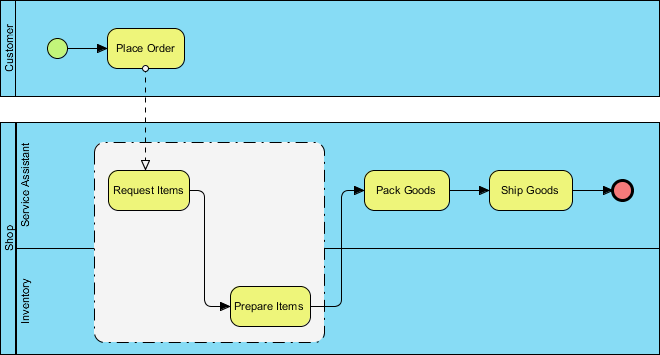
In the world of business process management, clarity is king. When you need to visualize a complex workflow that involves multiple departments or roles, a simple linear diagram is insufficient. You need a structure that separates responsibilities while maintaining a clear view of the data and control flow. This tutorial explores the Order Fulfillment Process modeled in Visual Paradigm using BPMN 2.0 standards. We will dissect the anatomy of a cross-functional swimlane diagram, explain the significance of the Groups element, and analyze the logical flow of an order from placement to shipment.
1. The Anatomy of a Cross-Functional Diagram
A cross-functional flowchart, often referred to as a swimlane diagram, divides the process into horizontal or vertical lanes. Each lane represents a specific actor, role, or organizational unit responsible for the tasks within that lane. This visual separation allows stakeholders to instantly see “who” is doing “what.”
In our Order Fulfillment scenario, we observe four distinct lanes:
- Customer: The initiator of the process.
- Service Assistant: The internal agent handling customer requests.
- Shop: The physical or logical location where goods are stored.
- Inventory: The backend system or department managing stock levels.
The Customer Interaction
The process begins in the Customer lane with a Start Event (represented by a green circle). This signifies the trigger for the workflow. The arrow flows into the Place Order task. This is a crucial interaction point. Notice the dashed line connecting the “Place Order” task in the Customer lane to the “Request Items” task in the Service Assistant lane. In BPMN, this is known as a Message Flow.
A Message Flow indicates the exchange of information between different participants. It signifies that the Customer does not directly perform the internal operations; instead, they send a signal (the order) to the Service Assistant, who then takes over the process.
2. Orchestrating the Fulfillment Workflow
Once the Service Assistant receives the order, the complexity of the process increases. The workflow must coordinate between the Service Assistant, Shop, and Inventory lanes. The logic follows a specific sequence of operations:
- Request Items: The Service Assistant initiates a request. This is the entry point for the internal fulfillment logic.
- Prepare Items: The request triggers the Shop or Inventory team. This task represents the physical or digital preparation of the goods.
- Pack Goods: Once items are prepared, they move to the packing phase.
- Ship Goods: The final operational step before the process concludes.
The solid black arrows connecting these tasks are Sequence Flows. Unlike the dashed message flow, Sequence Flows represent the direct order of execution within the same process instance. The arrow flows from “Request Items” to “Prepare Items,” and subsequently to “Pack Goods” and “Ship Goods.”
3. Understanding the Role of “Groups” in BPMN
One of the most distinct features in the provided diagram is the large, dashed rectangular box surrounding the “Request Items” and “Prepare Items” activities. This element is a Group (or sometimes referred to as a logical grouping in specific tools).
As per the BPMN specification, a Group is a visual aid used to organize diagram elements. It is often accompanied by a label (e.g., “Order Processing Logic”). It is vital to understand the technical implications of this element:
- Visual Organization: It acts as a container that visually clusters related tasks, helping the reader understand that “Request Items” and “Prepare Items” are part of a specific sub-activity or a specific phase of the business logic.
- Zero Impact on Logic: This is the most important technical distinction. A Group does not alter the control flow. The arrows that enter or leave the Group are not blocked by the Group’s boundary. The process flows through the Group, not around it.
- No Execution: Unlike a Sub-Process (which is an executable activity), a Group is purely presentational. It is used for documentation purposes to add context without changing the underlying executable model.
In our diagram, the Group effectively tells the reader: “The activities inside this dashed box are the core fulfillment operations performed by the Shop and Inventory teams.”
4. Conclusion: From Start to Finish
The diagram concludes with a End Event (the red circle with a thick border) in the Service Assistant lane. This indicates the successful completion of the process. The flow demonstrates a seamless handoff from the external world (Customer) to internal operations (Service, Shop, Inventory) and back to the external goal (Shipping).
By utilizing swimlanes, message flows, and logical grouping, this model provides a comprehensive view of the Order Fulfillment system architecture. It separates concerns, defines handoffs, and clarifies the sequence of operations, making it an ideal blueprint for business analysts and system architects.