
Mastering Dynamic Diagrams: The PlantUML Preprocessor & VPasCode Workflow
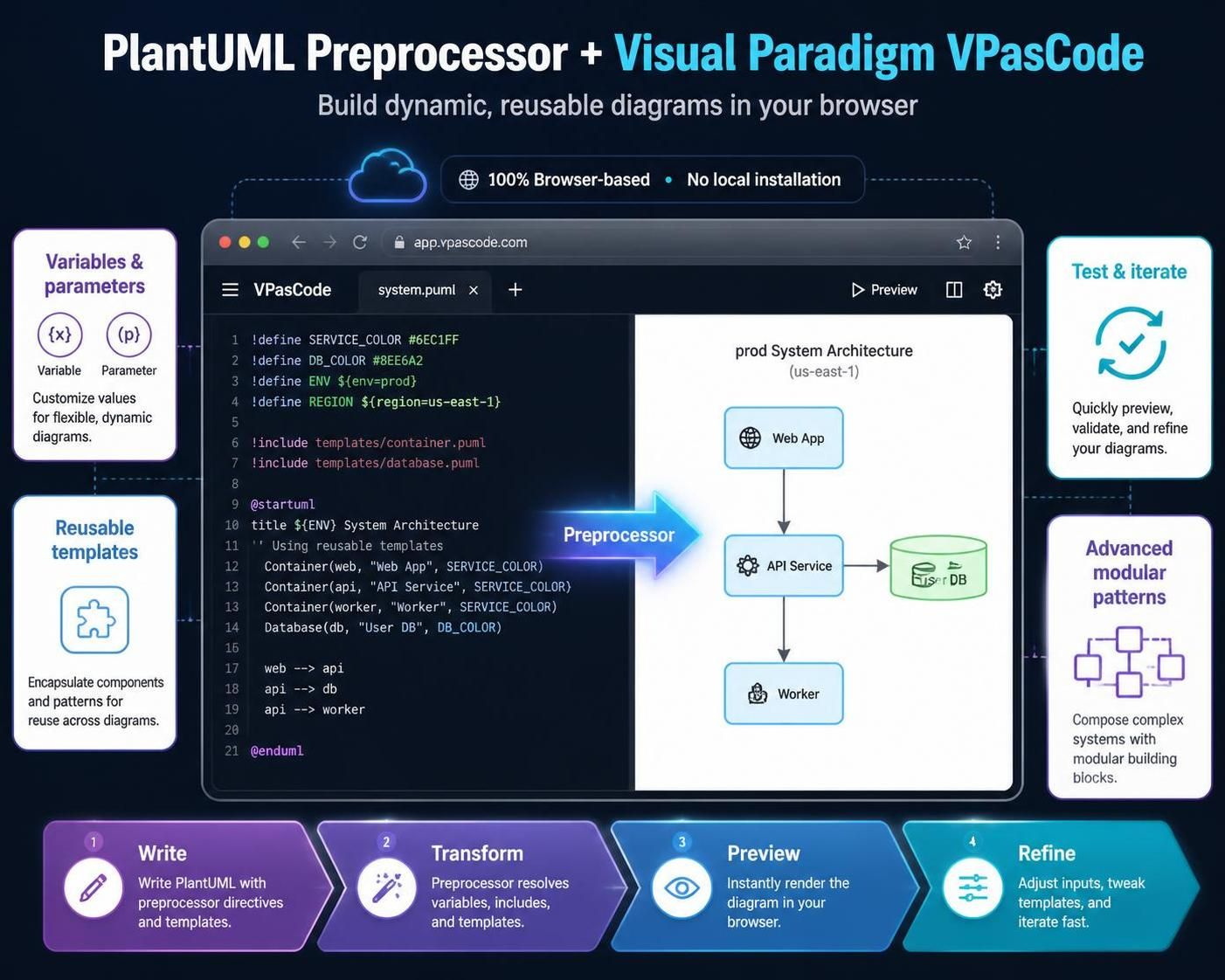
In the realm of modern system architecture, static diagrams often become obsolete the moment they are created. To keep up with agile development cycles, architects need a way to build diagrams that are as dynamic and reusable as the code they describe. The combination of the PlantUML preprocessor engine and Visual Paradigm VPasCode provides a powerful solution, transforming static text into intelligent, browser-based architecture blueprints.
This guide explores how leveraging variables, modular templates, and the preprocessor engine allows you to write complex system models once and deploy them across multiple contexts, from development environments to production.
1. Why Use Variables in PlantUML?
Hardcoding specific values—such as database names, IP addresses, or service colors—into your PlantUML code leads to maintenance nightmares. If you need to update a configuration, you might have to manually edit dozens of lines across different files. By using variables, you introduce flexibility and control.
Variables enable three critical architectural patterns:
- Centralize Configuration: Define a variable like
$DB_NAMEat the top of your script. If you need to change the database name, you update it in one place, and it propagates throughout the entire diagram. - Enable Modularity: Create shared template files that adapt based on context. For example, you can use variables to switch a diagram from a “Development” view (showing internal details) to a “Production” view (showing only high-level connectivity).
- Reduce Repetition: Use loops and macros to generate repetitive structures, such as scaling a “Microservice Cluster” from 3 instances to 10, or generating API endpoints dynamically.
In the VPasCode environment, these benefits are amplified by the live preview feature. You see the immediate impact of your variable changes as you type, eliminating the need for constant compilation and file swapping.
2. Variable Syntax and Declaration
Modern PlantUML has evolved beyond the legacy !define approach. The current standard utilizes the ! prefix for variables, offering better scoping and type safety.
Basic Assignment (=)
Use the standard assignment operator to set a value. This is used for variables that are expected to always have a value defined.
$appName = "OrderService"
$maxRetries = 5
Conditional Assignment (?=)
The ?= operator is crucial for creating flexible templates. It sets a default value only if the variable hasn’t already been defined. This allows include files to be overridden by outer configurations.
$Environment ?= "Staging"

// If $Environment was already set by an include file or command line, this line is skipped.
Scope Rules
Understanding where a variable lives is vital for preventing conflicts:
- Global Scope: Variables declared at the top level (outside of functions) are global within the script.
- Local Scope: Variables declared inside
!functionor!procedureblocks are local to that specific block unless explicitly managed.
3. Data Types and Handling
PlantUML variables are not just simple strings; they support complex data types required for robust system modeling.
String and Integer
These are the most common types. Strings must be enclosed in quotes, while integers are used for math or loop counters.
$host = "api.example.com"
$port = 8080
JSON Handling
For complex configurations, you can embed JSON structures directly into variables. This is particularly useful for passing configuration data to diagrams or macros.
$config = %str2json("{ 'debug': true }")
Boolean Logic
PlantUML treats 0 as false and any non-zero number or non-empty string as true. For better readability and to avoid ambiguity, it is best practice to use the built-in functions %true() and %false().
4. The VPasCode Workflow
Visual Paradigm VPasCode acts as a browser-based, AI-enhanced workspace that integrates seamlessly with the PlantUML preprocessor. The workflow follows four distinct steps:
- Write: Write PlantUML code with preprocessor directives (variables, includes) and templates. You can define colors, regions, and environments directly in the text editor.
- Transform: The preprocessor engine resolves all variables, expands includes, and substitutes parameters. This happens server-side or in the browser, turning your template into concrete code.
- Preview: Instantly render the diagram in your browser. The VPasCode interface allows you to toggle between the code view and the rendered diagram view.
- Refine: Adjust inputs, tweak templates, and iterate fast. Because the environment is dynamic, you can change a variable value like
$Regionfrom “us-east-1” to “eu-west-1” and instantly see the diagram update to reflect the new architecture.
By encapsulating components into reusable templates and using parameters, you can compose complex systems with modular building blocks. This approach ensures your documentation remains accurate, maintainable, and scalable.