
Mastering Loan Approval Workflows with Visual Paradigm and BPMN
In the realm of Business Process Management (BPM), clarity is currency. When designing complex workflows like a loan approval system, the goal is to create a model that is not only visually intuitive but also logically robust. This tutorial explores the architecture of a Loan Request Approval Process using Visual Paradigm. We will deconstruct the flow from the initial application to the final decision, examining how parallel activities, gateway logic, and script integration combine to form a complete system.
The Architecture of the Loan Approval Process
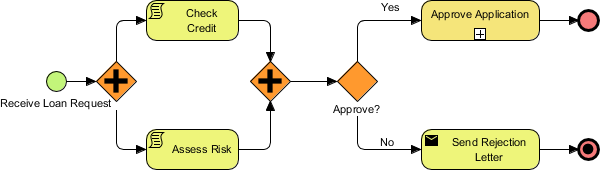
The diagram provided illustrates a classic decision-making loop. It begins with a trigger event and branches into parallel processing streams before converging at a decision point. This structure allows for efficiency—assessing credit and risk simultaneously—while maintaining strict control over the final outcome.
1. Initialization: The Start Event
The process begins with the Receive Loan Request event, represented by the green circle. In BPMN modeling, this signifies the moment the system becomes active. The process arrow flowing out of this node indicates the sequence flow, or the order in which tasks will occur. This is the entry point where an external agent (a customer) interacts with the system.
2. Parallel Execution: The Exclusive Gateway
Immediately following the start event is an orange diamond containing a plus sign (+). This is a Parallel Gateway (often called a Fork). It is a critical component in this architecture because it splits the single incoming flow into two independent, simultaneous paths.
- Top Path: Check Credit. This task is marked with a script icon, indicating that the work is performed by an automated script or a custom Java/Python routine rather than a human. This step validates the applicant’s financial history against a database.
- Bottom Path: Assess Risk. This task likely involves a human analyst or a complex algorithm evaluating the risk profile of the loan. By executing this in parallel, the system does not wait for the credit check to finish before starting the risk assessment, significantly reducing the total turnaround time.
3. Convergence and Decision Logic
Once both the “Check Credit” and “Assess Risk” tasks are complete, the flow reaches a second orange diamond. This is a Parallel Gateway (Join). It waits until it receives signals from both incoming branches before proceeding. This ensures that the final decision is based on a complete dataset.
From this join, the flow moves to a Decision Gateway (the orange diamond without a symbol). Here, the system evaluates the data collected in the previous steps. The logic is binary:
- Yes (Approve): If the risk is low and credit is sufficient, the flow moves to the Approve Application task.
- No (Reject): If the criteria are not met, the flow moves to the Send Rejection Letter task.
Visual Paradigm Modeling Best Practices
When constructing this diagram in Visual Paradigm, precision is key to ensuring the process can be simulated or automated later. Notice how the final nodes are represented by red circles.
- End Events: The top red circle with a thick border indicates a standard End Event, signifying the successful completion of the process. The bottom red circle with a thick border and a diagonal slash represents a Terminate End Event. This indicates that the process has ended abruptly due to an error or a negative outcome (the rejection).
- Script Tasks: The icon on the “Check Credit” task is vital. It tells the Visual Paradigm engine that this is not a manual task but a technical script. This allows you to define the script logic in the properties panel, which is essential for the tool to execute the simulation.
By breaking down the process into these distinct phases—Initialization, Parallel Processing, and Decision Making—you create a robust blueprint that can be easily understood by stakeholders and easily converted into executable code.