
Mastering Microservices with VPasCode: AI-Driven Order Sequence Design
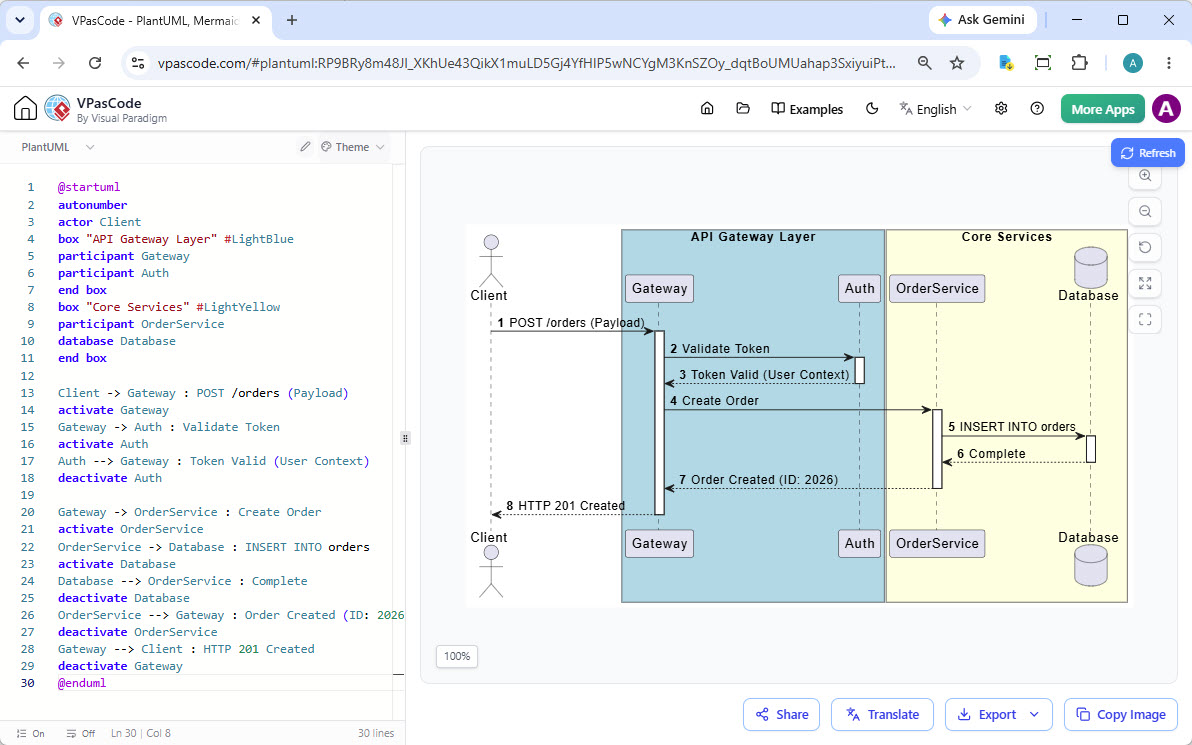
In modern software engineering, the ability to visualize complex interactions between system components is just as critical as the code itself. The image provided illustrates a classic API Gateway Pattern implementation using a Sequence Diagram. This architecture separates concerns by routing requests through a central entry point (the Gateway) before they reach internal core services.
This tutorial will guide you through the system architecture depicted in the diagram, explain the specific PlantUML syntax used to construct it, and demonstrate how to leverage the VPasCode editor to model these interactions efficiently.
Understanding the System Architecture
The diagram visualizes a multi-layered architecture designed for scalability and security. By analyzing the swimlanes (vertical partitions) and the flow of messages, we can identify three distinct layers:
- The Client: Represented by the stick figure (Actor), this is the external entity initiating the request. It could be a web browser, a mobile app, or a third-party application.
- The API Gateway Layer (Blue Box): This acts as the single entry point for all client requests. It contains the
Gatewayparticipant, responsible for routing, and theAuthparticipant, responsible for security validation. This separation ensures that the core business logic never has to worry about network entry points or basic authentication. - The Core Services Layer (Yellow Box): This layer houses the business logic. The
OrderServicehandles the creation of orders, while theDatabaserepresents the persistence layer where data is stored.
Step-by-Step: Tracing the Interaction Flow
To understand the lifecycle of an order creation request, we must trace the vertical execution bars (lifelines) and the horizontal arrows (messages) from top to bottom.
1. Initiating the Request (Step 1)
The process begins with the Client sending a POST /orders request containing a payload. The diagram shows this request hitting the Gateway first. This triggers the activate bar, indicating the Gateway is now processing logic.
2. Authentication & Validation (Steps 2-4)
Before allowing access to the core, the Gateway delegates the request to the Auth service.
- The Gateway sends a
Validate Tokenmessage. - The Auth service processes this and returns
Token Valid (User Context). - Once verified, the Gateway proceeds to send a
Create Ordercommand to the OrderService.
This “fail-fast” approach ensures that invalid requests are rejected early, saving resources in the backend.
3. Data Persistence (Steps 5-6)
The OrderService receives the command and interacts with the Database.
- An
INSERT INTO orderscommand is sent to the database. - The database confirms the operation with a
Completemessage.
Note the activation bar on the Database lifeline; it is active only during this specific interaction.
4. Returning the Response (Steps 7-8)
The response flows back up the chain. The OrderService returns the ID (e.g., ID: 2026) to the Gateway. Finally, the Gateway sends an HTTP 201 Created status code back to the Client, signaling success.
Recreating the Diagram with VPasCode
The screenshot demonstrates the power of “Diagram as Code.” Instead of dragging and dropping shapes, we define the structure using text. Below is the exact code structure used to generate the visualization shown in the VPasCode editor.
@startuml
autonumber
actor Client
box "API Gateway Layer" #LightBlue
  participant Gateway
  participant Auth
end box
box "Core Services" #LightYellow
  participant OrderService
  database Database
end box

Client -> Gateway : POST /orders (Payload)
activate Gateway
Gateway -> Auth : Validate Token
activate Auth
Auth --> Gateway : Token Valid (User Context)
deactivate Auth

Gateway -> OrderService : Create Order
activate OrderService
OrderService -> Database : INSERT INTO orders
activate Database
Database --> OrderService : Complete
deactivate Database
OrderService --> Gateway : Order Created (ID: 2026)
deactivate OrderService
Gateway --> Client : HTTP 201 Created
deactivate Gateway
@enduml
Key Modeling Concepts
When analyzing or creating this diagram, observe the following technical details that define a high-quality sequence diagram:
- Activation Bars: The thin vertical rectangles (e.g., on the Gateway and Auth lifelines) represent the period during which the object is performing an action. If an object is waiting for a response, the bar remains active but no message is being sent.
- Return Messages: Notice the difference in arrowheads. Solid arrows with a triangular head (like
Client -> Gateway) indicate a call or message. Dashed arrows with a half-head (likeAuth --> Gateway) indicate a return message or a response. - Grouping with Boxes: The
boxcommand is essential for organizing complex diagrams. By groupingGatewayandAuthinto “API Gateway Layer,” you visually communicate architectural boundaries without cluttering the diagram.
Conclusion
The diagram in the VPasCode editor is more than just a picture; it is a precise specification of a microservices workflow. By understanding the interaction between the Gateway, Auth service, and Core Services, developers can better anticipate bottlenecks and ensure their API designs are robust. Using tools like VPasCode allows teams to maintain these diagrams as code, ensuring they stay synchronized with the actual software implementation.