
Mastering UML Composite Structure Diagrams in Visual Paradigm
In the realm of software engineering, understanding the “what” is only half the battle; understanding the “how” is where true architectural mastery lies. While standard Class Diagrams provide a macro view of a system’s components, the Composite Structure Diagram offers a critical micro view. This diagram type allows architects to peer inside a class, revealing the internal parts, connectors, and ports that define its behavior.
In this tutorial, we will explore the “Safety Inspection Structure” model created in Visual Paradigm. We will dissect how to model complex collaborations, define internal interfaces, and visualize the relationship between external actors and internal data structures.
The Anatomy of a Composite Structure Diagram
A Composite Structure Diagram is essentially a class diagram with an added layer of depth. It is used to show the internal parts of a classifier (like a class) and how these parts interact. In Visual Paradigm, this is often used to bridge the gap between high-level design and component-based implementation.
Key Concepts Illustrated
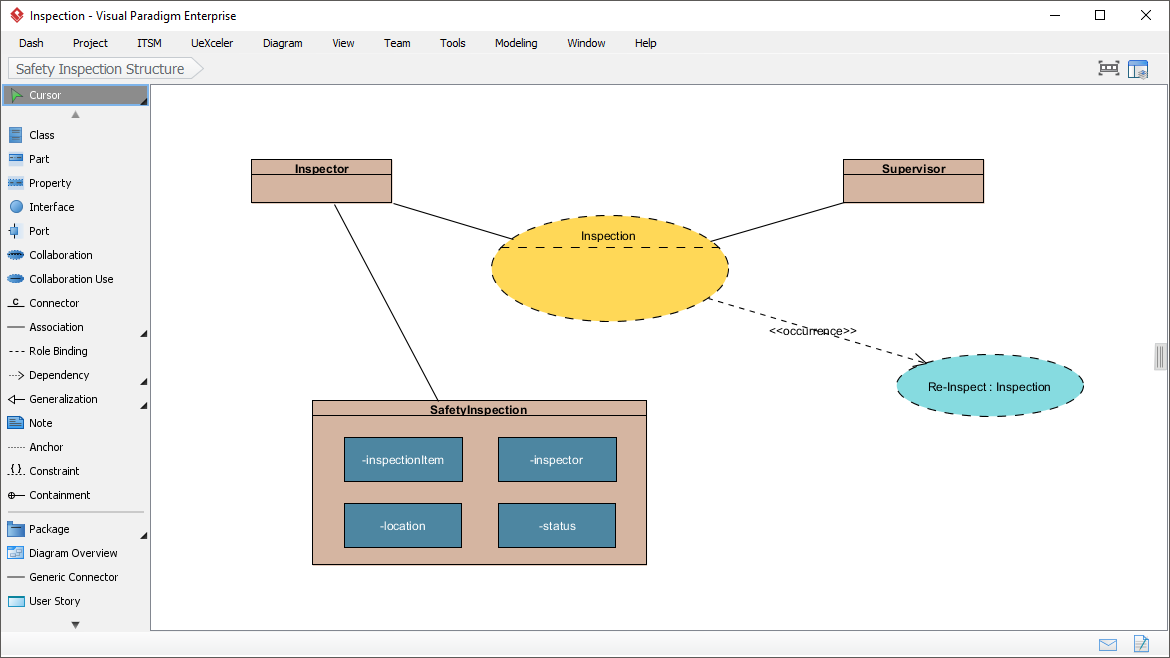
- Classifier Parts (The Container): The large rectangle labeled SafetyInspection represents the composite structure. It is not just a box; it is a container holding internal state.
- Internal Properties (The Parts): Inside the container, we see blue blocks like
-inspectionItem,-location, and-status. These are the internal variables or “parts” that make up the whole. - Collaboration (The Behavior): The yellow oval Inspection represents a Collaboration. In UML, a collaboration is a structure that specifies the interaction between a set of roles. It defines how the parts work together.
- Roles (The Actors): The classes Inspector and Supervisor are connected to the Collaboration. They represent the external entities that play specific roles within the system’s internal logic.
Step-by-Step: Modeling the Safety Inspection System
Let us walk through the logical flow of this specific diagram to understand the design intent.
1. Defining the Internal State
First, we define the core object: SafetyInspection. By using a Composite Structure, we explicitly state that this object is composed of smaller, distinct elements. In the diagram, the parts -inspectionItem, -location, and -status are modeled as owned parts. This is distinct from a standard attribute; it implies a structural composition.
2. Establishing the Collaboration
The yellow dashed oval Inspection acts as the “protocol” for the system. It defines the roles required to perform an inspection. Notice how Inspector and Supervisor connect to this oval. They are not necessarily connected directly to the class SafetyInspection in a data sense, but rather to the interaction pattern required to execute the inspection.
3. Linking Roles to Structure
The solid line connecting Inspector to SafetyInspection indicates that the Inspector class is directly involved with the internal structure of the inspection. This could mean the Inspector holds a reference to the SafetyInspection part, or they share a common interface.
4. Modeling Reuse and Dependencies
Look at the blue oval Re-Inspect : Inspection. This is a critical design pattern known as Occurrence. The dashed arrow labeled <<occurrence>> points from the main Collaboration to this specific instance.
This signifies that the “Re-Inspect” process is a specific use-case or a derived occurrence of the general “Inspection” collaboration. It allows the modeler to show that a complex process can spawn specific, smaller interactions without cluttering the main diagram.
Why Use Composite Structure Diagrams?
Why complicate your model with a diagram that looks like a class diagram? The answer lies in decoupling and clarity.
- Component-Based Design: If you are moving from design to code, this diagram maps directly to class composition (e.g., Java objects holding references to other objects).
- Interface Definition: It clearly separates the “Internal” parts from the “External” roles. This is vital for defining APIs or ports where the internal implementation is hidden.
- Complexity Management: When a class becomes too complex (like a “SafetyInspection” that manages items, locations, and status), splitting it into a composite structure makes the model readable.
Visualizing the Logic: Code Representation
To understand how this translates to a standardized format like PlantUML (often used for documentation), the logic of this diagram can be represented as follows:
class Inspector
class Supervisor
class SafetyInspection {
  -inspectionItem
  -location
  -status
}

' The Collaboration (Yellow Oval)
collaboration Inspection

' The Occurrence (Blue Oval)
occurrence ReInspect

' Relationships
Inspector --|> Inspection : Plays Role
Supervisor --|> Inspection : Plays Role
SafetyInspection -- Inspection : Uses
Inspection ..> ReInspect : «occurrence»
Conclusion
The “Safety Inspection Structure” diagram serves as a perfect example of how to model a system from a micro point of view. By distinguishing between the Collaboration (the interaction), the Parts (the internal data), and the Occurrence (the specific instance), you create a model that is not just a drawing, but a blueprint for implementation.
Whether you are designing a safety management system or a complex microservice architecture, mastering the Composite Structure Diagram will give you the precision needed to define how your system’s parts truly fit together.