
Mastering UML Deployment Diagrams: Visual Paradigm’s Jukebox Architecture
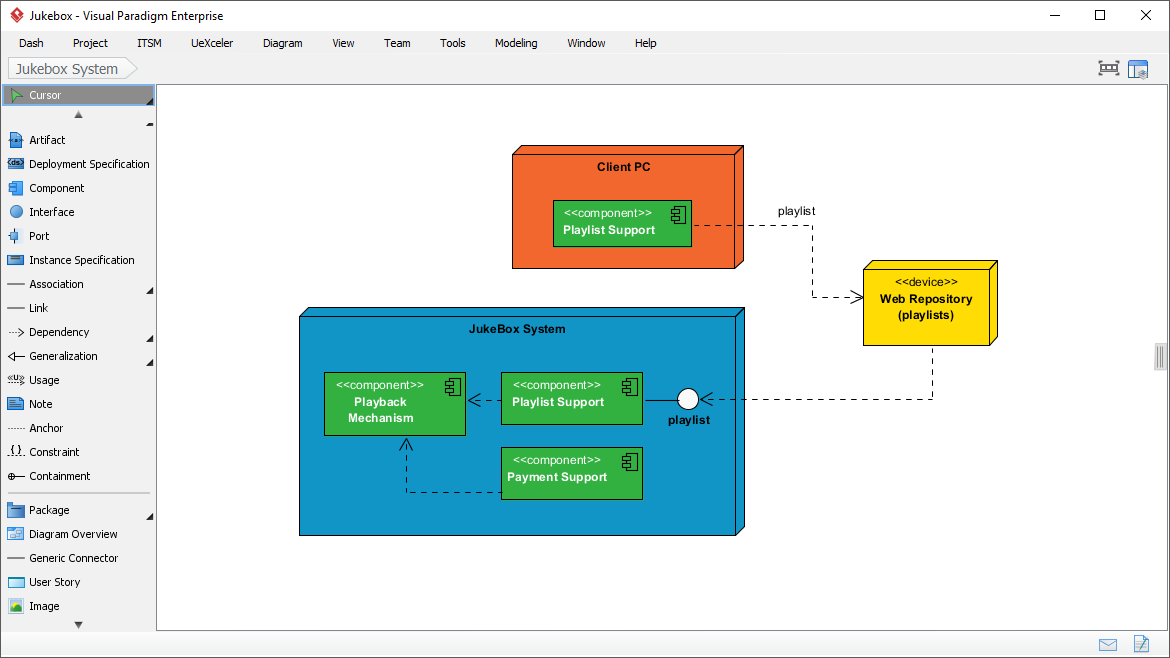
In the realm of software engineering, bridging the gap between abstract design and physical reality is a critical challenge. This is where the Deployment Diagram becomes indispensable. Unlike UML class or sequence diagrams that focus on logic and behavior, deployment diagrams visualize the hardware topology and where software artifacts physically reside.
In this tutorial, we will deconstruct a real-world example using Visual Paradigm, analyzing a Jukebox System architecture. By walking through the visual elements, node structures, and component relationships shown in our diagram, you will learn how to model complex infrastructure for infrastructure planning and cloud resource allocation.
Understanding the Core Concepts
Before diving into the specifics of the Jukebox System, it is essential to understand the two primary building blocks of a Deployment Diagram:
- Nodes (Hardware): These represent physical computing devices. In the diagram, we see a Client PC (orange) and a Web Repository (yellow). These are the “physical” environment where the system runs.
- Artifacts (Software): These are the physical instances of software components deployed onto the nodes. They are typically represented as small rectangles with a “stack of paper” icon (e.g.,
<<component>> Playlist Support).
Analyzing the Jukebox System Architecture
The diagram provided illustrates a distributed system where the Jukebox functionality is split across different physical locations. Let’s break down the architecture layer by layer.
1. The Client PC (User Interface Layer)
At the top of the diagram, the Client PC represents the user’s local device. This is where the user interacts with the system. Inside this node, we find a specific artifact:
[Node: Client PC]
  └── Artifact: <> Playlist Support
This Playlist Support component running on the client PC is likely the local interface or a caching mechanism that allows the user to manage their music list without needing constant interaction with the server.
2. The JukeBox System (Core Logic Layer)
The large blue container represents the central system, perhaps hosted on a dedicated server or a cluster. It houses the core business logic:
- Playback Mechanism: Handles the actual audio streaming.
- Playlist Support: Manages the logic of the playlist (potentially different from the client-side view).
- Payment Support: Handles financial transactions.
Notice the dependency arrows between these components. The Payment Support depends on the Playback Mechanism, suggesting a business rule where payment must be verified or processed before the music plays.
3. The Web Repository (Data Layer)
The yellow box on the right represents a Web Repository, specifically labeled as (playlists). This is a dedicated node for storing data. It is not a database server for the entire application, but a specialized resource for the playlist data.
Modeling Relationships and Dependencies
One of the most powerful aspects of this diagram is how it maps the data flow between physical nodes using dashed lines and stereotypes.
Mapping the Playlist Flow
Observe the relationship between the Client PC and the Web Repository. A dashed line labeled playlist connects them. This indicates that the software on the Client PC relies on the Web Repository to fetch or store playlist data.
Furthermore, look at the connection between the JukeBox System and the Web Repository. There is a white circle connector (often called a “ball and socket” notation or assembly/usage port) labeled playlist. This signifies that the internal components of the JukeBox System (specifically the internal Playlist Support) “use” the service provided by the Web Repository.
The architecture reveals a sophisticated design pattern:
- The Client PC has a local view of the playlist.
- The JukeBox System (Server) also manages playlists.
- The Web Repository acts as the shared data store.
Visualizing Physical Dependencies
In Visual Paradigm, you can model these connections using specific UML stereotypes. The diagram uses a dashed arrow with an open arrowhead to denote a dependency. In a deployment context, this is often mapped to network protocols or API calls.
@startuml
node "Client PC" as Client {
  component "Playlist Support" as ClientPlaylist
}

node "JukeBox System" as Server {
  component "Playback Mechanism" as Playback
  component "Playlist Support" as ServerPlaylist
  component "Payment Support" as Payment
}

node "Web Repository" as Repo {
  note "Stores Playlists"
}

ClientPlaylist -[dashed]-> Repo : playlist
ServerPlaylist -[dashed]-> Repo : playlist
@enduml
Why Use Visual Paradigm for Deployment?
Visual Paradigm provides a robust environment for these tasks. The interface shown in the screenshot demonstrates a clean separation of tools:
- Tool Palette: The left sidebar allows you to drag and drop Artifact, Deployment Specification, and Component elements.
- 3D Visualization: The software supports 3D rendering for nodes, making it easier to distinguish between the “Client” environment and the “Server” environment visually.
- Traceability: You can link these deployment artifacts back to your logical design components, ensuring that every piece of software has a designated place in the infrastructure.
Conclusion
By mastering Deployment Diagrams, you move from designing “what the software does” to planning “how the software runs.” The Jukebox System example demonstrates a clear separation of concerns: the client manages the user interface, the server manages the logic, and the repository manages the data. This separation is vital for scalability and maintenance in modern cloud environments.
Whether you are planning a microservices architecture or a legacy monolithic deployment, tools like Visual Paradigm allow you to model these physical constraints with precision, ensuring your system is ready for the real world.