
Mastering UML Sequence Diagrams with Visual Paradigm: From Concept to Automated Refinement
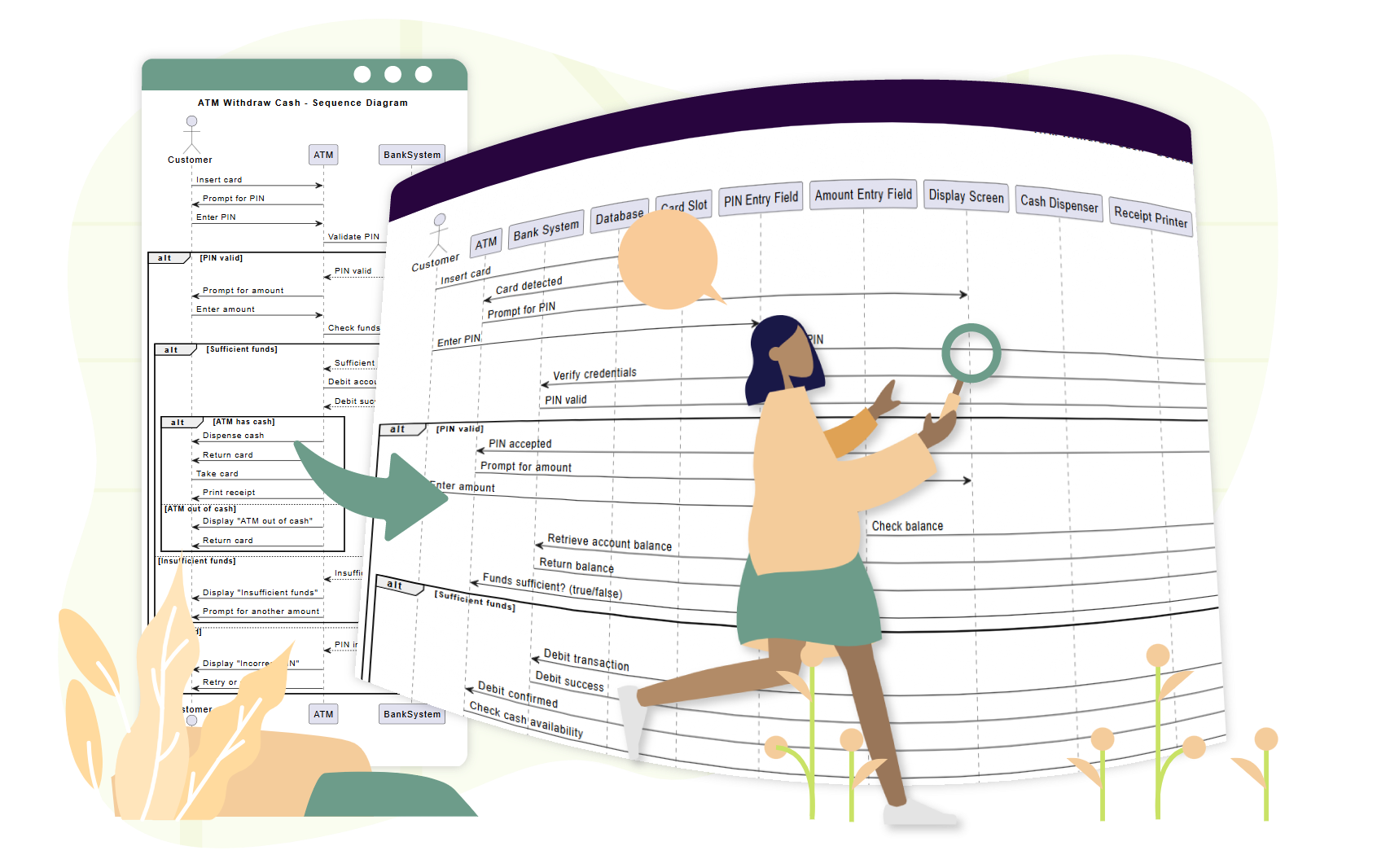
In the realm of software engineering, clarity is currency. A well-crafted UML Sequence Diagram does more than just show who talks to whom; it visualizes the dynamic behavior of a system over time, revealing the intricate dance of data flow, decision-making, and error handling.
Visual Paradigm has revolutionized this process by integrating Artificial Intelligence directly into the modeling environment. Whether you are a seasoned architect or a student learning the ropes, understanding how to leverage these tools—from manual construction to AI-assisted refinement—is essential for modern system design.
1. The Anatomy of a Sequence Diagram
Before diving into the tools, we must understand the core concepts illustrated in the “ATM Withdraw Cash” scenario. A sequence diagram is built upon three fundamental pillars:
Participants (Lifelines)
These are the objects or actors interacting with the system. In our ATM example, you can see:
- Customer: The external actor initiating the interaction.
- ATM: The primary interface device.
- BankSystem: The backend logic handling security and funds.
- Database: The persistent storage layer.
Messages (Interactions)
Messages represent the flow of data between participants. They are categorized as:
- Synchronous: The sender waits for a response (e.g.,
Verify Credentials). - Asynchronous: The sender continues processing without waiting (e.g.,
Display Message).
Control Structures
Real-world logic is rarely linear. Sequence diagrams use fragments to handle complexity:
- alt (Alternative): Used for conditional logic (e.g., If PIN is valid, Else reject).
- opt (Optional): Used for actions that may or may not happen (e.g., Two-Factor Authentication).
2. The Refinement Workflow: From Text to Diagram
Visual Paradigm’s Sequence Diagram Refinement Tool streamlines the transition from abstract ideas to concrete models. Here is how the process works for a complex scenario like an ATM withdrawal.
Step 1: Input Data
Instead of drawing boxes manually, you provide a simple prompt or high-level text description. For example: “Generate a UML sequence diagram for a user logging into a website.”
Step 2: AI Processing
The AI engine analyzes the input to identify components and relationships. It doesn’t just draw lines; it understands architectural layers. It often enhances the structure by automatically adding necessary components, such as separating Views, Controllers, and Models.
Step 3: Review and Edit
The tool generates a refined diagram. You can regenerate it if necessary, edit the result using standard modeling tools, or export it to formats like SVG. This iterative process allows for rapid prototyping.
3. Real-World Application: The ATM Scenario
Let’s break down the “ATM Withdraw Cash” example shown in the illustration to understand how the tool handles logic.
Handling Conditional Logic (The alt Fragment)
The diagram clearly shows the branching paths. The alt fragment labeled [PIN valid] represents a critical decision point. The AI correctly places the logic to verify credentials before proceeding to check funds.
Complex Error Handling
The diagram illustrates robust error handling. If funds are insufficient, the system displays a message and returns the card. This demonstrates the tool’s ability to model not just the “Happy Path,” but also the failure states that developers must code for.
4. Best Practices for Prompt Engineering
To get the most out of Visual Paradigm’s AI capabilities, the quality of your input matters. Here are four rules to ensure high-quality outputs:
- Use Action Verbs: Start commands with clear directives like
Generate,Refine, orAdd. - Be Specific: Mention specific UML elements you want to see, such as “use an alt fragment for payment failure”.
- Build Progressively: Start with a high-level flow, then use iterative prompts to add complexity, exceptions, and specific architectural details.
- Verify Domain Accuracy: While the AI is powerful, always review the output for domain-specific accuracy. AI accelerates the process but does not replace the need for human expertise.
5. Tooling: Visual Paradigm
Visual Paradigm stands out as a comprehensive platform for software engineering. It bridges the gap between design and code, offering features like:
- Integrated AI: Tools like the Sequence Diagram Refinement Tool and Chatbot allow for rapid model generation directly within the IDE.
- UML Modeling: A robust set of tools for creating all standard UML diagrams, from Class Diagrams to Activity Diagrams.
- Code Engineering: The ability to generate Java, C#, and other code skeletons from your diagrams, and conversely, reverse engineer code into UML.
By utilizing Visual Paradigm’s AI capabilities, developers can democratize the creation of complex technical diagrams. Whether you are prototyping a new feature or documenting a legacy system, these tools offer a path to higher-quality software design with significantly less effort.