
Mastering Visual Paradigm: Unified Architecture with VP OpenDocs and AI
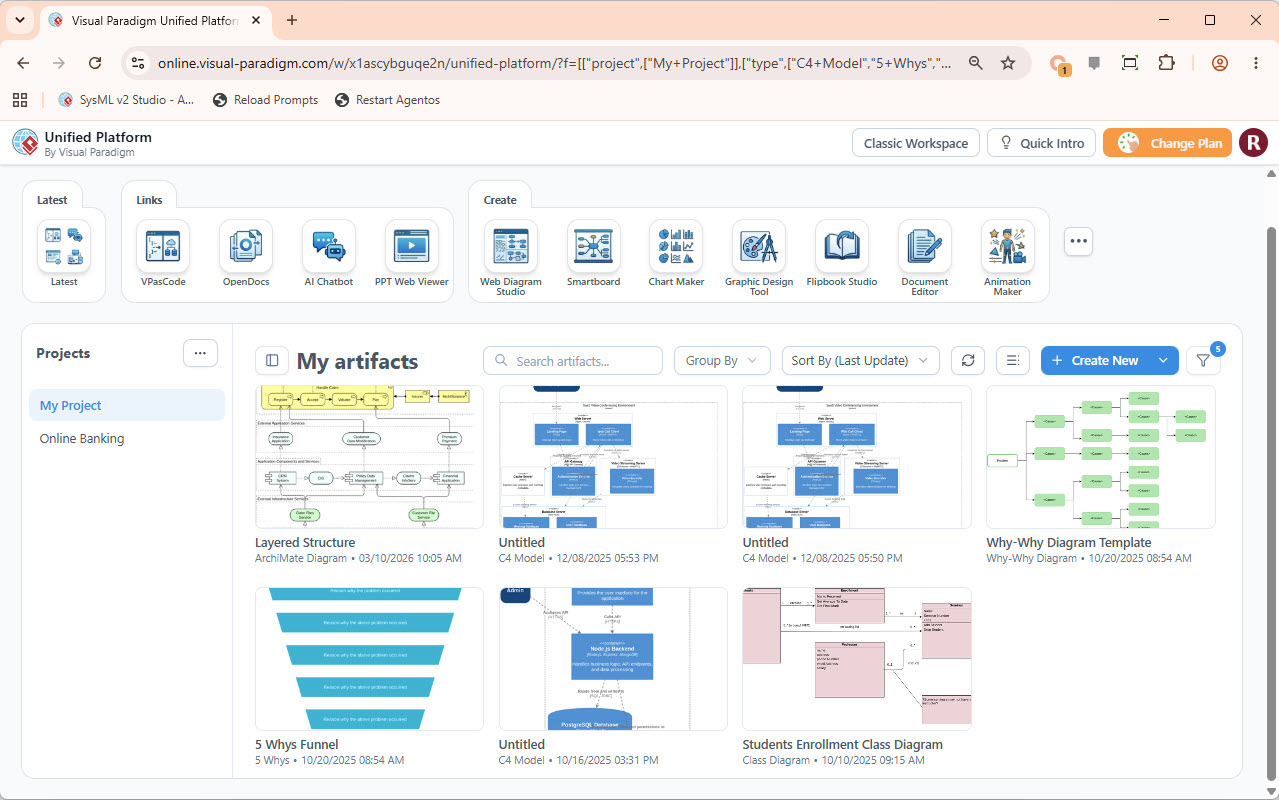
In the realm of modern software engineering and business architecture, the separation between desktop modeling tools and online collaboration environments often creates friction. Historically, engineers would model complex systems locally, while stakeholders viewed static PDFs or screenshots in the cloud. The Visual Paradigm Unified Platform eliminates this divide by establishing a single source of truth. This tutorial explores the architectural philosophy behind this unified ecosystem, how it centralizes your workspace, and how to leverage its diverse tooling suite effectively.
1. The Core Architecture: Bridging Desktop and Cloud
The fundamental innovation of the Unified Platform is its ability to serve as a bridge between Desktop Modeling Projects and VP Online Apps. Instead of treating these as siloed products, the platform architecture treats them as facets of the same data structure.
This system solves three critical challenges in system modeling:
- Centralized App Hub: Rather than launching disparate applications (like a Word processor, a diagramming tool, and a database designer) from different servers, the Unified Platform acts as the entry point. It provides a clear, organized navigation to launch any existing or upcoming app.
- Unified Drive Space: The platform introduces a “single drive-like workspace.” This means your web designs, models, and diagrams are not stored in isolated folders but are accessible within a cohesive drive structure. This ensures that a diagram created in the “Desktop” environment is instantly visible and editable in the “Online” environment.
- Product Alignment: The architecture ensures seamless visibility. Desktop diagrams are brought directly into the VP Online interface, maintaining the integrity of the data model regardless of where the user is working.
2. Navigating the Artifact Repository
Upon accessing the Unified Platform, users are greeted by the My Artifacts view. This dashboard is more than a file browser; it is a context-aware workspace designed to visualize the health and diversity of your project data.
Understanding the Artifact Grid
The grid layout displays various types of modeling artifacts, categorized by their type and last update time. In the screenshot provided, we can observe a rich ecosystem of modeling techniques:
- Architectural Diagrams: Tools like VPasCode or OpenDocs allow for the generation of layered structures (e.g., the “Layered Structure” artifact visible in the grid), which are essential for defining system boundaries.
- System Modeling: The presence of C4 Models indicates the use of the Context, Container, Component, and Code abstraction layers. These models help visualize software architecture at different levels of granularity.
- Problem Solving: Artifacts like the 5 Whys Funnel and Why-Why Diagram demonstrate the platform’s capability to handle root cause analysis and logical deduction alongside technical design.
3. The Tooling Ecosystem: From Code to Presentation
The “Create” section of the Unified Platform reveals the depth of the ecosystem. It is not merely a viewer but a comprehensive suite of tools. Let’s break down the specific tooling capabilities shown in the interface:
The “Create” Suite
- VPasCode & OpenDocs: These tools allow for the transition from text to visuals. VPasCode, for instance, enables users to write code that automatically generates architecture diagrams, ensuring that documentation stays in sync with the actual system.
- Smartboard & Chart Maker: For strategy and collaboration, these tools provide a canvas for brainstorming. The Smartboard allows for real-time collaboration, while the Chart Maker simplifies the creation of organizational or process charts.
- Flipbook Studio & Document Editor: These address the output phase. Once a model is created, it can be exported into a Flipbook for interactive presentation or formatted via the Document Editor for professional reporting.
Practical Workflow: The “My Project” Context
The sidebar labeled My Project (with a sub-item “Online Banking”) demonstrates how the platform organizes work by business domain. When you select a project, the Unified Platform filters the artifact view to show only relevant diagrams, such as the “Students Enrollment Class Diagram” or the “C4 Model.”
This structure implies a workflow where:
- You start with a high-level C4 Model to define the system scope.
- You drill down into specific components using Class Diagrams (e.g., “Students Enrollment”).
- You use VPasCode to generate code skeletons or documentation based on these diagrams.
- You present the final strategy using Smartboards or Flipbooks.
4. Advanced Modeling Concepts: The “Why-Why” and “5 Whys”
One of the most interesting aspects of the Unified Platform is its inclusion of non-technical modeling tools like the Why-Why Diagram and 5 Whys Funnel. These are critical for Business Process Re-engineering (BPR).
When you open an artifact like the “Why-Why Diagram Template,” you are entering a logical deduction workspace. Unlike standard flowcharts that map “If-Then” process steps, these diagrams map “Because-Therefore” causal relationships. In the Unified Platform, these are treated with the same data integrity as a database schema, allowing you to link a root cause found in a “5 Whys” analysis directly to a process improvement in your “C4 Model.”
Conclusion
The Visual Paradigm Unified Platform represents a shift from “tool-centric” workflows to “data-centric” workflows. By unifying the drive space, aligning products, and centralizing the app hub, it empowers engineers and architects to focus on the system itself rather than the software managing it. Whether you are designing an online banking system or analyzing enrollment processes, the Unified Platform ensures that your models are always accessible, consistent, and ready for the next stage of development.