
Mastering VP AI Ecosystem: From Desktop Modeling to Unified Platform Architecture
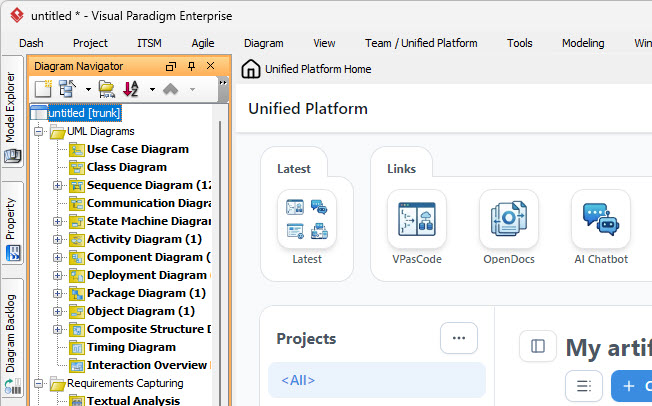
In the modern landscape of software engineering and system design, the barrier between local development environments and collaborative cloud platforms is dissolving. The image presented here illustrates the core of this evolution: the seamless integration between the Visual Paradigm Desktop application and the Unified Platform.
This tutorial will dissect the architecture shown in the screenshot, explaining how the Diagram Navigator acts as the brain of local modeling while the Unified Platform Home serves as the gateway for collaborative discovery and deployment. Understanding this duality is crucial for teams aiming to maintain continuity across hybrid workflows.
1. The Desktop Architecture: The Diagram Navigator
On the left side of the interface, we observe the standard Visual Paradigm Enterprise workspace. Specifically, the Diagram Navigator panel is visible, displaying a project structure rooted in a “UML Diagrams” node.
This hierarchical structure is fundamental to how Visual Paradigm organizes complexity. Instead of scattering files across a directory, the tool uses a Model-Based approach. Let’s break down the specific artifacts visible in the navigator:
- Use Case Diagram: Represents the functional requirements and interactions between actors and the system.
- Sequence Diagram: Details the time-ordered interactions between objects.
- State Machine Diagram: Defines the states an object passes through during its lifecycle.
- Communication, Activity, and Component Diagrams: These cover structural organization, behavioral logic, and system composition.
When you save a model in this environment (indicated by the [trunk] branch notation), you are essentially committing a snapshot of this entire tree structure to the cloud repository. This ensures that when you switch contexts, the logical integrity of your system design is preserved.
2. The Unified Platform: App Discovery and Collaboration
The right side of the screenshot shifts the focus from authoring to Discovery and Access. This is the Unified Platform Home, a dashboard designed to reduce friction when accessing tools within the ecosystem.
Key Functional Areas:
- Latest & Projects: These sections provide immediate access to the most recently modified models. This feature is vital for “Contextual Desktop-Web Interoperability,” allowing you to resume work on a model started on your local machine simply by clicking a link.
- VPasCode: A specialized tool within the ecosystem. Unlike standard GUI-based modeling, VPasCode allows for Modeling as Code. It enables developers to define diagrams using text-based syntax (similar to PlantUML), which is ideal for version control systems (Git) and automated CI/CD pipelines.
- OpenDocs & AI Chatbot: These tools represent the platform’s push towards documentation management and intelligent assistance, ensuring that the model is not just a diagram but a living document.
3. The “Unified Creation Menu” Concept
The context provided in the prompt highlights a specific architectural improvement: the Unified Creation Menu. In older versions of modeling tools, users often had to navigate through complex menus to select the specific type of diagram they wanted to create. The Unified Platform simplifies this.
Instead of navigating to individual apps, the platform provides a redesigned creation menu. From this unified interface, you can initiate diagrams, documents, or other visual artifacts directly. This reduces the cognitive load required to start a new project, allowing the architect to focus on the logic rather than the tool configuration.
Technical Workflow: The Hybrid Architecture
The power of this setup lies in the workflow loop. It is not merely a file transfer; it is a synchronization of the model metadata.
Here is a conceptual representation of how the data flows between the Desktop and the Web:
USER ACTION: Start in Visual Paradigm Desktop
  |
  v
[1] Create/Extend Model (Diagram Navigator)
  |
  v
[2] Save to Cloud Repository (Sync Trigger)
  |
  v
[3] Access via Unified Platform (Web Interface)
  |
  v
[4] Launch Specialized Apps (VPasCode, OpenDocs)
  |
  v
[5] Update Model Metadata
  |
  v
[6] Sync Back to Desktop (Automatic or Manual)
This architecture ensures that teams can choose the best tool for each task without losing continuity. Whether you are designing a high-level architecture on a web tablet or debugging a specific sequence interaction on a high-performance desktop, the model remains a single source of truth.
Conclusion
The screenshot serves as a visual proof of the “Unified Platform” strategy. By bridging the gap between the rich, feature-heavy desktop environment and the accessible, app-discovery focused web dashboard, Visual Paradigm eliminates the silos that often plague enterprise modeling. For the technical user, this means a smoother transition from concept to code, supported by a robust ecosystem of tools like VPasCode and OpenDocs.